> ## Documentation Index
> Fetch the complete documentation index at: https://www.cashfree.com/docs/llms.txt
> Use this file to discover all available pages before exploring further.
# Webhooks
> Configure Cashfree e-Sign webhooks to receive notifications when documents are signed, declined, expired, or completed during Aadhaar-based electronic signing.
Webhooks are event-based notifications that are received when a specific event related to the e-sign verification occurs.
In rare cases, such as network retries, read timeouts, processing delays, or delivery failures, the same webhook might be sent more than once for the same event. To prevent unintended side effects, implement idempotency in your webhook handler to handle duplicate deliveries.
## Add webhooks
Add your webhook URL in our system for us to deliver webhook events.
Follow the instructions below to configure the webhook URL. Ensure to provide the publicly accessible HTTPS URL to your webhook endpoint.
1. Log in to the **[Merchant Dashboard](https://merchant.cashfree.com/merchants/)** and click **Developers**.
2. Click **Webhooks** listed under the **Secure ID** card.
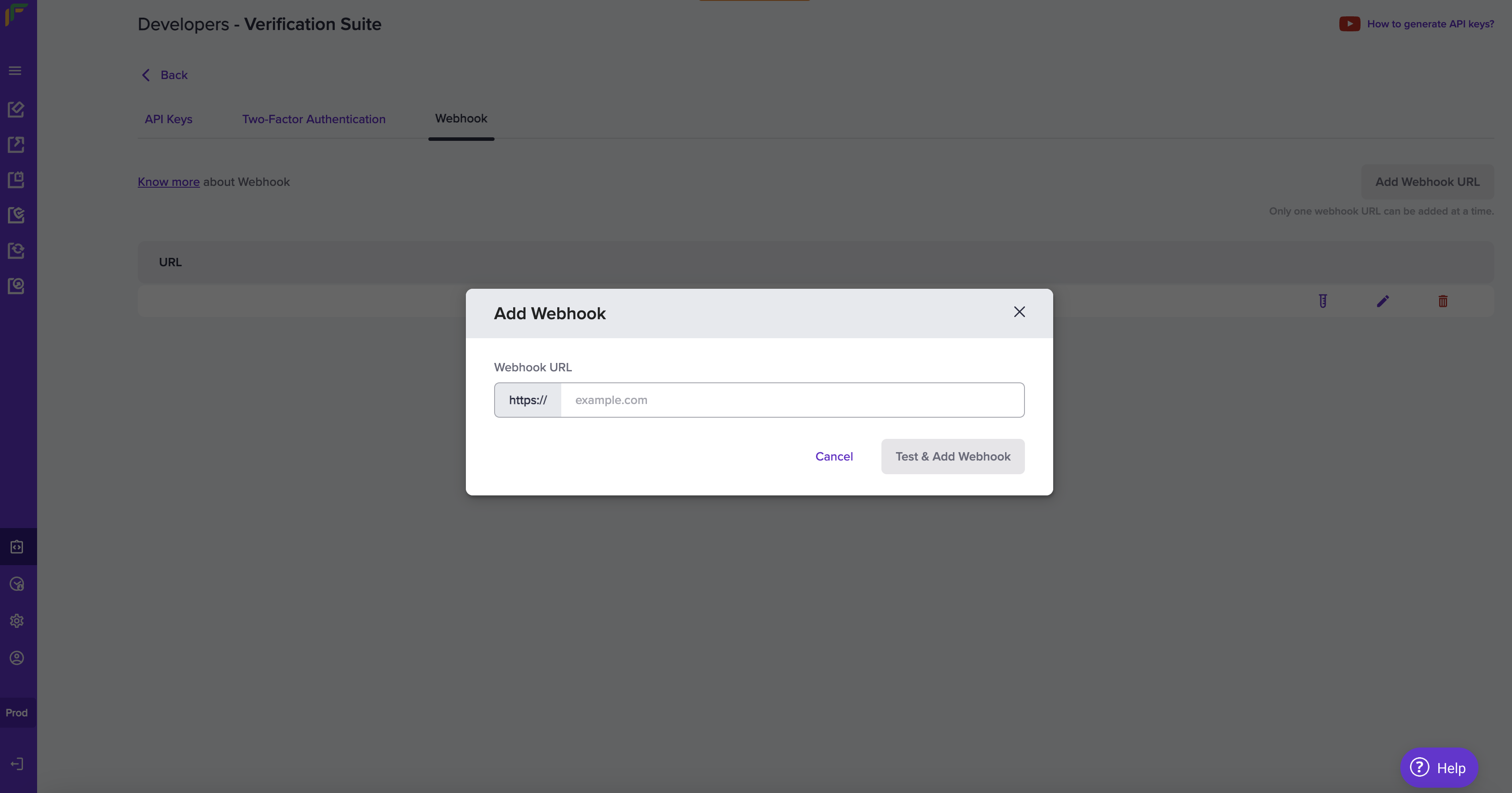
3. Click **Add Webhook URL** in the **Webhook** screen.
4. In the **Add Webhook** popup, fill in the following information:
* **Webhook URL**: Enter the URL in this field.
5. Click **Test & Add Webhook**.
 ***
## Webhook events
| Event | Description |
| :----------------------------- | :--------------------------------------------------------------------- |
| E\_SIGN\_VERIFICATION\_SUCCESS | You will receive this event when the e-sign verification is a success. |
| E\_SIGN\_VERIFICATION\_FAILURE | You will receive this event when the e-sign verification is a failure. |
| E\_SIGN\_VERIFICATION\_EXPIRED | You will receive this event when the e-sign verification is expired. |
The following events are triggered at different stages of the e-sign verification process:
```json theme={"dark"}
{
"event_type":"ESIGN_VERIFICATION_SUCCESS",
"event_time":"2023-07-19 10:46:16",
"version":"v1",
"data": {
"status": "SUCCESS",
"reference_id": 32,
"verification_id": "ABC00123",
"document_id": 36,
"signers": [
{
"name": "John Doe",
"status": "SUCCESS",
"is_notified": true
},
{
"name": "Frank Kelvin",
"status": "SUCCESS",
"is_notified": true
}
],
"signed_doc_url": "SIGNED_DOC_URL"
}
}
```
```json theme={"dark"}
{
"event_type":"ESIGN_VERIFICATION_FAILURE",
"event_time":"2023-07-19 10:46:16",
"version":"v1",
"data": {
"status": "FAILURE",
"reference_id": 32,
"verification_id": "ABC00123",
"document_id": 36,
"signers": [
{
"name": "John Doe",
"status": "SUCCESS",
"is_notified": true
},
{
"name": "Frank Kelvin",
"status": "FAILURE",
"is_notified": false
}
],
"signed_doc_url": "SIGNED_DOC_URL"
}
}
```
```json theme={"dark"}
{
"event_type":"ESIGN_VERIFICATION_EXPIRED",
"event_time":"2023-07-19 10:46:16",
"version":"v1",
"data": {
"status": "EXPIRED",
"reference_id": 32,
"verification_id": "ABC00123",
"document_id": 36,
"signers": [
{
"name": "John Doe",
"status": "EXPIRED",
"is_notified": true
},
{
"name": "Frank Kelvin",
"status": "RECEVIED",
"is_notified": false
}
],
"signed_doc_url": ""
}
}
```
## Webhook signature
You will receive the webhook signature in the webhook header. Here is a sample header from a webhook request.
| Header name | Header value |
| ------------------- | :------------------------------------------: |
| content-length | 1099 |
| x-webhook-attempt | 1 |
| content-type | application/json |
| x-webhook-signature | 07r5C3VMwsGYeldGOCYxe5zoHhIN1zLfa8O0U/yngHI= |
| x-webhook-timestamp | 1746427759733 |
Always capture the webhook payload in its raw text format before parsing into JSON. Parsing and re-serialising the payload can change the structure (for example, array ordering, spacing, or `null` handling) and cause a signature mismatch during verification. Use the exact raw body string from the request when computing the signature.
## Webhook payload fields
The webhook payload contains important metadata in its top-level fields.
| Field | Type | Description |
| ------------ | -------- | --------------------------------------------------------------------------------------------- |
| `event_type` | `string` | Indicates the type of event that triggered the webhook. |
| `event_time` | `string` | The UTC timestamp of when the event occurred, formatted in ISO 8601 (`YYYY-MM-DDTHH:MM:SSZ`). |
| `version` | `string` | Indicates the webhook format being used. Default version is "v1". |
| `data` | `object` | Contains event-specific details related to this feature. |
Verifying the signature is mandatory before processing any response. Refer to [Signature Verification](/docs/api-reference/vrs/webhook-signature-verification#webhook-signature-verification) for more details.
***
## Webhook events
| Event | Description |
| :----------------------------- | :--------------------------------------------------------------------- |
| E\_SIGN\_VERIFICATION\_SUCCESS | You will receive this event when the e-sign verification is a success. |
| E\_SIGN\_VERIFICATION\_FAILURE | You will receive this event when the e-sign verification is a failure. |
| E\_SIGN\_VERIFICATION\_EXPIRED | You will receive this event when the e-sign verification is expired. |
The following events are triggered at different stages of the e-sign verification process:
```json theme={"dark"}
{
"event_type":"ESIGN_VERIFICATION_SUCCESS",
"event_time":"2023-07-19 10:46:16",
"version":"v1",
"data": {
"status": "SUCCESS",
"reference_id": 32,
"verification_id": "ABC00123",
"document_id": 36,
"signers": [
{
"name": "John Doe",
"status": "SUCCESS",
"is_notified": true
},
{
"name": "Frank Kelvin",
"status": "SUCCESS",
"is_notified": true
}
],
"signed_doc_url": "SIGNED_DOC_URL"
}
}
```
```json theme={"dark"}
{
"event_type":"ESIGN_VERIFICATION_FAILURE",
"event_time":"2023-07-19 10:46:16",
"version":"v1",
"data": {
"status": "FAILURE",
"reference_id": 32,
"verification_id": "ABC00123",
"document_id": 36,
"signers": [
{
"name": "John Doe",
"status": "SUCCESS",
"is_notified": true
},
{
"name": "Frank Kelvin",
"status": "FAILURE",
"is_notified": false
}
],
"signed_doc_url": "SIGNED_DOC_URL"
}
}
```
```json theme={"dark"}
{
"event_type":"ESIGN_VERIFICATION_EXPIRED",
"event_time":"2023-07-19 10:46:16",
"version":"v1",
"data": {
"status": "EXPIRED",
"reference_id": 32,
"verification_id": "ABC00123",
"document_id": 36,
"signers": [
{
"name": "John Doe",
"status": "EXPIRED",
"is_notified": true
},
{
"name": "Frank Kelvin",
"status": "RECEVIED",
"is_notified": false
}
],
"signed_doc_url": ""
}
}
```
## Webhook signature
You will receive the webhook signature in the webhook header. Here is a sample header from a webhook request.
| Header name | Header value |
| ------------------- | :------------------------------------------: |
| content-length | 1099 |
| x-webhook-attempt | 1 |
| content-type | application/json |
| x-webhook-signature | 07r5C3VMwsGYeldGOCYxe5zoHhIN1zLfa8O0U/yngHI= |
| x-webhook-timestamp | 1746427759733 |
Always capture the webhook payload in its raw text format before parsing into JSON. Parsing and re-serialising the payload can change the structure (for example, array ordering, spacing, or `null` handling) and cause a signature mismatch during verification. Use the exact raw body string from the request when computing the signature.
## Webhook payload fields
The webhook payload contains important metadata in its top-level fields.
| Field | Type | Description |
| ------------ | -------- | --------------------------------------------------------------------------------------------- |
| `event_type` | `string` | Indicates the type of event that triggered the webhook. |
| `event_time` | `string` | The UTC timestamp of when the event occurred, formatted in ISO 8601 (`YYYY-MM-DDTHH:MM:SSZ`). |
| `version` | `string` | Indicates the webhook format being used. Default version is "v1". |
| `data` | `object` | Contains event-specific details related to this feature. |
Verifying the signature is mandatory before processing any response. Refer to [Signature Verification](/docs/api-reference/vrs/webhook-signature-verification#webhook-signature-verification) for more details.