> ## Documentation Index
> Fetch the complete documentation index at: https://www.cashfree.com/docs/llms.txt
> Use this file to discover all available pages before exploring further.
# Settlement Recon Report
> Reconcile every Cashfree settlement with the partner Settlement Recon report, which lists transactions, adjustments, refunds, and disputes per settlement cycle.
The **Settlement Recon** report helps you reconcile all types of settlements for a selected date range. It lists settlements received in the specified date range, along with detailed information about transactions, adjustments/refunds against transactions, disputes, and more.
## Generate settlement recon report
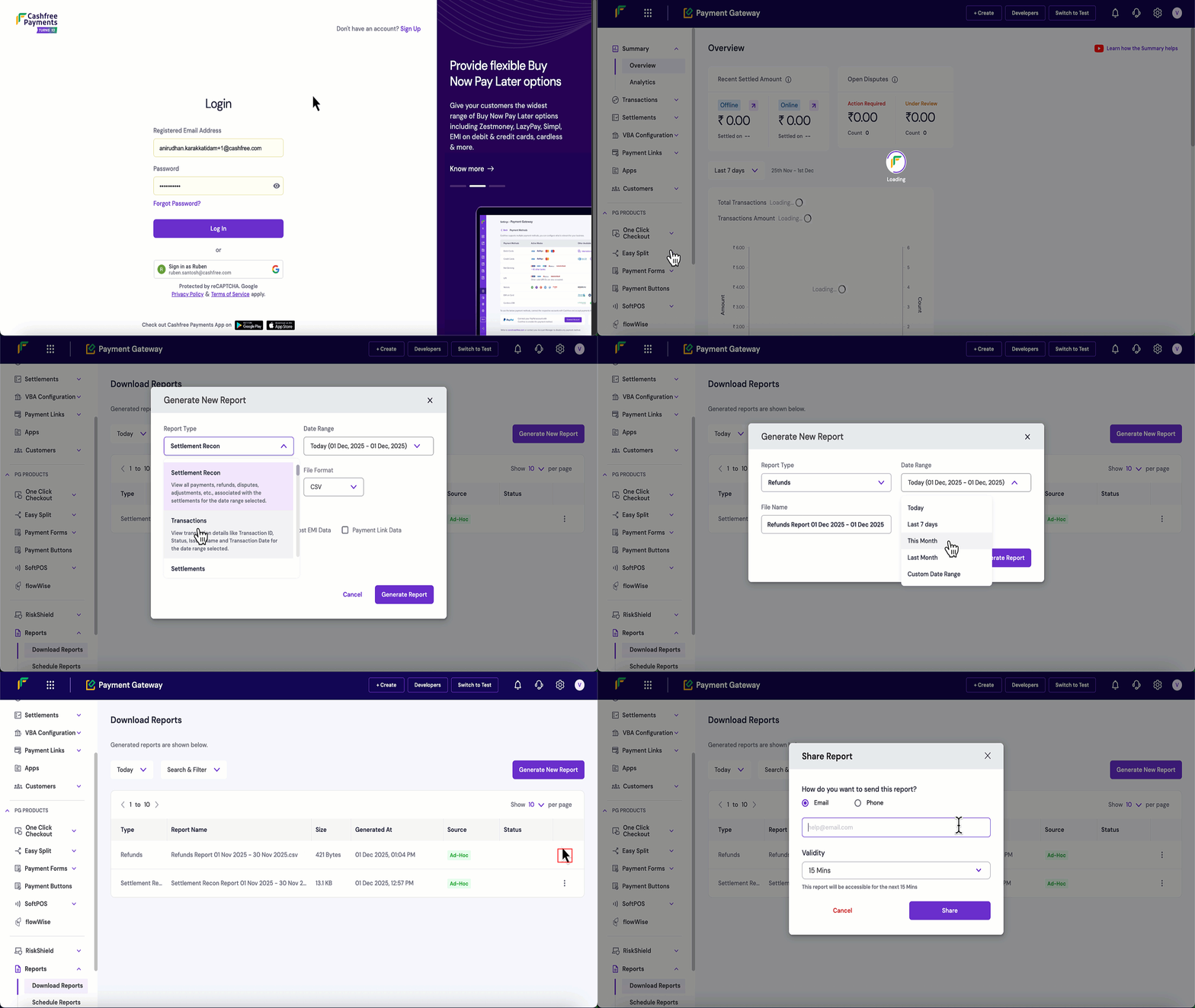
Follow these steps to generate and download a Settlement Recon report:
1. Log in to the [Merchant Dashboard](https://merchant.cashfree.com/auth/login).
2. Navigate to **Payment Gateway** > **Reports** > **Download Reports**.
3. Click the **Generate New Report** button.
4. Configure your report settings:
* **Report Type**: Select **Settlement Recon** from the dropdown.
* **Date Range**: Choose the time period for the report.
* **File Format**: Select CSV or XLSX.
* **File Name**: Modify if needed, this is optional.
5. Click **Generate Report**.
6. Once generated, click the **three dots (⋮)** next to your report.
7. Click **Download Report** to save the file.
8. Click **Share Report** to share the report via email or mobile number and set the validity period.
 ## Settlement recon report specification
The **Settlements** section provides one row per settlement batch, showing what was settled, when it was processed, and the final amount credited to your bank account.
The following table describes the parameters available in the settlements section of the settlement recon report:
| Parameter | Sample value | Flag | Description |
| ------------------------ | ------------------- | -------- | --------------------------------------------------------------------------------------------------------------------------------------------------------------- |
| ID | 208386848 | id | Unique ID for the settlement generated by Cashfree. Use this ID to cross-reference the settlement in other reports. |
| Total Transaction Amount | 110.00 | amount | Sum of all eligible transaction amounts considered for this settlement before any charges, taxes, refunds, chargebacks, or other adjustments. |
| Settlement Amount | 20.00 | amount | Amount left after deducting Cashfree’s charges and other fees from the total transaction amount, before applying adjustments. |
| Adjustment | 14.32 | amount | Net effect of all adjustments linked to this settlement, such as chargebacks, refunds, and other adjustments. Can be positive or negative. |
| Net Settlement Amount | 14.32 | amount | Final amount credited to your bank account for this settlement after charges, taxes, and adjustments. This should match the credit seen in your bank statement. |
| From | 2025-10-08 18:18:03 | datetime | Date and time of the earliest transaction included in this settlement batch. |
| Till | 2025-10-08 18:18:03 | datetime | Date and time of the latest transaction included in this settlement batch. |
| Status | Processed | enum | Current status of the settlement for example: **Processed**, **Pending**, **Failed**. |
| UTR No. | AXISCN1169361047 | id | Bank reference number (UTR) for this settlement payout. You can use this to match the settlement with the entry in your bank statement. |
| Settlement Date | 2025-10-08 18:18:03 | datetime | Date and time when the settlement was successfully processed and confirmed. |
| Settlement Type | STANDARD | enum | Type of settlement, such as **STANDARD**, **INSTANT**, or **ON\_DEMAND**. |
| Settlement Charge | 20.00 | amount | Total settlement-level charges applied for this settlement batch. |
| Settlement Tax | 10.00 | amount | Tax amount applied on the settlement charges. |
| Remarks | Settled | text | Any additional comments or notes added to the settlement, usually to highlight exceptions or special handling. |
The **Transaction details** section shows detailed information for each individual transaction and event included in the settlements. Each row represents a specific event such as payment, refund, or chargeback.
The following table describes the parameters available in the transaction details section of the settlement recon report:
| Parameter | Sample value | Flag | Description |
| -------------------------- | ------------------------------------------- | -------- | ----------------------------------------------------------------------------------------------------------------------------------------------------------------------------------------------------------- |
| Event ID | 4387450090 | id | Unique ID for the event in Cashfree systems such as: payment, refund, chargeback, dispute, or adjustment. This ID is always generated by Cashfree. |
| Event Type | PAYMENT | enum | Category of the event. Typical values include **PAYMENT**, **REFUND**, **CHARGEBACK**, **CHARGEBACK\_REVERSE**, **DISPUTE**, **DISPUTE\_REVERSE**, **RISK**, **RISK\_REVERSE**, **OTHER\_ADJUSTMENT**, etc. |
| Sale Type | CREDIT | enum | Indicates whether the event increases or decreases the amount eligible for settlement. **CREDIT** increases the amount; **DEBIT** decreases it. |
| Event Currency | INR | currency | Currency in which the event amount is recorded. For payments, this is the transaction currency. |
| Event Time | 2025-09-26 15:05:12 | datetime | Date and time when the event actually occurred (for example, when the payment was created or the refund initiated). |
| Processed On | 2025-10-08 15:35:50 | datetime | Date and time when this event was processed for settlement. |
| Status | SUCCESS | enum | Status of the event. Important for events such as refunds, disputes and chargebacks for example: **SUCCESS**, **PENDING**, **FAILED**, **N/A**. |
| Event Amount | 3.00 | amount | Original amount of the event in the event currency. |
| Event Settlement Amount | 3.00 | amount | Portion of the event amount that is considered for settlement after applying relevant charges and taxes. |
| Settlement Date | 2025-10-08 15:35:50 | datetime | Date on which this event was included in a settlement. |
| UTR | AXISCN1169361047 | id | UTR of the settlement in which this event was included. Use this to link the event to the settlement in the summary section and your bank statement. |
| Refund Type | – | enum | For refund events, shows whether the refund is standard or instant. Blank for non-refund events. |
| Refund ARN | – | id | ARN/RRN for refund transactions, when available (usually for card or UPI refunds). Blank for non-refund events. |
| Adjustment Remarks | – | text | Notes explaining an **OTHER\_ADJUSTMENT** or similar event. Blank for regular payment or refund events. |
| Merchant Reference ID | CFPay\_r9291pj3m5bg\_1ka6odkrf4 | id | Order ID sent by you while creating the payment in the Create Order API. Use this to map the event to your internal systems. |
| Customer Reference ID | CUST123 | id | Customer identifier that you provided for the transaction for example; your internal customer ID. |
| Cashfree Reference ID | 4273894975 | id | Unique payment ID generated by Cashfree. Useful for matching the event with payment-specific reports. |
| Customer Name | Ravi Kumar | text | Customer name sent by you for the transaction. |
| Customer Phone | 917837674034 | text | Customer phone number sent by you for the transaction. |
| Customer Email | [ravi@example.com](mailto:ravi@example.com) | text | Customer email address sent by you for the transaction. |
| Currency | INR | currency | Currency in which the order was created with Cashfree. |
| Transaction Amount | 3.00 | amount | Amount charged to the customer for the payment. |
| Transaction Service Charge | 5.10 | amount | Service charges applied on this transaction. |
| Txn ST/GST | 0.92 | amount | Tax applied on the transaction service charge. |
| Net Settlement Amount | 3.00 | amount | Amount from this transaction that is eligible for settlement after deducting transaction-level charges and taxes. |
| Transaction Time | 2025-09-26 15:05:12 | datetime | Date and time when the payment was successfully completed. |
| Payment Mode | UPI | enum | Mode used for the payment, such as **CARD**, **NETBANKING**, **WALLET**, **UPI**, etc. |
| Bank Name | HDFC Bank | text | For card and net-banking payments, the issuing bank name. For UPI payments, the UPI channel or app name. |
| Auth ID | 123456 | id | Authorisation ID for card transactions, when available. Empty for non-card payments. |
| Card Type (Scheme) | visa | enum | Card network used for the transaction, such as **visa**, **mastercard**, **rupay**, **amex**, **diners**, **maestro**. Applies only to card payments. |
| Vendor ID 1 | ani\_vendor\_1 | id | ID of the first vendor to whom part of the transaction amount was split using Cashfree Easy Split. |
| Vendor Amount 1 | 100.00 | amount | Amount allocated to the first vendor under Easy Split. |
| Vendor ID 2 | – | id | ID of the second vendor for the same transaction, if the amount was split further. |
| Vendor Amount 2 | – | amount | Amount allocated to the second vendor. |
| Vendor ID 3 | – | id | ID of the third vendor, if applicable. |
| Vendor Amount 3 | – | amount | Amount allocated to the third vendor. |
| Vendor ID 4 | – | id | ID of the fourth vendor, if applicable. |
| Vendor Amount 4 | – | amount | Amount allocated to the fourth vendor. |
| Vendor ID 5 | – | id | ID of the fifth vendor, if applicable. |
| Vendor Amount 5 | – | amount | Amount allocated to the fifth vendor. |
| Key\_1 | cf\_link\_id | text | Name of the first custom key that you passed in `order_tags` while creating the order. |
| Value\_1 | 111908804 | text | Value of the first custom key from `order_tags`. |
| Key\_2 | – | text | Name of the second custom key from `order_tags`, if present. |
| Value\_2 | – | text | Value of the second custom key from `order_tags`, if present. |
| Key\_3 | – | text | Name of the third custom key from `order_tags`, if present. |
| Value\_3 | – | text | Value of the third custom key from `order_tags`, if present. |
| Order Amount | 3.00 | amount | Order-level amount associated with this payment, as specified when the order was created. |
| Payment Mode SubType | UPI | enum | More specific classification of the payment mode, if applicable for example, corporate credit card. |
## Custom reconciliation fields (`order_tags`)
Use the `order_tags` object on the [Create Order API](/docs/api-reference/payments/latest/orders/create) to attach custom string key-value pairs to an order. Each key and value must be between 1 and 255 characters. You can pass up to 10 tags per order.
The first three key-value pairs from `order_tags` surface in the **Transaction details** section of this report as `Key_1`/`Value_1`, `Key_2`/`Value_2`, and `Key_3`/`Value_3`. Additional tags remain on the order but don't appear in the Settlement Recon export.
Use `order_tags` for any business-specific identifiers you need at settlement time—for example branch or outlet ID, campaign code, internal invoice reference, or membership tier. Pass only the fields you need for reconciliation and limit `order_tags` to three keys so they map clearly to `Key_1` through `Key_3`.
The first three keys in your request determine which columns appear in the report. Name keys consistently across orders so finance teams can filter and pivot on `Value_1`, `Value_2`, and `Value_3`.
**Example: education and multi-institute fee collection**
```json theme={"dark"}
"order_tags": {
"institute_code": "INST001",
"roll_number": "2024001234",
"division": "A"
}
```
After settlement, filter or pivot the downloaded report on `Value_1`, `Value_2`, or `Value_3` to reconcile collections by institute, student, or division. The same approach applies to other use cases using different key names.
## Settlement recon report specification
The **Settlements** section provides one row per settlement batch, showing what was settled, when it was processed, and the final amount credited to your bank account.
The following table describes the parameters available in the settlements section of the settlement recon report:
| Parameter | Sample value | Flag | Description |
| ------------------------ | ------------------- | -------- | --------------------------------------------------------------------------------------------------------------------------------------------------------------- |
| ID | 208386848 | id | Unique ID for the settlement generated by Cashfree. Use this ID to cross-reference the settlement in other reports. |
| Total Transaction Amount | 110.00 | amount | Sum of all eligible transaction amounts considered for this settlement before any charges, taxes, refunds, chargebacks, or other adjustments. |
| Settlement Amount | 20.00 | amount | Amount left after deducting Cashfree’s charges and other fees from the total transaction amount, before applying adjustments. |
| Adjustment | 14.32 | amount | Net effect of all adjustments linked to this settlement, such as chargebacks, refunds, and other adjustments. Can be positive or negative. |
| Net Settlement Amount | 14.32 | amount | Final amount credited to your bank account for this settlement after charges, taxes, and adjustments. This should match the credit seen in your bank statement. |
| From | 2025-10-08 18:18:03 | datetime | Date and time of the earliest transaction included in this settlement batch. |
| Till | 2025-10-08 18:18:03 | datetime | Date and time of the latest transaction included in this settlement batch. |
| Status | Processed | enum | Current status of the settlement for example: **Processed**, **Pending**, **Failed**. |
| UTR No. | AXISCN1169361047 | id | Bank reference number (UTR) for this settlement payout. You can use this to match the settlement with the entry in your bank statement. |
| Settlement Date | 2025-10-08 18:18:03 | datetime | Date and time when the settlement was successfully processed and confirmed. |
| Settlement Type | STANDARD | enum | Type of settlement, such as **STANDARD**, **INSTANT**, or **ON\_DEMAND**. |
| Settlement Charge | 20.00 | amount | Total settlement-level charges applied for this settlement batch. |
| Settlement Tax | 10.00 | amount | Tax amount applied on the settlement charges. |
| Remarks | Settled | text | Any additional comments or notes added to the settlement, usually to highlight exceptions or special handling. |
The **Transaction details** section shows detailed information for each individual transaction and event included in the settlements. Each row represents a specific event such as payment, refund, or chargeback.
The following table describes the parameters available in the transaction details section of the settlement recon report:
| Parameter | Sample value | Flag | Description |
| -------------------------- | ------------------------------------------- | -------- | ----------------------------------------------------------------------------------------------------------------------------------------------------------------------------------------------------------- |
| Event ID | 4387450090 | id | Unique ID for the event in Cashfree systems such as: payment, refund, chargeback, dispute, or adjustment. This ID is always generated by Cashfree. |
| Event Type | PAYMENT | enum | Category of the event. Typical values include **PAYMENT**, **REFUND**, **CHARGEBACK**, **CHARGEBACK\_REVERSE**, **DISPUTE**, **DISPUTE\_REVERSE**, **RISK**, **RISK\_REVERSE**, **OTHER\_ADJUSTMENT**, etc. |
| Sale Type | CREDIT | enum | Indicates whether the event increases or decreases the amount eligible for settlement. **CREDIT** increases the amount; **DEBIT** decreases it. |
| Event Currency | INR | currency | Currency in which the event amount is recorded. For payments, this is the transaction currency. |
| Event Time | 2025-09-26 15:05:12 | datetime | Date and time when the event actually occurred (for example, when the payment was created or the refund initiated). |
| Processed On | 2025-10-08 15:35:50 | datetime | Date and time when this event was processed for settlement. |
| Status | SUCCESS | enum | Status of the event. Important for events such as refunds, disputes and chargebacks for example: **SUCCESS**, **PENDING**, **FAILED**, **N/A**. |
| Event Amount | 3.00 | amount | Original amount of the event in the event currency. |
| Event Settlement Amount | 3.00 | amount | Portion of the event amount that is considered for settlement after applying relevant charges and taxes. |
| Settlement Date | 2025-10-08 15:35:50 | datetime | Date on which this event was included in a settlement. |
| UTR | AXISCN1169361047 | id | UTR of the settlement in which this event was included. Use this to link the event to the settlement in the summary section and your bank statement. |
| Refund Type | – | enum | For refund events, shows whether the refund is standard or instant. Blank for non-refund events. |
| Refund ARN | – | id | ARN/RRN for refund transactions, when available (usually for card or UPI refunds). Blank for non-refund events. |
| Adjustment Remarks | – | text | Notes explaining an **OTHER\_ADJUSTMENT** or similar event. Blank for regular payment or refund events. |
| Merchant Reference ID | CFPay\_r9291pj3m5bg\_1ka6odkrf4 | id | Order ID sent by you while creating the payment in the Create Order API. Use this to map the event to your internal systems. |
| Customer Reference ID | CUST123 | id | Customer identifier that you provided for the transaction for example; your internal customer ID. |
| Cashfree Reference ID | 4273894975 | id | Unique payment ID generated by Cashfree. Useful for matching the event with payment-specific reports. |
| Customer Name | Ravi Kumar | text | Customer name sent by you for the transaction. |
| Customer Phone | 917837674034 | text | Customer phone number sent by you for the transaction. |
| Customer Email | [ravi@example.com](mailto:ravi@example.com) | text | Customer email address sent by you for the transaction. |
| Currency | INR | currency | Currency in which the order was created with Cashfree. |
| Transaction Amount | 3.00 | amount | Amount charged to the customer for the payment. |
| Transaction Service Charge | 5.10 | amount | Service charges applied on this transaction. |
| Txn ST/GST | 0.92 | amount | Tax applied on the transaction service charge. |
| Net Settlement Amount | 3.00 | amount | Amount from this transaction that is eligible for settlement after deducting transaction-level charges and taxes. |
| Transaction Time | 2025-09-26 15:05:12 | datetime | Date and time when the payment was successfully completed. |
| Payment Mode | UPI | enum | Mode used for the payment, such as **CARD**, **NETBANKING**, **WALLET**, **UPI**, etc. |
| Bank Name | HDFC Bank | text | For card and net-banking payments, the issuing bank name. For UPI payments, the UPI channel or app name. |
| Auth ID | 123456 | id | Authorisation ID for card transactions, when available. Empty for non-card payments. |
| Card Type (Scheme) | visa | enum | Card network used for the transaction, such as **visa**, **mastercard**, **rupay**, **amex**, **diners**, **maestro**. Applies only to card payments. |
| Vendor ID 1 | ani\_vendor\_1 | id | ID of the first vendor to whom part of the transaction amount was split using Cashfree Easy Split. |
| Vendor Amount 1 | 100.00 | amount | Amount allocated to the first vendor under Easy Split. |
| Vendor ID 2 | – | id | ID of the second vendor for the same transaction, if the amount was split further. |
| Vendor Amount 2 | – | amount | Amount allocated to the second vendor. |
| Vendor ID 3 | – | id | ID of the third vendor, if applicable. |
| Vendor Amount 3 | – | amount | Amount allocated to the third vendor. |
| Vendor ID 4 | – | id | ID of the fourth vendor, if applicable. |
| Vendor Amount 4 | – | amount | Amount allocated to the fourth vendor. |
| Vendor ID 5 | – | id | ID of the fifth vendor, if applicable. |
| Vendor Amount 5 | – | amount | Amount allocated to the fifth vendor. |
| Key\_1 | cf\_link\_id | text | Name of the first custom key that you passed in `order_tags` while creating the order. |
| Value\_1 | 111908804 | text | Value of the first custom key from `order_tags`. |
| Key\_2 | – | text | Name of the second custom key from `order_tags`, if present. |
| Value\_2 | – | text | Value of the second custom key from `order_tags`, if present. |
| Key\_3 | – | text | Name of the third custom key from `order_tags`, if present. |
| Value\_3 | – | text | Value of the third custom key from `order_tags`, if present. |
| Order Amount | 3.00 | amount | Order-level amount associated with this payment, as specified when the order was created. |
| Payment Mode SubType | UPI | enum | More specific classification of the payment mode, if applicable for example, corporate credit card. |
## Custom reconciliation fields (`order_tags`)
Use the `order_tags` object on the [Create Order API](/docs/api-reference/payments/latest/orders/create) to attach custom string key-value pairs to an order. Each key and value must be between 1 and 255 characters. You can pass up to 10 tags per order.
The first three key-value pairs from `order_tags` surface in the **Transaction details** section of this report as `Key_1`/`Value_1`, `Key_2`/`Value_2`, and `Key_3`/`Value_3`. Additional tags remain on the order but don't appear in the Settlement Recon export.
Use `order_tags` for any business-specific identifiers you need at settlement time—for example branch or outlet ID, campaign code, internal invoice reference, or membership tier. Pass only the fields you need for reconciliation and limit `order_tags` to three keys so they map clearly to `Key_1` through `Key_3`.
The first three keys in your request determine which columns appear in the report. Name keys consistently across orders so finance teams can filter and pivot on `Value_1`, `Value_2`, and `Value_3`.
**Example: education and multi-institute fee collection**
```json theme={"dark"}
"order_tags": {
"institute_code": "INST001",
"roll_number": "2024001234",
"division": "A"
}
```
After settlement, filter or pivot the downloaded report on `Value_1`, `Value_2`, or `Value_3` to reconcile collections by institute, student, or division. The same approach applies to other use cases using different key names.