> ## Documentation Index
> Fetch the complete documentation index at: https://www.cashfree.com/docs/llms.txt
> Use this file to discover all available pages before exploring further.
# Preauthorisation
> Use Cashfree preauthorisation to hold funds on a customer's card now and capture or release them later, ideal for travel, rentals, and reservation use cases.
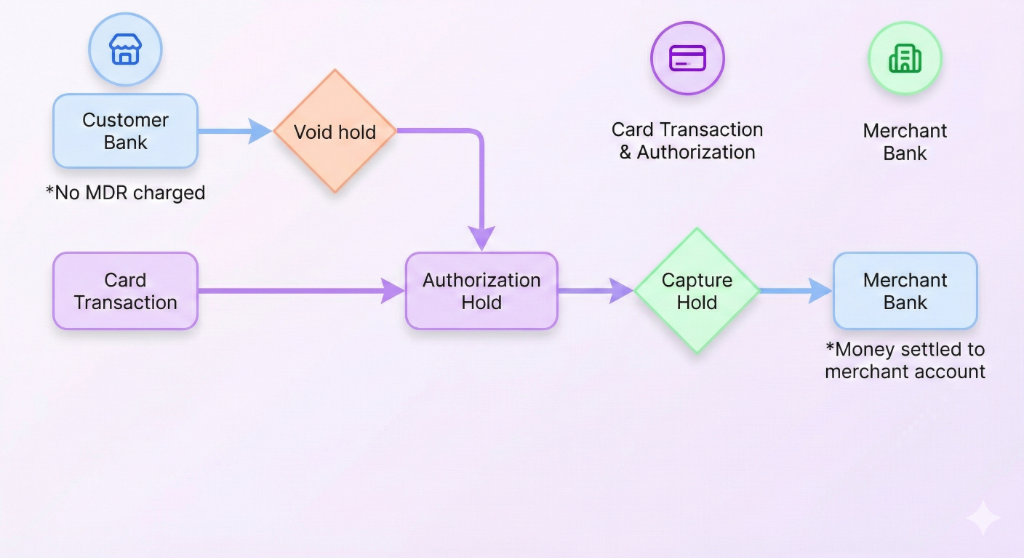
**Preauthorisation** (pre-auth) allows you to temporarily block funds on a customer’s card or account and capture the payment later, typically after order fulfilment. This helps secure funds without charging the customer immediately.
Cashfree Payment Gateway (PG) supports preauthorisation for the following payment methods:
* UPI
* Visa credit, debit, and prepaid cards
* Mastercard credit, debit, and prepaid cards
* Rupay credit, debit, and prepaid cards
## How preauthorisation works
Preauthorisation allows you to manage payments flexibly in the following ways:
* Authorise an amount on a customer’s card or account without immediate capture.
* Capture the authorised amount later—either fully or partially—when required.
* Void the authorisation to release the blocked funds if the order is not fulfilled.
Unlike standard transactions, where funds are instantly captured, preauthorisation provides flexibility in payment processing.
## Preauthorisation flow
1. The customer initiates the payment.
2. The bank blocks the amount on the customer’s card or account after successful payment completion.
3. You can:
* Either Capture the full or partial amount.\
**OR**
* Void the authorisation to release the blocked funds to the customer.
**Note**: If not captured within seven days, the funds are automatically released.
 ## Preauthorisation feature request
Please use the [raise an issue support form](https://merchant.cashfree.com/merchants/landing?env=prod\&raise_issue=1) to request this feature to be enabled for your account.
## Managing preauthorisation transactions
You can capture or void preauthorisation transactions from the **[Merchant Dashboard](https://merchant.cashfree.com/auth/login)** or integrate the capture and void APIs to automate the process.
**Note**
>
* You must capture or void a preauthorisation transaction within seven days of authorisation.
* A transaction can only be captured or voided once.
* Once captured, a transaction cannot be voided.
* Once voided, a transaction cannot be captured.
* Transactions not captured within seven days are automatically released back to the customer.
* Voided transactions return funds to the customer immediately.
* After preauthorisation is enabled for your account, ensure all preauthorisation transactions are either captured or voided.
* For UPI, you can capture the transaction for up to one year or until the expiry date, whichever occurs first.
## Supported payment instruments for preauthorisation
Cashfree Payment Gateway supports preauthorisation workflow on cards and UPI (Unified Payments Interface).
### Cards
Once preauthorisation is enabled for your account, every card payment will be preauthorised by default, you do not need to provide any additional parameters while initiating the payment.
Below is a sample [Order Pay API](/docs/api-reference/payments/latest/payments/order-pay) request and response:
```json Sample request theme={"dark"}
curl --request POST \
--url https://sandbox.cashfree.com/pg/orders/sessions \
--header 'Content-Type: application/json' \
--header 'x-api-version: ' \
--data '{
"payment_session_id": "session__CvcEmNKDkmERQrxnx39ibhJ3Ii034pjc8ZVxf3qcgEXCWlgDDlHRgz2XYZCqpajDQSXMMtCusPgOIxYP2LZx0-05p39gC2Vgmq1RAj--gcn",
"payment_method": {
"card": {
"channel": "link",
"card_number": "4111111111111111",
"card_expiry_mm": "06",
"card_expiry_yy": "22",
"card_cvv": "900",
"card_holder_name": "Tushar Gupta"
}
},
"save_instrument": true
}'
```
```json Sample response theme={"dark"}
{
"action": "link",
"cf_payment_id": "4105073870",
"channel": "link",
"data": {
"url": "https://api.cashfree.com/pg/view/gateway/session_FEeYTISZ-xOJcuR7YeOZOm1MhVIrjHa2l1G79Pg_ZktVJxPSdu7oAKf9RTFZQlR19lkBU7VGIh8dARedu9otO8VstZVT3-HpjLpIn75v-hKCNOxYuEOV_wJ975ed89f2-ad57-4094-8728-7cff9f1928f2",
"payload": null,
"content_type": null,
"method": null
},
"payment_amount": 1.00,
"payment_method": "card"
}
```
### UPI
For UPI pre-auth, you need to pass additional parameters in the `/orders/pay` API request. Once you have created the order, invoke the [Order Pay API](/docs/api-reference/payments/latest/payments/order-pay) call with the `authorize_only`, `authorization` parameters.
The `authorization` object contains the following attributes:
* `approve_by` - The time by when customer needs to approve this one time mandate request.
* `start_time` - The time when the mandate should start.
* `end_time` - The time until when the mandate hold will be on customer’s bank account. You can call capture and void until this time.
#### UPI collect
Below is a sample UPI Collect request and response:
```json UPI preauthorisation payment request theme={"dark"}
curl --request POST \
--url https://api.cashfree.com/pg/orders/sessions \
--header 'Content-Type: application/json' \
--data '{
"payment_session_id": "HTIdYxfOYgqKyYM3rLCZ",
"payment_method" : {
"upi" : {
"channel": "collect",
"upi_id": "rohit@okicici",
"authorize_only": true,
"authorization" : {
"approve_by": "2022-02-08T19:20:12+05:30",
"start_time": "2022-02-09T12:34:34Z",
"end_time": "2022-02-10T12:34:34Z"
}
}
}
}'
```
```json Response theme={"dark"}
{
"payment_method": "upi",
"channel": "collect",
"action": "custom",
"data": {
"url": null,
"payload": null,
"content_type": null,
"method": null
},
"cf_payment_id": 749079622
}
```
#### UPI intent
Below is a sample UPI Intent request and response:
```json UPI preauthorisation payment request theme={"dark"}
curl --request POST \
--url https://api.cashfree.com/pg/orders/sessions \
--header 'Content-Type: application/json' \
--data '{
"payment_session_id": "HTIdYxfOYgqKyYM3rLCZ",
"payment_method" : {
"upi" : {
"channel": "link",
"authorize_only": true,
"authorization" : {
"approve_by": "2022-02-08T19:20:12+05:30",
"start_time": "2022-02-09T12:34:34Z",
"end_time": "2022-02-10T12:34:34Z"
}
}
}
}'
```
```json Response theme={"dark"}
{
"action": "custom",
"cf_payment_id": 2333615254,
"channel": "link",
"data": {
"url": null,
"payload": {
"bhim": "bhim://upi/mandate?pa=MerchantVPA@Bank&pn=MerchantName&tr=transactionref1234&am=5.00&cu=INR&orgid=400011&mc=4722&purpose=01&tn=Cashfree%20Payments&validitystart=19122023&validityend=28122023&amrule=MAX&recur=ONETIME&rev=N&share=Y&block=Y&txnType=CREATE&mode=13",
"default": "upi://mandate?pa=MerchantVPA@Bank&pn=MerchantName&tr=transactionref1234&am=5.00&cu=INR&orgid=400011&mc=4722&purpose=01&tn=Cashfree%20Payments&validitystart=19122023&validityend=28122023&amrule=MAX&recur=ONETIME&rev=N&share=Y&block=Y&txnType=CREATE&mode=13",
"gpay": "tez://upi/mandate?pa=MerchantVPA@Bank&pn=MerchantName&tr=transactionref1234&am=5.00&cu=INR&orgid=400011&mc=4722&purpose=01&tn=Cashfree%20Payments&validitystart=19122023&validityend=28122023&amrule=MAX&recur=ONETIME&rev=N&share=Y&block=Y&txnType=CREATE&mode=13",
"paytm": "paytmmp://upi/mandate?pa=MerchantVPA@Bank&pn=MerchantName&tr=transactionref1234&am=5.00&cu=INR&orgid=400011&mc=4722&purpose=01&tn=Cashfree%20Payments&validitystart=19122023&validityend=28122023&amrule=MAX&recur=ONETIME&rev=N&share=Y&block=Y&txnType=CREATE&mode=13",
"phonepe": "phonepe://upi/mandate?pa=MerchantVPA@Bank&pn=MerchantName&tr=transactionref1234&am=5.00&cu=INR&orgid=400011&mc=4722&purpose=01&tn=Cashfree%20Payments&validitystart=19122023&validityend=28122023&amrule=MAX&recur=ONETIME&rev=N&share=Y&block=Y&txnType=CREATE&mode=13",
"web": "https://api.cashfree.com/pg/view/upi/25hg94m.ZUlx19KgZ48TXh82GrsNamC20vVw0QVK17xLE2BFOo.708f026c-5f7d-4c49-9"
},
"content_type": null,
"method": null
},
"payment_amount": 5,
"payment_method": "upi"
}
```
### Capture
The capture workflow helps you to capture the payment and move the authorised amount partially or completely from customers bank account to your bank account, by calling [Pre-Authorisation API](/docs/api-reference/payments/latest/payments/preauthorisation) for capture.
```json Capture request theme={"dark"}
curl --request POST \
--url https://api.cashfree.com/pg/orders/:order_id/authorization \
--header 'Content-Type: application/json' \
--header 'x-api-version: <>' \
--header 'x-client-id: <>' \
--header 'x-client-secret: <>' \
--data '{
"action": "CAPTURE",
"amount": "2.00"
}'
```
```json Capture response - Cards theme={"dark"}
{
"auth_id": "016381",
"authorization": {
"action": "CAPTURE",
"status": "SUCCESS",
"captured_amount": 1,
"start_time": "2025-07-15T16:40:24+05:30",
"end_time": "2025-07-18T16:40:24+05:30",
"approve_by": null,
"action_reference": "7525782703466058805917",
"action_time": "2025-07-15T16:47:50.285775"
},
"bank_reference": "519611740779",
"cf_payment_id": "4129256397",
"entity": "payment",
"error_details": null,
"international_payment": {
"international": false
},
"is_captured": true,
"order_amount": 1,
"order_currency": "INR",
"order_id": "abhishek-287",
"payment_amount": 1,
"payment_completion_time": "2025-07-15T16:40:51+05:30",
"payment_currency": "INR",
"payment_gateway_details": {
"gateway_name": "CASHFREE",
"gateway_order_id": null,
"gateway_payment_id": null,
"gateway_order_reference_id": null,
"gateway_status_code": null,
"gateway_settlement": "cashfree",
"gateway_reference_name": null
},
"payment_group": "debit_card",
"payment_message": "PRE_AUTH|Transaction Success",
"payment_method": {
"card": {
"card_bank_name": "KOTAK MAHINDRA BANK",
"card_country": "IN",
"card_network": "visa",
"card_network_reference_id": null,
"card_number": "XXXXXXXXXXXX4738",
"card_sub_type": "R",
"card_type": "debit_card",
"channel": "link"
}
},
"payment_offers": null,
"payment_status": "SUCCESS",
"payment_surcharge": null,
"payment_time": "2025-07-15T16:40:24+05:30"
}
```
```json Capture response - UPI theme={"dark"}
{
"auth_id": "203924176048",
"authorization": {
"action": "CAPTURE",
"status": "SUCCESS",
"captured_amount": 2.00,
"start_time": "2022-02-09T18:04:34+05:30",
"end_time": "2022-02-10T18:04:34+05:30",
"approve_by": "2022-02-08T19:20:12+05:30"
},
"bank_reference": "203924176048",
"cf_payment_id": 7079622,
"entity": "payment",
"is_captured": false,
"order_amount": 3.00,
"order_id": "order_184824oxmihLPJhERptCzgR08YGOan2",
"payment_amount": 3.00,
"payment_currency": "INR",
"payment_group": "upi",
"payment_message": "PRE_AUTH|Transaction initiated",
"payment_method": {
"upi": {
"channel": "collect",
"upi_id": "rohit@okicici"
}
},
"payment_status": "SUCCESS",
"payment_time": "2022-02-08T14:31:56+05:30"
}
```
### Void
The void workflow helps you to release the entire authorised amount back to the customer, by calling [Pre-Authorisation API](/docs/api-reference/payments/latest/payments/preauthorisation) for void.
```json Void request theme={"dark"}
curl --request POST \
--url https://api.cashfree.com/pg/orders/:order_id/authorization \
--header 'Content-Type: application/json' \
--header 'x-api-version: <>' \
--header 'x-client-id: <>' \
--header 'x-client-secret: <>' \
--data '{
"action": "VOID"
}'
```
```json Void response - Cards theme={"dark"}
{
"auth_id": "023166",
"authorisation": {
"action": "VOID",
"status": "SUCCESS",
"captured_amount": null,
"start_time": "2025-07-15T16:49:06+05:30",
"end_time": "2025-07-18T16:49:06+05:30",
"approve_by": null,
"action_reference": "7525784179616489005910",
"action_time": "2025-07-15T16:50:17.911008"
},
"bank_reference": "519611251479",
"cf_payment_id": "4129285491",
"entity": "payment",
"error_details": null,
"international_payment": {
"international": false
},
"is_captured": false,
"order_amount": 1,
"order_currency": "INR",
"order_id": "abhishek-288",
"payment_amount": 1,
"payment_completion_time": "2025-07-15T16:49:40+05:30",
"payment_currency": "INR",
"payment_gateway_details": {
"gateway_name": "CASHFREE",
"gateway_order_id": null,
"gateway_payment_id": null,
"gateway_order_reference_id": null,
"gateway_status_code": null,
"gateway_settlement": "cashfree",
"gateway_reference_name": null
},
"payment_group": "debit_card",
"payment_message": "PRE_AUTH|Transaction Success",
"payment_method": {
"card": {
"card_bank_name": "KOTAK MAHINDRA BANK",
"card_country": "IN",
"card_network": "visa",
"card_network_reference_id": null,
"card_number": "XXXXXXXXXXXX4738",
"card_sub_type": "R",
"card_type": "debit_card",
"channel": "link"
}
},
"payment_offers": null,
"payment_status": "VOID",
"payment_surcharge": null,
"payment_time": "2025-07-15T16:49:06+05:30"
}
```
```json Void response - UPI theme={"dark"}
{
"auth_id": null,
"authorisation": {
"action": "VOID",
"status": "SUCCESS",
"captured_amount": null,
"start_time": "2022-02-09T18:04:34+05:30",
"end_time": "2022-02-10T18:04:34+05:30",
"approve_by": "2022-02-08T19:20:12+05:30"
},
"bank_reference": "203924193623",
"cf_payment_id": 749235871,
"entity": "payment",
"is_captured": false,
"order_amount": 3.00,
"order_id": "order_184824pANPV12CVRkdxHi3mrPZ9KOcg",
"payment_amount": 3.00,
"payment_currency": "INR",
"payment_group": "upi",
"payment_message": "PRE_AUTH|Transaction initiated",
"payment_method": {
"upi": {
"channel": "collect",
"upi_id": "rsedwardian@okicici"
}
},
"payment_status": "VOID",
"payment_time": "2022-02-08T16:15:23+05:30"
}
```
## FAQs
Capture call is performed after authorisation. It is a merchant-initiated request (via API or Merchant Dashboard) to collect the previously authorised funds. This step debits the amount from the customer.
If not captured within 7 days, the authorisation expires, and the funds are released back to the customer.
Yes, merchants can capture a partial amount of the authorised funds.
MDR is always applied only on the captured amount.
All Visa, Mastercard and RuPay credit, debit and prepaid cards support preauthorisation.
A void call cancels the authorisation before capture, releasing the hold on funds.
No, voiding must be for the entire authorised amount.
Here are some common use cases:
## Preauthorisation feature request
Please use the [raise an issue support form](https://merchant.cashfree.com/merchants/landing?env=prod\&raise_issue=1) to request this feature to be enabled for your account.
## Managing preauthorisation transactions
You can capture or void preauthorisation transactions from the **[Merchant Dashboard](https://merchant.cashfree.com/auth/login)** or integrate the capture and void APIs to automate the process.
**Note**
>
* You must capture or void a preauthorisation transaction within seven days of authorisation.
* A transaction can only be captured or voided once.
* Once captured, a transaction cannot be voided.
* Once voided, a transaction cannot be captured.
* Transactions not captured within seven days are automatically released back to the customer.
* Voided transactions return funds to the customer immediately.
* After preauthorisation is enabled for your account, ensure all preauthorisation transactions are either captured or voided.
* For UPI, you can capture the transaction for up to one year or until the expiry date, whichever occurs first.
## Supported payment instruments for preauthorisation
Cashfree Payment Gateway supports preauthorisation workflow on cards and UPI (Unified Payments Interface).
### Cards
Once preauthorisation is enabled for your account, every card payment will be preauthorised by default, you do not need to provide any additional parameters while initiating the payment.
Below is a sample [Order Pay API](/docs/api-reference/payments/latest/payments/order-pay) request and response:
```json Sample request theme={"dark"}
curl --request POST \
--url https://sandbox.cashfree.com/pg/orders/sessions \
--header 'Content-Type: application/json' \
--header 'x-api-version: ' \
--data '{
"payment_session_id": "session__CvcEmNKDkmERQrxnx39ibhJ3Ii034pjc8ZVxf3qcgEXCWlgDDlHRgz2XYZCqpajDQSXMMtCusPgOIxYP2LZx0-05p39gC2Vgmq1RAj--gcn",
"payment_method": {
"card": {
"channel": "link",
"card_number": "4111111111111111",
"card_expiry_mm": "06",
"card_expiry_yy": "22",
"card_cvv": "900",
"card_holder_name": "Tushar Gupta"
}
},
"save_instrument": true
}'
```
```json Sample response theme={"dark"}
{
"action": "link",
"cf_payment_id": "4105073870",
"channel": "link",
"data": {
"url": "https://api.cashfree.com/pg/view/gateway/session_FEeYTISZ-xOJcuR7YeOZOm1MhVIrjHa2l1G79Pg_ZktVJxPSdu7oAKf9RTFZQlR19lkBU7VGIh8dARedu9otO8VstZVT3-HpjLpIn75v-hKCNOxYuEOV_wJ975ed89f2-ad57-4094-8728-7cff9f1928f2",
"payload": null,
"content_type": null,
"method": null
},
"payment_amount": 1.00,
"payment_method": "card"
}
```
### UPI
For UPI pre-auth, you need to pass additional parameters in the `/orders/pay` API request. Once you have created the order, invoke the [Order Pay API](/docs/api-reference/payments/latest/payments/order-pay) call with the `authorize_only`, `authorization` parameters.
The `authorization` object contains the following attributes:
* `approve_by` - The time by when customer needs to approve this one time mandate request.
* `start_time` - The time when the mandate should start.
* `end_time` - The time until when the mandate hold will be on customer’s bank account. You can call capture and void until this time.
#### UPI collect
Below is a sample UPI Collect request and response:
```json UPI preauthorisation payment request theme={"dark"}
curl --request POST \
--url https://api.cashfree.com/pg/orders/sessions \
--header 'Content-Type: application/json' \
--data '{
"payment_session_id": "HTIdYxfOYgqKyYM3rLCZ",
"payment_method" : {
"upi" : {
"channel": "collect",
"upi_id": "rohit@okicici",
"authorize_only": true,
"authorization" : {
"approve_by": "2022-02-08T19:20:12+05:30",
"start_time": "2022-02-09T12:34:34Z",
"end_time": "2022-02-10T12:34:34Z"
}
}
}
}'
```
```json Response theme={"dark"}
{
"payment_method": "upi",
"channel": "collect",
"action": "custom",
"data": {
"url": null,
"payload": null,
"content_type": null,
"method": null
},
"cf_payment_id": 749079622
}
```
#### UPI intent
Below is a sample UPI Intent request and response:
```json UPI preauthorisation payment request theme={"dark"}
curl --request POST \
--url https://api.cashfree.com/pg/orders/sessions \
--header 'Content-Type: application/json' \
--data '{
"payment_session_id": "HTIdYxfOYgqKyYM3rLCZ",
"payment_method" : {
"upi" : {
"channel": "link",
"authorize_only": true,
"authorization" : {
"approve_by": "2022-02-08T19:20:12+05:30",
"start_time": "2022-02-09T12:34:34Z",
"end_time": "2022-02-10T12:34:34Z"
}
}
}
}'
```
```json Response theme={"dark"}
{
"action": "custom",
"cf_payment_id": 2333615254,
"channel": "link",
"data": {
"url": null,
"payload": {
"bhim": "bhim://upi/mandate?pa=MerchantVPA@Bank&pn=MerchantName&tr=transactionref1234&am=5.00&cu=INR&orgid=400011&mc=4722&purpose=01&tn=Cashfree%20Payments&validitystart=19122023&validityend=28122023&amrule=MAX&recur=ONETIME&rev=N&share=Y&block=Y&txnType=CREATE&mode=13",
"default": "upi://mandate?pa=MerchantVPA@Bank&pn=MerchantName&tr=transactionref1234&am=5.00&cu=INR&orgid=400011&mc=4722&purpose=01&tn=Cashfree%20Payments&validitystart=19122023&validityend=28122023&amrule=MAX&recur=ONETIME&rev=N&share=Y&block=Y&txnType=CREATE&mode=13",
"gpay": "tez://upi/mandate?pa=MerchantVPA@Bank&pn=MerchantName&tr=transactionref1234&am=5.00&cu=INR&orgid=400011&mc=4722&purpose=01&tn=Cashfree%20Payments&validitystart=19122023&validityend=28122023&amrule=MAX&recur=ONETIME&rev=N&share=Y&block=Y&txnType=CREATE&mode=13",
"paytm": "paytmmp://upi/mandate?pa=MerchantVPA@Bank&pn=MerchantName&tr=transactionref1234&am=5.00&cu=INR&orgid=400011&mc=4722&purpose=01&tn=Cashfree%20Payments&validitystart=19122023&validityend=28122023&amrule=MAX&recur=ONETIME&rev=N&share=Y&block=Y&txnType=CREATE&mode=13",
"phonepe": "phonepe://upi/mandate?pa=MerchantVPA@Bank&pn=MerchantName&tr=transactionref1234&am=5.00&cu=INR&orgid=400011&mc=4722&purpose=01&tn=Cashfree%20Payments&validitystart=19122023&validityend=28122023&amrule=MAX&recur=ONETIME&rev=N&share=Y&block=Y&txnType=CREATE&mode=13",
"web": "https://api.cashfree.com/pg/view/upi/25hg94m.ZUlx19KgZ48TXh82GrsNamC20vVw0QVK17xLE2BFOo.708f026c-5f7d-4c49-9"
},
"content_type": null,
"method": null
},
"payment_amount": 5,
"payment_method": "upi"
}
```
### Capture
The capture workflow helps you to capture the payment and move the authorised amount partially or completely from customers bank account to your bank account, by calling [Pre-Authorisation API](/docs/api-reference/payments/latest/payments/preauthorisation) for capture.
```json Capture request theme={"dark"}
curl --request POST \
--url https://api.cashfree.com/pg/orders/:order_id/authorization \
--header 'Content-Type: application/json' \
--header 'x-api-version: <>' \
--header 'x-client-id: <>' \
--header 'x-client-secret: <>' \
--data '{
"action": "CAPTURE",
"amount": "2.00"
}'
```
```json Capture response - Cards theme={"dark"}
{
"auth_id": "016381",
"authorization": {
"action": "CAPTURE",
"status": "SUCCESS",
"captured_amount": 1,
"start_time": "2025-07-15T16:40:24+05:30",
"end_time": "2025-07-18T16:40:24+05:30",
"approve_by": null,
"action_reference": "7525782703466058805917",
"action_time": "2025-07-15T16:47:50.285775"
},
"bank_reference": "519611740779",
"cf_payment_id": "4129256397",
"entity": "payment",
"error_details": null,
"international_payment": {
"international": false
},
"is_captured": true,
"order_amount": 1,
"order_currency": "INR",
"order_id": "abhishek-287",
"payment_amount": 1,
"payment_completion_time": "2025-07-15T16:40:51+05:30",
"payment_currency": "INR",
"payment_gateway_details": {
"gateway_name": "CASHFREE",
"gateway_order_id": null,
"gateway_payment_id": null,
"gateway_order_reference_id": null,
"gateway_status_code": null,
"gateway_settlement": "cashfree",
"gateway_reference_name": null
},
"payment_group": "debit_card",
"payment_message": "PRE_AUTH|Transaction Success",
"payment_method": {
"card": {
"card_bank_name": "KOTAK MAHINDRA BANK",
"card_country": "IN",
"card_network": "visa",
"card_network_reference_id": null,
"card_number": "XXXXXXXXXXXX4738",
"card_sub_type": "R",
"card_type": "debit_card",
"channel": "link"
}
},
"payment_offers": null,
"payment_status": "SUCCESS",
"payment_surcharge": null,
"payment_time": "2025-07-15T16:40:24+05:30"
}
```
```json Capture response - UPI theme={"dark"}
{
"auth_id": "203924176048",
"authorization": {
"action": "CAPTURE",
"status": "SUCCESS",
"captured_amount": 2.00,
"start_time": "2022-02-09T18:04:34+05:30",
"end_time": "2022-02-10T18:04:34+05:30",
"approve_by": "2022-02-08T19:20:12+05:30"
},
"bank_reference": "203924176048",
"cf_payment_id": 7079622,
"entity": "payment",
"is_captured": false,
"order_amount": 3.00,
"order_id": "order_184824oxmihLPJhERptCzgR08YGOan2",
"payment_amount": 3.00,
"payment_currency": "INR",
"payment_group": "upi",
"payment_message": "PRE_AUTH|Transaction initiated",
"payment_method": {
"upi": {
"channel": "collect",
"upi_id": "rohit@okicici"
}
},
"payment_status": "SUCCESS",
"payment_time": "2022-02-08T14:31:56+05:30"
}
```
### Void
The void workflow helps you to release the entire authorised amount back to the customer, by calling [Pre-Authorisation API](/docs/api-reference/payments/latest/payments/preauthorisation) for void.
```json Void request theme={"dark"}
curl --request POST \
--url https://api.cashfree.com/pg/orders/:order_id/authorization \
--header 'Content-Type: application/json' \
--header 'x-api-version: <>' \
--header 'x-client-id: <>' \
--header 'x-client-secret: <>' \
--data '{
"action": "VOID"
}'
```
```json Void response - Cards theme={"dark"}
{
"auth_id": "023166",
"authorisation": {
"action": "VOID",
"status": "SUCCESS",
"captured_amount": null,
"start_time": "2025-07-15T16:49:06+05:30",
"end_time": "2025-07-18T16:49:06+05:30",
"approve_by": null,
"action_reference": "7525784179616489005910",
"action_time": "2025-07-15T16:50:17.911008"
},
"bank_reference": "519611251479",
"cf_payment_id": "4129285491",
"entity": "payment",
"error_details": null,
"international_payment": {
"international": false
},
"is_captured": false,
"order_amount": 1,
"order_currency": "INR",
"order_id": "abhishek-288",
"payment_amount": 1,
"payment_completion_time": "2025-07-15T16:49:40+05:30",
"payment_currency": "INR",
"payment_gateway_details": {
"gateway_name": "CASHFREE",
"gateway_order_id": null,
"gateway_payment_id": null,
"gateway_order_reference_id": null,
"gateway_status_code": null,
"gateway_settlement": "cashfree",
"gateway_reference_name": null
},
"payment_group": "debit_card",
"payment_message": "PRE_AUTH|Transaction Success",
"payment_method": {
"card": {
"card_bank_name": "KOTAK MAHINDRA BANK",
"card_country": "IN",
"card_network": "visa",
"card_network_reference_id": null,
"card_number": "XXXXXXXXXXXX4738",
"card_sub_type": "R",
"card_type": "debit_card",
"channel": "link"
}
},
"payment_offers": null,
"payment_status": "VOID",
"payment_surcharge": null,
"payment_time": "2025-07-15T16:49:06+05:30"
}
```
```json Void response - UPI theme={"dark"}
{
"auth_id": null,
"authorisation": {
"action": "VOID",
"status": "SUCCESS",
"captured_amount": null,
"start_time": "2022-02-09T18:04:34+05:30",
"end_time": "2022-02-10T18:04:34+05:30",
"approve_by": "2022-02-08T19:20:12+05:30"
},
"bank_reference": "203924193623",
"cf_payment_id": 749235871,
"entity": "payment",
"is_captured": false,
"order_amount": 3.00,
"order_id": "order_184824pANPV12CVRkdxHi3mrPZ9KOcg",
"payment_amount": 3.00,
"payment_currency": "INR",
"payment_group": "upi",
"payment_message": "PRE_AUTH|Transaction initiated",
"payment_method": {
"upi": {
"channel": "collect",
"upi_id": "rsedwardian@okicici"
}
},
"payment_status": "VOID",
"payment_time": "2022-02-08T16:15:23+05:30"
}
```
## FAQs
Capture call is performed after authorisation. It is a merchant-initiated request (via API or Merchant Dashboard) to collect the previously authorised funds. This step debits the amount from the customer.
If not captured within 7 days, the authorisation expires, and the funds are released back to the customer.
Yes, merchants can capture a partial amount of the authorised funds.
MDR is always applied only on the captured amount.
All Visa, Mastercard and RuPay credit, debit and prepaid cards support preauthorisation.
A void call cancels the authorisation before capture, releasing the hold on funds.
No, voiding must be for the entire authorised amount.
Here are some common use cases:
- **Ticket Bookings** – Airlines, concerts, and events often place a hold on a credit card to ensure funds are available before finalising the booking. This is useful if confirmation is pending or for refundable ticket options.
- **Car Rentals** – Rental companies use preauthorisation to secure a deposit in case of damages, late returns, or additional charges. The hold is released if no extra fees are incurred.
- **Hotel Reservations** – Hotels preauthorise a guest’s credit card at check-in to cover potential incidentals, damages, or unpaid charges, ensuring payment security before checkout.
Yes, preauthorisation is feasible on both payment links and payment forms.
Payment Links
**How it works:**
- The merchant generates a payment link on a preauthorisation-enabled account.
- The customer selects the link and enters payment details.
- The payment is authorised (funds are held but not captured immediately).
- The merchant can capture the payment later when needed.
- If the order is cancelled, the hold can be released without charging the card.
Payment Forms
**How it works:**
- The customer enters payment details in the form.
- The system processes an authorisation-only request.
- The merchant can capture the funds later or release the authorisation if the transaction is voided.
Settlement occurs when the merchant finalises a preauthorised transaction by capturing the funds.
Merchants typically receive funds from preauthorised transactions as per their normal settlement cycle, i.e., T+x days after a successful capture.
A dispute may result in a chargeback, requiring the merchant to provide proof of authorisation and service fulfilment.
Currently, the preauthorisation feature is not supported for American Express and Diners cards due to limitations imposed by the respective card networks. We are actively monitoring any changes in network policies and will update our services accordingly if support becomes available in the future.
The following sponsor banks currently support the preauthorisation feature on Cashfree Payments:
* Axis Bank
* HDFC Bank
* ICICI Bank
* IndusInd Bank
* Kotak Mahindra Bank
* Yes Bank
* Federal Bank
* State Bank of India
snippets/related-topics-loader.mdx