> ## Documentation Index
> Fetch the complete documentation index at: https://www.cashfree.com/docs/llms.txt
> Use this file to discover all available pages before exploring further.
# Token Vault
> Securely process saved card payments with Cashfree Token Vault, an RBI-compliant tokenisation service that protects cardholder data on every order.
Cashfree's Token Vault is an industry-leading solution that enables you to offer customers a secure save card functionality whilst remaining RBI compliant. The solution provides a fast and secure checkout experience that delivers higher conversion rates and improved payment success rates.
Saved card transactions have approximately 10% better success rates compared to guest checkout transactions.
### Key benefits of Cashfree's token vault
The following features make Cashfree's Token Vault solution comprehensive:
* **Full compliance**: Cashfree Payments is a certified and compliant Token Requestor supporting all card types and schemes (Visa, Mastercard, RuPay, AmEx, Diners).
* **Enhanced performance**: Saved card payments deliver \~10% better success rates and increased conversions.
* **Seamless experience**: Integration with [CVV-Less](/docs/payments/features/cvv-less) and [Native OTP](/docs/payments/features/native-otp) features for frictionless checkout.
* **Interoperability**: Support for cross-platform scenarios where you can save cards via one payment aggregator and process via another.
## Tokenisation
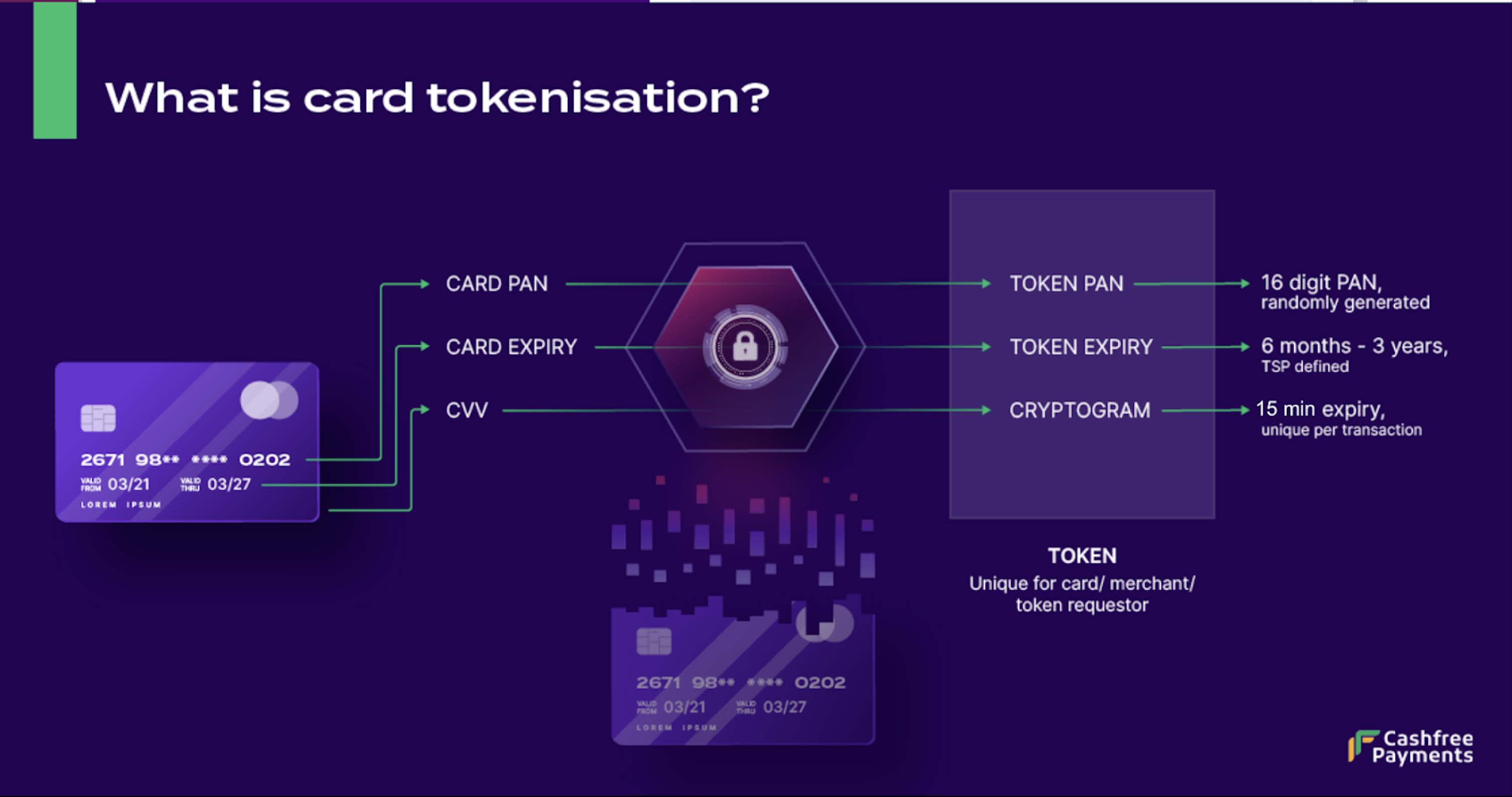
Tokenisation is the process of replacing sensitive card details such as card number, expiry, and CVV with a unique, non-sensitive identifier called a token. This process ensures that actual card data is never stored or exposed during transactions.
### Key concepts
Understanding these terms helps you implement tokenisation effectively:
* **Token Requestor**: The merchant or payment gateway (like Cashfree Payments) that initiates tokenisation requests on behalf of merchants
* **Token Service Provider**: The card network or issuing bank that generates and manages tokens
* **Token**: A unique identifier specific to each combination of card, merchant, customer, and Token Requestor
Each token is cryptographically secure and can't be reverse-engineered to reveal the original card details, unlike standard encryption methods.
 ### Customer journey
The tokenisation process provides a seamless experience for customers across their payment lifecycle:
### Customer journey
The tokenisation process provides a seamless experience for customers across their payment lifecycle:
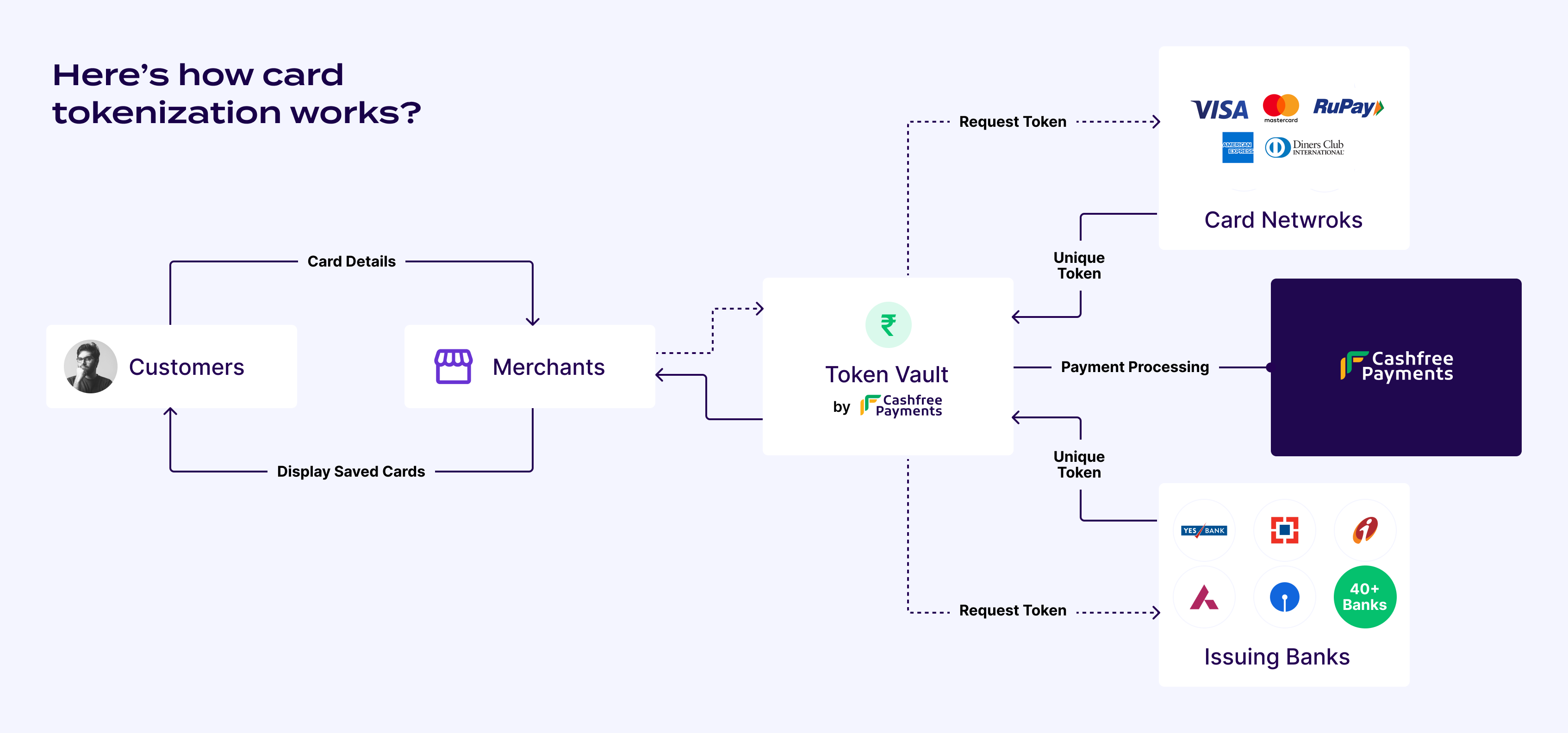 #### First-time payment with guest checkout
The initial tokenisation process works as follows:
1. Customer enters full card details and consents to save the card
2. Customer completes payment authentication using OTP
3. Cashfree generates an Alt ID and cryptogram to process the transaction
4. After successful transaction processing, Cashfree tokenises the card with the card network/issuer
5. Cashfree receives the token and the card is saved for future use
#### Repeat payment with saved card
Subsequent payments use the saved token for enhanced security and speed:
1. Saved cards appear at checkout with identifiers (last 4 digits, issuing bank, card network)
2. Customer selects a previously saved card
3. Cashfree fetches the token and generates a cryptogram from the network/issuer
4. Customer completes OTP authentication
5. Payment processes securely using the token without exposing actual card data
## Integrating with Cashfree's Token Vault
Cashfree offers different integration methods for its Token Vault:
### Merchants with CF-hosted checkout
Merchants using Cashfree hosted checkout will be able to use tokenisation functionality with zero additional effort. It's enabled by default for all checkout merchants, and Cashfree handles tokenisation and payment processing end-to-end.
* Customers can save their card by opting for tokenisation on the checkout. The checkout also displays a nudge highlighting the benefits of saving the card.
#### First-time payment with guest checkout
The initial tokenisation process works as follows:
1. Customer enters full card details and consents to save the card
2. Customer completes payment authentication using OTP
3. Cashfree generates an Alt ID and cryptogram to process the transaction
4. After successful transaction processing, Cashfree tokenises the card with the card network/issuer
5. Cashfree receives the token and the card is saved for future use
#### Repeat payment with saved card
Subsequent payments use the saved token for enhanced security and speed:
1. Saved cards appear at checkout with identifiers (last 4 digits, issuing bank, card network)
2. Customer selects a previously saved card
3. Cashfree fetches the token and generates a cryptogram from the network/issuer
4. Customer completes OTP authentication
5. Payment processes securely using the token without exposing actual card data
## Integrating with Cashfree's Token Vault
Cashfree offers different integration methods for its Token Vault:
### Merchants with CF-hosted checkout
Merchants using Cashfree hosted checkout will be able to use tokenisation functionality with zero additional effort. It's enabled by default for all checkout merchants, and Cashfree handles tokenisation and payment processing end-to-end.
* Customers can save their card by opting for tokenisation on the checkout. The checkout also displays a nudge highlighting the benefits of saving the card.
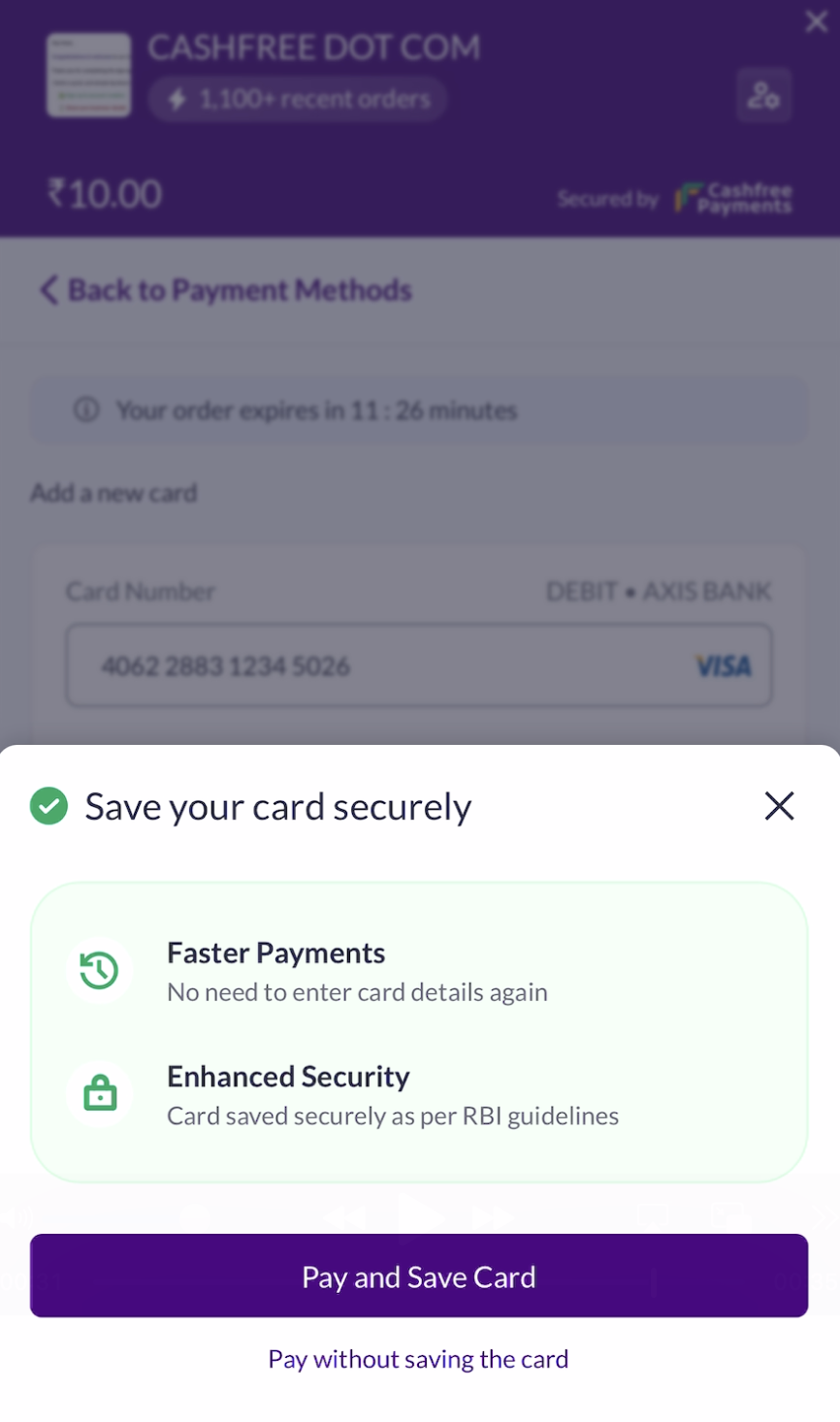 * For repeat customers there's OTP based authentication for the first time, before displaying saved cards, for added layer of security.
* Repeat customers can select a saved card and have a [CVV-Less](/docs/payments/features/cvv-less) payment experience with just a single click!
### Seamless merchants with merchant-hosted checkout
Merchants using the seamless flow, can integrate Cashfree's Token Vault APIs with their platform. Once integrated, Cashfree Payments handles both saving cards and processing payments via saved cards.
#### Saving the card with Cashfree as Token Requestor
* In [Create Order API](https://www.cashfree.com/docs/api-reference/payments/latest/orders/create-order), merchant needs to pass `customer_id`, against which the token would be generated and stored.
* For card payments ask for customer consent on the UI to save the card, and then in [Order Pay API](https://www.cashfree.com/docs/api-reference/payments/latest/payments/order-pay) pass `save_instrument: true`. Merchants can also add a nudge stating benefits of tokenisation to prompt users to save the card.
```bash cURL {17} theme={"dark"}
curl --request POST \
--url https://sandbox.cashfree.com/pg/orders/sessions \
--header 'Content-Type: application/json' \
--header 'x-api-version: ' \
--data '{
"payment_session_id": "session__someidwhichislongandhasnumbers1232132andcharacterscn",
"payment_method": {
"card": {
"channel": "link",
"card_number": "4111111111111111",
"card_expiry_mm": "06",
"card_expiry_yy": "22",
"card_cvv": "900",
"card_holder_name": "Tushar Gupta"
}
},
"save_instrument": true
}'
```
* Cashfree first processes the plain card transaction via alt ID and cryptogram. If the transaction succeeds, Cashfree tokenises and saves the card. If the transaction fails, Cashfree does not attempt tokenisation or save the card, because a successfully authenticated transaction is a prerequisite for tokenisation.
* You can also configure [tokenisation webhooks](/docs/api-reference/payments/latest/token-vault/webhooks) to receive callbacks on whether the card was saved.
#### Using Cashfree as Token Requestor and processing payment via Cashfree
* In order to display saved cards for a customer on checkout, call [Fetch All Saved Card Instruments](https://www.cashfree.com/docs/api-reference/payments/previous/v2023-08-01/token-vault/fetch-all-saved-card-instrument) API with `customer_id`, merchant will get complete details of all cards saved for that customer like card type, issuing bank, card scheme, last 4 digits of card - which they can display on checkout so that customer can identify its cards and select one of them for payment.
* To process payment via saved card, call [Order Pay](https://www.cashfree.com/docs/api-reference/payments/latest/payments/order-pay) API and pass `instrument_id` received in response of [Fetch All Saved Card Instruments](https://www.cashfree.com/docs/api-reference/payments/previous/v2023-08-01/token-vault/fetch-all-saved-card-instrument) API, corresponding to the card that was selected by the customer on checkout. Cashfree would fetch the token and cryptogram against that card and process the payment.
```bash cURL {10} theme={"dark"}
curl --request POST \
--url https://sandbox.cashfree.com/pg/orders/sessions \
--header 'Content-Type: application/json' \
--header 'x-api-version: ' \
--data '{
"payment_session_id": "session__CvcEmNKDkmERQrxnx39ibhJ3Ii034pjc8ZVxf3qcgEXCWlgDDlHRgz2XYZCqpajDQSXMMtCusPgOIxYP2LZx0-05p39gC2Vgmq1RAj--gcn",
"payment_method": {
"card": {
"channel": "link",
"instrument_id": "54deabb4-ba45-4a60-9e6a-9c016fe7ab10",
"card_cvv": "900" // Optional
}
}
}'
```
* Saved cards don't require CVV to process the payment. For a more seamless checkout experience, avoid collecting CVV for saved cards. For more information, refer to [CVV-Less Card Payments](/docs/payments/features/cvv-less).
CVV-less flow has approximately 5% better success rates for saved cards.
#### Using external Token Requestor and processing payment via Cashfree
* Cashfree's Token Vault solution is interoperable. If you use an external **Token Requestor**, you can still process those tokenised cards through Cashfree.
For external guest checkout transaction:
* Once a customer enters plain card on Checkout, the merchant needs to get the Alt ID and cryptogram from its *Token Requestor*.
* In [Order Pay](https://www.cashfree.com/docs/api-reference/payments/latest/payments/order-pay) API pass alt id number, alt id expiry, cryptogram, cvv generated by your *Token Requestor* against the plain card details. Cashfree would use Alt ID and cryptogram to process the payment.
```bash cURL {10,11,12,13,14,15} theme={"dark"}
curl --request POST \
--url https://sandbox.cashfree.com/pg/orders/sessions \
--header 'Content-Type: application/json' \
--header 'x-api-version: ' \
--data '{
"payment_session_id": "session__CvcEmNKDkmERQrxnx39ibhJ3Ii034pjc8ZVxf3qcgEXCWlgDDlHRgz2XYZCqpajDQSXMMtCusPgOIxYP2LZx0-05p39gC2Vgmq1RAj--gcn",
"payment_method": {
"card": {
"channel": "link",
"card_number": "4111111111111111", // alt id number
"card_expiry_mm": "03", // alt id expiry mm
"card_expiry_yy": "26", // alt id expiry yy
"cryptogram": "AQBBBBBBZatIlaIAmWKSghwBBBB=",
"card_cvv": "900",
"token_type": "NETWORK_GC_TOKEN",
"card_holder_name": "Tushar Gupta", //optional
"card_display": "3243", // optional
"token_reference_id": "22457512314" // conditional, required only for diners
}
}
}'
```
For external saved card transaction:
* To process payment with cards saved via an external *Token Requestor*, fetch all saved cards from the *Token Requestor* and display it on checkout. Once a customer selects a saved card, merchant needs to get the token and cryptogram from its *Token Requestor* as only the *Token Requestor* is allowed to generate cryptogram required for transaction processing.
* In [Order Pay](https://www.cashfree.com/docs/api-reference/payments/latest/payments/order-pay) API pass token number, token expiry, cryptogram of the card that was selected by the customer on checkout. Cashfree would use that token and cryptogram to process the payment.
```bash cURL {10,11,12,13,14} theme={"dark"}
curl --request POST \
--url https://sandbox.cashfree.com/pg/orders/sessions \
--header 'Content-Type: application/json' \
--header 'x-api-version: ' \
--data '{
"payment_session_id": "session__CvcEmNKDkmERQrxnx39ibhJ3Ii034pjc8ZVxf3qcgEXCWlgDDlHRgz2XYZCqpajDQSXMMtCusPgOIxYP2LZx0-05p39gC2Vgmq1RAj--gcn",
"payment_method": {
"card": {
"channel": "link",
"card_number": "4111111111111111", // token number
"card_expiry_mm": "03", // token expiry mm
"card_expiry_yy": "26", // token expiry yy
"cryptogram": "AQBBBBBBZatIlaIAmWKSghwBBBB=",
"token_requestor_id": "22457512314",
"card_cvv": "900", // optional
"card_holder_name": "Tushar Gupta" // optional
"card_display": "3243" // optional
}
}
}'
```
* Saved cards don't require CVV to process the payment. For a more seamless checkout experience, avoid collecting CVV for saved cards. CVV is an optional field in the API request. For more information about the CVV-less flow, refer to [CVV-Less Card Payments](/docs/payments/features/cvv-less).
#### Using Cashfree as Token Requestor and processing payment externally
* Cashfree's Token Vault solution is interoperable. To process payment with an external PA for a card saved with Cashfree, merchant needs to get the token and cryptogram from Cashfree, as only the *Token Requestor*, Cashfree in this case, is allowed to generate cryptogram required for transaction processing.
* Call [Fetch All Saved Card Instruments](https://www.cashfree.com/docs/api-reference/payments/previous/v2023-08-01/token-vault/fetch-all-saved-card-instrument) API with `customer_id`, merchant will get complete details of all cards saved for that customer to display it on checkout.
* Once customer selects one of these cards, merchant needs to call [Fetch Cryptogram for a Saved Card Instrument](https://www.cashfree.com/docs/api-reference/payments/latest/token-vault/fetch-cryptogram-for-a-saved-card-instrument) API with `customer_id` and `instrument_id` to get the cryptogram.
* Merchant can then use this token and cryptogram to process the payment with any Payment Aggregator.
## FAQs
posthog.capture('Accordion Clicked', { title: "What all card details can the merchant save under tokenisation guidelines?" })}>
Merchants are allowed to store only the **card BIN**, **last 4 digits of the actual card number**, and **card expiry**.
They can't store the entire plain card number or CVV.
posthog.capture('Accordion Clicked', { title: "Can a card be saved without a successful transaction?" })}>
No. A successfully authenticated transaction is a **pre-requisite** for tokenising the card.
posthog.capture('Accordion Clicked', { title: "Can a tokenised card be processed by any payment aggregator?" })}>
Yes. Cashfree's **token vault solution is interoperable**.
A token generated with one payment aggregator can be processed via any PA, provided that the same PA generates and provides the **cryptogram** from the card network. That token + cryptogram can then be used by any PA to process the payment.
posthog.capture('Accordion Clicked', { title: "Can tokens created with another provider be migrated to Cashfree?" })}>
No. Tokens **aren't portable** due to the ecosystem limitations.
* Merchants can continue using their existing token vault and get the **token + cryptogram** from it to process with Cashfree.
* Or, merchants must ask customers to **save cards again**, which would then be stored in Cashfree's token vault.
posthog.capture('Accordion Clicked', { title: "Does Cashfree offer TSP capability for token vault?" })}>
Yes. Cashfree offers a **standalone, plug and play token vault solution**.
* The merchant can act as the ***Token Requestor*** by procuring their own **TRID (*Token Requestor* ID)** directly from the card networks.
* Cashfree enables merchants to tokenise cards, generate and retrieve cryptograms, and process transactions seamlessly through **any payment aggregator (including Cashfree)**.
* This ensures flexibility whilst maintaining compliance with **network tokenisation standards**.
* For repeat customers there's OTP based authentication for the first time, before displaying saved cards, for added layer of security.
* Repeat customers can select a saved card and have a [CVV-Less](/docs/payments/features/cvv-less) payment experience with just a single click!
### Seamless merchants with merchant-hosted checkout
Merchants using the seamless flow, can integrate Cashfree's Token Vault APIs with their platform. Once integrated, Cashfree Payments handles both saving cards and processing payments via saved cards.
#### Saving the card with Cashfree as Token Requestor
* In [Create Order API](https://www.cashfree.com/docs/api-reference/payments/latest/orders/create-order), merchant needs to pass `customer_id`, against which the token would be generated and stored.
* For card payments ask for customer consent on the UI to save the card, and then in [Order Pay API](https://www.cashfree.com/docs/api-reference/payments/latest/payments/order-pay) pass `save_instrument: true`. Merchants can also add a nudge stating benefits of tokenisation to prompt users to save the card.
```bash cURL {17} theme={"dark"}
curl --request POST \
--url https://sandbox.cashfree.com/pg/orders/sessions \
--header 'Content-Type: application/json' \
--header 'x-api-version: ' \
--data '{
"payment_session_id": "session__someidwhichislongandhasnumbers1232132andcharacterscn",
"payment_method": {
"card": {
"channel": "link",
"card_number": "4111111111111111",
"card_expiry_mm": "06",
"card_expiry_yy": "22",
"card_cvv": "900",
"card_holder_name": "Tushar Gupta"
}
},
"save_instrument": true
}'
```
* Cashfree first processes the plain card transaction via alt ID and cryptogram. If the transaction succeeds, Cashfree tokenises and saves the card. If the transaction fails, Cashfree does not attempt tokenisation or save the card, because a successfully authenticated transaction is a prerequisite for tokenisation.
* You can also configure [tokenisation webhooks](/docs/api-reference/payments/latest/token-vault/webhooks) to receive callbacks on whether the card was saved.
#### Using Cashfree as Token Requestor and processing payment via Cashfree
* In order to display saved cards for a customer on checkout, call [Fetch All Saved Card Instruments](https://www.cashfree.com/docs/api-reference/payments/previous/v2023-08-01/token-vault/fetch-all-saved-card-instrument) API with `customer_id`, merchant will get complete details of all cards saved for that customer like card type, issuing bank, card scheme, last 4 digits of card - which they can display on checkout so that customer can identify its cards and select one of them for payment.
* To process payment via saved card, call [Order Pay](https://www.cashfree.com/docs/api-reference/payments/latest/payments/order-pay) API and pass `instrument_id` received in response of [Fetch All Saved Card Instruments](https://www.cashfree.com/docs/api-reference/payments/previous/v2023-08-01/token-vault/fetch-all-saved-card-instrument) API, corresponding to the card that was selected by the customer on checkout. Cashfree would fetch the token and cryptogram against that card and process the payment.
```bash cURL {10} theme={"dark"}
curl --request POST \
--url https://sandbox.cashfree.com/pg/orders/sessions \
--header 'Content-Type: application/json' \
--header 'x-api-version: ' \
--data '{
"payment_session_id": "session__CvcEmNKDkmERQrxnx39ibhJ3Ii034pjc8ZVxf3qcgEXCWlgDDlHRgz2XYZCqpajDQSXMMtCusPgOIxYP2LZx0-05p39gC2Vgmq1RAj--gcn",
"payment_method": {
"card": {
"channel": "link",
"instrument_id": "54deabb4-ba45-4a60-9e6a-9c016fe7ab10",
"card_cvv": "900" // Optional
}
}
}'
```
* Saved cards don't require CVV to process the payment. For a more seamless checkout experience, avoid collecting CVV for saved cards. For more information, refer to [CVV-Less Card Payments](/docs/payments/features/cvv-less).
CVV-less flow has approximately 5% better success rates for saved cards.
#### Using external Token Requestor and processing payment via Cashfree
* Cashfree's Token Vault solution is interoperable. If you use an external **Token Requestor**, you can still process those tokenised cards through Cashfree.
For external guest checkout transaction:
* Once a customer enters plain card on Checkout, the merchant needs to get the Alt ID and cryptogram from its *Token Requestor*.
* In [Order Pay](https://www.cashfree.com/docs/api-reference/payments/latest/payments/order-pay) API pass alt id number, alt id expiry, cryptogram, cvv generated by your *Token Requestor* against the plain card details. Cashfree would use Alt ID and cryptogram to process the payment.
```bash cURL {10,11,12,13,14,15} theme={"dark"}
curl --request POST \
--url https://sandbox.cashfree.com/pg/orders/sessions \
--header 'Content-Type: application/json' \
--header 'x-api-version: ' \
--data '{
"payment_session_id": "session__CvcEmNKDkmERQrxnx39ibhJ3Ii034pjc8ZVxf3qcgEXCWlgDDlHRgz2XYZCqpajDQSXMMtCusPgOIxYP2LZx0-05p39gC2Vgmq1RAj--gcn",
"payment_method": {
"card": {
"channel": "link",
"card_number": "4111111111111111", // alt id number
"card_expiry_mm": "03", // alt id expiry mm
"card_expiry_yy": "26", // alt id expiry yy
"cryptogram": "AQBBBBBBZatIlaIAmWKSghwBBBB=",
"card_cvv": "900",
"token_type": "NETWORK_GC_TOKEN",
"card_holder_name": "Tushar Gupta", //optional
"card_display": "3243", // optional
"token_reference_id": "22457512314" // conditional, required only for diners
}
}
}'
```
For external saved card transaction:
* To process payment with cards saved via an external *Token Requestor*, fetch all saved cards from the *Token Requestor* and display it on checkout. Once a customer selects a saved card, merchant needs to get the token and cryptogram from its *Token Requestor* as only the *Token Requestor* is allowed to generate cryptogram required for transaction processing.
* In [Order Pay](https://www.cashfree.com/docs/api-reference/payments/latest/payments/order-pay) API pass token number, token expiry, cryptogram of the card that was selected by the customer on checkout. Cashfree would use that token and cryptogram to process the payment.
```bash cURL {10,11,12,13,14} theme={"dark"}
curl --request POST \
--url https://sandbox.cashfree.com/pg/orders/sessions \
--header 'Content-Type: application/json' \
--header 'x-api-version: ' \
--data '{
"payment_session_id": "session__CvcEmNKDkmERQrxnx39ibhJ3Ii034pjc8ZVxf3qcgEXCWlgDDlHRgz2XYZCqpajDQSXMMtCusPgOIxYP2LZx0-05p39gC2Vgmq1RAj--gcn",
"payment_method": {
"card": {
"channel": "link",
"card_number": "4111111111111111", // token number
"card_expiry_mm": "03", // token expiry mm
"card_expiry_yy": "26", // token expiry yy
"cryptogram": "AQBBBBBBZatIlaIAmWKSghwBBBB=",
"token_requestor_id": "22457512314",
"card_cvv": "900", // optional
"card_holder_name": "Tushar Gupta" // optional
"card_display": "3243" // optional
}
}
}'
```
* Saved cards don't require CVV to process the payment. For a more seamless checkout experience, avoid collecting CVV for saved cards. CVV is an optional field in the API request. For more information about the CVV-less flow, refer to [CVV-Less Card Payments](/docs/payments/features/cvv-less).
#### Using Cashfree as Token Requestor and processing payment externally
* Cashfree's Token Vault solution is interoperable. To process payment with an external PA for a card saved with Cashfree, merchant needs to get the token and cryptogram from Cashfree, as only the *Token Requestor*, Cashfree in this case, is allowed to generate cryptogram required for transaction processing.
* Call [Fetch All Saved Card Instruments](https://www.cashfree.com/docs/api-reference/payments/previous/v2023-08-01/token-vault/fetch-all-saved-card-instrument) API with `customer_id`, merchant will get complete details of all cards saved for that customer to display it on checkout.
* Once customer selects one of these cards, merchant needs to call [Fetch Cryptogram for a Saved Card Instrument](https://www.cashfree.com/docs/api-reference/payments/latest/token-vault/fetch-cryptogram-for-a-saved-card-instrument) API with `customer_id` and `instrument_id` to get the cryptogram.
* Merchant can then use this token and cryptogram to process the payment with any Payment Aggregator.
## FAQs
posthog.capture('Accordion Clicked', { title: "What all card details can the merchant save under tokenisation guidelines?" })}>
Merchants are allowed to store only the **card BIN**, **last 4 digits of the actual card number**, and **card expiry**.
They can't store the entire plain card number or CVV.
posthog.capture('Accordion Clicked', { title: "Can a card be saved without a successful transaction?" })}>
No. A successfully authenticated transaction is a **pre-requisite** for tokenising the card.
posthog.capture('Accordion Clicked', { title: "Can a tokenised card be processed by any payment aggregator?" })}>
Yes. Cashfree's **token vault solution is interoperable**.
A token generated with one payment aggregator can be processed via any PA, provided that the same PA generates and provides the **cryptogram** from the card network. That token + cryptogram can then be used by any PA to process the payment.
posthog.capture('Accordion Clicked', { title: "Can tokens created with another provider be migrated to Cashfree?" })}>
No. Tokens **aren't portable** due to the ecosystem limitations.
* Merchants can continue using their existing token vault and get the **token + cryptogram** from it to process with Cashfree.
* Or, merchants must ask customers to **save cards again**, which would then be stored in Cashfree's token vault.
posthog.capture('Accordion Clicked', { title: "Does Cashfree offer TSP capability for token vault?" })}>
Yes. Cashfree offers a **standalone, plug and play token vault solution**.
* The merchant can act as the ***Token Requestor*** by procuring their own **TRID (*Token Requestor* ID)** directly from the card networks.
* Cashfree enables merchants to tokenise cards, generate and retrieve cryptograms, and process transactions seamlessly through **any payment aggregator (including Cashfree)**.
* This ensures flexibility whilst maintaining compliance with **network tokenisation standards**.