> ## Documentation Index
> Fetch the complete documentation index at: https://www.cashfree.com/docs/llms.txt
> Use this file to discover all available pages before exploring further.
# Overview
> Manage Cashfree disputes and chargebacks end-to-end from the Merchant Dashboard, with notifications, evidence uploads, APIs, and reporting for each case.
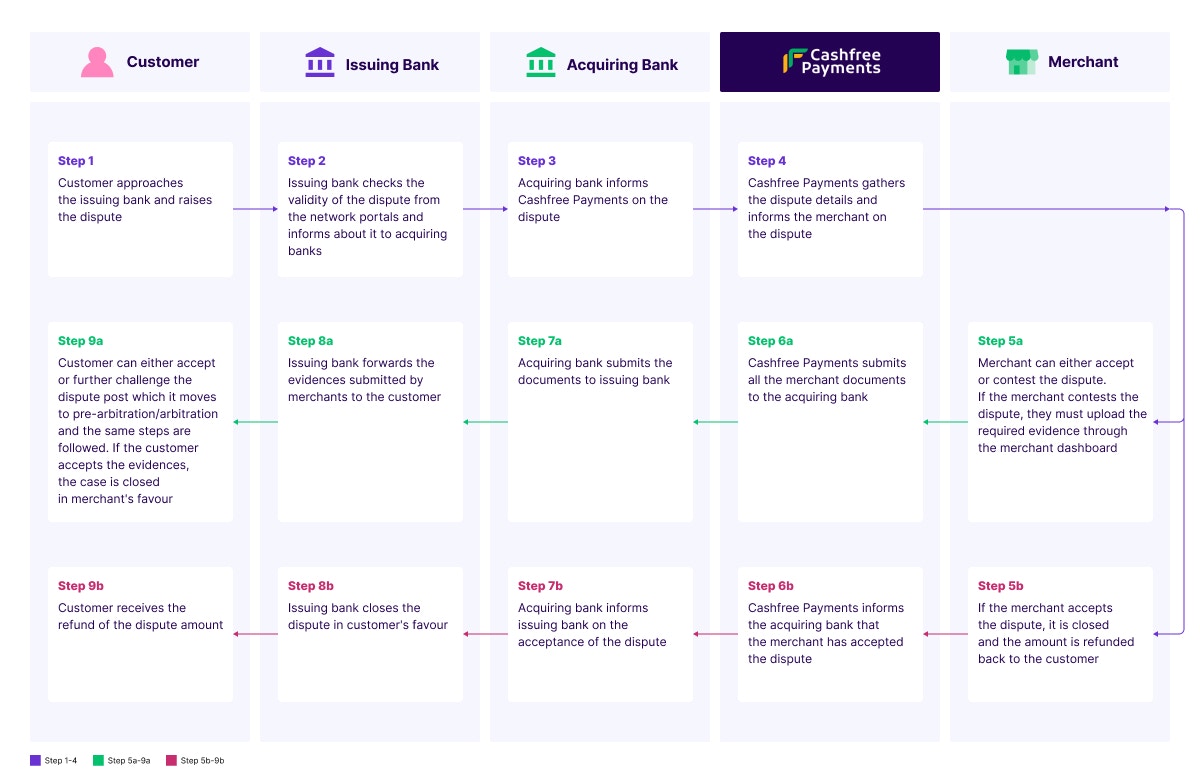
A dispute arises when a customer disagrees with a transaction and raises it with either their bank or Cashfree Payments. Customers may also report fraudulent transactions to cybercells, and banks often initiate disputes over suspicious transactions directly. We will notify you over email whenever a new dispute is created, changes state or there is a new update from Cashfree.
To get real-time notifications for a dispute raised by a customer, configure your email on the dashboard:
1. Log in to the [Merchant Dashboard](https://merchant.cashfree.com/auth/login).
2. Go to **Payment Gateway Dashboard > Settings > Notifications > Merchant Notifications > Dispute Emails** and click the **Add Recipient** button to add the email addresses that should receive dispute notifications then select the **Disputes** email category and click **Submit**.
Install [Cashfree Agent Skills](/docs/tools-ai/cashfree-agent-skills) to bring Cashfree product knowledge into your AI coding assistant (Claude Code, Cursor, VS Code Copilot, Gemini CLI, and more) to answer integration questions and generate accurate code without leaving your editor.
## Chargeback types
| State | Description | Response time | Resolution time |
| --------------- | ------------------------------------------------------------------------ | ------------------------------ | --------------------------------------------------------------------------------------------------------------------- |
| Dispute | Initial complaints from customers or fraud alerts from banks/authorities | 3 days (1 day for fraud cases) | • Customer complaints: 5-7 business days
• Fraud cases: Up to several months
• Wallet/Netbanking: \~30 days |
| Retrieval | Preliminary query raised by customer with their bank | 3 days | • If contested: 30-45 days waiting period
• If accepted: \~10 days |
| Chargeback | Customer formally disputes transaction after retrieval | 3 days | • Cards: 30-45 days
• UPI: 15-20 days |
| Pre-arbitration | Second level dispute if customer disagrees with evidence | 2 days | • Cards: 30-45 days
• UPI: 15-20 days |
| Arbitration | Final stage where card networks/NPCI makes decision | 1 day | \~15 days for final verdict |
* Your customer can raise a pre-arbitration or an arbitration even for a dispute that is Closed (Merchant Won).
* Response Time: Maximum days allowed to respond to the dispute
* Resolution Time: Typical time taken to reach a final decision
* Arbitration involves additional fees for the losing party
* Timelines may vary based on payment method and case complexity
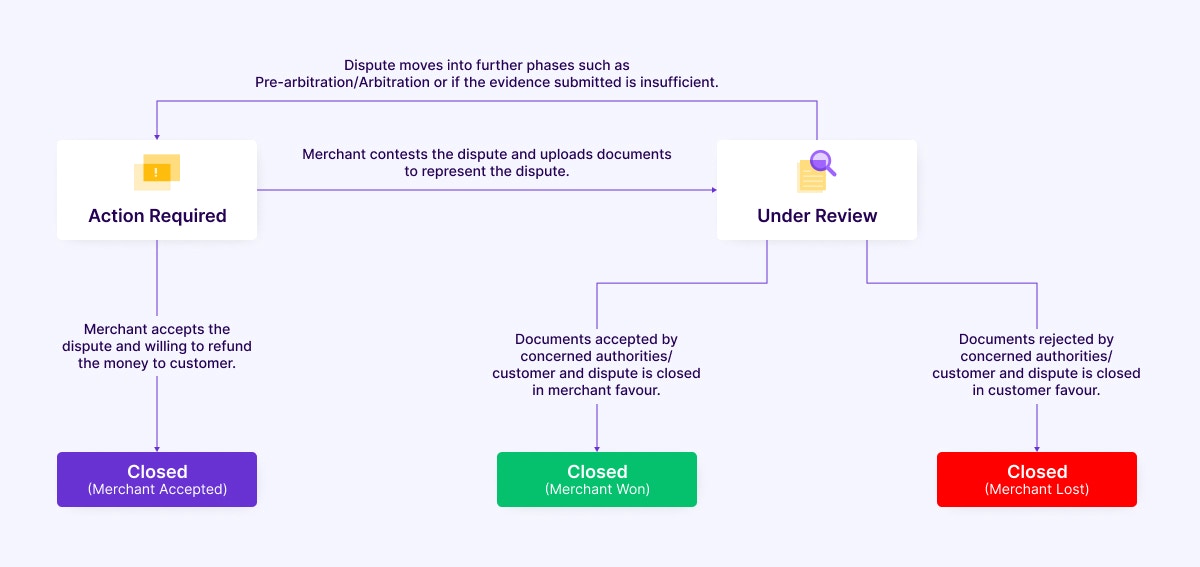
## Chargeback process states
 ## Manage chargebacks
Learn in detail about the various scenarios involved in disputes.
If you accept a dispute and agree that the customer raised a valid dispute, Cashfree Payments refunds the amount to the customer's account. This is sometimes the most appropriate option.
Keep the following points in mind before you decide to contest the dispute:
Have the complete set of documents available before you upload them. Learn more about the [documents required during the upload process](/docs/payments/manage/disputes/disputes-process-flow).
The issuing bank reviews all documents, so ensure you upload valid documents.
It is not necessary to contest every dispute. In some cases like pre-arbitration and arbitration, there is a high penalty involved.
The entire dispute may take around 3 months to conclude.
If you do not respond, you lose the dispute and Cashfree Payments refunds the customer.
## Webhooks
You can subscribe to the following asynchronous webhook events for disputes. Read more about [dispute webhooks](/docs/api-reference/payments/latest/disputes/dispute-webhooks).
* `DISPUTE_CREATED`
* `DISPUTE_UPDATED`
* `DISPUTE_CLOSED`
## Manage chargebacks
Learn in detail about the various scenarios involved in disputes.
If you accept a dispute and agree that the customer raised a valid dispute, Cashfree Payments refunds the amount to the customer's account. This is sometimes the most appropriate option.
Keep the following points in mind before you decide to contest the dispute:
Have the complete set of documents available before you upload them. Learn more about the [documents required during the upload process](/docs/payments/manage/disputes/disputes-process-flow).
The issuing bank reviews all documents, so ensure you upload valid documents.
It is not necessary to contest every dispute. In some cases like pre-arbitration and arbitration, there is a high penalty involved.
The entire dispute may take around 3 months to conclude.
If you do not respond, you lose the dispute and Cashfree Payments refunds the customer.
## Webhooks
You can subscribe to the following asynchronous webhook events for disputes. Read more about [dispute webhooks](/docs/api-reference/payments/latest/disputes/dispute-webhooks).
* `DISPUTE_CREATED`
* `DISPUTE_UPDATED`
* `DISPUTE_CLOSED`