> ## Documentation Index
> Fetch the complete documentation index at: https://www.cashfree.com/docs/llms.txt
> Use this file to discover all available pages before exploring further.
# Intelliforms
> Use Cashfree Intelliforms to build smart payment forms that collect customer data, calculate amounts, and accept payments without writing or hosting code.
Cashfree Intelliforms are intelligent payment forms designed for businesses dealing with a predefined group of known customers. These forms streamline payment collection by allowing customers to identify themselves using unique identifiers and make personalised payments, all through a single shared link. In other words, Intelliforms helps you collect personalised payments from the customers using a single shared form.
## Use cases
This section provides an insight on the scenarios where Intelliforms are applicable.
* **School or College Fees**: Students pay semester-wise fees using their admission number.
* **Housing Societies**: Residents pay rent or maintenance using flat numbers.
* **Memberships and Events**: Members pay using a membership ID.
* **Recurring Dues**: Collect periodic payments with built-in expiry and late fee rules.
## Key benefits
This section provides an insight on the key benefits offered by Intelliforms.
* **Single payment link**: Share one link with all customers instead of generating individual links.
* **Personalised payments**: Based on uploaded data, customers can view their specific payment amount.
* **Secure access**: Optional One-Time Password (OTP) verification helps secure access by validating the customer’s identity before displaying payment details.
* **Custom rules**: Configure late fees, discounts, and customer-level expirations with ease.
## How Intelliforms work
This section provides a brief overview of how Intelliforms work.
1. **Merchant creates form**: Define fields such as identifiers, personal details, and payment amount.
2. **Upload customer data**: Upload an CSV file with customer information matching the form’s structure.
3. **Customer accesses link**: The customer identifies themselves using their unique identifiers.
4. **Verification and payment**: The system verifies the identifier, displays payment details, and accepts the payment.
## Creating an Intelliform
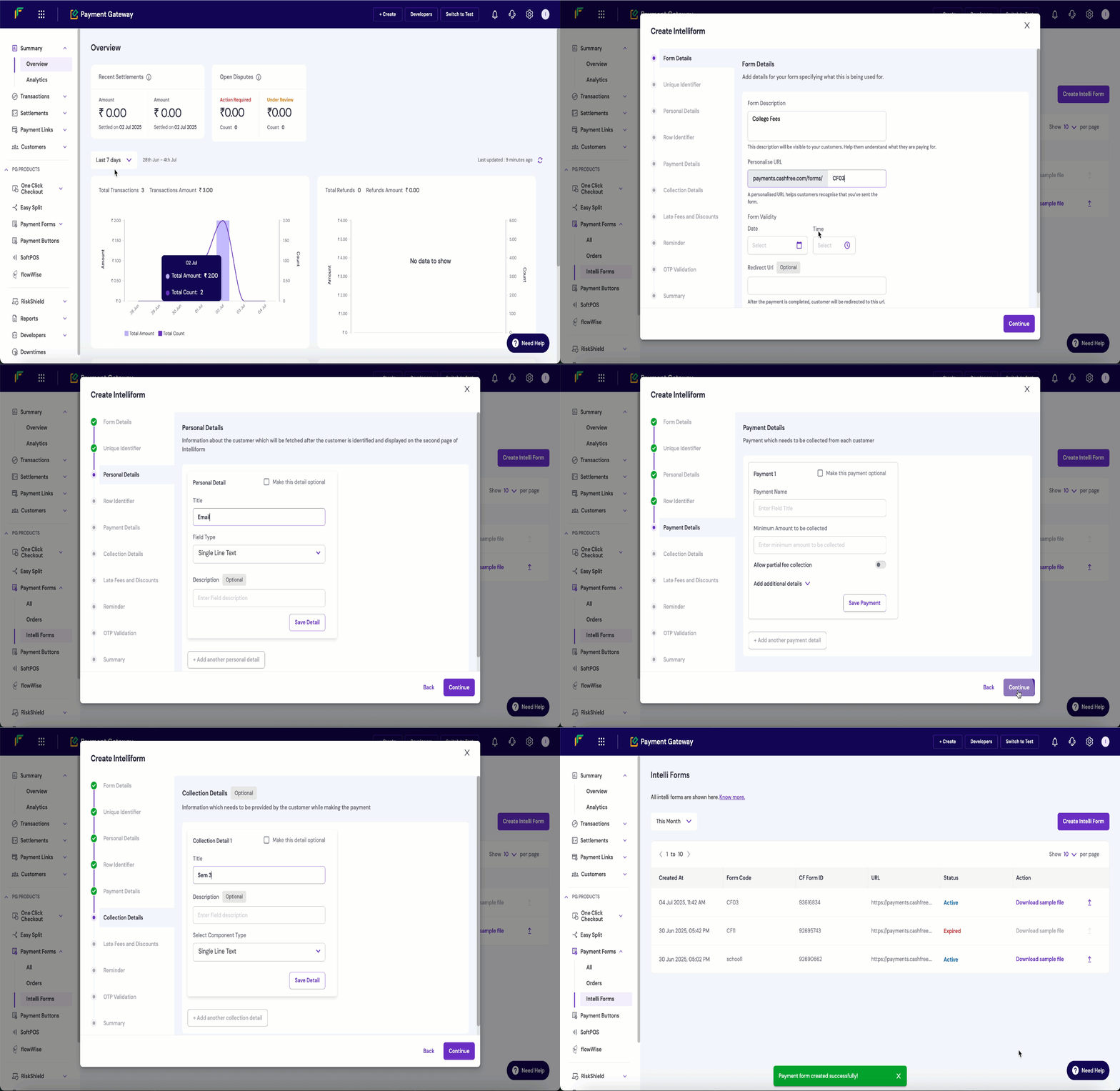
Follow these steps to create and configure a new Intelliform through the **Merchant Dashboard**:
* Log in to the [**Merchant Dashboard**](https://merchant.cashfree.com/auth/login).
* From the dashboard sidebar, select **Intelliforms** under the **Payment Forms** category.
* Click **Create New Intelliform**.
* Provide a **Form Description** to define the purpose of the form such as Semester Fee Collection.
* Set a **Personalised URL** (shortcode) that uniquely identifies the form.
* Select an **Expiry Date** after which the form becomes inactive.
* Add a **Redirect URL** to guide users to a specific page after successful or failed payment.
* Add required form fields:
* **Unique Identifiers** such as Admission Number, Flat Number.
* **Personal Details** such as Phone Number, Email, Parent’s Name.
* **Row Identifiers** such as Semester Name, if applicable.
* **Payment Amount**
* **Collection Fields** such as optional inputs like remarks or reference numbers.
* Set up **Late Fee Rules**:
* Flat amount
* Per-day penalty
* Custom logic-based rules
* Define **Discount Rules** such as loyalty or merit-based discounts.
* Enable **Data Upload Reminders** via SMS or email for incomplete uploads.
* Toggle **OTP Validation** to restrict access and verify users via mobile/email.
* Activate **User-Level Expiration** if you want each customer link to expire individually.
* Specify expiration dates within the uploaded data if required.
* Review the form and click **Continue**.
* The form will be created and saved.
* Share the form link with your customers to begin collecting payments.
## Uploading customer data
Follow these steps to upload customer data from the **Merchant Dashboard**:
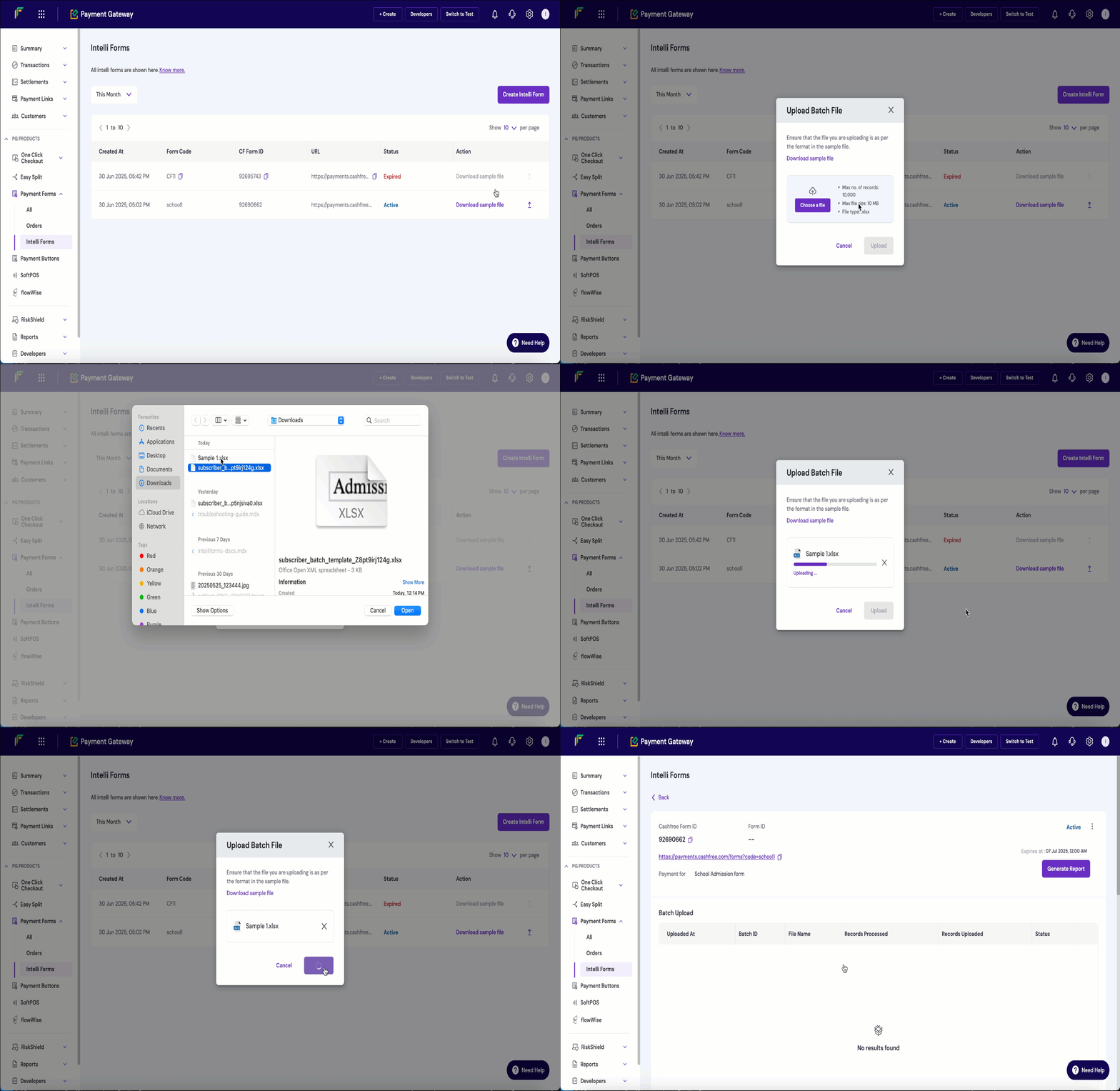
Log in to the [**Merchant Dashboard**](https://merchant.cashfree.com/auth/login). From the dashboard sidebar, select **Intelliforms** under the **Payment Forms** category. Download the sample CSV file by clicking *Download sample file* from the respective form present in the dashboard. Fill in customer details following the predefined format. Upload the duly filled CSV file. The system validates the file based on matching headers and processes valid entries.
 ## Uploading customer data
Follow these steps to upload customer data from the **Merchant Dashboard**:
## Uploading customer data
Follow these steps to upload customer data from the **Merchant Dashboard**: