> ## Documentation Index
> Fetch the complete documentation index at: https://www.cashfree.com/docs/llms.txt
> Use this file to discover all available pages before exploring further.
# Overview
> Browse the Cashfree.js components available after SDK initialisation and learn how to use the create method to mount payment fields on your site.
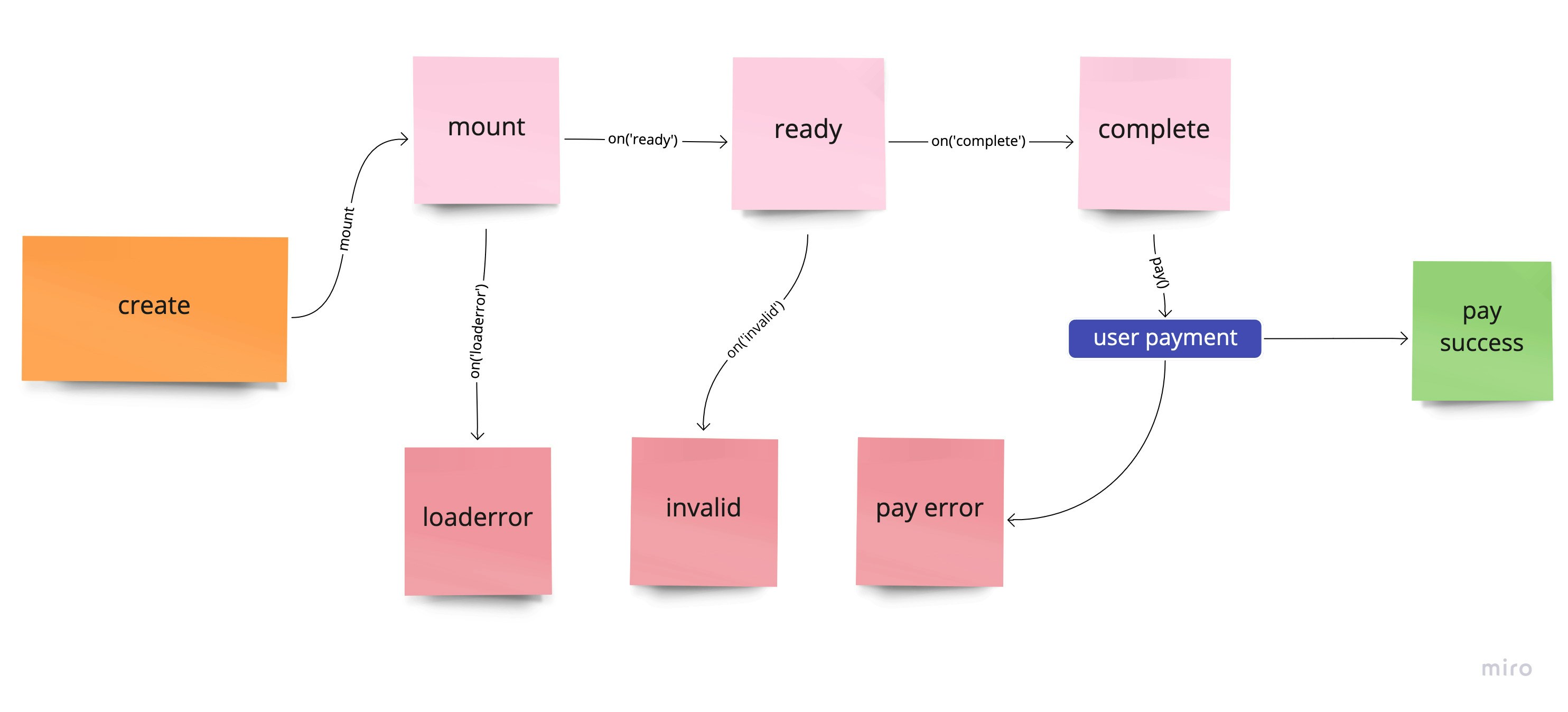
Once you initialise the cashfree.js sdk, you can use the create method to create a component.
```javascript theme={"dark"}
let cashfree = Cashfree({mode: "sandbox"});
let options = {};
let component = cashfree.create("componentName", options);
```
## Component lifecycle
 ## Methods
### Mount component
A component can be mounted in DOM container.
```
Syntax: `component.mount(querySelector)`
```
Example
```
component.mount("#componentContainer")
```
### Update component
The values of a component can be updated.
```
Syntax: `component.update(values)`
```
Example
```
let values = {
keyName: "keyValue"
}
component.update(values)
```
### Unmount component
To unmount a component from DOM container. Use component.mount to mount again.
```
component.unmount()
```
### Get component data
To get the data and state of a component
```
let data = component.data()
```
#### Returns
```
{
value: {},
error: undefined,
message: {},
invalid: undefined,
empty: true,
complete: false,
ready: false,
componentName: "componentName",
node: null,
mounted: false,
loaderror: false,
focus: false,
disabled: false,
kind: "string"
}
```
| Name | Description | Default |
| --------------- | ------------------------------------------------------ | --------------- |
| `value` | Contains the value of the component. | `{}` |
| `error` | Contains error that has occurred in the component | `undefined` |
| `message` | Contains any message that can be shown to the customer | `{}` |
| `invalid` | Is `true` if the component is invalid | `undefined` |
| `empty` | Is `true` if the component is empty | `false` |
| `complete` | Is `true` if the component is complete | `false` |
| `ready` | Is `true` if the component is ready for user input | `false` |
| `componentName` | Contains the type of the component | `componentName` |
| `node` | Contains the reference to the parent of the component | `null` |
| `mounted` | Is `true` if the component has been mounted | `false` |
### Blur component
Trigger blur on component. Can only be applied if `kind` of the component is `input`
```js theme={"dark"}
component.blur()
```
### Focus component
Trigger focus on component. Can only be applied if `kind` of the component is `input`
```js theme={"dark"}
component.focus()
```
### Clear component
Trigger clear on component to empty it. Can only be applied if `kind` of the component is `input`
```js theme={"dark"}
component.clear()
```
### Click component
Trigger click on component. Can only be applied if `kind` of the component is `button`
```js theme={"dark"}
component.click()
```
### Disable component
Disabling component will apply the `classes.disabled` and `style.base[":disabled"]` or `style.empty[":disabled"]` to the container and component respectively. Can be applied to `input` and `button`
```js theme={"dark"}
component.disable()
```
### Enable component
To enable a disabled component. Can be applied to `input` and `button`
```js theme={"dark"}
component.enable()
```
### Destroy component
To destroy a component. Once a component is destroyed it cannot be mounted again
```js theme={"dark"}
component.destroy()
```
## Events
You can register a callback function to various events that occur with a component. The basic syntax is `component.on(eventName, callBackFunction)`
### ready
Triggers when a component is ready for user interaction
```js theme={"dark"}
component.on('ready', function(data){
//data is same as component.data()
})
```
### focus
Triggers on component `kind` `input` when focussed
```js theme={"dark"}
component.on('focus', function(data){
//data is same as component.data()
})
```
### blur
Triggers on component `kind` `input` when blurred
```js theme={"dark"}
component.on('blur', function(data){
//data is same as component.data()
})
```
### invalid
Triggers on component `kind` `input` when value entered by the user is invalid. Callback receives object that has the error. Read more about error here
```js theme={"dark"}
component.on('invalid', function(data){
//data is same as component.data()
//data.error has the actual error
//you can use data.error.message to show to customer
})
```
### change
Triggers on component `kind` `input` whenever change happens for the value
```js theme={"dark"}
component.on('change', function(data){
//data is same as component.data()
})
```
### empty
Triggers on component `kind` `input` when empty
```js theme={"dark"}
component.on('empty', function(data){
//data is same as component.data()
})
```
### complete
Triggers on component `kind` `input` when value entered is complete and valid
```js theme={"dark"}
component.on('complete', function(data){
//data is same as component.data()
})
```
### click
Triggers on component `kind` `button` when clicked
```js theme={"dark"}
component.on('click', function(data){
//data is same as component.data()
})
```
### paymentrequested
Triggers on component payable components when payment has been successfully initiated
```js theme={"dark"}
component.on('paymentrequested', function(data){
//data is same as component.data()
})
```
### loaderror
Triggers on component which could not be mounted. Callback receives object that has the error. Read more about error here
```js theme={"dark"}
component.on('loaderror', function(data){
//data is same as component.data()
//data.error has the actual error
//you can use data.error.message to show to customer
})
```
## Methods
### Mount component
A component can be mounted in DOM container.
```
Syntax: `component.mount(querySelector)`
```
Example
```
component.mount("#componentContainer")
```
### Update component
The values of a component can be updated.
```
Syntax: `component.update(values)`
```
Example
```
let values = {
keyName: "keyValue"
}
component.update(values)
```
### Unmount component
To unmount a component from DOM container. Use component.mount to mount again.
```
component.unmount()
```
### Get component data
To get the data and state of a component
```
let data = component.data()
```
#### Returns
```
{
value: {},
error: undefined,
message: {},
invalid: undefined,
empty: true,
complete: false,
ready: false,
componentName: "componentName",
node: null,
mounted: false,
loaderror: false,
focus: false,
disabled: false,
kind: "string"
}
```
| Name | Description | Default |
| --------------- | ------------------------------------------------------ | --------------- |
| `value` | Contains the value of the component. | `{}` |
| `error` | Contains error that has occurred in the component | `undefined` |
| `message` | Contains any message that can be shown to the customer | `{}` |
| `invalid` | Is `true` if the component is invalid | `undefined` |
| `empty` | Is `true` if the component is empty | `false` |
| `complete` | Is `true` if the component is complete | `false` |
| `ready` | Is `true` if the component is ready for user input | `false` |
| `componentName` | Contains the type of the component | `componentName` |
| `node` | Contains the reference to the parent of the component | `null` |
| `mounted` | Is `true` if the component has been mounted | `false` |
### Blur component
Trigger blur on component. Can only be applied if `kind` of the component is `input`
```js theme={"dark"}
component.blur()
```
### Focus component
Trigger focus on component. Can only be applied if `kind` of the component is `input`
```js theme={"dark"}
component.focus()
```
### Clear component
Trigger clear on component to empty it. Can only be applied if `kind` of the component is `input`
```js theme={"dark"}
component.clear()
```
### Click component
Trigger click on component. Can only be applied if `kind` of the component is `button`
```js theme={"dark"}
component.click()
```
### Disable component
Disabling component will apply the `classes.disabled` and `style.base[":disabled"]` or `style.empty[":disabled"]` to the container and component respectively. Can be applied to `input` and `button`
```js theme={"dark"}
component.disable()
```
### Enable component
To enable a disabled component. Can be applied to `input` and `button`
```js theme={"dark"}
component.enable()
```
### Destroy component
To destroy a component. Once a component is destroyed it cannot be mounted again
```js theme={"dark"}
component.destroy()
```
## Events
You can register a callback function to various events that occur with a component. The basic syntax is `component.on(eventName, callBackFunction)`
### ready
Triggers when a component is ready for user interaction
```js theme={"dark"}
component.on('ready', function(data){
//data is same as component.data()
})
```
### focus
Triggers on component `kind` `input` when focussed
```js theme={"dark"}
component.on('focus', function(data){
//data is same as component.data()
})
```
### blur
Triggers on component `kind` `input` when blurred
```js theme={"dark"}
component.on('blur', function(data){
//data is same as component.data()
})
```
### invalid
Triggers on component `kind` `input` when value entered by the user is invalid. Callback receives object that has the error. Read more about error here
```js theme={"dark"}
component.on('invalid', function(data){
//data is same as component.data()
//data.error has the actual error
//you can use data.error.message to show to customer
})
```
### change
Triggers on component `kind` `input` whenever change happens for the value
```js theme={"dark"}
component.on('change', function(data){
//data is same as component.data()
})
```
### empty
Triggers on component `kind` `input` when empty
```js theme={"dark"}
component.on('empty', function(data){
//data is same as component.data()
})
```
### complete
Triggers on component `kind` `input` when value entered is complete and valid
```js theme={"dark"}
component.on('complete', function(data){
//data is same as component.data()
})
```
### click
Triggers on component `kind` `button` when clicked
```js theme={"dark"}
component.on('click', function(data){
//data is same as component.data()
})
```
### paymentrequested
Triggers on component payable components when payment has been successfully initiated
```js theme={"dark"}
component.on('paymentrequested', function(data){
//data is same as component.data()
})
```
### loaderror
Triggers on component which could not be mounted. Callback receives object that has the error. Read more about error here
```js theme={"dark"}
component.on('loaderror', function(data){
//data is same as component.data()
//data.error has the actual error
//you can use data.error.message to show to customer
})
```