> ## Documentation Index
> Fetch the complete documentation index at: https://www.cashfree.com/docs/llms.txt
> Use this file to discover all available pages before exploring further.
# Verify Beneficiary Name
> Use Cashfree to verify a beneficiary's bank account name before sending Cashgrams so funds reach the correct recipient and avoid costly transfer reversals.
## Beneficiary verification workflow
Businesses can verify beneficiary names to ensure that the refunds, reimbursements, claims, etc., are sent to the intended beneficiary account only. This feature helps you to validate the bank account and also ensures that the bank account is registered in the name of the intended beneficiary.
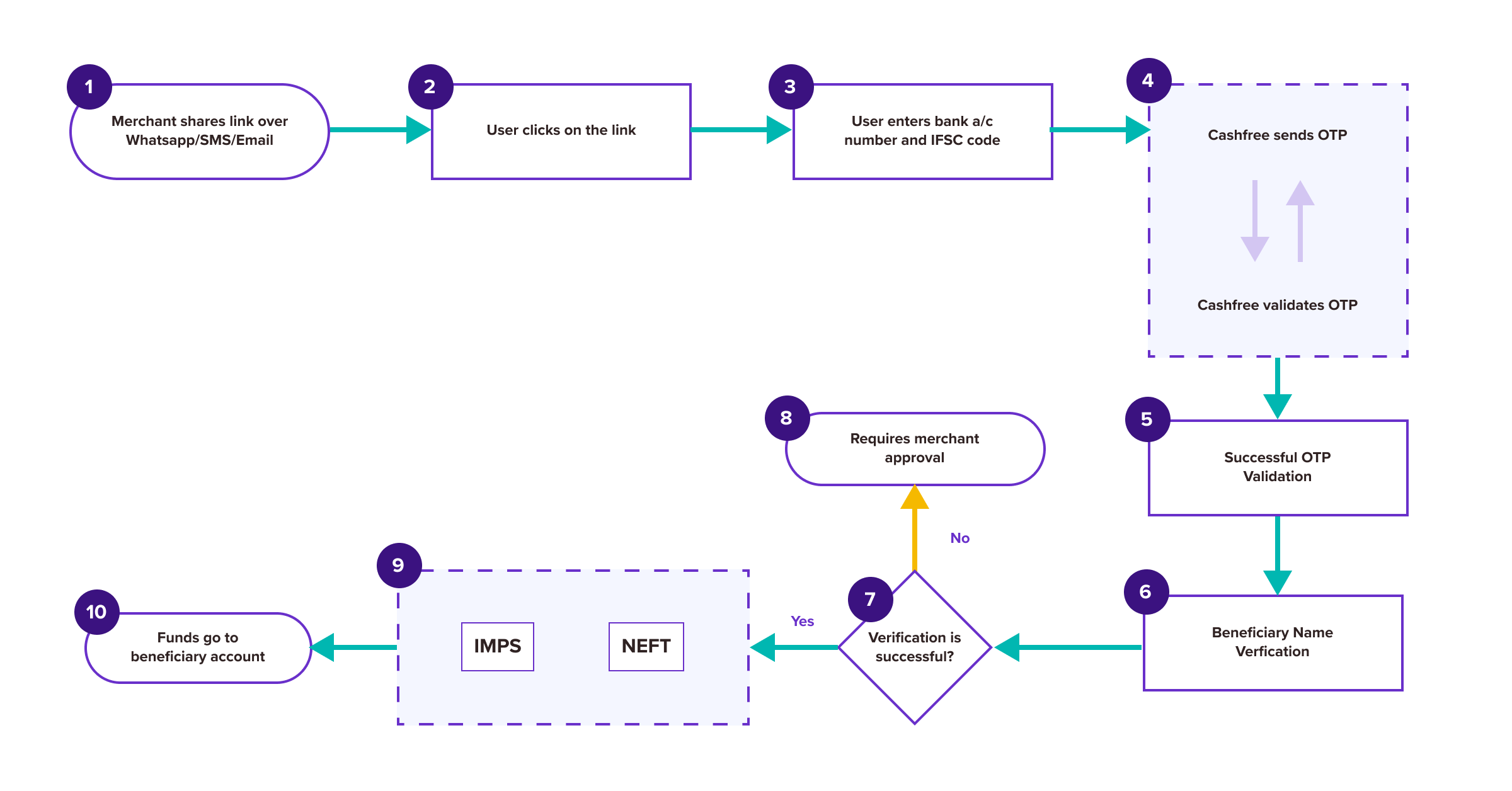 1. Create [Cashgram](/payouts/cashgram/create-new-cashgram) with the option **Enable bank account verification** enabled. Share the link with the intended beneficiary over WhatsApp/SMS/email.
2. Beneficiary enters their bank account number and IFSC.
3. Cashfree Payments does a penny transfer to the bank account. On getting a response from the bank, Cashfree Payments ensures that the account is valid and validates if the name entered by you matches with the beneficiary name as registered with the bank.
* If the name matches accurately, the amount gets credited to the beneficiary account instantly.
* If there is a mismatch, the transaction will have to be manually approved from the **Verify Beneficiary Name** section.
***
## Verify beneficiary name
To verify the beneficiary name,
1. Log in to the [Merchant Dashboard](https://merchant.cashfree.com/auth/login).
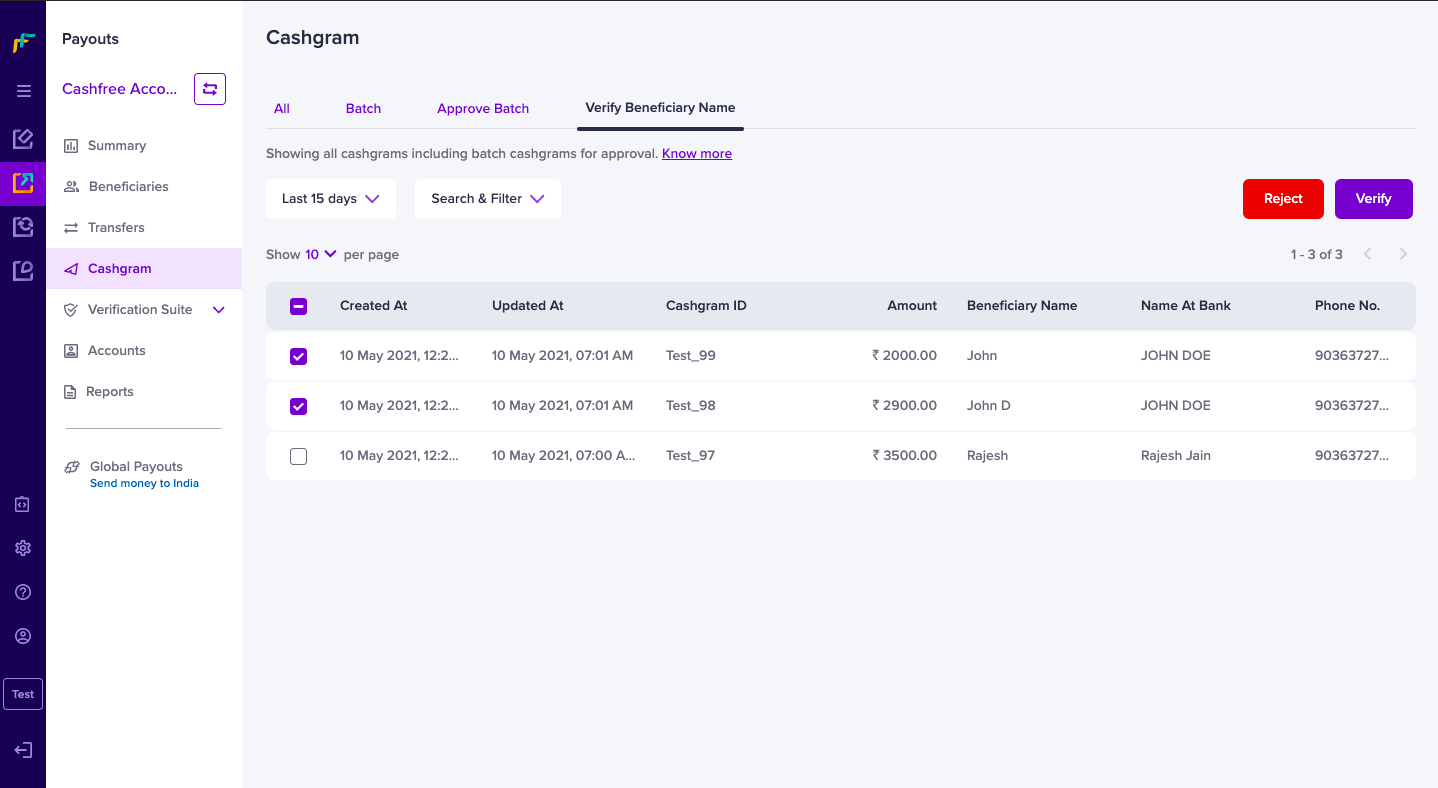
2. Go to **Payouts Dashboard** > **Cashgram** > **Verify Beneficiary Name**.
3. Select the Cashgrams that you want to verify.
4. Click **Verify**.
1. Create [Cashgram](/payouts/cashgram/create-new-cashgram) with the option **Enable bank account verification** enabled. Share the link with the intended beneficiary over WhatsApp/SMS/email.
2. Beneficiary enters their bank account number and IFSC.
3. Cashfree Payments does a penny transfer to the bank account. On getting a response from the bank, Cashfree Payments ensures that the account is valid and validates if the name entered by you matches with the beneficiary name as registered with the bank.
* If the name matches accurately, the amount gets credited to the beneficiary account instantly.
* If there is a mismatch, the transaction will have to be manually approved from the **Verify Beneficiary Name** section.
***
## Verify beneficiary name
To verify the beneficiary name,
1. Log in to the [Merchant Dashboard](https://merchant.cashfree.com/auth/login).
2. Go to **Payouts Dashboard** > **Cashgram** > **Verify Beneficiary Name**.
3. Select the Cashgrams that you want to verify.
4. Click **Verify**.
 Contact your Cashfree Payments Account Manager to enable this feature. This
feature is only available on Cashgram payouts to bank accounts currently.
Contact your Cashfree Payments Account Manager to enable this feature. This
feature is only available on Cashgram payouts to bank accounts currently.