> ## Documentation Index
> Fetch the complete documentation index at: https://www.cashfree.com/docs/llms.txt
> Use this file to discover all available pages before exploring further.
# Error Handling
> Learn how Cashfree Payouts APIs return errors and sub-codes so your integration can detect failed operations, retry requests, and surface clear merchant messages.
When you integrate with Cashfree Payouts APIs, handle errors in a predictable way so your application can recover without creating duplicate or misleading outcomes. Every API response should be treated as a contract: inspect the top-level status, then use the returned sub-code and message to decide whether to retry, correct the request, or surface a merchant-friendly error.
## Error response structure
Cashfree APIs typically return a response with a top-level status field and an error payload when the request can't be completed successfully.
A typical error response looks like this:
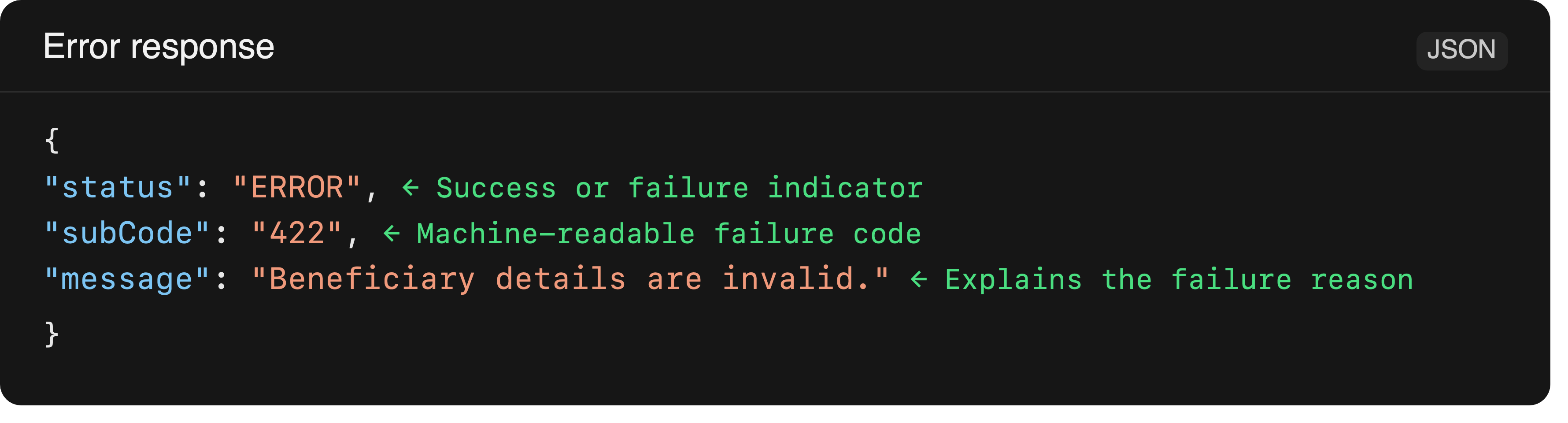 Use the sub-code as the main decision point in your integration. Error messages can change over time, but the sub-code is the stable signal for handling logic.
## How to handle errors
Follow these steps for every API call:
1. Check the top-level `status` field first.
2. If the response is `ERROR`, inspect the `subCode` and map it to an action.
3. For client-side issues such as validation failures, update the request data and resubmit only after correcting the input.
4. For temporary service issues such as rate limits or server errors, retry with backoff and jitter.
5. If the operation is asynchronous or the transfer moves into a pending state, use the status APIs or webhooks to track the final outcome.
### Example
The following example shows a simple pattern for handling a failed response:
```javascript theme={"dark"}
const response = await payouts.createTransfer(payload);
if (response.status === "ERROR") {
if (["429", "500", "503", "520"].includes(response.subCode)) {
await retryWithBackoff(payload);
} else {
throw new Error(response.message);
}
}
```
## Common error categories
The exact sub-code can vary by endpoint, but the following categories are the most common in Payouts integrations.
| Category | Typical sub-code | Description | Recommended action |
| :------------------------------ | :--------------------------- | :------------------------------------------------------------------ | :-------------------------------------------------------------------------------- |
| Bad request | `400` or `422` | The request body or parameters are invalid. | Fix the request data and retry after correcting the input. |
| Authentication failure | `401` or `403` | The API credentials are missing, invalid, or not authorised. | Verify your credentials and account permissions. |
| Resource not found | `404` | The beneficiary, transfer, or referenced resource doesn't exist. | Confirm the identifier and create or fetch the correct resource first. |
| Conflict or precondition failed | `409` or `412` | The request conflicts with the current state or account conditions. | Check the resource state, balance, or account restrictions before retrying. |
| Rate limit | `429` | Too many requests were sent in a short period. | Slow down the request rate and retry after a short delay. |
| Temporary server issue | `500`, `502`,`503`, or `520` | Cashfree or an upstream service is temporarily unavailable. | Retry with exponential backoff and don't treat the request as permanently failed. |
## Retry and recovery guidance
Retrying isn't always safe. Retry only when the failure is temporary and the operation can be repeated without creating duplicate outcomes. Treat errors as part of the integration design rather than as an afterthought.
* Classify each failure as user-correctable, retryable, or terminal.
* Don't retry validation errors, authentication failures, or permanent bank declines until the underlying issue is fixed.
* For `429` and `5XX` errors, retry with exponential backoff and brief jitter.
* Preserve the same request reference across retries when possible to avoid duplicate payouts.
* For asynchronous payout flows, don't assume a request is final until the status API or webhook confirms the terminal state.
### When not to retry
Don't retry automatically when the error is caused by:
* Invalid beneficiary or transfer details
* Missing or invalid credentials
* Insufficient balance or account restrictions
* A manual approval step that must be completed first
* A permanent downstream decline or bank rejection
## Recommended approach
Build your integration around three outcomes:
* **Success**: Continue the workflow and update the merchant view.
* **Retryable failure**: Retry the request after a short delay.
* **Permanent failure**: Stop, surface the issue clearly, check the input accuracy or contact support if needed.
If you are using Cashfree SDKs, catch the raised exception and map it to the same decision logic described above.
Use the sub-code as the main decision point in your integration. Error messages can change over time, but the sub-code is the stable signal for handling logic.
## How to handle errors
Follow these steps for every API call:
1. Check the top-level `status` field first.
2. If the response is `ERROR`, inspect the `subCode` and map it to an action.
3. For client-side issues such as validation failures, update the request data and resubmit only after correcting the input.
4. For temporary service issues such as rate limits or server errors, retry with backoff and jitter.
5. If the operation is asynchronous or the transfer moves into a pending state, use the status APIs or webhooks to track the final outcome.
### Example
The following example shows a simple pattern for handling a failed response:
```javascript theme={"dark"}
const response = await payouts.createTransfer(payload);
if (response.status === "ERROR") {
if (["429", "500", "503", "520"].includes(response.subCode)) {
await retryWithBackoff(payload);
} else {
throw new Error(response.message);
}
}
```
## Common error categories
The exact sub-code can vary by endpoint, but the following categories are the most common in Payouts integrations.
| Category | Typical sub-code | Description | Recommended action |
| :------------------------------ | :--------------------------- | :------------------------------------------------------------------ | :-------------------------------------------------------------------------------- |
| Bad request | `400` or `422` | The request body or parameters are invalid. | Fix the request data and retry after correcting the input. |
| Authentication failure | `401` or `403` | The API credentials are missing, invalid, or not authorised. | Verify your credentials and account permissions. |
| Resource not found | `404` | The beneficiary, transfer, or referenced resource doesn't exist. | Confirm the identifier and create or fetch the correct resource first. |
| Conflict or precondition failed | `409` or `412` | The request conflicts with the current state or account conditions. | Check the resource state, balance, or account restrictions before retrying. |
| Rate limit | `429` | Too many requests were sent in a short period. | Slow down the request rate and retry after a short delay. |
| Temporary server issue | `500`, `502`,`503`, or `520` | Cashfree or an upstream service is temporarily unavailable. | Retry with exponential backoff and don't treat the request as permanently failed. |
## Retry and recovery guidance
Retrying isn't always safe. Retry only when the failure is temporary and the operation can be repeated without creating duplicate outcomes. Treat errors as part of the integration design rather than as an afterthought.
* Classify each failure as user-correctable, retryable, or terminal.
* Don't retry validation errors, authentication failures, or permanent bank declines until the underlying issue is fixed.
* For `429` and `5XX` errors, retry with exponential backoff and brief jitter.
* Preserve the same request reference across retries when possible to avoid duplicate payouts.
* For asynchronous payout flows, don't assume a request is final until the status API or webhook confirms the terminal state.
### When not to retry
Don't retry automatically when the error is caused by:
* Invalid beneficiary or transfer details
* Missing or invalid credentials
* Insufficient balance or account restrictions
* A manual approval step that must be completed first
* A permanent downstream decline or bank rejection
## Recommended approach
Build your integration around three outcomes:
* **Success**: Continue the workflow and update the merchant view.
* **Retryable failure**: Retry the request after a short delay.
* **Permanent failure**: Stop, surface the issue clearly, check the input accuracy or contact support if needed.
If you are using Cashfree SDKs, catch the raised exception and map it to the same decision logic described above.