> ## Documentation Index
> Fetch the complete documentation index at: https://www.cashfree.com/docs/llms.txt
> Use this file to discover all available pages before exploring further.
# Payouts: IP Whitelisting and Public Key FAQs
> Find answers to common questions about IP whitelisting and public key uploads required to authenticate Cashfree Payouts API requests in production.
> [accordion] Why do I have to whitelist the IP address or generate a public key?
>
> Whitelisting the IP address or generating a public key provides a layer of authentication. These cybersecurity techniques prevent anonymous or unknown disbursement requests and allow only verified requests.
> [accordion] What is an IP address?
>
> A string of characters that identifies each computer using the Internet Protocol to communicate over a network. Computers use IP addresses to communicate with each other over the internet.
> [accordion] What does it mean to whitelist an IP?
>
> Whitelisted IPs are an index of approved entities. A whitelist approves a list of email addresses, IP addresses for communication.
> [accordion] What happens after I whitelist my IP address?
>
> The Cashfree production server allows your API requests.
> [accordion] How many IP addresses can I whitelist?
>
> You can whitelist a maximum of 25 IP addresses.
> [accordion] Does Cashfree support IPv6?
>
> No, we only support API requests from IPv4 at the moment.
> [accordion] Why does an IP whitelisting error occur even after whitelisting an IP, and how can it be resolved?
>
> An IP whitelisting error can occur if multiple Payout accounts exist and the IP address is whitelisted only on one account, but the API keys in use belong to a different account. To resolve this, whitelist the IP address on all Payout accounts and ensure the correct set of API keys is used for the intended account. Switching to the appropriate account usually fixes the issue and prevents further authentication errors.
> [accordion] When do I use a public key?
>
> If your IP address is not static, generate a public key in the Cashfree portal.
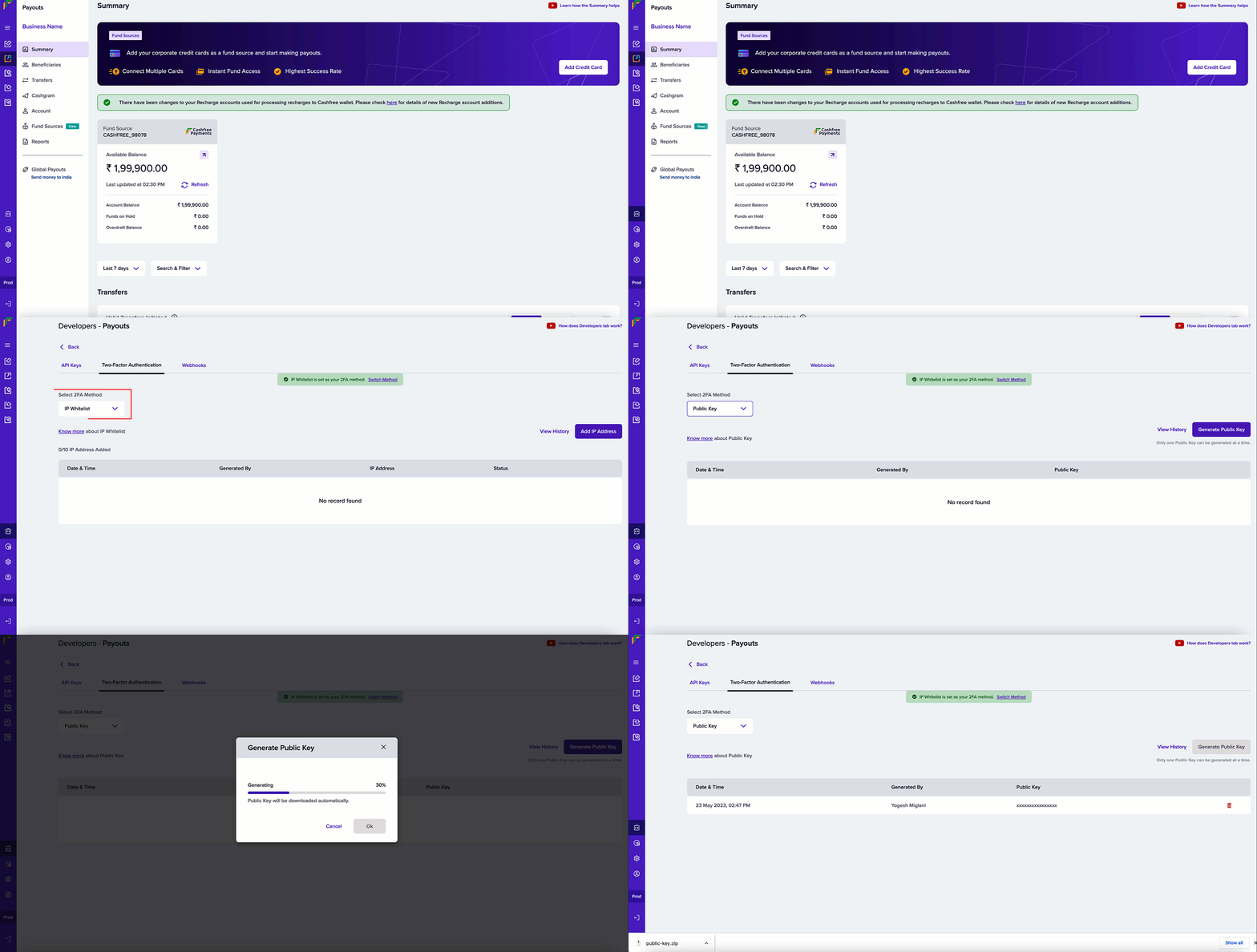
> [accordion] How to generate a public key from the Cashfree portal?
>
> 1. In the Cashfree dashboard, select **Developers** from the navigation panel on the left.
> 2. Click **Two-Factor Authentication** from the **Payouts** card.
> 3. Select **Public Key** from the **Select 2FA Method** dropdown menu.
> 4. Click **Generate Public Key**.
> 5. The public key is downloaded to your computer. Use your registered email ID to access the key.
>
> 
> [accordion] How many public keys can I generate at a time?
>
> One. You can generate only 1 public key at a time.
> [accordion] How to use the public key to send API requests?
>
> You need to generate a signature and proceed with the API requests.
>
> Below are the steps to generate the signature:
>
> 1. Retrieve your client ID.
> 2. Append this with CURRENT UNIX timestamp separated by a period (.).
> 3. Encrypt this data with the generated public key using RSA encryption - this is the signature.
> 4. Pass this signature in the header X-CF-Signature.
> [accordion] Do Payment Gateway (PG) APIs require IP whitelisting?
>
> No. Payment Gateway APIs do not require IP whitelisting. Other Cashfree products can require IP whitelisting as part of their API authentication. Check the documentation for the product whose API you are calling.
>
> If you receive a `Broken Link` or `not enabled` error during testing, confirm that you are not applying another product's IP whitelist requirement to a Payment Gateway API call.
>
> [FAQs feedback component](https://www.cashfree.com/devstudio/preview/pg/embed/faqFeedback?section=payouts%2Fip-whitelist%23do-payment-gateway-pg-apis-require-ip-whitelisting)
> [accordion] Which Client ID should I use for Public Key Signature Authentication, and how do I resolve a 'Signature Mismatched' error?
>
> For the Public Key Signature Authentication flow, you can use any active Client ID, including your current one. You don't need to use the oldest (first) Client ID created for the account.
>
> To resolve a `Signature Mismatched` error, verify the following:
>
> * In the `X-Client-Id` header, pass the same Client ID that you used to form the signature string.
> * Form the string as `clientId.unixTimestamp` (Client ID, a dot, then the current UNIX timestamp).
> * Encrypt the string using RSA with OAEP padding and the public key downloaded from the Merchant Dashboard. Base64-encode the result and pass it in the `X-Cf-Signature` header.
> * Generate a new signature every 5 minutes. The signature is valid for 5 minutes. See [2FA: IP Whitelisting and Public Keys](https://www.cashfree.com/docs/payouts/payouts/integrations/payouts-2fa.md).
> * Use a Client ID and public key from the same environment (for example, the same Payouts or Secure ID account).
>
> [FAQs feedback component](https://www.cashfree.com/devstudio/preview/pg/embed/faqFeedback?section=payouts%2Fip-whitelist%23which-client-id-should-i-use-for-public-key-signature-authentication-and-how-do-i-resolve-a-signature-mismatched-error)
> [accordion] Which Cashfree IP addresses should I whitelist in my server firewall?
>
> To receive Payouts webhooks, whitelist Cashfree's IP addresses on your server. See the list in [IPs to whitelist](https://www.cashfree.com/docs/api-reference/payouts/v2/webhooks/webhooks-v2.md#ips-to-whitelist).
> [accordion] How do I whitelist an IP address for the Payouts UAT (test) environment?
>
> To whitelist an IP address in the UAT environment:
>
> 1. Log in to the [Merchant Dashboard](https://merchant.cashfree.com/auth/login).
> 2. Click **Switch to Test** on the top tab, then click **Developers**.
> 3. Under **Payouts**, click **Two-Factor Authentication** in the dropdown.
> 4. Add your IP address for whitelisting. Ensure your 2FA mode is set to **IP Whitelist**. If it is not, use the **Switch Mode** button to change it.
Related topics
- [2FA Setup](https://www.cashfree.com/docs/payouts/payouts/integrations/payouts-2fa.md)
- [Go-live Checklist](https://www.cashfree.com/docs/payouts/payouts/integrations/payouts-go-live.md)
- [Standard Transfer Integration](https://www.cashfree.com/docs/payouts/payouts/integrations/standard-transfer)
- [Batch Transfer Integration](https://www.cashfree.com/docs/payouts/payouts/integrations/batch-transfer.md)
- [Payouts FAQs](https://www.cashfree.com/docs/help/payouts/general-faqs.md)
Related topics
- [2FA - IP Whitelisting and Public Keys](https://www.cashfree.com/docs/payouts/payouts/integrations/payouts-2fa.md)
- [Go-live Checklist](https://www.cashfree.com/docs/payouts/payouts/integrations/payouts-go-live.md)
- [Standard Transfer Integration](https://www.cashfree.com/docs/payouts/payouts/integrations/standard-transfer)
- [Payouts FAQs](https://www.cashfree.com/docs/payouts/payouts/general-faqs.md)
This documentation is built and hosted on [Mintlify](https://mintlify.com), a developer documentation platform.