> ## Documentation Index
> Fetch the complete documentation index at: https://www.cashfree.com/docs/llms.txt
> Use this file to discover all available pages before exploring further.

# IP Whitelisting

> Whitelist your public IPv4 address for Cashfree Secure ID so only authorised servers can call the Verification APIs in sandbox and production.

Whitelisting your IP address provides a layer of authentication. This prevents unauthorised API requests and ensures only verified requests are processed.

<Note>IP whitelisting is required for both the sandbox (test) and production environments. You configure it as a two-factor authentication (2FA) method in the [Merchant Dashboard](https://merchant.cashfree.com/auth/login).</Note>

## Prerequisites

Before you whitelist an IP address, ensure the following:

* You have generated Secure ID API credentials. Secure ID client IDs typically start with `CF`. Use Secure ID credentials, not Payment Gateway keys.
* You have a public IPv4 address. Cashfree does not support IPv6, CIDR ranges such as `/24`, or private IP addresses, including the `10.x.x.x`, `172.16.x.x` to `172.31.x.x`, and `192.168.x.x` ranges. Whitelist only individual IPv4 addresses.
* You plan to whitelist no more than 25 IP addresses.
* If your service uses dynamic or range-based outbound IP addresses, for example Render, IP whitelisting may not be feasible. Use the [Signature Generation (Public Key) method](/docs/api-reference/vrs/getting-started#2fa-api-signature-generation) instead.

Complete these steps to generate Secure ID API credentials:

1. Log in to the [Merchant Dashboard](https://merchant.cashfree.com/auth/login).
2. Select the apps icon (nine dots), then select **Secure ID**.
3. Select **Switch to Test** for sandbox credentials, or stay in production for live credentials.
4. Go to **Developers > Two-Factor Authentication** and create the API key.

## Whitelist an IP address

To whitelist your IP address, follow these steps:

1. Log in to the [Merchant Dashboard](https://merchant.cashfree.com/auth/login).
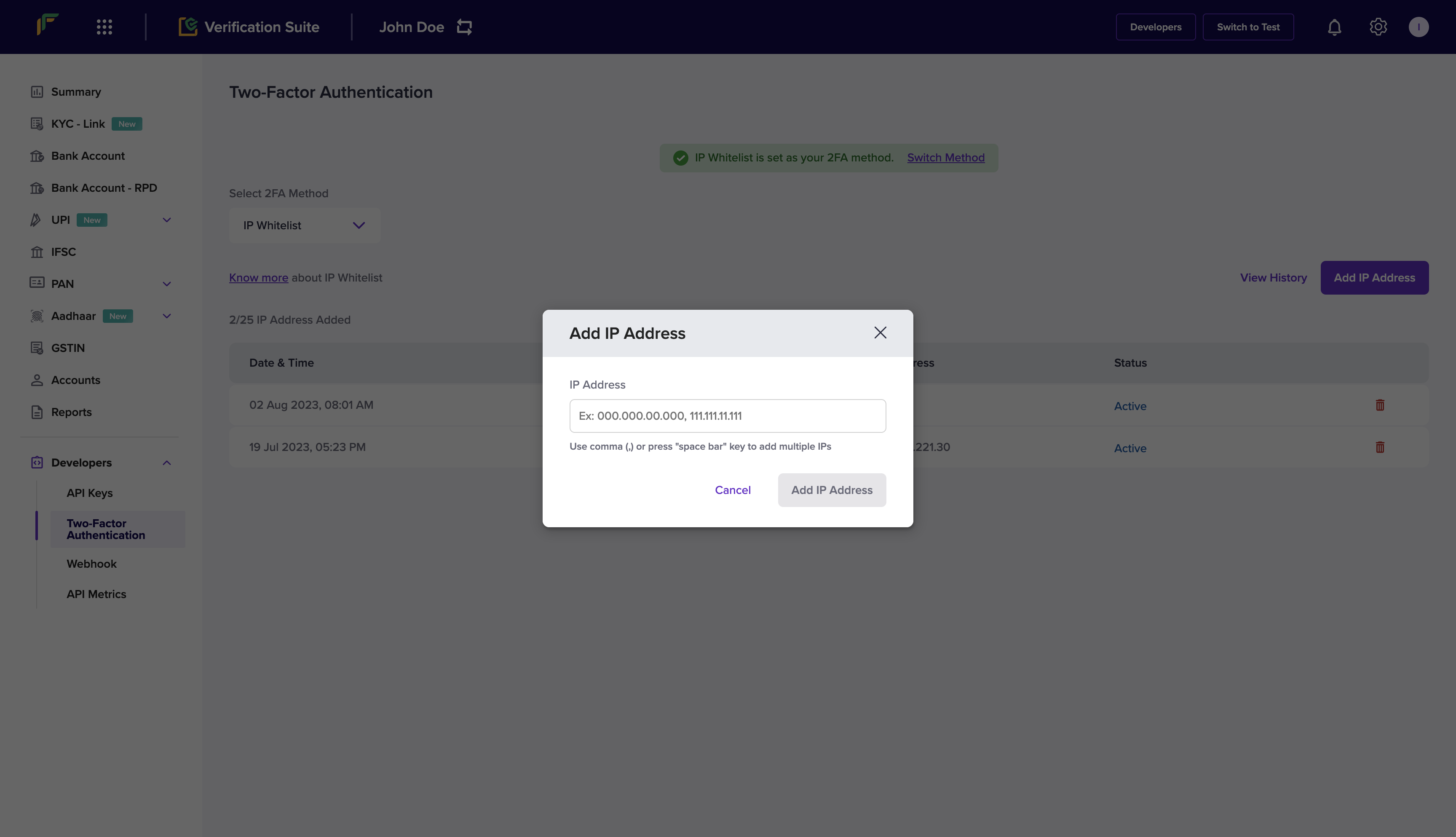
2. Go to **Developers > Two-Factor Authentication** under the **Secure ID** card.
3. Select **IP Whitelist** from the **Select 2FA Method** drop-down.
4. Select **Add IP Address**.
5. Enter the IP address you want to whitelist and select **Add IP Address** to save.

The whitelisted IP addresses are displayed in the grid. After adding a new IP address, wait at least 5 seconds for the change to sync before retrying your API request.
<img src="https://mintcdn.com/cashfreepayments-d00050e9/Kmx9_F-Zyh5NOURB/static/secure-id/get-started/integration/Screenshot_2024-01-03_at_2.03.39_PM.png?fit=max&auto=format&n=Kmx9_F-Zyh5NOURB&q=85&s=6ded36ce00dc24b0b345fb393e2d56cd" alt="Grid showing whitelisted IP addresses in the Cashfree Secure ID dashboard" width="3456" height="1986" data-path="static/secure-id/get-started/integration/Screenshot_2024-01-03_at_2.03.39_PM.png" />

## Switch between 2FA methods

Complete these steps to change the active two-factor authentication method:

1. Log in to the [Merchant Dashboard](https://merchant.cashfree.com/auth/login).
2. Go to **Developers > Two-Factor Authentication**.
3. Select **Switch Method** to toggle between IP Whitelisting and Public Key.

The **Select 2FA Method** drop-down only adds IP addresses or generates keys for the method that is already active. Selecting a different option in that drop-down does not change the active method.

Include the `x-cf-signature` header only when Public Key is the active method. Do not send `x-cf-signature` when IP Whitelisting is the active method.

## Find your IP address

Use your public IPv4 address, not a private or local network address. You can find your public IP address using either of the following methods.

### Use a browser

Open a browser and visit a service such as [whatismyipaddress.com](https://whatismyipaddress.com/).

### Use the command line

From the server that will call the API, run the following command:

```bash theme={"dark"}
curl https://api.ipify.org
```

The command returns your public IPv4 address.

<div class="hidden" data-table-of-contents="bottom">
  <p class="mt-4 font-medium flex items-center gap-2 related-docs-heading">
    <svg width="16" height="16" viewBox="0 0 24 24" fill="none" stroke="currentColor" stroke-width="2" stroke-linecap="round" stroke-linejoin="round" aria-hidden="true" class="w-4 h-4">
      <path d="M3 4h7a2 2 0 0 1 2 2v13a2 2 0 0 0-2-2H3z" />

      <path d="M21 4h-7a2 2 0 0 0-2 2v13a2 2 0 0 1 2-2h7z" />
    </svg>

    <span>Related topics</span>
  </p>

  <ul>
    <li><a href="/docs/api-reference/vrs/v2/bav-v2/bank-account-verification-sync-v2">Bank Account Verification API</a></li>
    <li><a href="/docs/api-reference/vrs/overview">Secure ID API Overview</a></li>
    <li><a href="/docs/secure-id/kyc-stack/verify-bank-account">Bank Account Verification</a></li>
    <li><a href="/docs/help/secure-id/general-faqs">Secure ID FAQs</a></li>
  </ul>
</div>
