> ## Documentation Index
> Fetch the complete documentation index at: https://www.cashfree.com/docs/llms.txt
> Use this file to discover all available pages before exploring further.
# Vehicle RC Verification
> Use the Cashfree Vehicle RC Verification API to confirm registration, ownership, chassis, and insurance details for any motor vehicle registered in India.
The Vehicle RC (Registration Certificate) Verification API enables businesses to confirm the authenticity and status of any registered motor vehicle in India. By providing a vehicle registration number, you can retrieve complete details directly from official transport databases, including information about the vehicle owner, chassis and engine numbers, model, date of registration, and insurance records.
This solution helps streamline onboarding, risk checks, and compliance for businesses dealing with vehicles, making it easy to validate ownership, track vehicle status, and access technical and insurance related information.
## Verification process
You can verify Vehicle RC details through two primary methods:
* **Merchant dashboard**: Verify Vehicle RCs using manual entry or document upload.
* Manual verification: Enter vehicle registration number to validate against transport authority records
* Smart OCR: Upload RC document images for automatic data extraction and verification
* **REST API**: Integrate verification directly into your applications.
> [tab] Dashboard verification
>
> Use the Merchant Dashboard to verify Vehicle RC details:
>
> ### Manual verification
>
> 1. Log in to the [Merchant Dashboard](https://merchant.cashfree.com/auth/login).
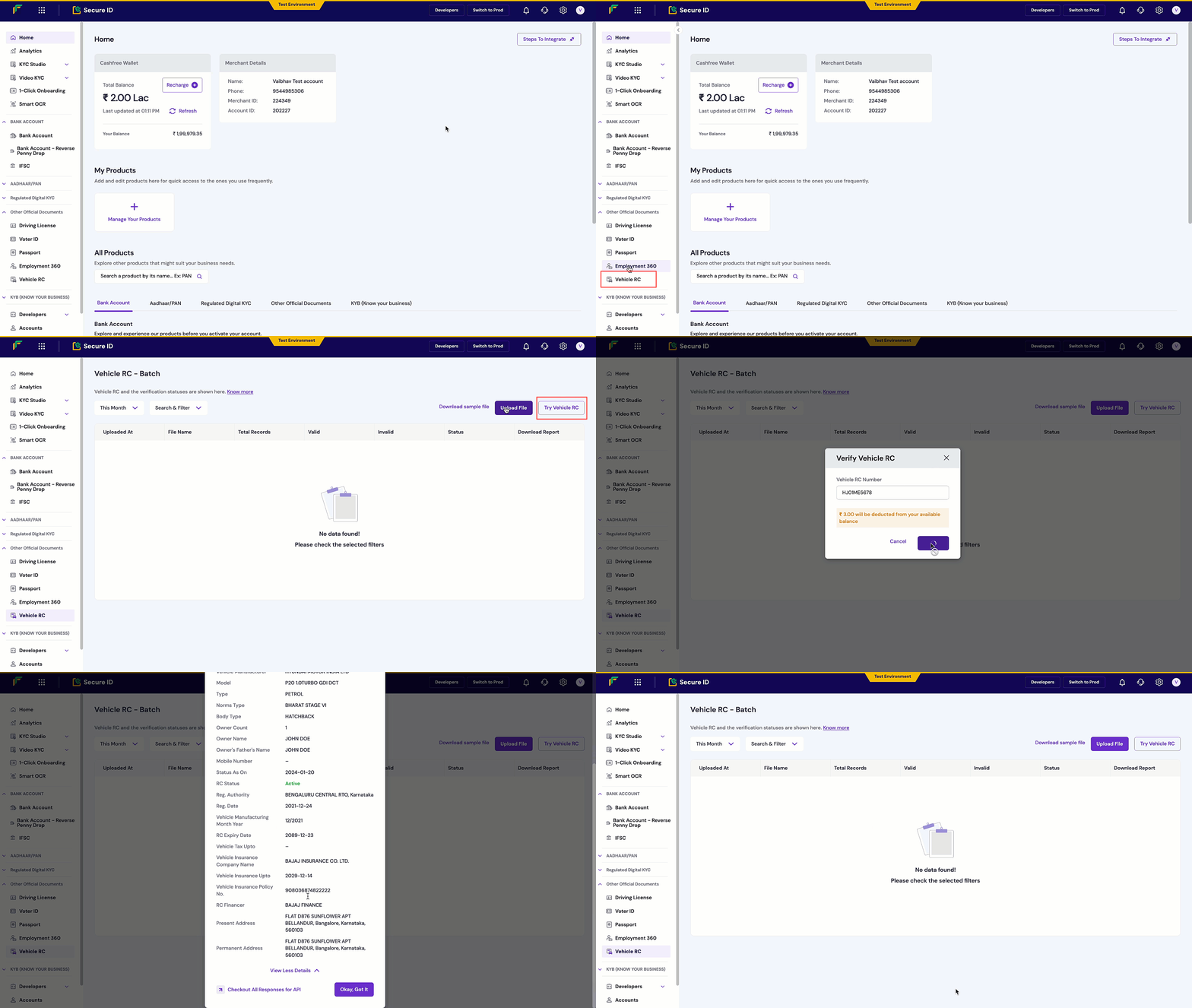
> 2. Navigate to **Secure ID** > **Other Official Documents** > **Vehicle RC**.
> 3. Enter the Vehicle Registration Number and click **Verify**.
> 4. Review the returned vehicle details including ownership and registration information.
>
> **Batch verification**:
>
> 1. Select **Upload File** under the Vehicle RC section.
> 2. Upload CSV containing multiple vehicle registration numbers.
> 3. Retrieve verification results for all uploaded entries in bulk.
>
> ### Smart OCR verification
>
> 1. Navigate to **Smart OCR** > **Vehicle RC Verification**.
> 2. Upload a scanned RC card/document or high-quality image (front side).
> 3. Smart OCR automatically detects and extracts key information.
>
> **Extracted fields**:
>
> * Vehicle registration number
> * Owner's name and father's/husband's name
> * Registration date and validity period
> * Vehicle class, fuel type, and body type
> * Maker, model, and variant details
> * Chassis number and engine number
> * Seating capacity and vehicle weight
> * Engine cubic capacity and colour
> * Registered owner's complete address
> * Issuing RTO authority and location
>
> 
>
> Vehicle RC verification process
>
> All verified vehicle RCs appear in your dashboard with comprehensive details including owner information, vehicle specifications, and registration status.
> [tab] API verification
>
> Integrate Vehicle RC verification programmatically using the REST API:
>
> 1. **Trigger the verification request** using the [Vehicle RC Verification API](https://www.cashfree.com/docs/api-reference/vrs/v2/vehicle-rc/get-vehicle-rc-details-1.md).
> 2. **Pass the vehicle registration number** for validation against official transport authority records.
> 3. **Receive verification results** with complete vehicle details, owner information, and registration status.
>
> **Endpoint**: `POST /verification/vehicle-rc`
>
> > [accordion] Request format
> >
> > ```json theme={"dark"}
> > {
> > "verification_id": "VRC00123",
> > "registration_number": "MH12AB1234"
> > }
> > ```
>
> > [accordion] Response format
> >
> > ```json theme={"dark"}
> > {
> > "verification_id": "VRC00123",
> > "reference_id": 12345,
> > "registration_number": "MH12AB1234",
> > "owner_details": {
> > "name": "John Doe",
> > "father_name": "Robert Doe",
> > "address": {
> > "house_number": "123",
> > "street": "Main Street",
> > "area": "Bandra West",
> > "city": "Mumbai",
> > "state": "Maharashtra",
> > "pincode": "400050"
> > }
> > },
> > "vehicle_details": {
> > "maker": "Maruti Suzuki",
> > "model": "Swift",
> > "variant": "VDI",
> > "body_type": "Hatchback",
> > "fuel_type": "Diesel",
> > "vehicle_class": "LMV",
> > "color": "White",
> > "seating_capacity": 5,
> > "unladen_weight": 1200,
> > "engine_capacity": 1248
> > },
> > "registration_details": {
> > "registration_date": "2020-01-15",
> > "validity_date": "2035-01-14",
> > "issuing_authority": "Maharashtra RTO 12",
> > "chassis_number": "MA3ERLF1S00XXXXXX",
> > "engine_number": "K12MXXXXXX"
> > },
> > "verification_status": "SUCCESS"
> > }
> > ```
>
> > [accordion] Error responses
> >
> > ```json theme={"dark"}
> > {
> > "type": "invalid_request_error",
> > "code": "verification_failed",
> > "message": "Invalid registration number format",
> > "details": [
> > {
> > "field": "registration_number",
> > "issue": "Registration number not found in records"
> > }
> > ]
> > }
> > ```
> [!NOTE]
>
> * Integrate the [Vehicle RC Verification API](https://www.cashfree.com/docs/api-reference/vrs/v2/vehicle-rc/get-vehicle-rc-details-1.md) into your application to automatically verify vehicle registration details within your signup or onboarding flow.
> * Government transport authorities provide the value for the `body_type` field in the Vehicle RC API response. Cashfree does not predefine or fix this field. The values are not standardised, and the source data may return new or different values at any time.
snippets/related-topics-loader.mdx
Related topics
- [Vehicle RC Verification API](https://www.cashfree.com/docs/api-reference/vrs/v2/vehicle-rc/get-vehicle-rc-details.md)
- [Smart OCR API](https://www.cashfree.com/docs/api-reference/vrs/v2/smart-ocr/smart-ocr.md)
- [OVD Overview](https://www.cashfree.com/docs/secure-id/ovd/overview.md)
- [Driving Licence Verification](https://www.cashfree.com/docs/secure-id/ovd/driving-licence.md)
This documentation is built and hosted on [Mintlify](https://mintlify.com), a developer documentation platform.