

- Cards - Indian and International + Apple Pay
- UPI
- Net banking
- Wallets
- Pay later and cardless EMIs
- Bank transfer
Activating payment methods from the dashboard
Activating payment methods from the dashboard
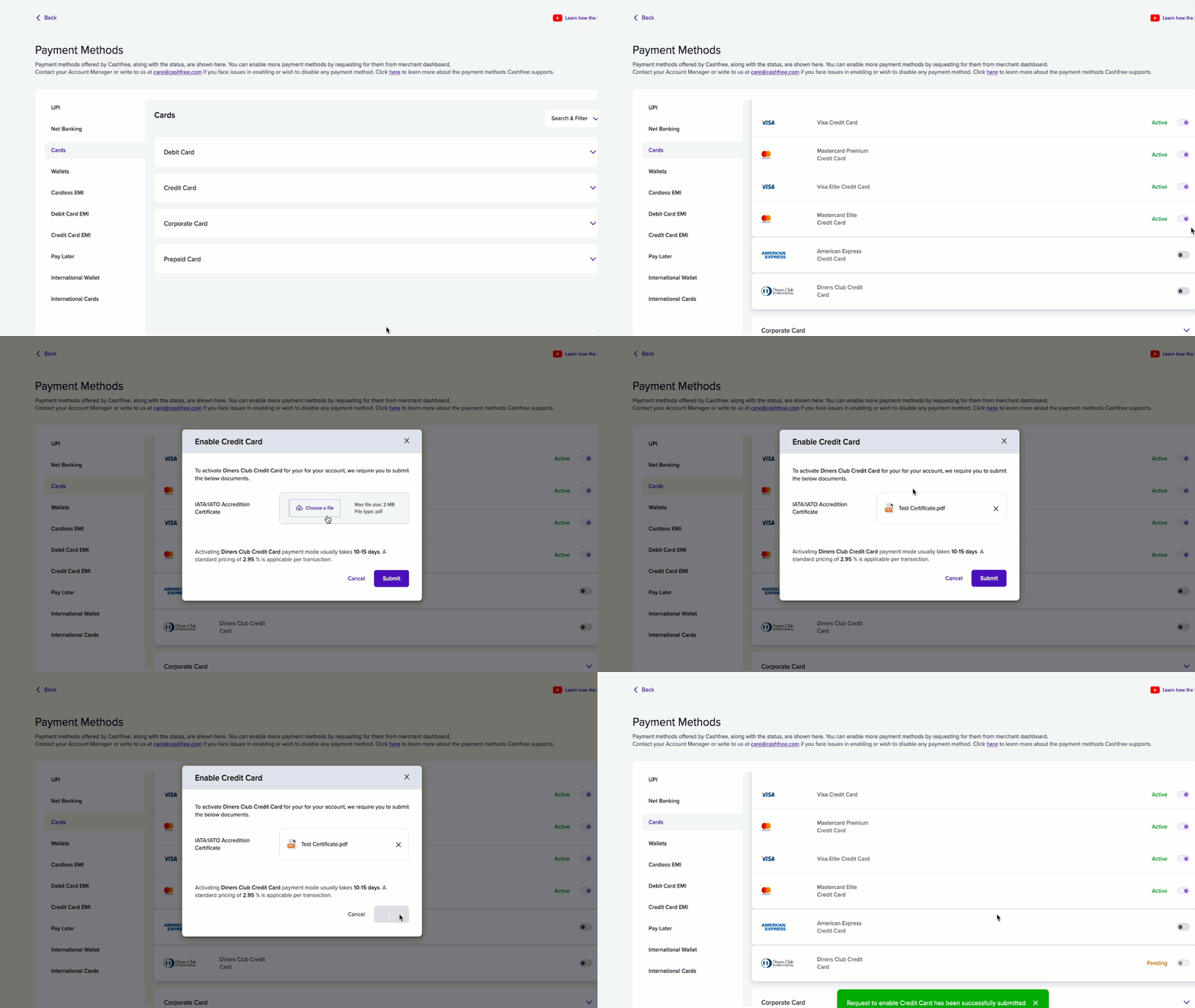
- Log in to the Merchant Dashboard.
- Go to Settings > Payment Gateway > Payment Methods.
- View all enabled payment modes on your account. You can also initiate a request for any payment mode directly from the dashboard.
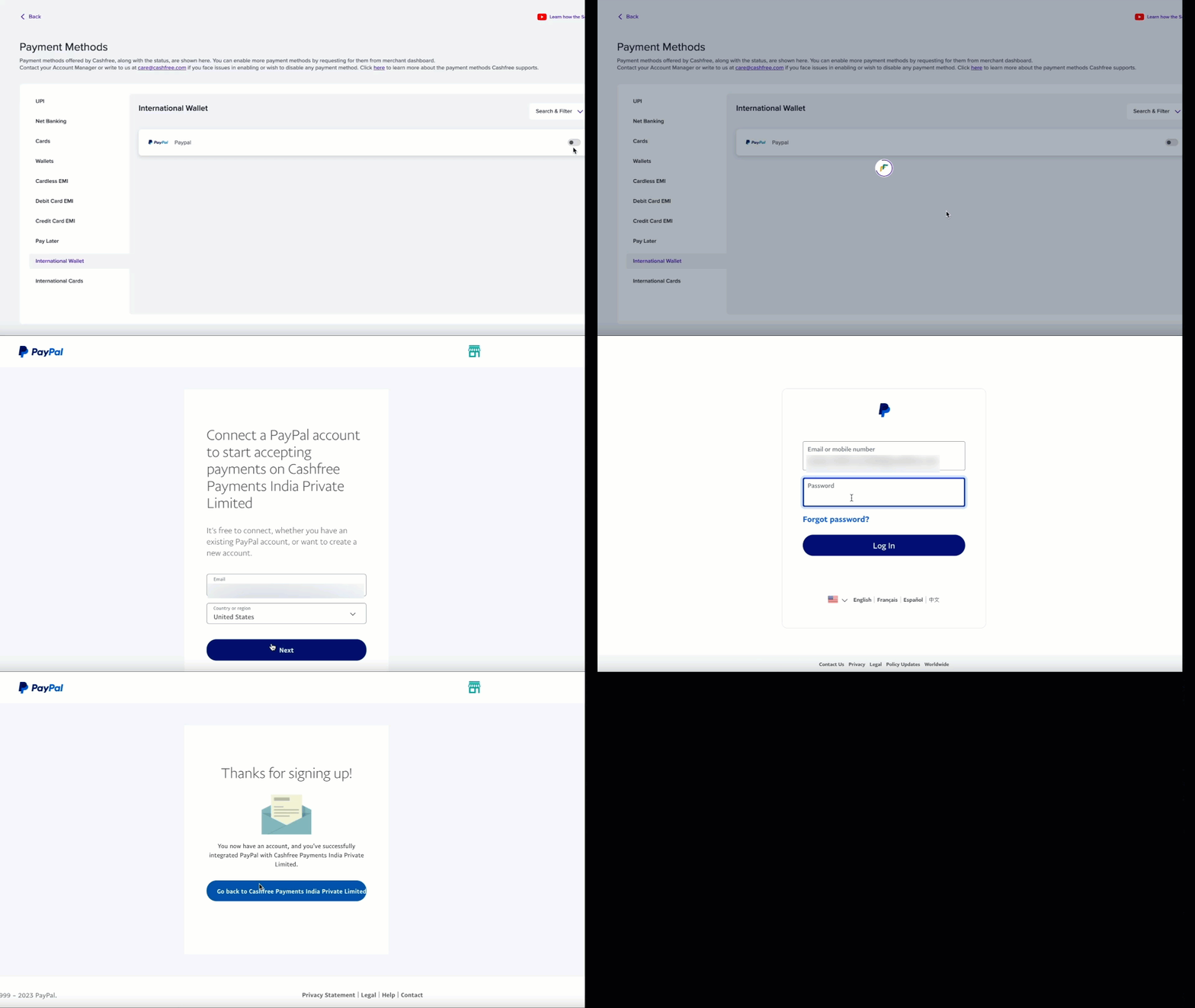
Activating PayPal from the dashboard
Activating PayPal from the dashboard
Cards
Cards are a widely used payment method for both consumers and businesses, whether online or in person. Cashfree supports both global and local card networks. Explore the card brands supported by Cashfree. You can accept payments from your customers using debit or credit cards from all international providers. Check the various capabilities we offer with Cards:3D Secure 2.0
Enhanced security protocol that provides real-time risk assessment and
authentication for online transactions.
CVV less flow
Remove the need for entering the CVV for cards saved with Cashfree
Save Cards
Securely store and tokenise cards in a PCI-compliant vault
Recurring Payments
Automated billing system for subscriptions and recurring charges with
flexible scheduling options.
Apple Pay Payments
Seamless Apple Pay-based card payments for eligible cards and transactions
Credit Card EMI
Support for EMI payments on credit cards with more than 10 banks.
Visa
Rupay
Mastercard
American Express
Diners
UPI
UPI is the most popular payment method in India. UPI lets customers transfer money directly from their bank account or an alternate funding source (such as a credit card or pre-paid wallet) using an authenticating intermediary like a phone number.UPI Intent, QR and Collect
Collect UPI payments using intent, QR, or collect.
Flash UPI
Add the UPI SDK to your app to power in-app payments.
Recurring Payments
Support for UPI one-time mandates and recurring payments.
Net banking
Cashfree can accept payments from your customers using net banking. This method is available by default. You can view which net banking banks are enabled for your account in the Merchant Dashboard.List of net banking with codes and TPV supported flags
List of net banking with codes and TPV supported flags
For testing purposes in sandbox mode merchant can use below bank code
“customer_bank_code”: 3333
Wallets
Cashfree supports a wide range of wallets to receive payments.Pay later and cardless EMIs
Cashfree supports payment options with EMI and pay later methods. Seamlessly integrate Cashfree’s platform to offer a range of credit and debit card EMIs, along with diverse pay later providers, enhancing the checkout experience.Credit card EMI
Cashfree supports credit card EMI payment method. You can use different EMI providers on our platform. Below is a list of supported providers and their payment codes for a seamless flow. If you are using a Cashfree hosted integration, we will automatically show all these options to eligible users on the checkout page. Here is a sample of the request that you need to send to/orders/sessions to process a seamless EMI payment. Read more about the Pay API.
The following card issuers are supported for card-based EMIs.
The following card issuers are supported for card-based EMIs.
Please send the exact values in the
card_bank_name parameter. We support varying tenures for each of these: 3, 6, 9, 12, 14, 18, 24, 36 depending on the issuing bank.Credit card EMI plans
Debit card EMI
Cashfree Payments supports two debit card EMI payment methods. These options are available to customers who are pre-approved by these issuing banks. Here’s a sample request to send to/orders/sessions for processing a seamless EMI payment. Read more about the Pay API. In case of a native OTP flow, Cashfree provides a Submit OTP API that you must integrate into your checkout page.
The following two card issuers are supported for card-based EMIs.
The following two card issuers are supported for card-based EMIs.
Cardless EMI plans
Customers can pay using non-card based EMI providers. A sample request is provided for reference. The available providers include FlexMoney, which offers cardless EMI options from HDFC Bank, ICICI Bank, IDFC Bank, TVS Credit, HDBFS, LazyPay, and CASHe, as well as other cardless EMI services like ZestMoney.Request
- flexmoney—FlexMoney; (powers cardless EMI from HDFC Bank, ICICI Bank, IDFC Bank, CASHe, TVS Credit, HDBFS, and LazyPay).
- zestmoneyv2-ZestMoney; (powers ZestMoney Cardless EMI).
Cardless EMI plans
Cardless EMI plans
Pay later providers
Customers can also make payments using the following pay later provider:- Lazypay