

Key benefits
Cashfree’s bank account verification offers the following benefits:- Enhanced security and fraud reduction: Confirms that the bank account belongs to the user and is active, helping prevent fraudsters from using fake, inactive, or dormant accounts.
- Reduced chargebacks: Verifying genuine accounts upfront helps businesses minimise chargebacks arising from unauthorised transactions or incorrect bank details.
- Faster verification: Enables real-time authentication through IMPS rails, eliminating delays associated with manual verification processes or document checks.
- Clear reasons for verification failure: Provides precise failure insights, such as invalid account number, incorrect IFSC, or blocked, frozen, or closed accounts, so you know exactly why verification failed in real-time.
- Bulk verification at scale: Verify up to 10,000 bank accounts in a single batch using APIs or bulk upload via simple Excel sheet uploads, without exposing sensitive financial information to any third party.
- Approval (maker–checker) workflow: Add maker and checker roles to manage permissions. Each time a maker uploads a batch file, checkers can review, validate, and approve or reject individual records before verification begins.
Use cases
BAV is widely adopted across industries to verify account ownership and reduce payment failures:| Sector | Use cases |
|---|---|
| Marketplaces | Verify users and vendors to ensure that payouts are credited only to the intended beneficiaries. |
| Businesses and individuals for payment verification | Validate bank account details and match the bank-registered name to avoid transfer failures or reversals. |
| Payments and fintech companies | Ensure frictionless onboarding by verifying user details with the bank to prevent mismatches or failed transactions. |
| Insurance providers | Authenticate individuals during onboarding or before disbursing insurance amounts. |
| Wallet service providers | Fast-track user onboarding and account activation with instant individual or business account verification. |
| Security and equity investment platforms | Allow users to start investing quickly with instant bank account verification. Integrate APIs that are customisable and easy to use. |
| Lending platforms | Verify borrower bank details before loan disbursal to eliminate transfer reversals or failures due to incorrect account numbers. |
| Recruitment and identification verification companies | Validate employee bank account details and match their names for faster onboarding and minimised transfer failures. |
Verification flow
-
Use the Sync BAV API to instantly verify a bank account.
- Input the bank account number, IFSC, phone number (optional), and name (optional) to get the account status, such as valid, invalid, or blocked, and detailed failure reasons like invalid IFSC or unsupported NRE accounts.
-
Use the Async BAV API to verify a bank account within 1–2 hours, after which you can retrieve the final status of the verification using the Get BAV Status API.
- Possible statuses include: valid, invalid, in_process, rejected, and pending.
-
Use the Bulk BAV API to verify bank account information in bulk by uploading a CSV/XLSX file containing the account details you want to verify.
- After uploading, use the Get Bulk BAV Status API to track the bulk verification request.
- You can retrieve the status using either the bulk reference ID or the bulk validation ID.
- To fetch the status of a specific record, provide the corresponding reference ID in the request.
Verify a bank account
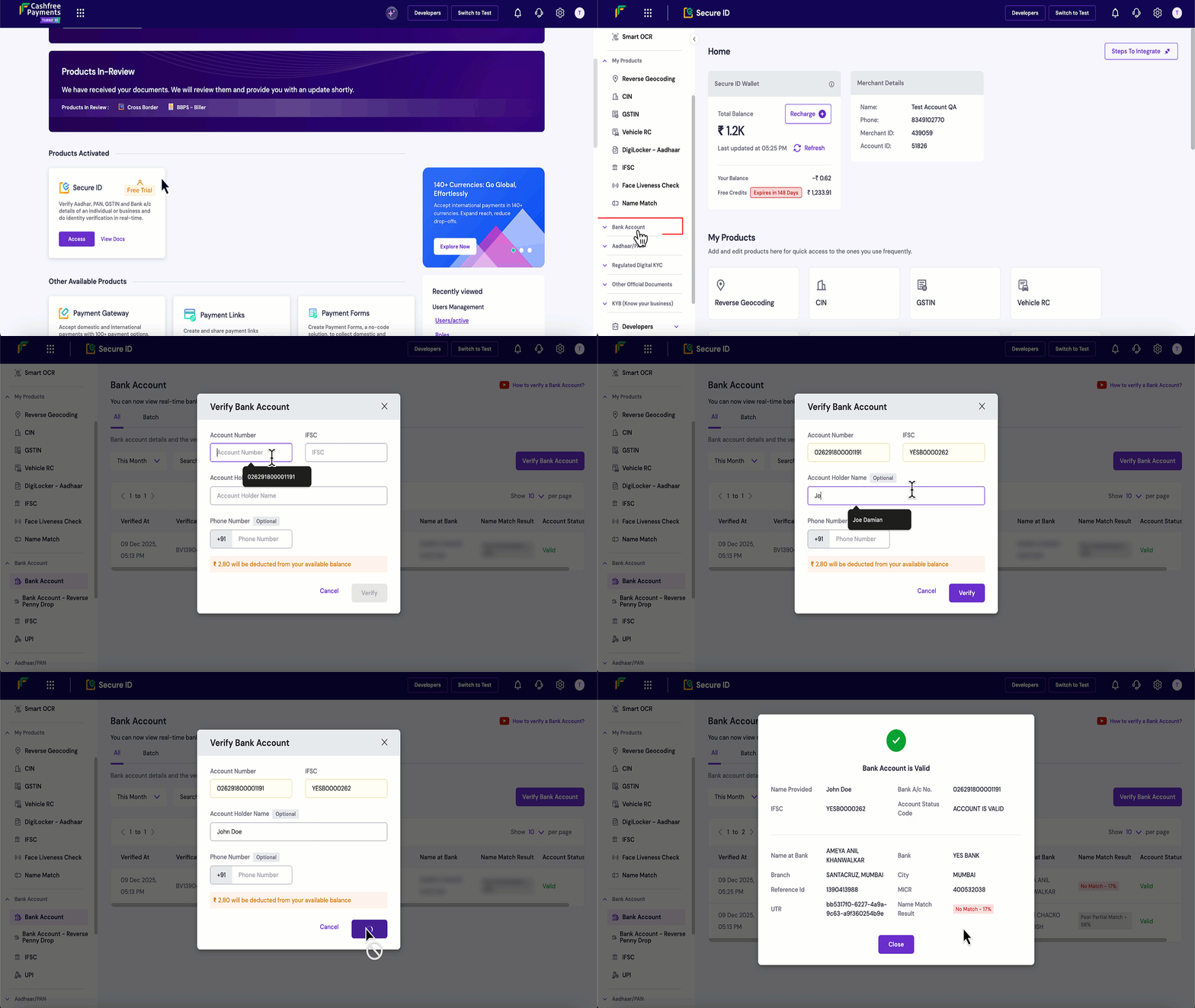
To verify bank accounts through the Merchant Dashboard, follow the instructions below:- Log in to the Merchant Dashboard.
- Go to Secure ID Dashboard > Bank Account > Verify Bank Account.
- In the Verify Bank Account pop-up, enter the Account Number, IFSC, and optionally the Account Holder Name and Phone Number.
- Click Verify. The bank account information is verified, and you receive a pop-up that displays the account status, name match results, and failure reasons, if any.
Verify bank accounts in batch
When you have a large number of bank accounts to verify, you can upload a single file containing all the required details and process them in one go. Batch verification supports.csv, .xls, and .xlsx formats. Each row in the file must include the account number, IFSC code, and, optionally, the account holder’s name and phone number.
You can download the sample file to understand the required format before uploading your data.
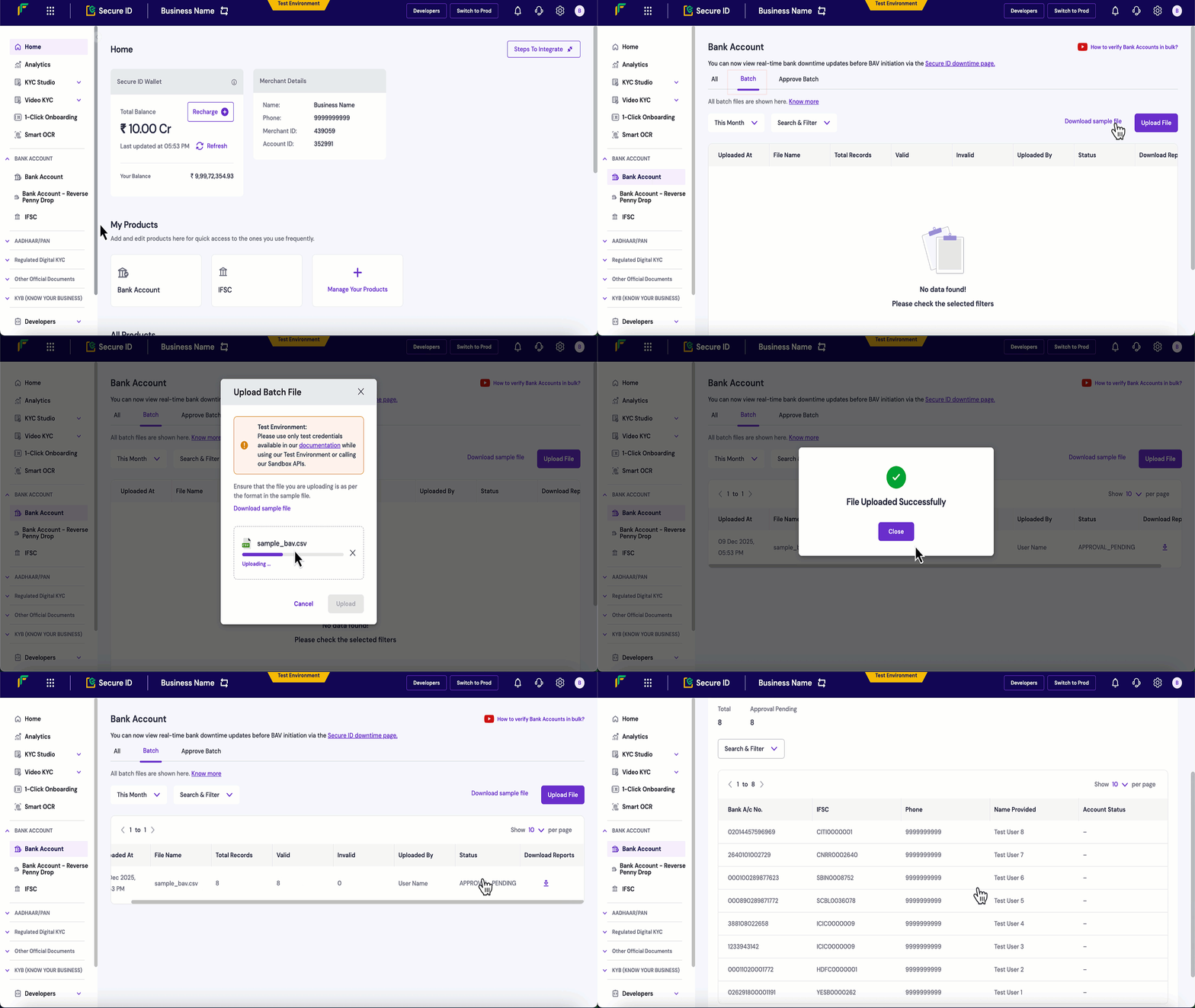
Follow the steps below to upload and verify a batch file:
- Log in to the Merchant Dashboard.
- Go to Secure ID Dashboard > Bank Account.
- Select the Batch tab and click Upload File.
- Click Download sample file to get the template (available in CSV or XLS format), fill in your bank account information following the required structure, and save the file.
- Click Upload and select the file with the details filled in to submit the batch for verification.
-
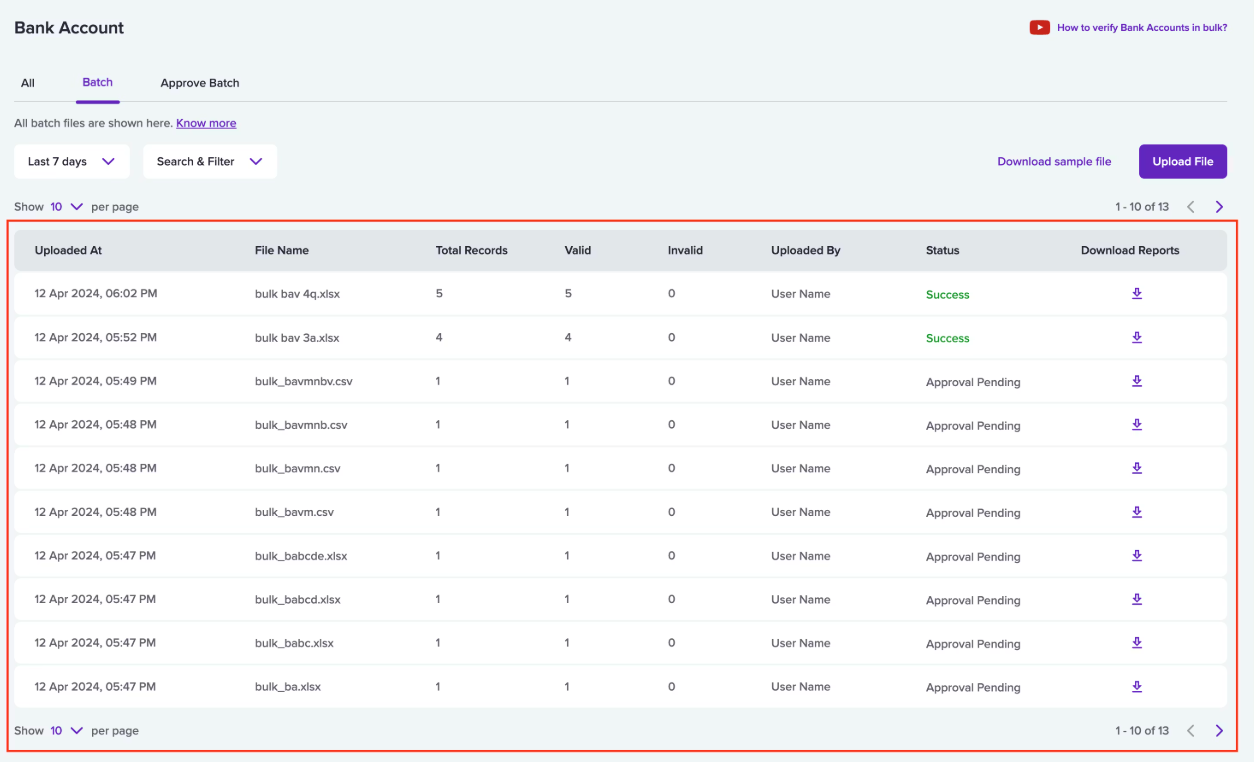
The uploaded file will appear in the Batch tab as a table for easy viewing.
-
Click the uploaded file to view the following information:
- File Name: Name of the uploaded file.
- Status: Status of the file, which can be success, failed, approval pending, etc.
- Uploaded At: Timestamp showing when the file was uploaded.
- Uploaded By: Name of the user who uploaded the file.
- Total records: Total number of bank account records in the file.
- Valid: Number of accounts that were successfully verified.
- Invalid: Number of accounts that failed verification.
-
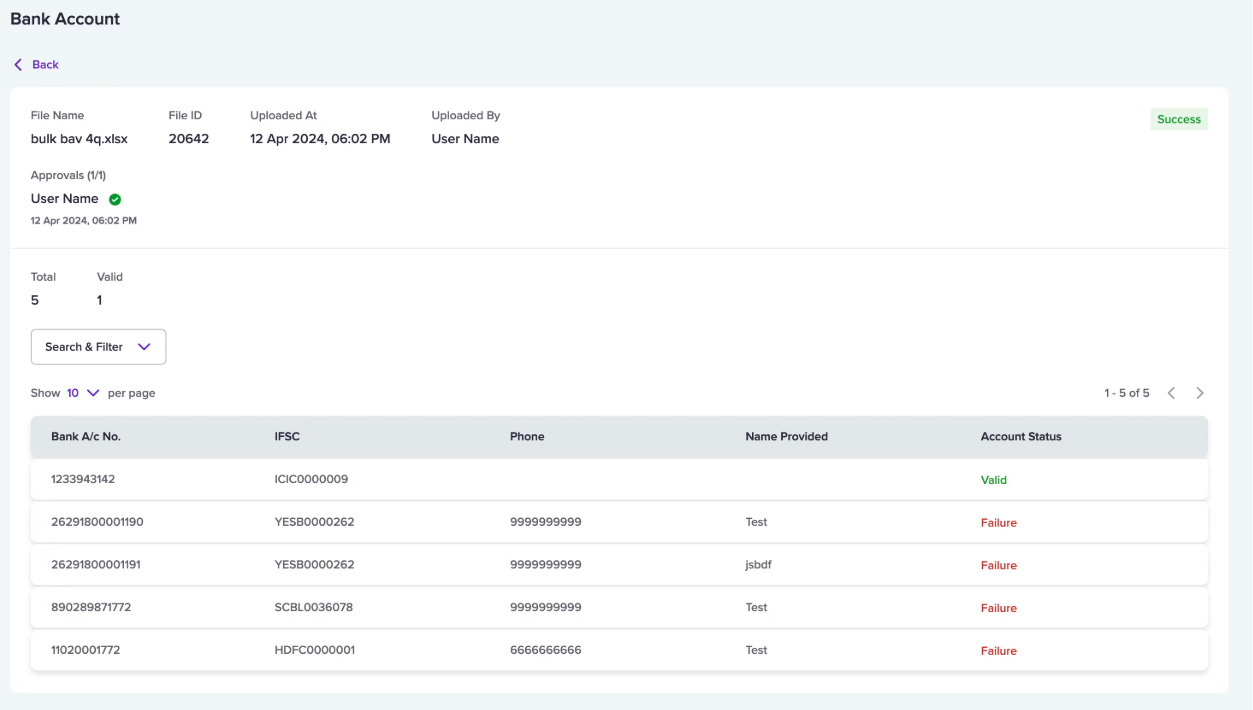
You can view the following details in the table:
- Bank A/c No.: Displays the bank account number used for verification.
- IFSC: Displays the IFSC code associated with the account.
- Phone: Displays the phone number of the bank account holder.
- Name: Displays the name of the bank account holder.
- Account Status: Displays the verification result for that account.
Approve batch verification flow
To verify a large number of bank accounts in one go, Cashfree supports Batch Upload of bank account details. Since this involves processing all records added in the file at once, you may want to check and approve the file before verification begins. To do this, you must create an approver profile within your Cashfree account. Once the file is approved by an approver, the bank account details will be verified, and the status of each account will be displayed in the file. All files that are pending approval will appear in the Approve Batch section.Name match scoring
The Name Match feature helps ensure that payments are processed to the correct beneficiary by validating whether the customer-provided name matches the name registered with the bank. Manually checking names can be time-consuming and prone to error, especially when handling large volumes. Name Match automates this process by comparing both names and returning a match result along with a numerical score that indicates how closely they align. Two parameters are returned in the response:nameMatchResult: The classification of the match.nameMatchScore: The numerical score (0 – 100).
Score categorisation
| Match result | Match score range |
|---|---|
| Direct Match | 100.00 |
| Good Partial Match | 85.00 – 99.00 |
| Moderate Partial Match | 60.00 – 84.00 |
| Poor Partial Match | 34.00 – 59.00 |
| No Match | 0 – 33.00 |
Examples
| Name 1 | Name 2 | nameMatchResult | nameMatchScore |
|---|---|---|---|
| Rohan Mathew Thomas | Rohan Mathew Thomas | Direct Match | 100.00 |
| Rohan Mathew Thomas | Rohan Thomas | Good Partial Match | 85.00 |
| Rohan Mathew Thomas | Roshan Thomas | Moderate Partial Match | 61.00 |
| Rohan Mathew Thomas | Rohan Mathew K | Poor Partial Match | 55.00 |
| Rohan Mathew Thomas | Rajeev | No Match | 14.00 |
FAQs
For how many banks can I do the verification?
For how many banks can I do the verification?
How can I verify bank account numbers on Cashfree Payments for multiple individuals?
How can I verify bank account numbers on Cashfree Payments for multiple individuals?
- Manual verification via the dashboard:
Enter just two details: bank account number and IFSC.
For bulk verification, use the bulk upload feature to submit a CSV/XLSX file and receive quick results. - API-based verification:
Integrate our Verification API with your existing internal systems or ERP to perform single or bulk verification automatically.
What are the other use cases of this feature?
What are the other use cases of this feature?
- As a key step in validating applicants before issuing loans for health, business, car, etc.
- Employee background checks: for example, by recruitment agencies.
- Vendor onboarding—marketplaces can validate vendor account details upfront to ensure accurate payouts later.
Why is bank account verification important?
Why is bank account verification important?
How does the retry logic work in case of timeouts or failures?
How does the retry logic work in case of timeouts or failures?
What are the different bank account verification (BAV) response statuses?
What are the different bank account verification (BAV) response statuses?
VALID, INVALID, NRE_ACCOUNT_FAIL, REJECTED, and more.Refer to the documentation for a full list of available status codes and their descriptions.
Does BAV support webhooks for event updates?
Does BAV support webhooks for event updates?
I want to use Cashfree Payments marketplace settlement for paying vendors. Do I need to take verification feature separately?
I want to use Cashfree Payments marketplace settlement for paying vendors. Do I need to take verification feature separately?
I am planning to opt for Cashfree Payouts for bulk disbursals. Do I need to go for verification API separately?
I am planning to opt for Cashfree Payouts for bulk disbursals. Do I need to go for verification API separately?
Is there any limit on the total number of bank account verification requests per day?
Is there any limit on the total number of bank account verification requests per day?
How much time does verification take?
How much time does verification take?