> ## Documentation Index
> Fetch the complete documentation index at: https://www.cashfree.com/docs/llms.txt
> Use this file to discover all available pages before exploring further.
# Account Activation
> Follow Cashfree Payments account activation steps for your business entity: KYC documents, bank verification, and entity-specific onboarding lists.
To activate a Cashfree Payments account, you must complete the onboarding process, submit entity-specific documents, and verify business details. For exploration, the sandbox environment allows you to test Cashfree products and simulate payment scenarios before going live.
This page covers the following topics:
* [Create an account](#create-account)
* [Explore test environment](#explore-test-environment)
* [Required documents](#required-documents)
* [Documents by entity type](#documents-by-entity-type)
## Create an account
To create a Cashfree Payments account, complete the following steps:
1. Go to the [Cashfree sign up page](https://merchant.cashfree.com/merchants/signup?source-action=Home%20page\&action=Sign%20Up\&button-id=StartNow_Navbar).
2. Provide the business email address and set a password, then select **Continue**. Alternatively, select **Sign up with Google** to create the account directly.
3. Enter the mobile number, select **Create account**, and verify it using the OTP sent to the registered phone.
Select the checkbox to receive account updates via WhatsApp. Cashfree may contact you for clarifications during the onboarding process.
After signing up, follow the instructions to complete account activation:
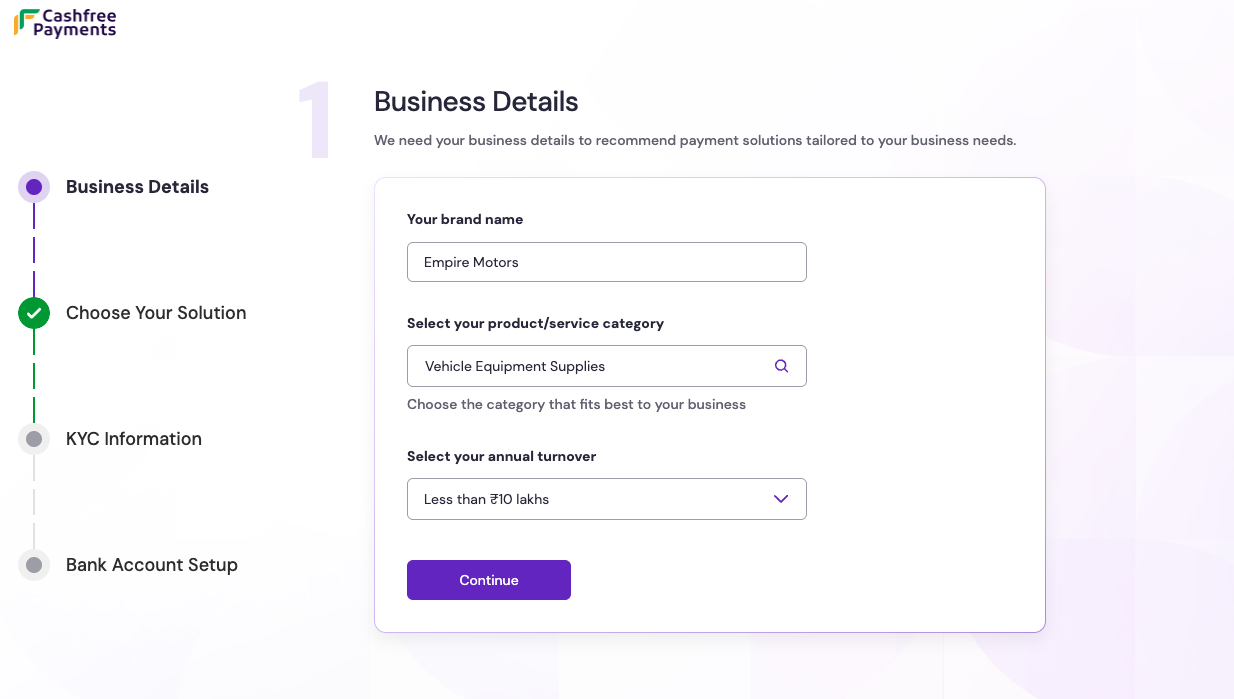
On the **Business details** page, enter the **brand name**, select the **product or service category**, and choose the **annual turnover** range from the dropdown menu. Select **Continue** to proceed.
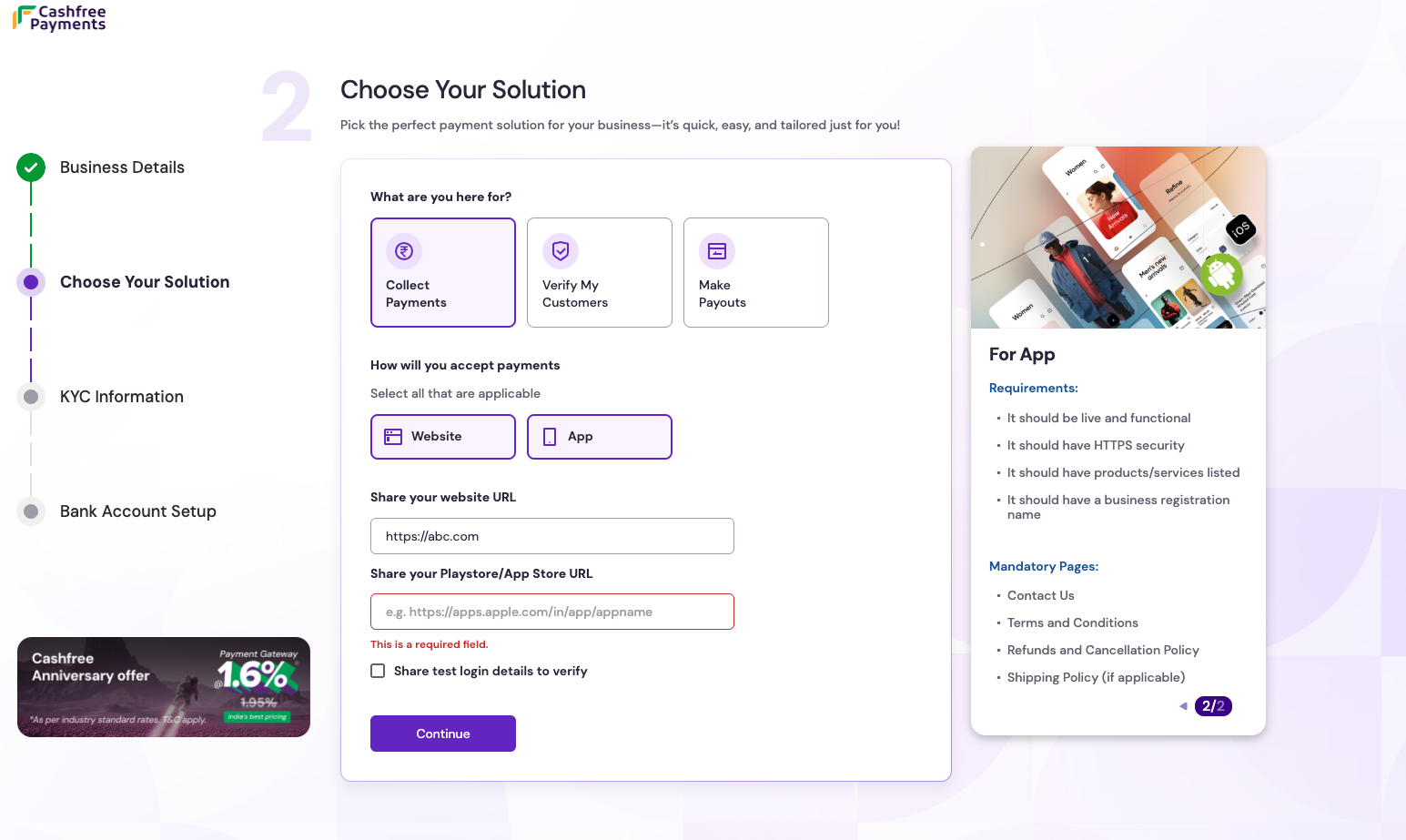
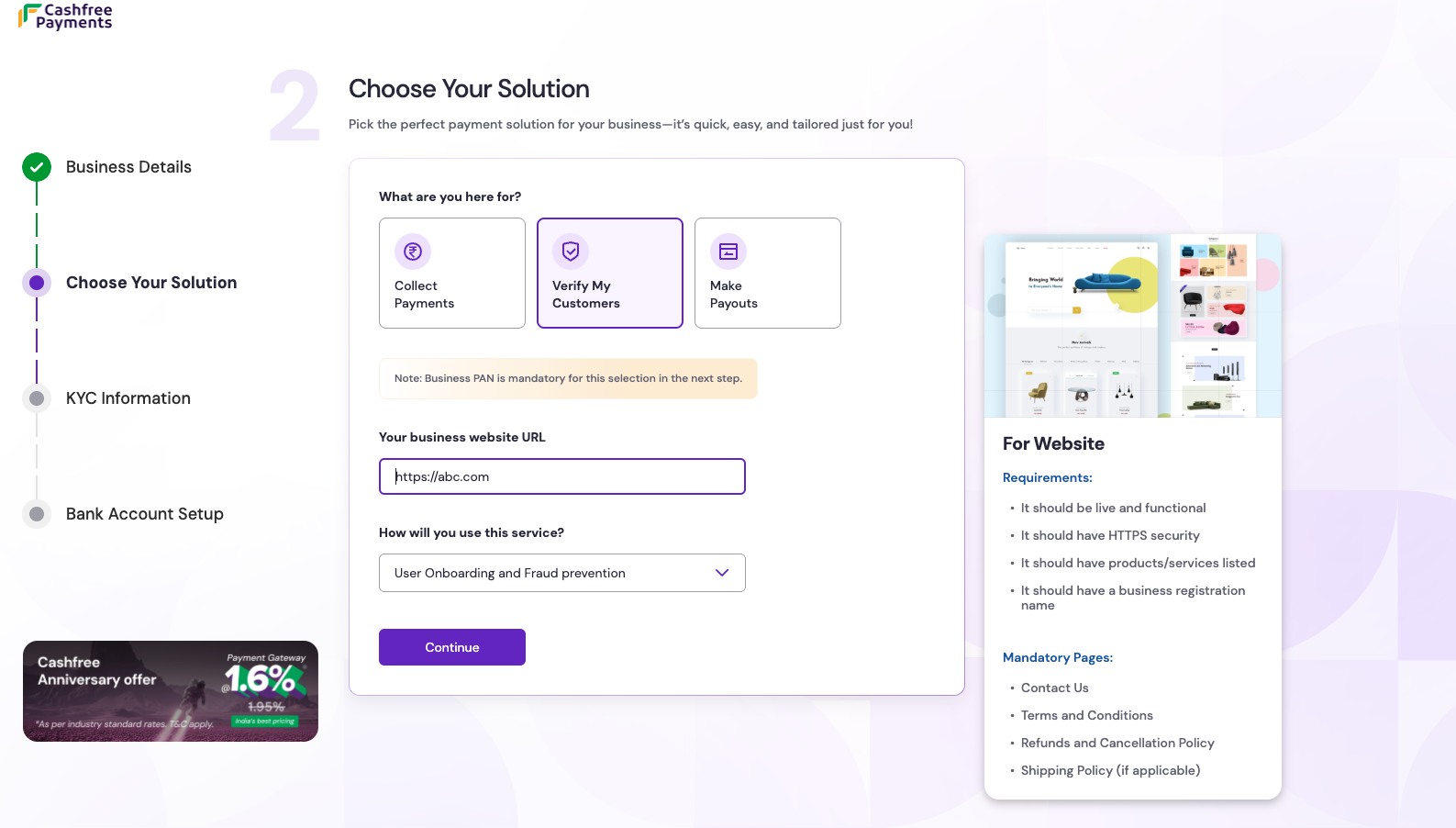
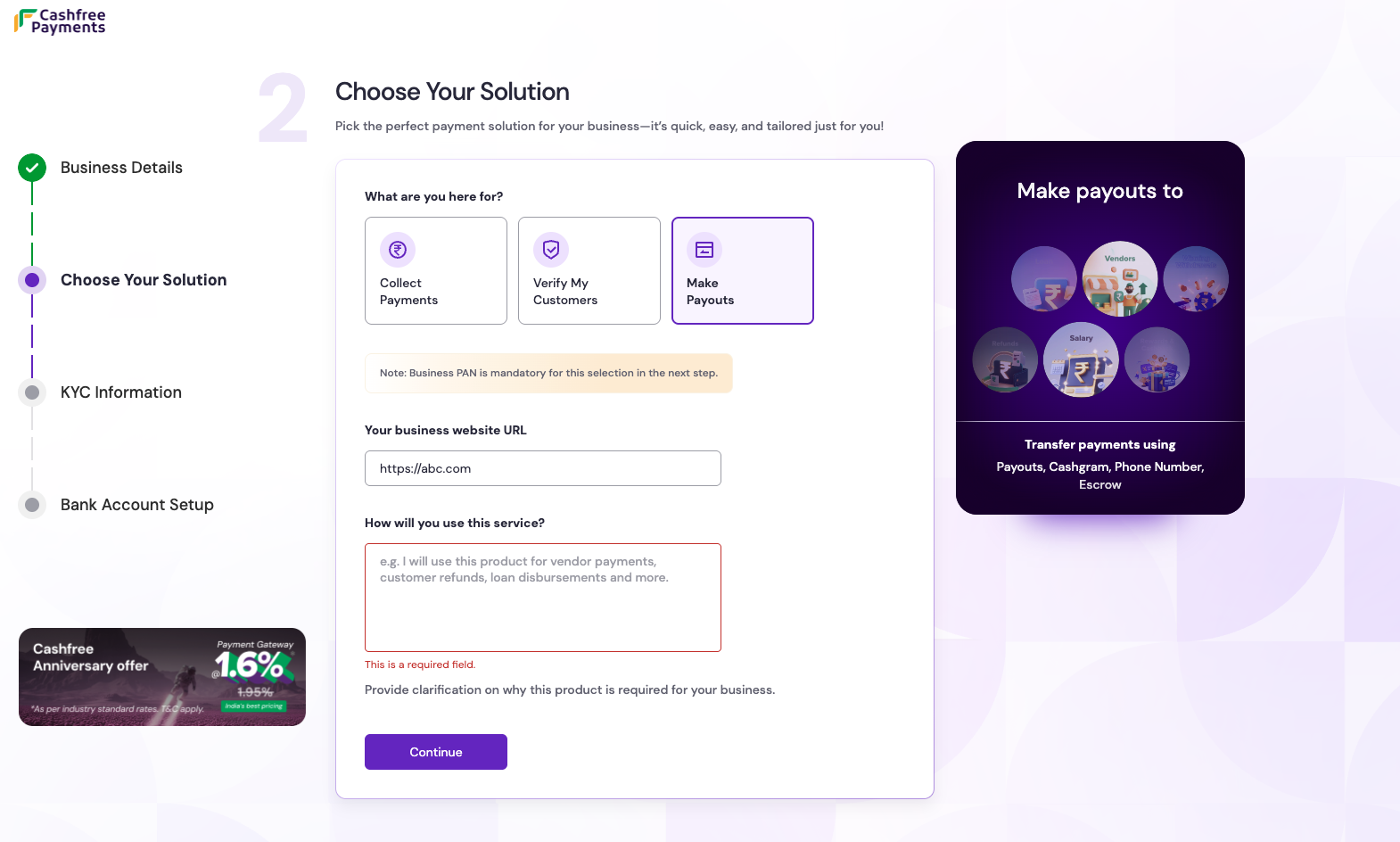
On the **Choose your solution** page, select the product that best fits the business needs. Provide the following details based on the selection:
Accept and automate online payments from customers across web and mobile apps while ensuring high conversion rates.
* **Requirements**: Provide the **website URL** or the **Play Store or App Store URL** for the app.
Onboard users faster and prevent fraud using automated Aadhaar, PAN, bank account, and KYC verification.
* **Requirements**: Provide the **website URL**.
Business PAN is mandatory for this selection in the next step.
Send instant money transfers to bank accounts, UPI IDs, cards, or wallets for vendor payments, refunds, and salaries.
* **Requirements**: Provide the **website URL**.
Business PAN is mandatory for this selection in the next step.
Select **Continue** after choosing the preferred solution.
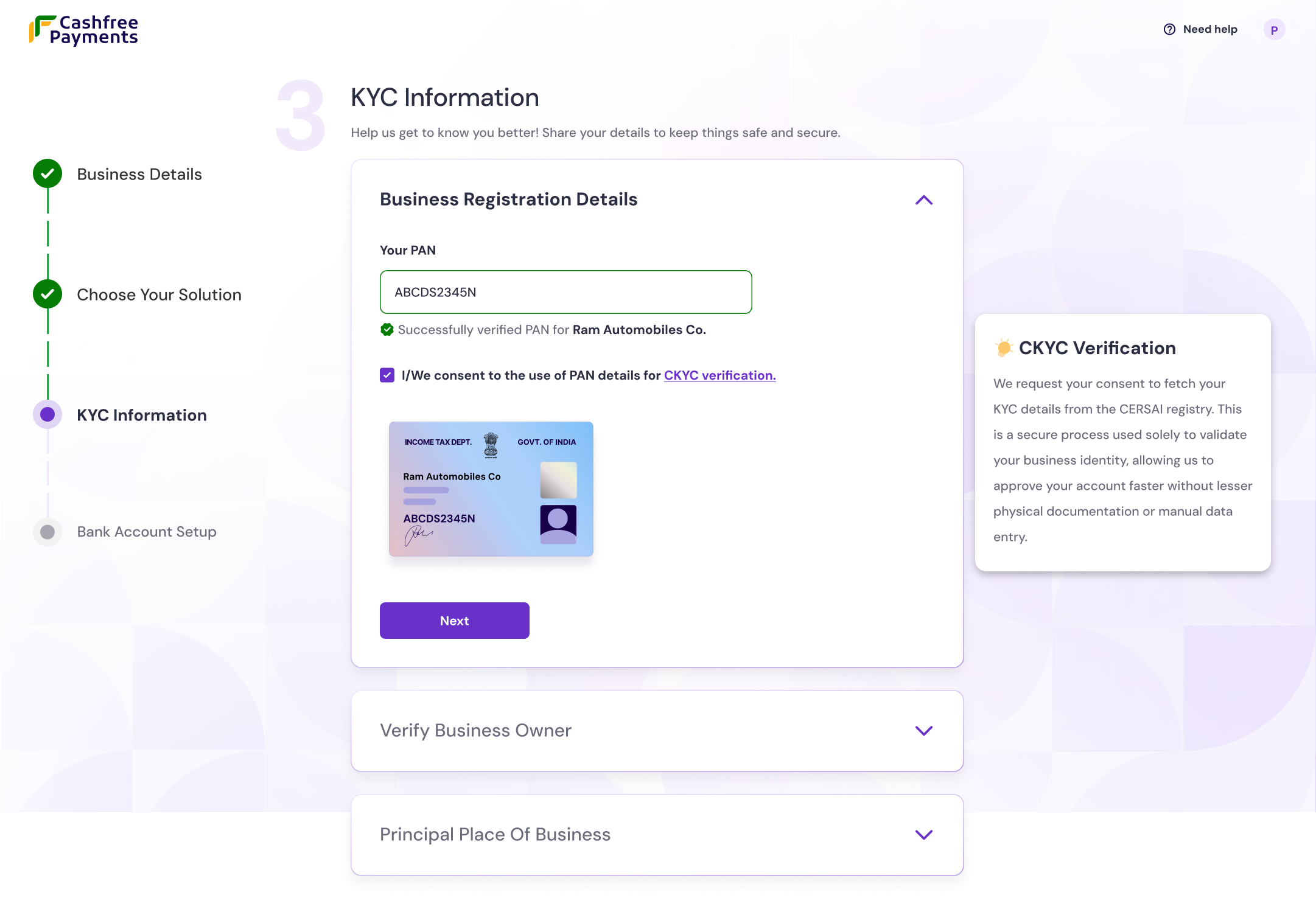
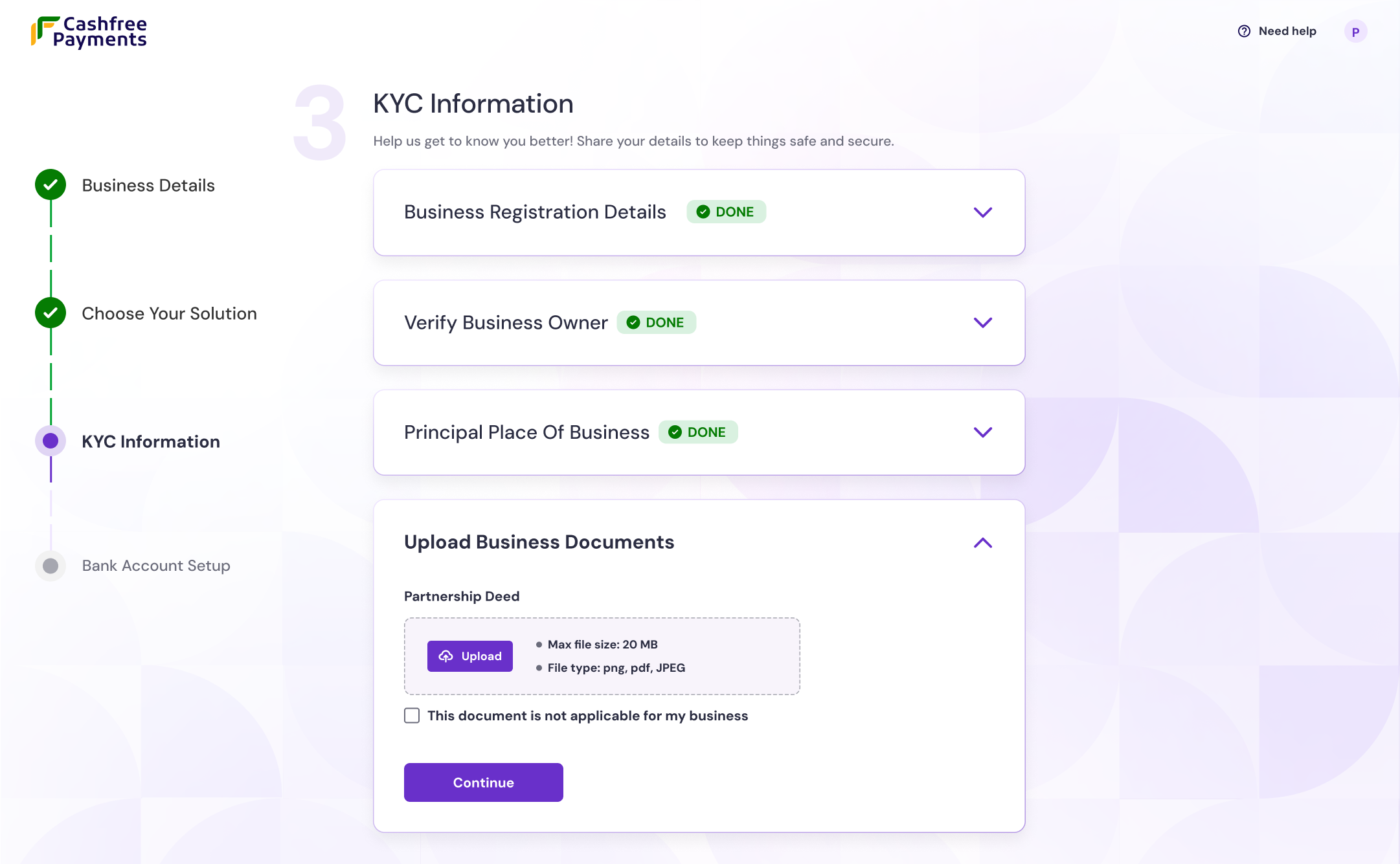
On the **KYC information** page, provide the following details:
* **Business registration details**: Enter a valid business PAN number. The system uses the PAN to fetch the legal name and GST, CIN, LLPIN data.
The remaining steps on the **KYC information** page vary based on the business structure:
* **Archetype identification**: The system automatically identifies individuals using the fourth digit "P" of the provided PAN.
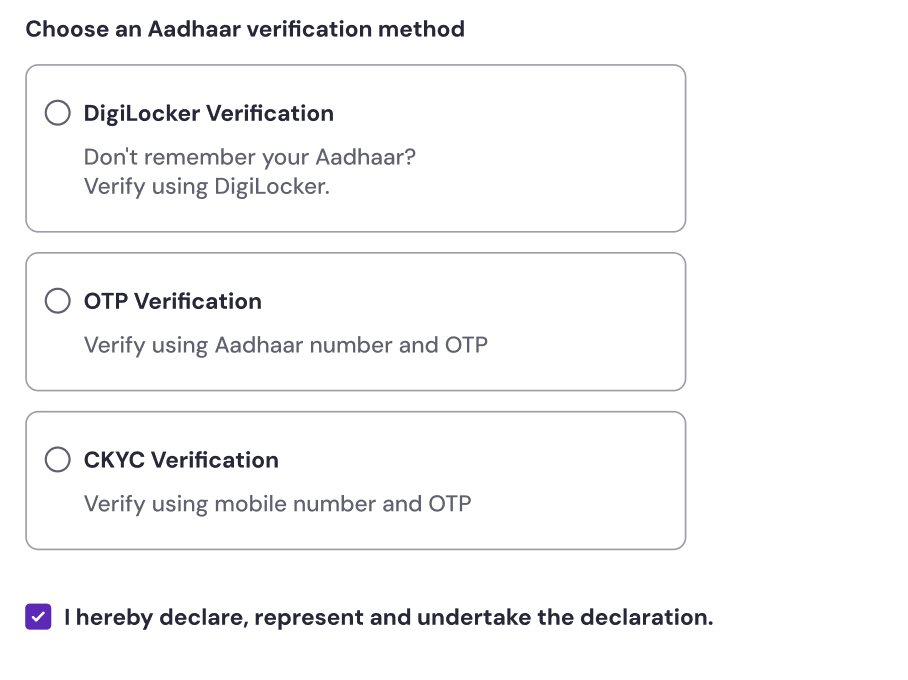
* **Business owner verification**:
* **OTP verification**: Complete identity verification instantly using the Aadhaar number and the OTP sent to the registered mobile number.
* **DigiLocker verification**: Securely authenticate and share Aadhaar information via the DigiLocker account.
* **CKYC verification**: Use the Central KYC (CKYC) record to prefill details automatically. This method is optional.
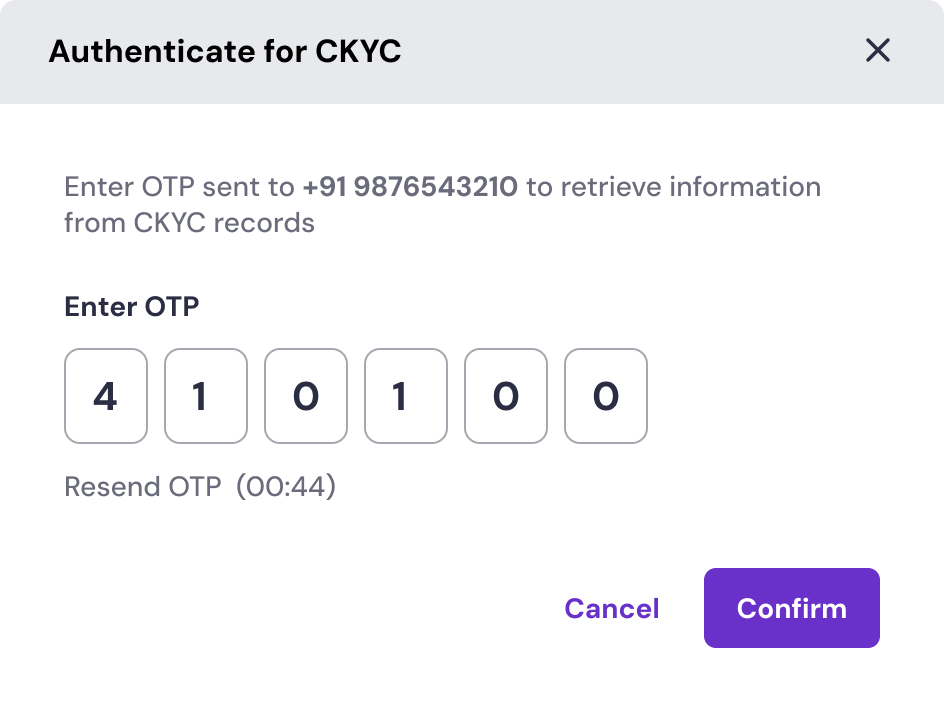
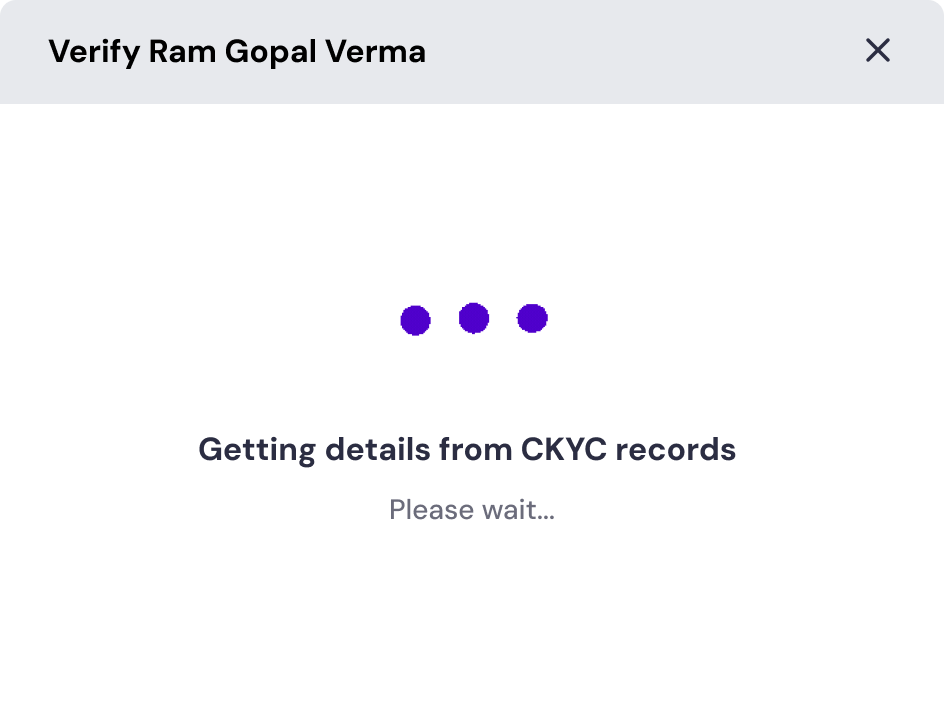
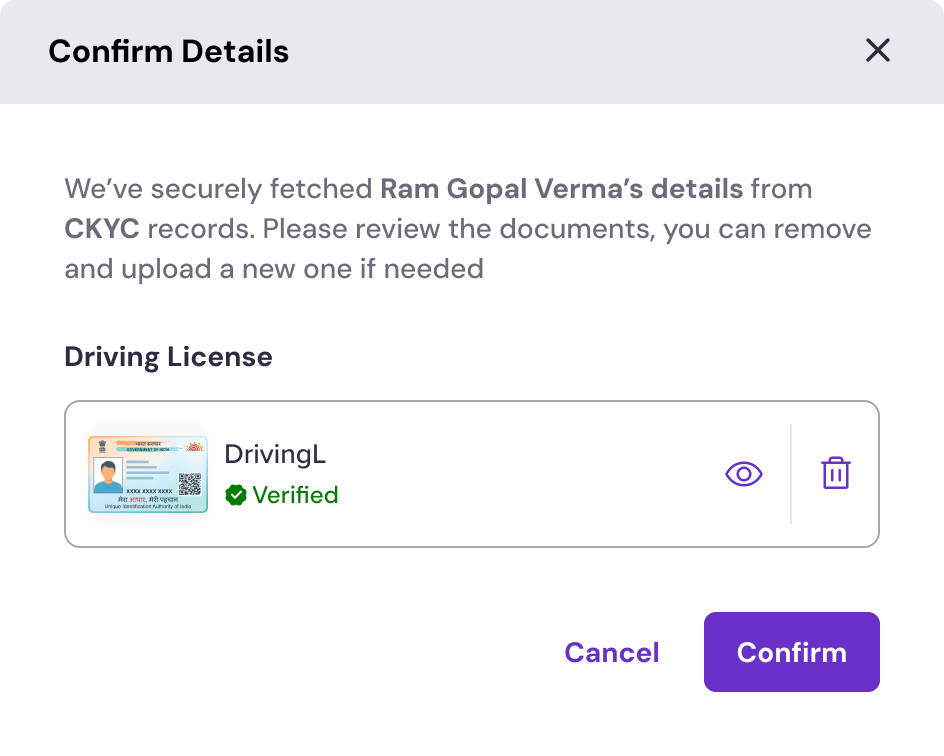
* **CKYC verification flow**: If CKYC verification is chosen, follow the steps below to complete it:
If CKYC verification is chosen, enter the mobile number and OTP linked to the PAN's CKYC record. The system will then securely retrieve their identifying documents.
Once the records are fetched, review the retrieved document (such as a driving licence or PAN). If the details are correct, click **Confirm**. You can also remove and upload a new document if needed.
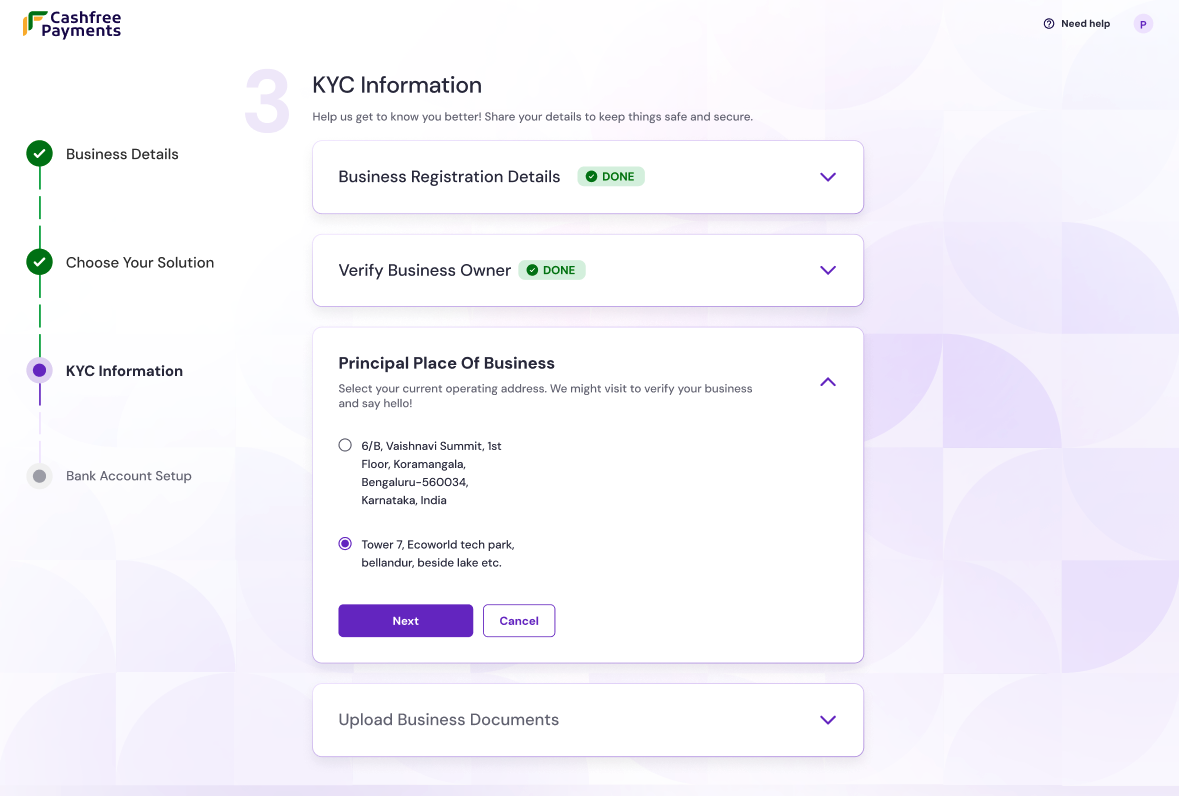
* **Principal place of business**: Enter the complete and accurate business address. The business location is subject to physical verification.
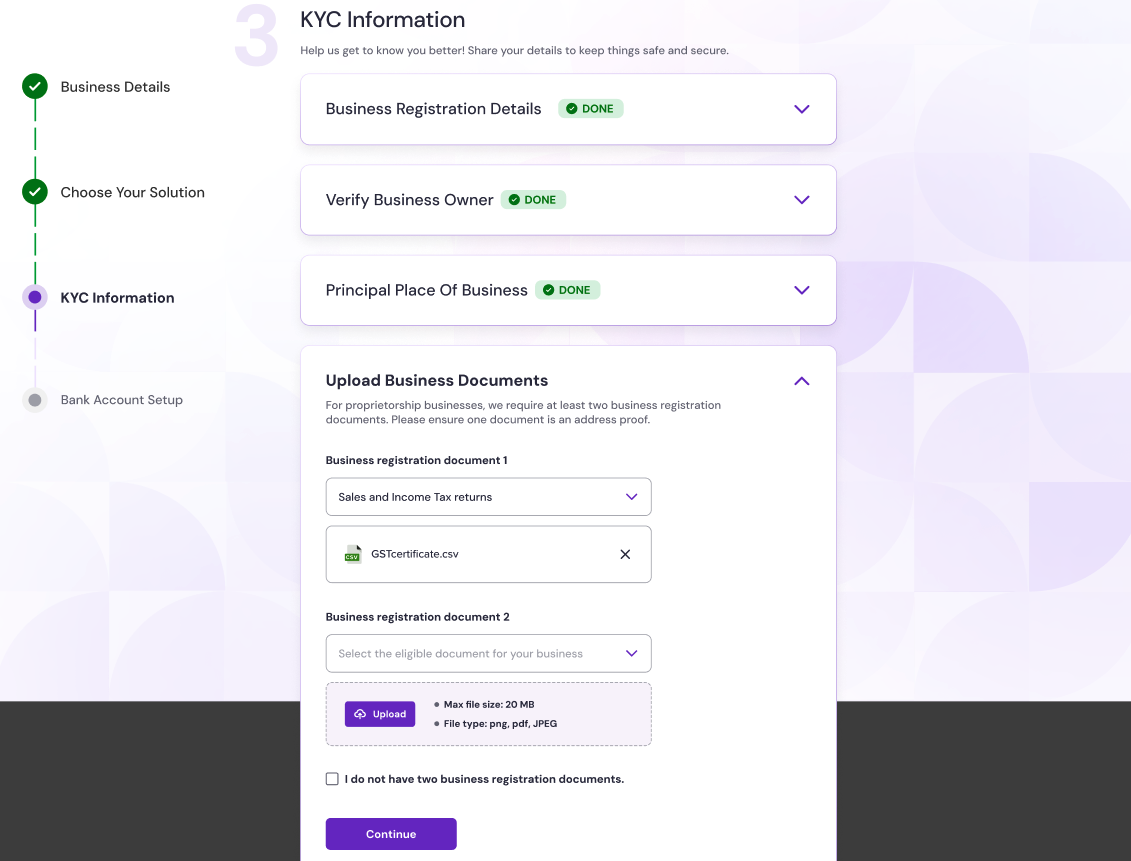
* **Upload business documents**: For proprietorship businesses, upload at least **two** proofs of business (such as Udyam, Shop & Establishment, or MSME certificate).
* Municipal certificate
* Udyog Aadhaar
* Shop & Establishment certificate
* Other government-issued registration proofs
If you do not have these documents, Cashfree changes the business type to **Unregistered**.
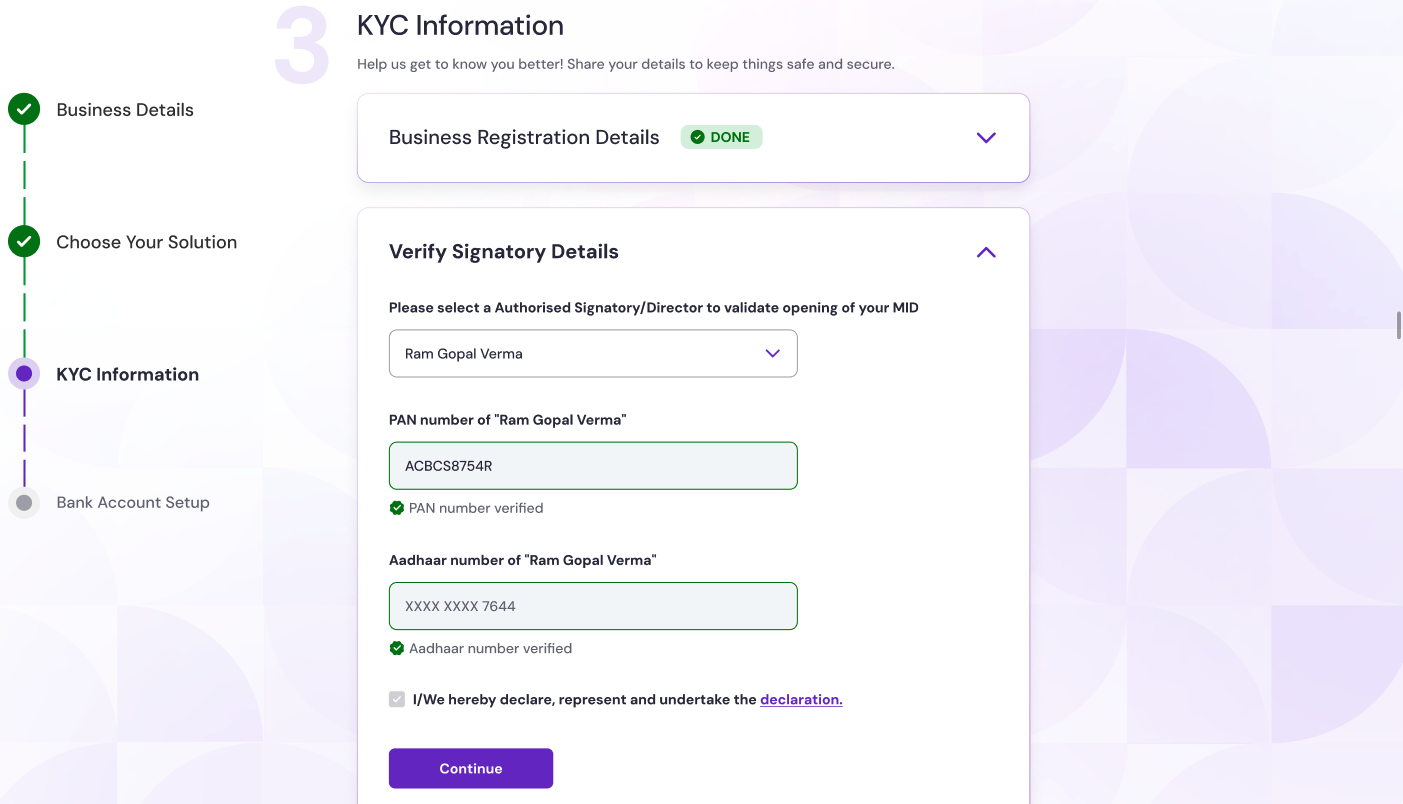
* **Archetype identification**: The system automatically identifies registered entities if the fourth digit of the provided PAN is not "P". For example, the fourth letter of a business PAN is "C".
* **Authorised signatory verification**: An authorised signatory must be verified to access the CKYC information and complete the KYC.
After getting consent of the merchant, the CKYC record is automatically retrieved using the business **PAN** and **Date of Incorporation (DOI)**.
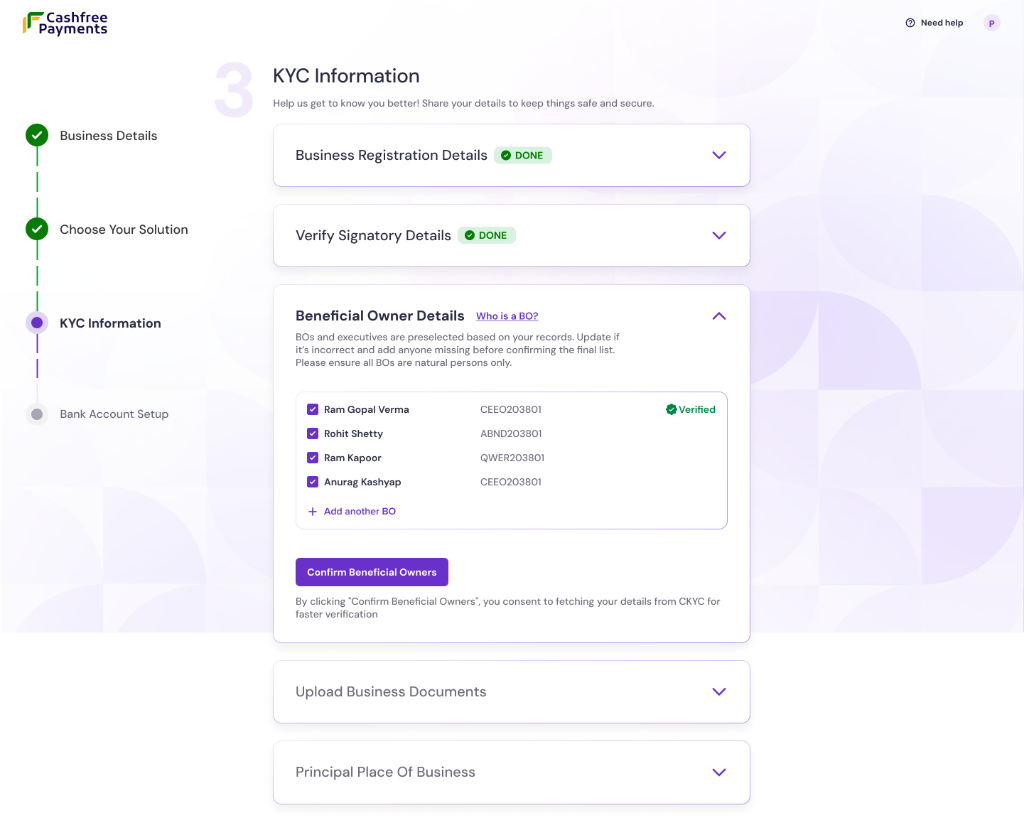
* **Beneficial owner (BO) details**:
Identify all individuals who hold a significant beneficial interest in the business, as required under the RBI KYC Master Direction.
The system identifies potential beneficial owners and executives based on the merchant's records.
* **Verified BOs**: If a BO has a green **Verified** status, no further action is required for them.
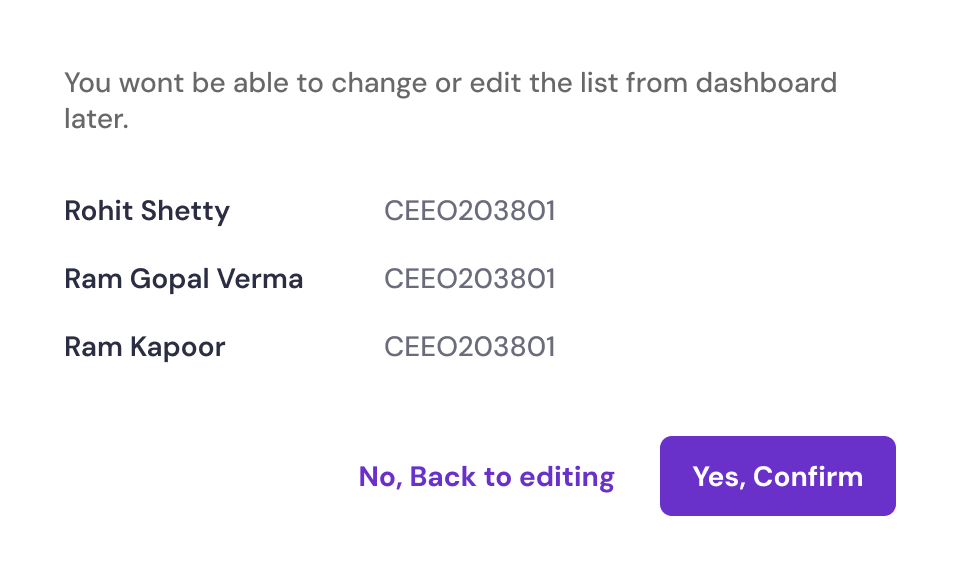
Once the list is accurate, select **Confirm Beneficial Owners** to proceed.
Once the verification is complete and the final list is confirmed, it becomes a **frozen list**. Beneficial Owner details cannot be changed or edited from the dashboard after that.
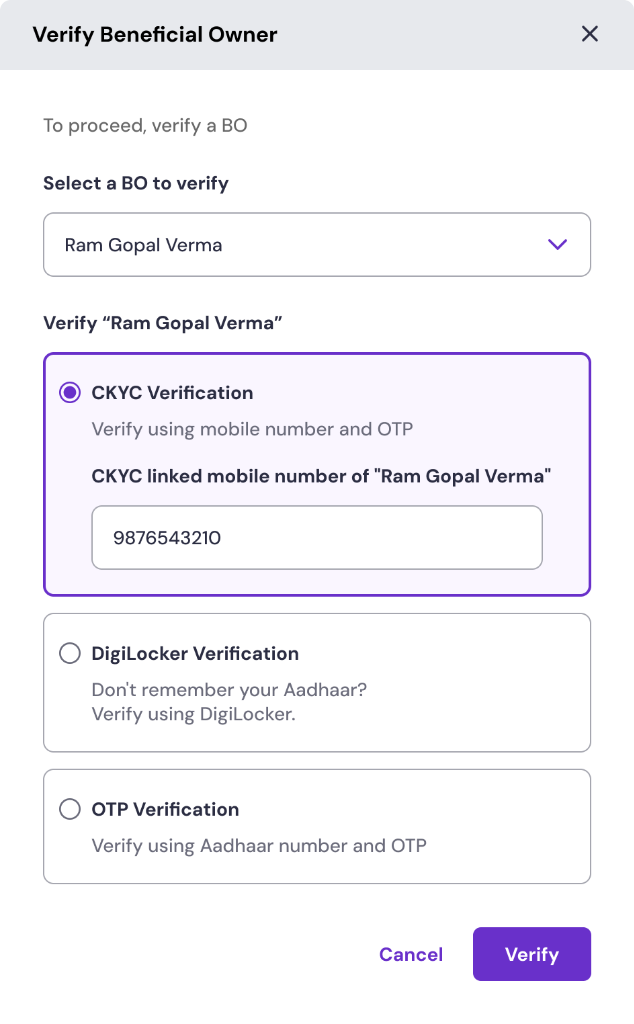
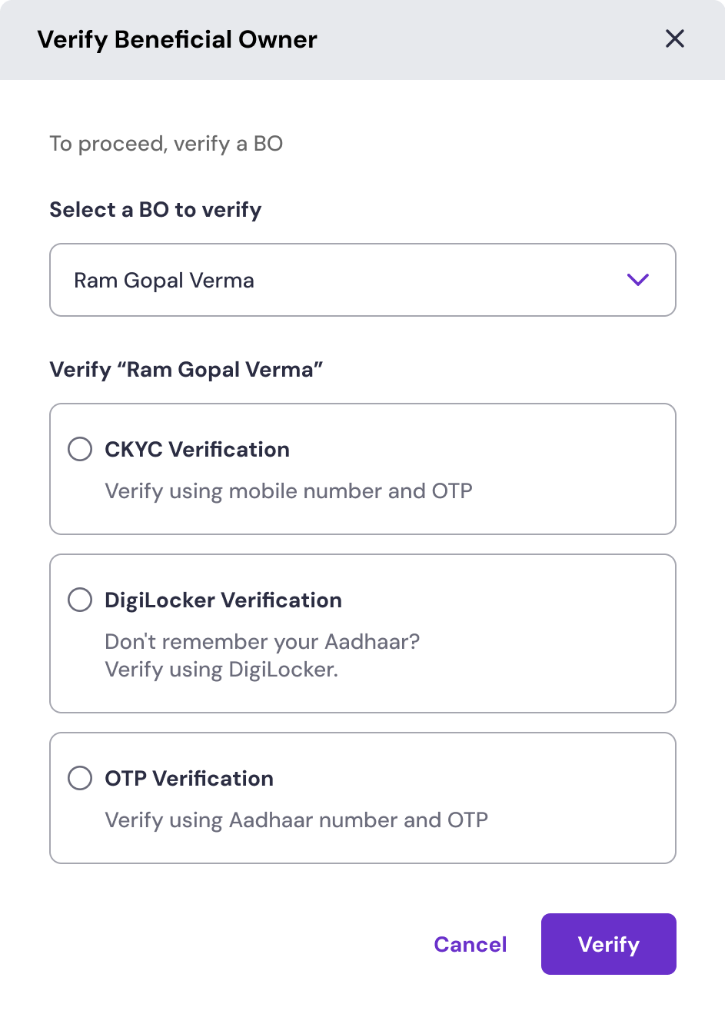
In case you are required to verify an unverified BO, you will see three verification options:
* **CKYC verification**: Verify using the mobile number and OTP linked to their CKYC record.
* **DigiLocker verification**: Authenticate via Aadhaar on their DigiLocker account.
* **OTP verification**: Verify instantly using Aadhaar number and an OTP.
If CKYC verification is chosen, enter the mobile number and OTP linked to the PAN's CKYC record. The system will then securely retrieve their identifying documents.
Once the records are fetched, review the retrieved document (such as a driving licence or PAN). If the details are correct, click **Confirm**. You can also remove and upload a new document if needed.
A beneficial owner is any individual who:
* Holds more than **10%** of the ownership or share capital in a **company**, **partnership**, or **Limited Liability Partnership (LLP)**.
* Holds more than **15%** of the interest in an **association**, **body of individuals (BOI)**, or **society**.
* Is entitled to **10% or more** of the interest in a **trust**.
Beneficial owners do not need to be identified for publicly listed companies or their majority-owned subsidiaries.
* **Principal place of business**: Enter the complete and accurate business address. The business location is subject to physical verification.
* **Upload business documents**: Provide the required business documents for final verification.
The exact documents required for upload vary depending on entity type. See [documents by entity type](#documents-by-entity-type) for the list that applies to your business.
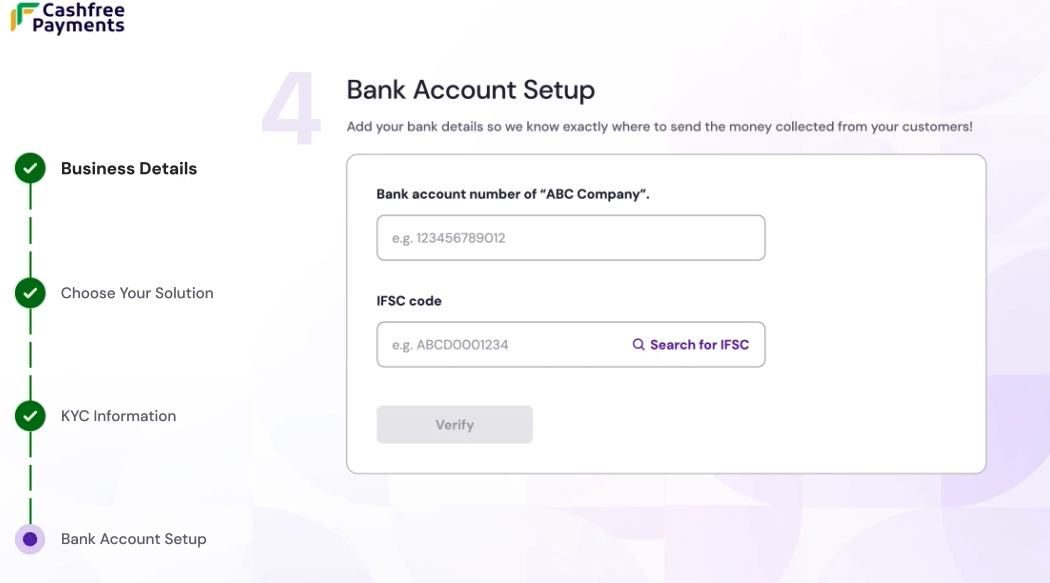
On the **Bank account setup** page, enter the company's **bank account number** and **IFSC code** to ensure settlements reach the correct account. Click **Verify** to validate the details.
The first transaction in newly opened accounts must be a credit from an existing KYC-complied bank account of the customer.
**Video KYC (V-CIP)** is a remote video call used to complete KYC for **individuals** or the **authorised signatory** when required.
* **When V-CIP is required**
* V-CIP is triggered if **Enhanced Due Diligence (EDD) fails**, or if additional supporting documents are still needed after EDD.
* **When V-CIP can be deferred**
* If **EDD is successful** and any requested documents are uploaded and verified, V-CIP is **not required** and can be deferred.
**Enhanced Due Diligence (EDD)** is an additional risk check performed before moving to V-CIP. EDD typically includes address verification, automated website and PAN checks, validation that the first transaction comes from an existing KYC-complied bank account, and review of email and phone communication trails. If these checks pass, the system relies on EDD and V-CIP is usually not required.
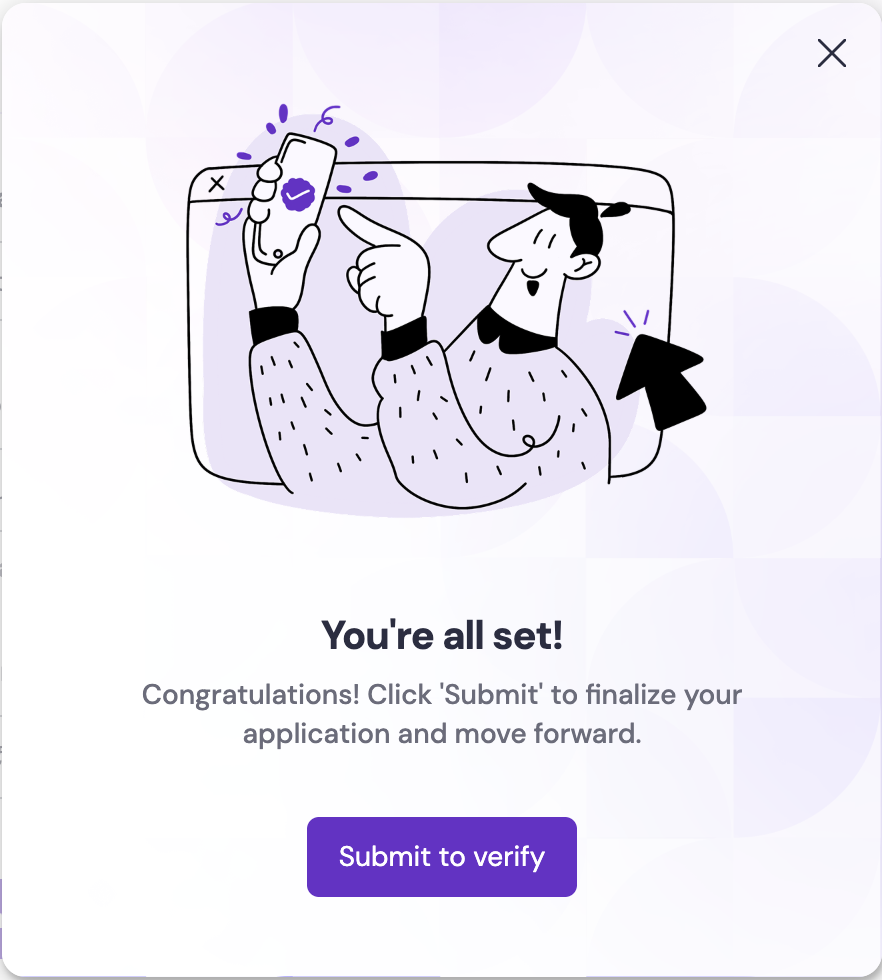
Select **Submit to verify** to finalise the application. After a brief verification process, you receive a confirmation, allowing you to start [integrating Cashfree Payments](/payments/overview) into your platform.
Account activation typically takes **24 working hours** after you submit all required documents, subject to compliance verification.
The video below highlights the detailed process of account creation.
### Explore test environment
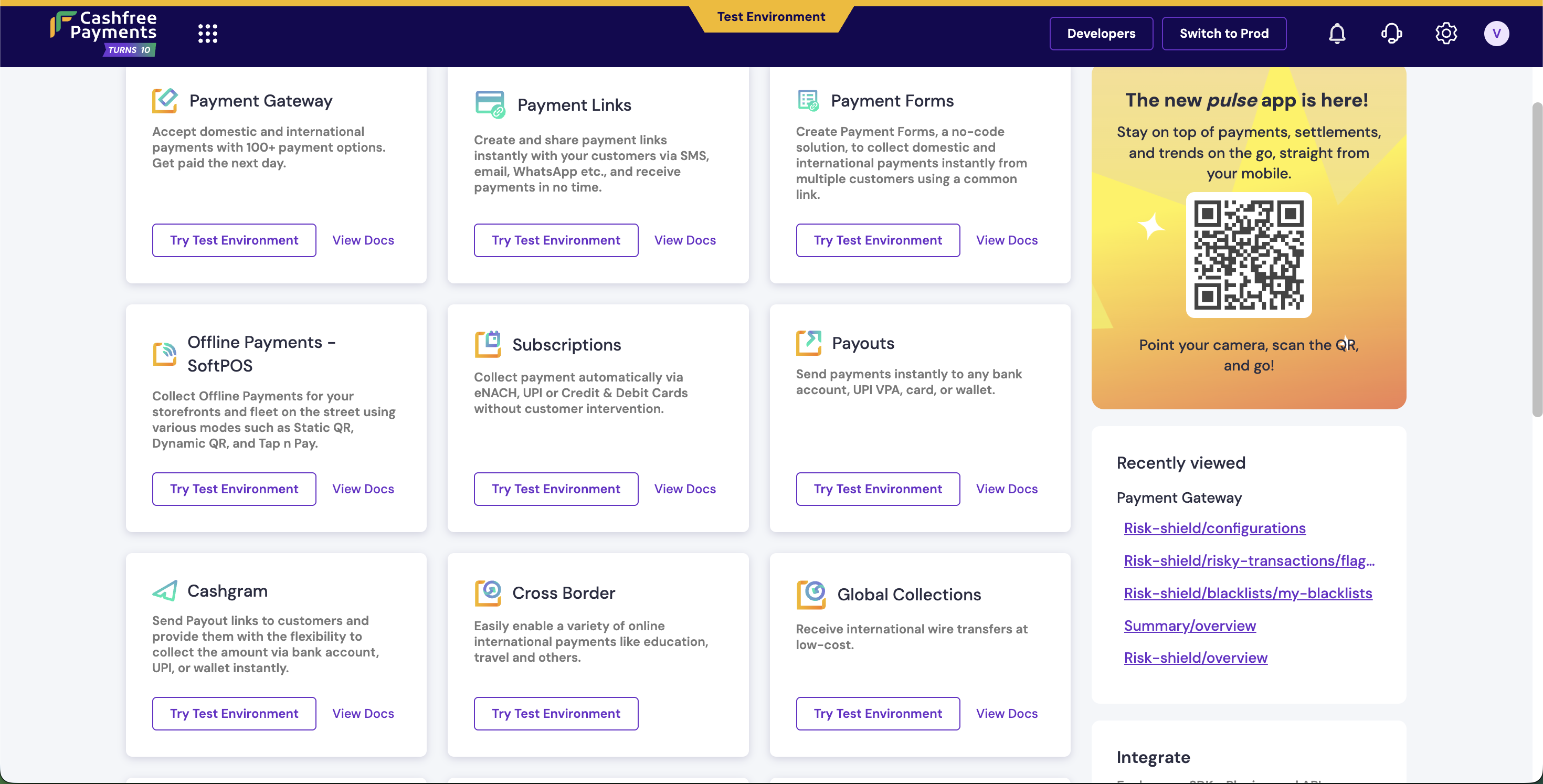
The test environment serves as a sandbox to explore and experiment with Cashfree Payments features without any financial impact. You can:
* Familiarise yourself with the dashboard interface.
* Explore integrations and read product documents.
* Test product features and simulate various payment scenarios.
* Verify workflows before going live.
Once you are confident with the setup in the test environment, you can activate your account to start processing real payments.
## Required documents
Account activation requires verification of the business and the identity of the person(s) who will operate it. Requirements vary by entity and line of business; see [Documents by entity type](#documents-by-entity-type) for the list that applies to your business.
### Business owner identification
Cashfree verifies the identity of the business owner or the person authorised to act for the business (authorised signatory) in one of these ways:
| Method | Description |
| :----------------------------------- | :----------------------------------------------------------------------------------------------------------------------------------------------------------------------------------------------------------------------------------------------------------------------------- |
| **Aadhaar OTP** | Cashfree sends a one-time password (OTP) to the mobile number linked to the Aadhaar. The merchant enters it to confirm identity. This is the most common method. |
| **Central KYC (CKYC)** | If KYC has already been completed with a bank or another regulated entity, details may be in the Central KYC registry. With consent, Cashfree fetches them so the merchant does not have to re-enter everything. Cashfree must attempt this for individuals as per guidelines. |
| **DigiLocker** | The merchant can sign in to their DigiLocker account and share Aadhaar or another government ID from there. Cashfree uses it to verify identity without a physical document upload. |
| **Manual (original valid document)** | If Aadhaar OTP, CKYC, or DigiLocker doesn’t work (e.g. mobile not linked, or technical issue), Cashfree accepts a certified copy of an original valid document such as a passport, voter ID, or driving licence. |
### Documents by line of business (LOB)
Additional documents are required based on the business category to determine the Merchant Category Code (MCC) and ownership.
| Category | Sub-category | Documents |
| :-------- | :------------------------------------ | :------------------------------------------- |
| SaaS | Software as a service (SaaS) | AOC for PCI-DSS compliance |
| SaaS | Food, health and beauty supplements | FSSAI |
| Education | Schools, colleges, vocational schools | UGC certificate/ICSE/CBSE/AICTE |
| Finance | Forex | FEMA registration, FFMC certificate |
| Finance | Payment service provider | PA PG licence, nodal account |
| Finance | Stock brokerage and trading | SEBI certificate |
| Finance | Lending | NBFCs or SLAs with RBI approved NBFCs |
| Utilities | Electric, gas, water | BBPS certificate |
| Travel | Tours and travel agencies | IATA certificate or IRCTC agency certificate |
### Website compliance
Cashfree automatically checks the merchant's website or app for:
| What is checked | Description |
| :---------------------- | :---------------------------------------------------------------------------------------------------------------------------------------------------------------- |
| Legal name match | Cashfree confirms that the business name on the site matches the one on the registration documents so the merchant's ownership or representation can be verified. |
| Business category (MCC) | Cashfree verifies that the stated business category is correct using automated checks. This helps apply the right rules for the industry. |
### Documents by entity type
Based on the business entity type, different documents are required. The sections below list what is needed for each entity; merchants may also need [extra documents by line of business](#documents-by-line-of-business-lob).
For a sole proprietor, the PAN’s fourth character is **P**. The items below are what is needed to verify the merchant and the business.
| Documents needed | Description |
| :-------------------------------- | :------------------------------------------------------------------------------------------------------------------------------------------------------------------------------------------------------------------------------------------------------------------------------------------------------------------------------------------------------------------------------------------------------- |
| **PAN or Form 60** | The personal Permanent Account Number (PAN) used for the business. If the merchant does not have a PAN, Form 60 (a declaration) is used instead as per tax rules. |
| **Bank details** | The bank account where settlements are to be received. The account must be in the name of the business owner. Cashfree needs the account number and IFSC to verify it. |
| **Aadhaar or Central KYC (CKYC)** | Identity is verified using Aadhaar (OTP sent to the linked mobile) or by pulling details from the Central KYC registry if KYC has already been completed with a bank or other regulated entity. Cashfree must attempt CKYC for individuals as per guidelines. |
| **Business proof** | If Cashfree's automated checks or address verification cannot confirm the business, at least **two** documents that show the business exists are required. Examples: GST registration, Udyam (MSME) certificate, Shop & Establishment licence, municipal or other local registration, tax returns, professional licence, IEC (import-export code), or any other government-issued business registration. |
If the merchant's details are in the Central KYC registry, Cashfree fetches them (including Aadhaar ID and permanent and current address where available) and fewer fields need to be filled. If not, Cashfree may ask for a short video call (Video KYC) to verify identity and address via DigiLocker or document upload.
For companies registered with the Ministry of Corporate Affairs, Cashfree verifies the company, the person who will operate the account (authorised signatory), and anyone with significant ownership (beneficial owners).
| Documents needed | Description |
| :-------------------------------------------------------------------- | :--------------------------------------------------------------------------------------------------------------------------------------------------------------------------------------------------------------------------------------------------------------------------------------------------------------- |
| **Business PAN** | The company’s Permanent Account Number (PAN). Cashfree uses it to fetch basic company details from government records. |
| **Certificate of Incorporation (CIN)** | The official document that shows the company was registered. Cashfree tries to fetch it automatically using the company PAN; if not available, the merchant may need to upload it. |
| **Memorandum of Association (MOA) and Articles of Association (AOA)** | The legal documents that define the company’s purpose, rules, and structure. Cashfree requires certified copies. They help confirm the company name, registered address, and who the directors and significant shareholders are. |
| **Board resolution or power of attorney** | A document from the company (on letterhead, signed by a director or company secretary) that authorises specific managers or officers to operate the Cashfree account on behalf of the company. A power of attorney can serve the same purpose if it clearly grants this authority. |
| **Authorised signatory identity** | The person who will operate the account must prove their identity. Cashfree accepts Aadhaar or PAN, and verifies them via Central KYC (CKYC), DigiLocker, or an uploaded copy of a valid ID (e.g. passport, voter ID, driving licence). |
| **Beneficial owners** | Anyone who holds a significant share or control in the company (as per RBI guidelines) must complete KYC. At least one beneficial owner must be verified for initial activation. Cashfree often prefills names from CKYC or from directors linked to the company PAN; the merchant confirms or adds anyone else. |
| **Address** | The company’s registered office address and, if different, the principal place of business. Cashfree uses this for verification and correspondence. |
Cashfree prefills directors and the person operating the account from company records and Central KYC when possible; then the merchant confirms or adds details. If not, the merchant will need to upload board resolution, power of attorney, and identity documents, and Cashfree may ask for a video call.
For LLPs and partnerships, Cashfree verifies the firm, the person who will operate the account, and the partners.
| Documents needed | Description |
| :-------------------------------- | :-------------------------------------------------------------------------------------------------------------------------------------------------------------------------------------------------------------- |
| **Business PAN** | The firm’s or LLP’s Permanent Account Number (PAN). |
| **LLPIN (for LLPs)** | The Limited Liability Partnership Identification Number. Cashfree fetches it automatically for LLPs where possible. |
| **Registration certificate** | Official proof that the LLP or partnership is registered with the relevant authority (e.g. Registrar of Firms), where applicable. |
| **Partnership deed** | The legal agreement between partners that sets out profit-sharing, roles, and other terms. It is mandatory for partnerships and helps Cashfree identify partners and the person authorised to act for the firm. |
| **Partner or signatory identity** | The designated partner or person who will operate the Cashfree account must prove their identity using Aadhaar or PAN, verified via Central KYC (CKYC), DigiLocker, or an uploaded ID. |
| **Partner KYC summary** | A list of all partners (or designated partners for LLPs) and any authorised signatories, with their KYC details completed as per standard individual verification requirements. |
Cashfree gets partner names from the deed and the person operating the account from Central KYC when available. If not, Cashfree may ask for the registration certificate and a video call to verify identity.
For trusts, societies, and NGOs Cashfree verifies the entity, the person authorised to operate the account, and key functionaries (e.g. trustees).
| Documents needed | Description |
| :-------------------------------- | :----------------------------------------------------------------------------------------------------------------------------------------------------------------------------------------------------------------------------------------------------------------------------------- |
| **Entity PAN or Form 60** | The trust’s, society’s, or NGO’s Permanent Account Number (PAN). If the entity doesn’t have a PAN, Form 60 is used as per tax rules. |
| **Authorised signatory identity** | The trustee, secretary, or other person who will operate the Cashfree account must prove their identity (Aadhaar or PAN) via Central KYC (CKYC), DigiLocker, or an uploaded ID. |
| **Entity documents** | **Trust:** Trust deed and, if the trust is registered, its registration certificate. **NGO or Society:** Registration certificate and, where applicable, 80G or 12A certificates (tax exemption documents). These help Cashfree confirm the entity’s name, purpose, and who runs it. |
| **Key persons and beneficiaries** | A list of trustees, key functionaries, and anyone else authorised to operate the account, with their KYC completed. For trusts, Cashfree may also need details of beneficiaries, settlor, or protector as per RBI KYC guidelines. |
When the person operating the account is in Central KYC, Cashfree fetches their details and usually no video call is needed. Otherwise Cashfree may ask for a video call and the registration certificate (if the trust or society is registered).
For associations or bodies of individuals that are not registered as a company, LLP, or society, Cashfree needs proof of the group’s existence and who can act for it.
| Documents needed | Description |
| :-------------------------- | :------------------------------------------------------------------------------------------------------------------------------------------------------------------------------------ |
| **Governing resolution** | A resolution or decision from the managing body (e.g. committee) that authorises the relationship with Cashfree and names the person(s) who can operate the account. |
| **PAN or Form 60** | The PAN (or Form 60 if no PAN) in the name of the association or body of individuals. |
| **Power of attorney** | A document that authorises specific persons to carry out transactions and represent the association or body with Cashfree. |
| **Authorised persons’ KYC** | Identity and address verification for the beneficial owners, managers, officers, or employees who are authorised to operate the account, as per standard individual KYC requirements. |
| **Existence documents** | Any documents that together establish that the association or body exists and how it is structured (e.g. constitution, rules, or registration with a government or regulatory body). |
Cashfree verifies the person authorised to act for the body; if their details are in Central KYC the process is simpler. Otherwise Cashfree may ask for a video call and documents such as the governing resolution, power of attorney, identity proof of the person authorised to act, or documents that establish the body’s existence.
Entities such as local authorities, universities, or other legal persons created by law need to show who can act for them and that the entity exists.
| Documents needed | Description |
| :-------------------------- | :----------------------------------------------------------------------------------------------------------------------------------------------------------- |
| **Authorisation documents** | Documents that state the name of the person authorised to act on behalf of the entity and the scope of their authority (e.g. what they can sign or approve). |
| **Authorised person’s KYC** | Identity and address verification for that person, in line with standard individual KYC requirements. |
| **Existence documents** | Official documents that prove the entity exists—for example, registration or establishment acts, government notifications, or equivalent documents. |
Identity of the person authorised to act is verified via Central KYC, DigiLocker, or document upload. If Cashfree cannot verify them automatically, a video call and documents such as authorisation proof and identity or existence documents may be requested.
A Hindu Undivided Family is a legal entity under Hindu law, comprising the family and its property. The **Karta** is the head of the HUF and typically manages its affairs.
| Documents needed | Description |
| :-------------------------- | :-------------------------------------------------------------------------------------------------------------------------------------------------------------- |
| **HUF PAN** | The Permanent Account Number (PAN) of the HUF as an entity. It is mandatory for the HUF to have its own PAN. |
| **Karta PAN** | The PAN of the person who is the Karta (head) of the HUF. Cashfree uses this to verify the person managing the HUF. |
| **Bank details** | The HUF’s bank account number and IFSC code. Settlements will be credited to this account. |
| **Aadhaar of Karta** | The Karta’s Aadhaar number. Cashfree verifies it by sending an OTP to the mobile number linked to that Aadhaar. |
| **HUF registration proof** | A document that proves the HUF exists—typically the HUF deed, or a letter from the tax authority recognising the HUF. |
| **Identity proof of Karta** | A copy of a valid ID for the Karta: Aadhaar, driving licence, voter ID, or passport. This supports the KYC Cashfree performs for the person acting for the HUF. |
When the Karta’s details are in Central KYC Cashfree fetches them and fewer steps are required. If not, Cashfree may ask for a video call and the HUF deed.
 The remaining steps on the **KYC information** page vary based on the business structure:
 * **CKYC verification flow**: If CKYC verification is chosen, follow the steps below to complete it:
 * Municipal certificate
* Udyog Aadhaar
* Shop & Establishment certificate
* Other government-issued registration proofs
* Municipal certificate
* Udyog Aadhaar
* Shop & Establishment certificate
* Other government-issued registration proofs
 ## Required documents
Account activation requires verification of the business and the identity of the person(s) who will operate it. Requirements vary by entity and line of business; see [Documents by entity type](#documents-by-entity-type) for the list that applies to your business.
### Business owner identification
Cashfree verifies the identity of the business owner or the person authorised to act for the business (authorised signatory) in one of these ways:
| Method | Description |
| :----------------------------------- | :----------------------------------------------------------------------------------------------------------------------------------------------------------------------------------------------------------------------------------------------------------------------------- |
| **Aadhaar OTP** | Cashfree sends a one-time password (OTP) to the mobile number linked to the Aadhaar. The merchant enters it to confirm identity. This is the most common method. |
| **Central KYC (CKYC)** | If KYC has already been completed with a bank or another regulated entity, details may be in the Central KYC registry. With consent, Cashfree fetches them so the merchant does not have to re-enter everything. Cashfree must attempt this for individuals as per guidelines. |
| **DigiLocker** | The merchant can sign in to their DigiLocker account and share Aadhaar or another government ID from there. Cashfree uses it to verify identity without a physical document upload. |
| **Manual (original valid document)** | If Aadhaar OTP, CKYC, or DigiLocker doesn’t work (e.g. mobile not linked, or technical issue), Cashfree accepts a certified copy of an original valid document such as a passport, voter ID, or driving licence. |
### Documents by line of business (LOB)
Additional documents are required based on the business category to determine the Merchant Category Code (MCC) and ownership.
| Category | Sub-category | Documents |
| :-------- | :------------------------------------ | :------------------------------------------- |
| SaaS | Software as a service (SaaS) | AOC for PCI-DSS compliance |
| SaaS | Food, health and beauty supplements | FSSAI |
| Education | Schools, colleges, vocational schools | UGC certificate/ICSE/CBSE/AICTE |
| Finance | Forex | FEMA registration, FFMC certificate |
| Finance | Payment service provider | PA PG licence, nodal account |
| Finance | Stock brokerage and trading | SEBI certificate |
| Finance | Lending | NBFCs or SLAs with RBI approved NBFCs |
| Utilities | Electric, gas, water | BBPS certificate |
| Travel | Tours and travel agencies | IATA certificate or IRCTC agency certificate |
### Website compliance
Cashfree automatically checks the merchant's website or app for:
| What is checked | Description |
| :---------------------- | :---------------------------------------------------------------------------------------------------------------------------------------------------------------- |
| Legal name match | Cashfree confirms that the business name on the site matches the one on the registration documents so the merchant's ownership or representation can be verified. |
| Business category (MCC) | Cashfree verifies that the stated business category is correct using automated checks. This helps apply the right rules for the industry. |
### Documents by entity type
Based on the business entity type, different documents are required. The sections below list what is needed for each entity; merchants may also need [extra documents by line of business](#documents-by-line-of-business-lob).
## Required documents
Account activation requires verification of the business and the identity of the person(s) who will operate it. Requirements vary by entity and line of business; see [Documents by entity type](#documents-by-entity-type) for the list that applies to your business.
### Business owner identification
Cashfree verifies the identity of the business owner or the person authorised to act for the business (authorised signatory) in one of these ways:
| Method | Description |
| :----------------------------------- | :----------------------------------------------------------------------------------------------------------------------------------------------------------------------------------------------------------------------------------------------------------------------------- |
| **Aadhaar OTP** | Cashfree sends a one-time password (OTP) to the mobile number linked to the Aadhaar. The merchant enters it to confirm identity. This is the most common method. |
| **Central KYC (CKYC)** | If KYC has already been completed with a bank or another regulated entity, details may be in the Central KYC registry. With consent, Cashfree fetches them so the merchant does not have to re-enter everything. Cashfree must attempt this for individuals as per guidelines. |
| **DigiLocker** | The merchant can sign in to their DigiLocker account and share Aadhaar or another government ID from there. Cashfree uses it to verify identity without a physical document upload. |
| **Manual (original valid document)** | If Aadhaar OTP, CKYC, or DigiLocker doesn’t work (e.g. mobile not linked, or technical issue), Cashfree accepts a certified copy of an original valid document such as a passport, voter ID, or driving licence. |
### Documents by line of business (LOB)
Additional documents are required based on the business category to determine the Merchant Category Code (MCC) and ownership.
| Category | Sub-category | Documents |
| :-------- | :------------------------------------ | :------------------------------------------- |
| SaaS | Software as a service (SaaS) | AOC for PCI-DSS compliance |
| SaaS | Food, health and beauty supplements | FSSAI |
| Education | Schools, colleges, vocational schools | UGC certificate/ICSE/CBSE/AICTE |
| Finance | Forex | FEMA registration, FFMC certificate |
| Finance | Payment service provider | PA PG licence, nodal account |
| Finance | Stock brokerage and trading | SEBI certificate |
| Finance | Lending | NBFCs or SLAs with RBI approved NBFCs |
| Utilities | Electric, gas, water | BBPS certificate |
| Travel | Tours and travel agencies | IATA certificate or IRCTC agency certificate |
### Website compliance
Cashfree automatically checks the merchant's website or app for:
| What is checked | Description |
| :---------------------- | :---------------------------------------------------------------------------------------------------------------------------------------------------------------- |
| Legal name match | Cashfree confirms that the business name on the site matches the one on the registration documents so the merchant's ownership or representation can be verified. |
| Business category (MCC) | Cashfree verifies that the stated business category is correct using automated checks. This helps apply the right rules for the industry. |
### Documents by entity type
Based on the business entity type, different documents are required. The sections below list what is needed for each entity; merchants may also need [extra documents by line of business](#documents-by-line-of-business-lob).