> ## Documentation Index
> Fetch the complete documentation index at: https://www.cashfree.com/docs/llms.txt
> Use this file to discover all available pages before exploring further.
# Embedded Merchant Onboarding for Platforms
> Enable your platform to onboard and activate merchants on Cashfree without leaving your interface using embedded KYC collection and verification workflows.
Integrate Cashfree's merchant onboarding APIs and embedded link to collect KYC information and verify merchants directly within your platform. Businesses that onboard through your platform are registered as merchants in Cashfree's system and linked to your partner account.
## Prerequisites
Before integrating merchant onboarding with Cashfree, ensure the following:
* **Register as a partner**: Register your platform as a partner with Cashfree. [Contact Cashfree support](https://merchant.cashfree.com/merchants/landing?env=prod\&raise_issue=1) to initiate the partnership process.
* **Obtain partner API key**: Log in to the [Partner Dashboard](https://partner.cashfree.com/auth/login) and navigate to **Developers** to generate your partner API key. You will use this key to authenticate all API requests.
* **Plan your data structure**: Determine which KYC fields your platform will collect upfront and which will be completed via the embedded link.
* **Prepare your hosting environment**: Ensure your platform can embed iframes or webviews to display the Cashfree onboarding link.
* **Configure webhook URL**: Provide a valid webhook URL where Cashfree will send merchant status notifications.
## Integration flow
Use the following steps to complete embedded merchant onboarding for your platform:
1. [Create a merchant profile in Cashfree](#step-1-create-a-merchant)
2. [Update merchant details as information becomes available](#step-2-update-merchant-details)
3. [Upload KYC documents for verification](#step-3-upload-kyc-documents)
4. [Generate and display the embeddable onboarding link](#step-4-generate-the-embeddable-onboarding-link)
5. [Monitor merchant onboarding status through APIs](#step-5-monitor-merchant-status)
6. [Subscribe to onboarding webhooks for status updates](#step-6-subscribe-to-merchant-onboarding-webhooks)
## Step 1: Create a merchant
Create a merchant record in Cashfree using the [Create Merchant API](/api-reference/platforms/latest/merchant-onboarding/create-merchant) with the merchant's core information.
{`curl --location 'https://api.cashfree.com/partners/merchants' \\
--header 'x-api-version: 2023-01-01' \\
--header 'x-partner-apikey: ' \\
--header 'Content-Type: application/json' \\
--data-raw '{
"merchant_id": "mohit_bav_testmid9",
"merchant_email": "mohit.jasapara+bavtestmid9@cashfree.com",
"merchant_name": "John Doe",
"poc_phone": "9999999999",
"merchant_site_url": "https://www.merchantwebsite.com",
"business_details": {
"business_legal_name": "Business Name",
"business_type": "Individual",
"business_pan": "ABCPV1234D",
"business_address": "Flat-101, Apartment Name, Street Name",
"business_city": "Bengaluru",
"business_state": "Karnataka",
"business_postalcode": "560076",
"business_model": "B2C",
"business_category": "Ecommerce/Retail",
"business_subcategory": "Books",
"business_non_gst_declaration": "My annual turnover is less than GST prescribed limit"
},
"website_details": {
"website_contact_us": "https://www.merchantwebsite.com/",
"website_privacy_policy": "https://www.merchantwebsite.com/privacypolicy/",
"website_refund_policy": "https://www.merchantwebsite.com/policies/refund-policy",
"website_shop_delivery": "https://www.merchantwebsite.com/policies/shipping-policy",
"website_checkout_page": "https://www.merchantwebsite.com/",
"website_about_us": "https://www.merchantwebsite.com/about-us/",
"website_pricing_policy": "https://www.merchantwebsite.com/payment-gateway-charges/",
"website_product_service": "https://www.merchantwebsite.com/payment-gateway-india/",
"website_address": "https://www.merchantwebsite.com/grievance-redressal-policy",
"website_tnc": "https://www.merchantwebsite.com/tnc/"
},
"bank_account_details": {
"bank_account_number": "001901029342",
"bank_ifsc": "ICIC0001728"
},
"signatory_details": {
"signatory_name": "John Doe",
"signatory_pan": "ABCPV1234D"
},
"additional_details": {
"payment_gateway_use_case": "Payment Gateway required for collecting money from customers for purchasing books",
"payment_gateway_mcc": "5942"
}
}'`}
{`{
"merchant_id": "test_merchantid_1",
"merchant_email": "john@cashfree.com",
"merchant_name": "John Doe Business",
"created_at": "2023-07-24T04:45:20.000Z",
"onboarding_status": "Email Verified",
"product_status": [
{
"product_name": "PG",
"product_min_kyc_status": "MIN_KYC_PENDING"
}
]
}`}
Store the `merchant_id` for use in subsequent API calls.
## Step 2: Update merchant details
Use the [Update Merchant API](/api-reference/platforms/latest/merchant-onboarding/update-merchant) to update a sub-merchant account's profile. You can update basic merchant details before the account is activated. Once active, most profile fields are locked and cannot be modified via API.
{`curl --location --request PUT 'https://api.cashfree.com/partners/merchants/' \\
--header 'x-api-version: 2023-01-01' \\
--header 'x-partner-apikey: ' \\
--header 'Content-Type: application/json' \\
--data-raw '{
"business_details": {
"business_gstin": "29AAICP2912R1ZR",
"business_cin": "U72900KA2015PTC082989"
}
}'`}
{`{
"merchant_id": "test_merchantid_1",
"merchant_email": "john@cashfree.com",
"merchant_name": "John Doe Business",
"created_at": "2023-07-24T04:45:20.000Z",
"onboarding_status": "Email Verified",
"product_status": [
{
"product_name": "PG",
"product_min_kyc_status": "MIN_KYC_PENDING"
}
]
}`}
## Step 3: Upload KYC documents
Upload KYC documents via the [Upload KYC Documents API](/api-reference/platforms/latest/merchant-onboarding/upload-documents) as they become available.
{`curl --location --request POST 'https://api.cashfree.com/partners/merchants//documents' \\
--header 'x-api-version: 2023-01-01' \\
--header 'x-partner-apikey: ' \\
--form 'document_type="BANK_STATEMENT"' \\
--form 'file=@/path/to/document.pdf'`}
{`{
"document_type": "bank_statement",
"uploaded_on": "2006-01-02T15:04:05-0700"
}`}
The `document_type` field accepts the following values;
* `PAN`
* `AADHAAR`
* `GSTIN`
* `CIN`
* `BANK_STATEMENT`
## Step 4: Generate the embeddable onboarding link
Generate an embeddable onboarding link for merchants to complete remaining KYC and Aadhaar verification using the [Create Embeddable Onboarding Link API](/api-reference/platforms/latest/merchant-onboarding/create-embeddable-onboarding-link-does-not-require-login).
{`curl --location 'https://api.cashfree.com/partners/merchants//onboarding-link' \\
--header 'x-api-version: 2023-01-01' \\
--header 'x-partner-apikey: ' \\
--header 'Content-Type: application/json' \\
--data '{
"return_url": "https://yourplatform.com/merchant/dashboard"
}'`}
{`{
"onboarding_link": "https://merchant.cashfree.com/onboarding?token=..."
}`}
The `onboarding_link` expires after 1 hour. Embed it in an iframe or webview do not expose it to end users as a direct URL.
After the merchant completes onboarding, Cashfree redirects them to your configured `return_url`.
## Step 5: Monitor merchant status
Query merchant status using the [Get Merchant Status API](/api-reference/platforms/latest/merchant-onboarding/get-merchant-status):
{`curl --location 'https://api.cashfree.com/partners/merchants/' \\
--header 'x-api-version: 2023-01-01' \\
--header 'x-partner-apikey: '`}
{`{
"merchant_id": "test_merchantid_1",
"merchant_email": "john@cashfree.com",
"merchant_name": "John Doe Business",
"created_at": "2023-07-24T04:45:20.000Z",
"onboarding_status": "Email Verified",
"product_status": [
{
"product_name": "PG",
"product_min_kyc_status": "MIN_KYC_PENDING"
}
]
}`}
Use the `onboarding_status` field to track merchant onboarding progress:
* `CREATED`: Onboarding started but not completed.
* `ACTIVE`: Merchant can process payments.
* `REJECTED`: Merchant onboarding rejected.
* `SUSPENDED`: Merchant account suspended.
## Step 6: Subscribe to merchant onboarding webhooks
Subscribe to merchant onboarding webhooks using the [Merchant Onboarding Webhooks API](/api-reference/platforms/latest/merchant-onboarding/webhooks) to receive real-time notifications of status changes. Configure your webhook URL in the [Partner Dashboard](https://partner.cashfree.com/auth/login) under **Developers > Webhooks**.
The webhook event types include the following:
* `merchant.onboarding.completed`: Merchant onboarding completed successfully.
* `merchant.onboarding.rejected`: Merchant onboarding was rejected by Cashfree.
* `merchant.onboarding.status_changed`: Merchant onboarding status has changed.
Verify webhook signatures using your partner API key before processing events. This prevents unauthorised requests from external sources.
## Identify business type using PAN
The fourth letter of the Permanent Account Number (PAN) identifies the entity type of the account holder.
For example, for the PAN: **ABCPR1234A**, the fourth letter is **P**, which identifies the account holder as an **individual** or **proprietorship**.
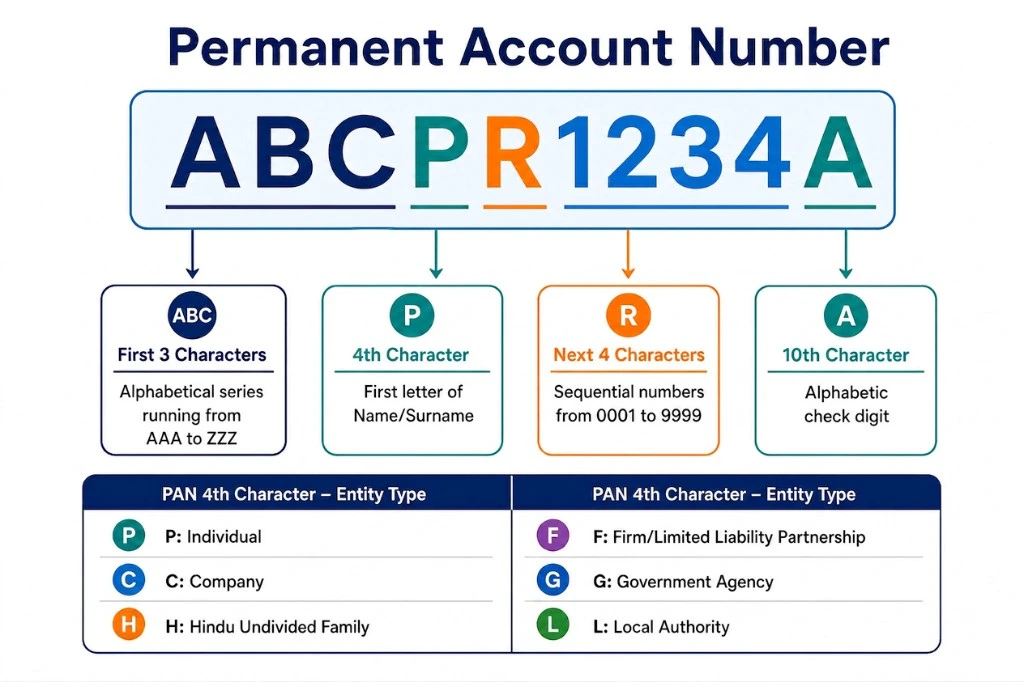 Use the following table to determine the correct `business_type` value for the merchant:
| Fourth letter of the PAN | business\_type |
| ------------------------ | ------------------------------- |
| P | Individual, Proprietorship |
| C | Private Limited, Public Limited |
| F | LLP, Partnership |
| T | Trust |
| H | Hindu Undivided Family (HUF) |
| A | Association of Persons (AOP) |
| B | Society |
| L | Local Authority |
| J | Artificial Juridical Person |
| G | Government |
## Test in sandbox
Use the following test credentials to test the onboarding flow end-to-end in the sandbox environment.
Use the following test credentials to validate the individual or proprietor onboarding flow in the sandbox environment:
| Field | Test value |
| ------------------------ | ---------------------------------------------------- |
| **Business PAN** | ABCPV1234D |
| **Business Legal Name** | John Doe |
| **Business Type** | Individual |
| **Business Model** | B2C |
| **Business Category** | Ecommerce/Retail |
| **Business Subcategory** | Other goods |
| **MCC** | 5199 |
| **Non-GST Declaration** | My annual turnover is less than GST prescribed limit |
| **Business Address** | Trial Address |
| **City/PIN/State** | Mumbai / 400067 / Maharashtra |
| **Aadhaar Number** | 655675523712 |
| **Aadhaar OTP** | 111000 |
| **Bank Account** | 026291800001191 |
| **Bank IFSC** | YESB0000262 |
Use the following test credentials to validate the private or public limited onboarding flow in the sandbox environment:
| Field | Test value |
| -------------------------------- | ---------------------------------------------------- |
| **Business PAN** | ABCCD8000T |
| **Business Legal Name** | John Doe Industries |
| **Owner PAN** | ABCPV1234D |
| **Owner Name as per PAN** | John Doe |
| **Business Type** | Private Limited |
| **Business Description** | I want to use payment gateway to collect payments... |
| **MCC** | 5199 |
| **Country** | India |
| **Business Non-GST Declaration** | My business category is exempted from GST |
| **CIN** | U72900KA2015PTC082989 |
| **GSTIN** | 29AAICP2912R1ZR |
| **Business Address** | Trial Address |
| **City/PIN/State** | Mumbai / 400067 / Maharashtra |
| **Aadhaar Number** | 655675523712 |
| **Aadhaar OTP** | 111000 |
| **Bank Account** | 026291800001191 |
| **Bank IFSC** | YESB0000262 |
## Production deployment
Before deploying to production, update your API endpoint and credentials:
| Environment | API endpoint |
| -------------- | ---------------------------------- |
| **Sandbox** | `https://api-sandbox.cashfree.com` |
| **Production** | `https://api.cashfree.com` |
Use the following table to determine the correct `business_type` value for the merchant:
| Fourth letter of the PAN | business\_type |
| ------------------------ | ------------------------------- |
| P | Individual, Proprietorship |
| C | Private Limited, Public Limited |
| F | LLP, Partnership |
| T | Trust |
| H | Hindu Undivided Family (HUF) |
| A | Association of Persons (AOP) |
| B | Society |
| L | Local Authority |
| J | Artificial Juridical Person |
| G | Government |
## Test in sandbox
Use the following test credentials to test the onboarding flow end-to-end in the sandbox environment.
Use the following test credentials to validate the individual or proprietor onboarding flow in the sandbox environment:
| Field | Test value |
| ------------------------ | ---------------------------------------------------- |
| **Business PAN** | ABCPV1234D |
| **Business Legal Name** | John Doe |
| **Business Type** | Individual |
| **Business Model** | B2C |
| **Business Category** | Ecommerce/Retail |
| **Business Subcategory** | Other goods |
| **MCC** | 5199 |
| **Non-GST Declaration** | My annual turnover is less than GST prescribed limit |
| **Business Address** | Trial Address |
| **City/PIN/State** | Mumbai / 400067 / Maharashtra |
| **Aadhaar Number** | 655675523712 |
| **Aadhaar OTP** | 111000 |
| **Bank Account** | 026291800001191 |
| **Bank IFSC** | YESB0000262 |
Use the following test credentials to validate the private or public limited onboarding flow in the sandbox environment:
| Field | Test value |
| -------------------------------- | ---------------------------------------------------- |
| **Business PAN** | ABCCD8000T |
| **Business Legal Name** | John Doe Industries |
| **Owner PAN** | ABCPV1234D |
| **Owner Name as per PAN** | John Doe |
| **Business Type** | Private Limited |
| **Business Description** | I want to use payment gateway to collect payments... |
| **MCC** | 5199 |
| **Country** | India |
| **Business Non-GST Declaration** | My business category is exempted from GST |
| **CIN** | U72900KA2015PTC082989 |
| **GSTIN** | 29AAICP2912R1ZR |
| **Business Address** | Trial Address |
| **City/PIN/State** | Mumbai / 400067 / Maharashtra |
| **Aadhaar Number** | 655675523712 |
| **Aadhaar OTP** | 111000 |
| **Bank Account** | 026291800001191 |
| **Bank IFSC** | YESB0000262 |
## Production deployment
Before deploying to production, update your API endpoint and credentials:
| Environment | API endpoint |
| -------------- | ---------------------------------- |
| **Sandbox** | `https://api-sandbox.cashfree.com` |
| **Production** | `https://api.cashfree.com` |