Cashfree’s Reverse Geocoding allows businesses to retrieve verified address details from latitude and longitude coordinates in real-time, helping match a user’s physical location with their declared address during KYC, insurance verification, and other location-based workflows. Reverse Geocoding provides structured address details like city, state, and PIN code, along with an accuracy score in percentage. It delivers real-time address data for verification and geo-tagging. Merchants can seamlessly integrate address verification into onboarding, fraud detection, and compliance processes for accurate location validation.

Why choose Cashfree

Reverse Geocoding offers the following key advantages:
  • Real-time address mapping: Instantly convert latitude and longitude to structured address details, including city, state, and PIN code.
  • Seamless integration: Easily integrate into your workflows for automated address verification and geo-tagging.
  • High accuracy and reliability: Ensure accurate address mapping, minimising errors and helping with regulatory compliance.

Use cases

Reverse Geocoding can be used across multiple industries for compliance, fraud prevention, and operational accuracy:
Business typeUse case
Fintech and bankingGeo-tag live photos and official documents during KYC to confirm user presence at the stated address.
InsuranceVerify the location of incidents, such as a car accident, by converting coordinates from a mobile app into a verifiable street address.
Lending and investment platformsDetect suspicious transactions by comparing a user’s live GPS location with their registered address.
Ride-sharing and on-demand servicesIdentify the nearest street address or landmark to a user’s GPS location for precise pickups and drop-offs.

Verify reverse geocoding

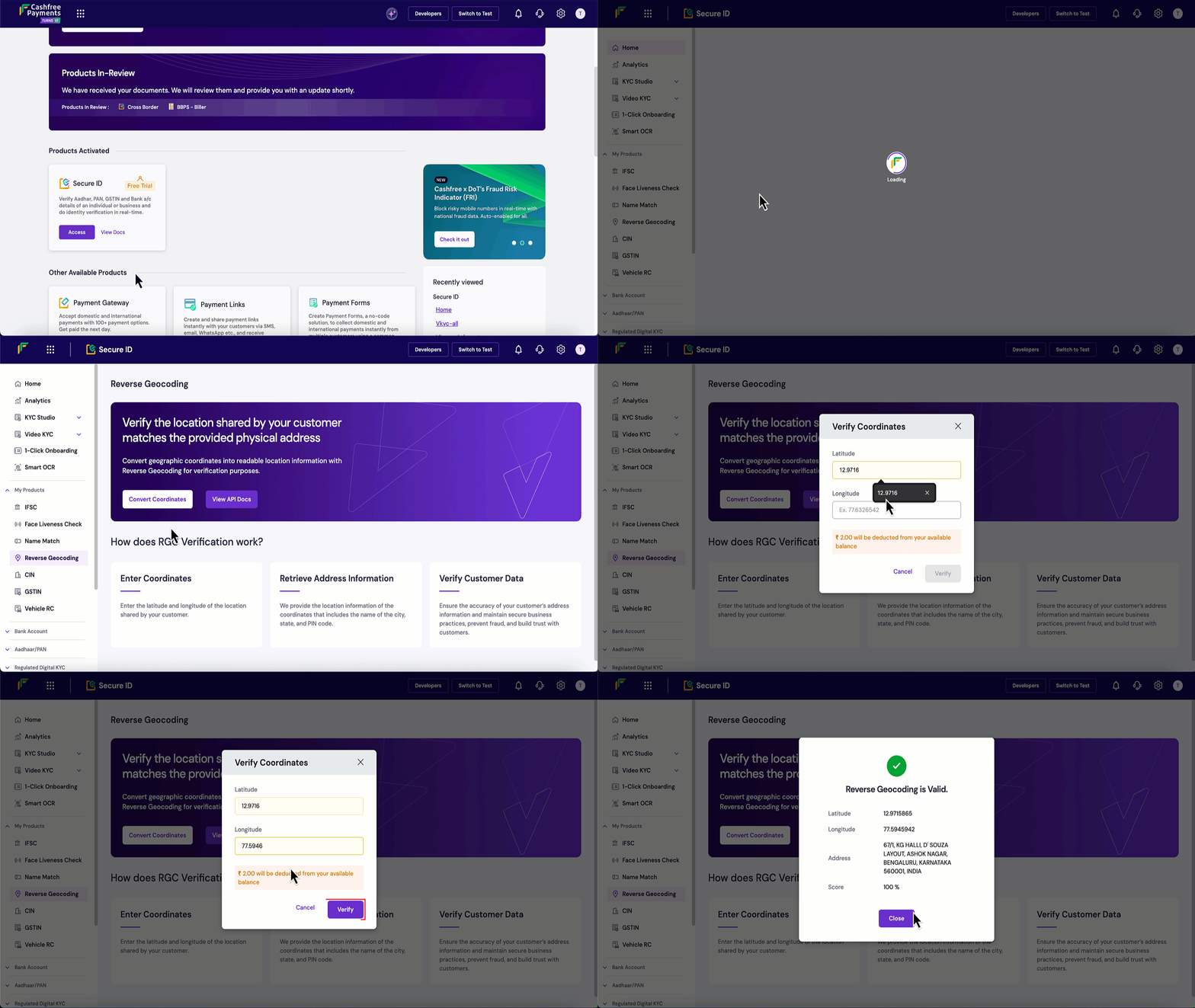
Follow these steps to verify address details in the Merchant Dashboard:
  1. Log in to the Merchant Dashboard.
  2. Go to Secure ID Dashboard > My Products > Reverse Geocoding.
  3. Click Convert Coordinates.
  4. Enter the latitude and longitude coordinates.
  5. Click Verify to retrieve the structured address with accuracy and landmark details.
You can use the Reverse Geocoding API to verify addresses and map GPS coordinates to precise physical locations.