Cashfree Payments Developer Documentation home page
Search or ask...
⌘K
Ask AI
Discord
Create Account
Create Account
Search...
Navigation
Reports
Bank Validation
Payments
Payouts
Secure ID
Partners and Platforms
Payments APIs
Payouts APIs
Secure ID APIs
Additional APIs
Partners APIs
Additional APIs
API Reference
AI and Tools
Help Center
Secure ID
Introduction
Get Started
KYC Stack
Know Your Business
Video KYC
DigiLocker/Aadhaar
1-Click Onboarding
Smart OCR
Officially Valid Documents
E-Sign
Account Aggregator
Biometric KYC
Address Verification
Reports
Bank Validation
PAN Verification
Aadhaar Verification
GSTIN Verification
Reports
Bank Validation
OpenAI
Open in ChatGPT
OpenAI
Open in ChatGPT
The Bank Validation report gives you information about all the bank account details you have verified. You can download the report to view account status, validation details, and more.
To view the bank accounts validation report,
Log in to the
Merchant Dashboard
.
Go to
Secure ID Dashboard
>
Reports
> select
Bank Validation
in the
Report Type
field.
Click
Generate Report
.
Specify a name for the report if you want it to be different from the one suggested.
Select the required File Format, .csv and .xls are supported.
Specify the
Date Range
for which you want to view the report.
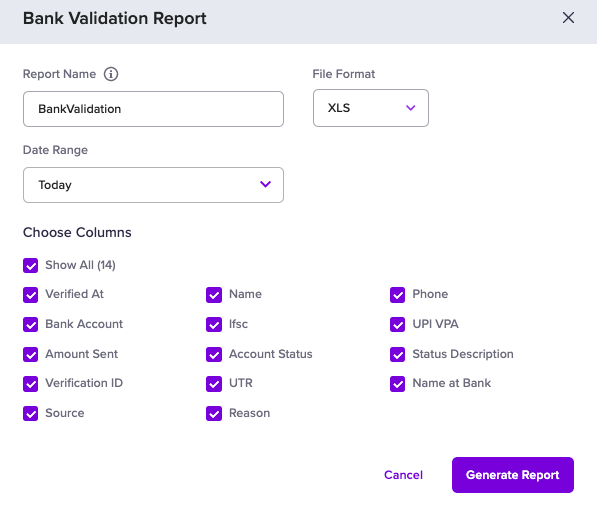
Select the details you want to include in the report, as shown below.
Click
Generate
. The generated report will be available for download in the
Reports
section.
Related topics
Bank Account Verification
Bank Account Verification API
PAN Verification Report
Aadhaar Verification Report
Was this page helpful?
Yes
No
Geocoding
PAN Verification
⌘I