

Use cases
Use GSTIN verification across industries to ensure compliance and streamline onboarding:Verification process
You can verify GSTIN through two primary methods: the merchant dashboard for manual verification or the REST API for programmatic integration.- Dashboard verification
- API verification
Use the merchant dashboard for quick manual GSTIN verification: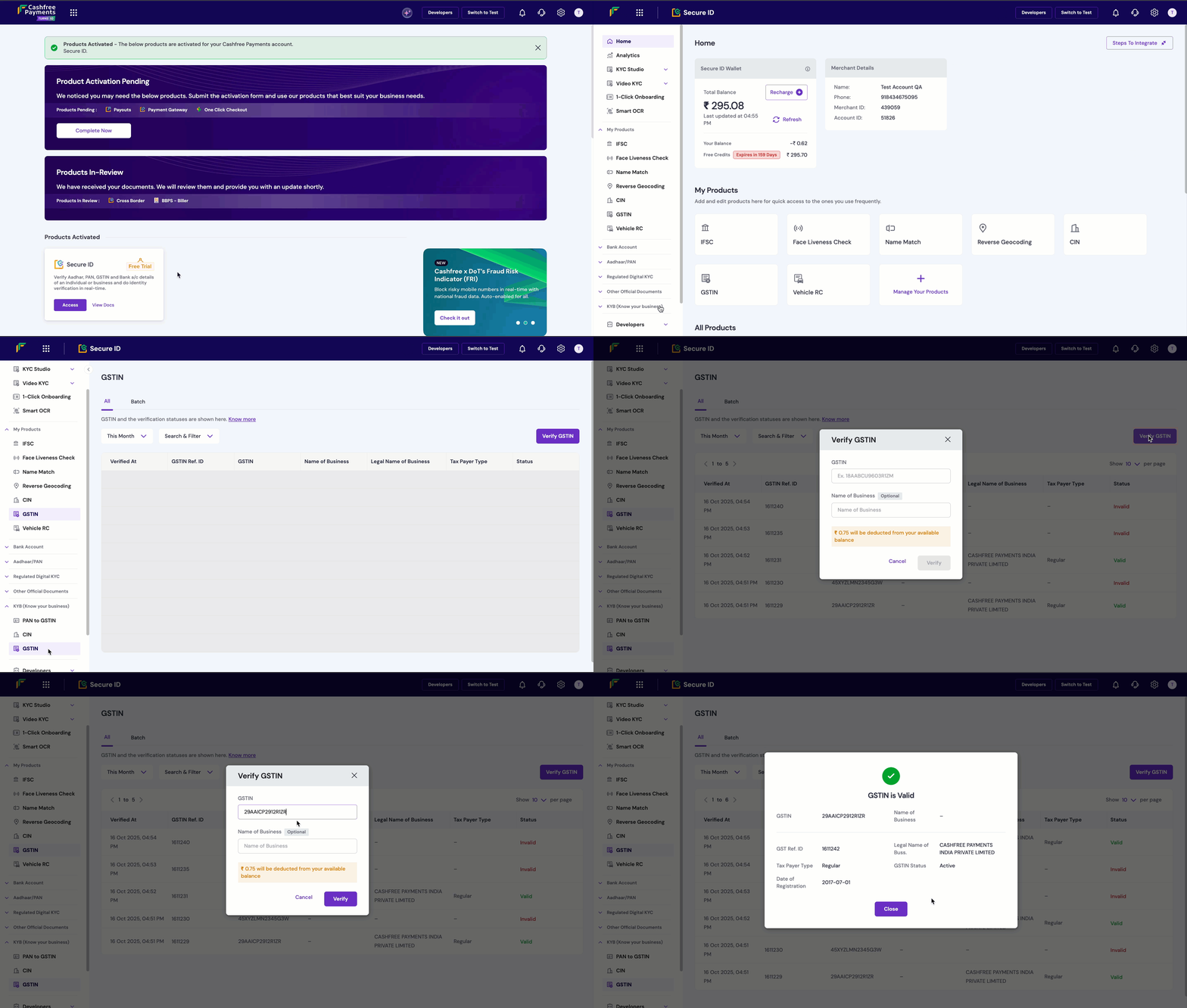
- Log in to the Merchant Dashboard.
- Navigate to Secure ID > KYB (Know Your Business) > GSTIN.
- Select Verify GSTIN, enter the GSTIN and business name (optional).
- Click Verify to get instant results.
Use the GSTIN Verification API for programmatic integration into your applications.
Understanding GSTIN format
The 15-digit GSTIN follows a structured format that encodes key business information:- Format Structure
- State Codes
Pattern:
[State Code][PAN][Registration Sequence][Check Digit]Example: 09ABCDE1234F1Z5Best practices
Follow these recommendations to optimise your GSTIN verification implementation and ensure reliable business validation:- Regular verification: Re-verify GSTINs periodically as registration status can change over time.
- Cross-reference data: Use GSTIN verification alongside other KYB verification methods for comprehensive business validation.
- Monitor status changes: Check for GSTIN status changes before processing transactions to avoid compliance issues.
- Maintain records: Store verification records for compliance and audit purposes as required by regulatory frameworks.
- Validate format: Ensure GSTIN follows the correct 15-digit format before making API calls to avoid unnecessary requests.
- Handle errors gracefully: Implement robust error handling for invalid, inactive, or temporarily unavailable GSTIN data.
- Cache results: Store verification results temporarily to reduce API calls for repeated checks of the same GSTIN.
- Set timeouts: Configure appropriate API timeout values to handle network latency and server response delays.
FAQs
What are the details that I will be able to see on verifying the GSTIN of an entity?
What are the details that I will be able to see on verifying the GSTIN of an entity?
The system will return whether the GSTIN is valid or not along with the following details (if valid):
- The legal name of the business
- GSTIN status
- Taxpayer type
- Date of registration
- GSTIN
- Nature of business
-
Business principal address
Is there any limit to the number of GSTINs that can be verified in a day?
Is there any limit to the number of GSTINs that can be verified in a day?
No, there is no limit to the number of GST numbers that can be verified in a day.
Can I verify the GSTIN by just knowing the name of the person?
Can I verify the GSTIN by just knowing the name of the person?
No, to verify a GSTIN, it is mandatory to enter the GST number.
Which businesses can benefit from GSTIN verification?
Which businesses can benefit from GSTIN verification?
With GSTIN verification, businesses can now verify the GST number of an entity instantly. The following businesses can benefit from this feature:
- Ecommerce marketplaces
- B2B Reseller Companies
- B2B Ecommerce
- Tax processing and return filing platforms
- Lending and micro-financing platforms
- Insurance providers
- Banks
-
Identity verification companies
Do I need to pay in advance for GSTIN verification?
Do I need to pay in advance for GSTIN verification?
Yes, GSTIN verification requires prepaid payment. Please get in touch with our sales team to set up your account and find the best suitable plan for you.
What are the details I need to input to verify a GSTIN?
What are the details I need to input to verify a GSTIN?
All you need to input is the 15-digit GSTIN number of the business and you will get an instant verification status and other business details.
What is online GSTIN verification?
What is online GSTIN verification?
Online GSTIN verification lets businesses validate and verify the authenticity of their customer/vendor/employee’s GSTIN details to avoid identity theft or dealing with fraudsters.
What is the average response time for the GSTIN Api?
What is the average response time for the GSTIN Api?
The average response time is less than a second.