Use the Cashfree Vehicle RC Verification API to confirm registration, ownership, chassis, and insurance details for any motor vehicle registered in India.
The Vehicle RC (Registration Certificate) Verification API enables businesses to confirm the authenticity and status of any registered motor vehicle in India. By providing a vehicle registration number, you can retrieve complete details directly from official transport databases, including information about the vehicle owner, chassis and engine numbers, model, date of registration, and insurance records.This solution helps streamline onboarding, risk checks, and compliance for businesses dealing with vehicles, making it easy to validate ownership, track vehicle status, and access technical and insurance related information.
Upload a scanned RC card/document or high-quality image (front side).
Smart OCR automatically detects and extracts key information.
Extracted fields:
Vehicle registration number
Owner’s name and father’s/husband’s name
Registration date and validity period
Vehicle class, fuel type, and body type
Maker, model, and variant details
Chassis number and engine number
Seating capacity and vehicle weight
Engine cubic capacity and colour
Registered owner’s complete address
Issuing RTO authority and location
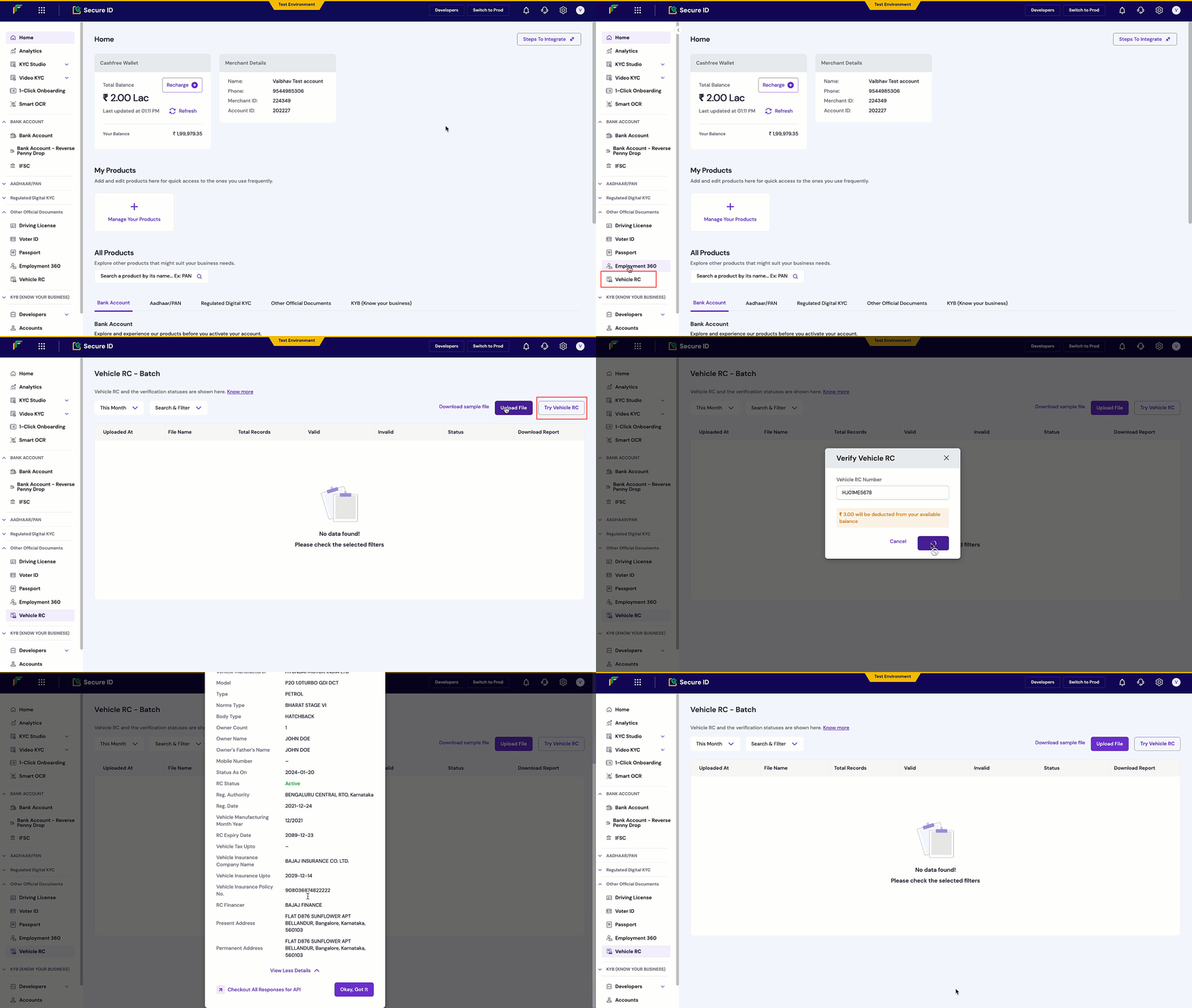
Vehicle RC verification process
All verified vehicle RCs appear in your dashboard with comprehensive details including owner information, vehicle specifications, and registration status.
Integrate Vehicle RC verification programmatically using the REST API:
{ "type": "invalid_request_error", "code": "verification_failed", "message": "Invalid registration number format", "details": [ { "field": "registration_number", "issue": "Registration number not found in records" } ]}
Integrate the Vehicle RC Verification API into your application to automatically verify vehicle registration details within your signup or onboarding flow.
Government transport authorities provide the value for the body_type field in the Vehicle RC API response. Cashfree does not predefine or fix this field. The values are not standardised, and the source data may return new or different values at any time.