

- Dashboard
- API
To create a new subscription from the dashboard, Go to 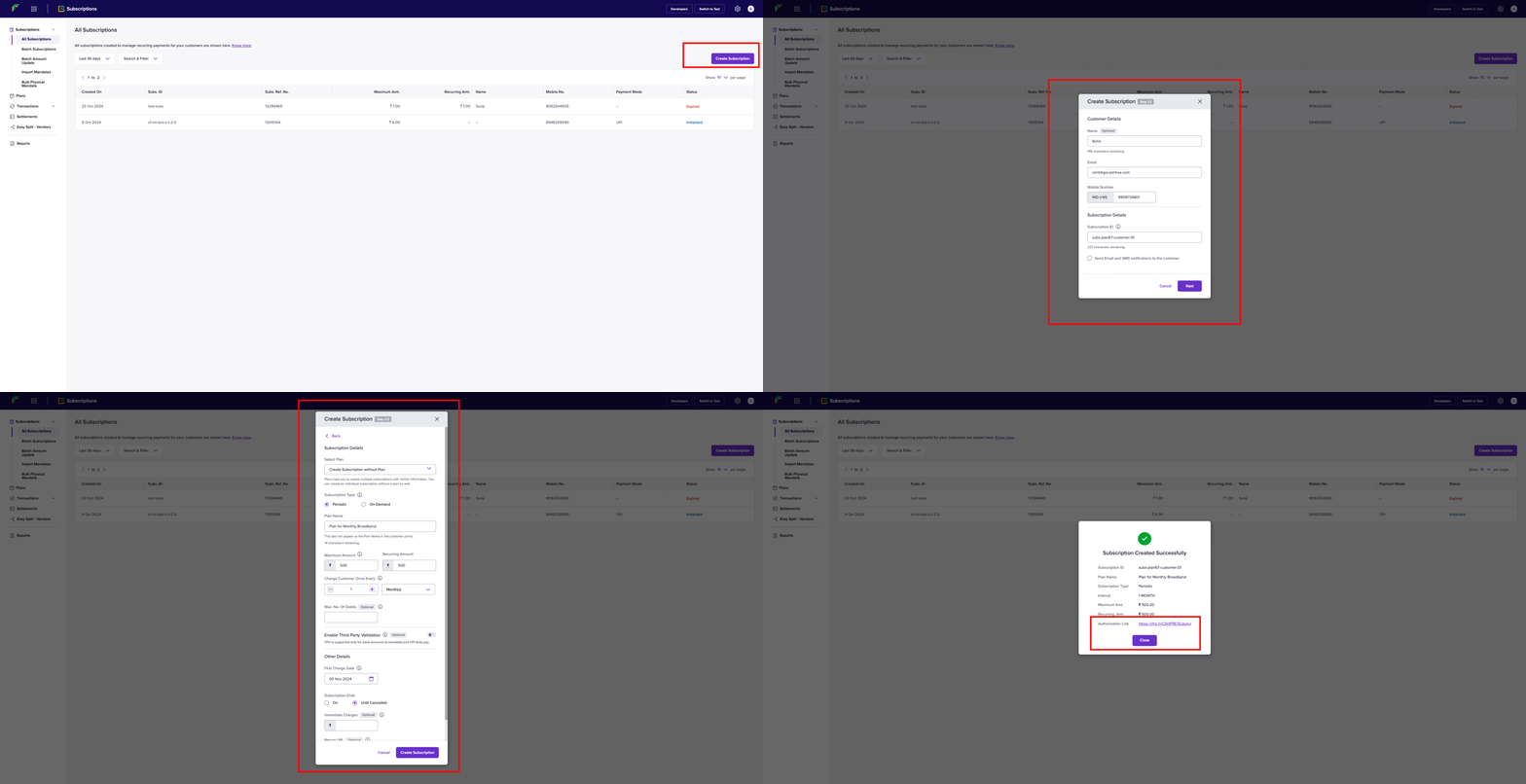
Subscriptions Dashboard > All Subscriptions > Create Subscription. Follow the steps as shown in the below image.Subscriptions Dashboard > Batch Subscriptions > Upload File to upload a file that contains all the information required for multiple subscriptions.Authorisation lifecycle
Before a subscription becomes ACTIVE, the customer must authorise it. Authorisation indicates that the customer has completed the initial payment (if applicable) and successfully subscribed. If the customer doesn’t complete payment within a certain timeframe, the subscription link will expire. The table below explains the various states an authorisation can go through once it’s created:Authorisation validity period
An authorisation request remains in the INITIALIZED state while the customer completes the mandate authorisation. The authorisation validity period defines the maximum time available for the customer to complete this action. If the customer doesn’t complete the authorisation within this period, the authorisation automatically moves to the FAILED state with the reasonNo action performed by customer.
Refer to the following example, where Cashfree creates an authorisation request at 10:00 AM with a validity period of 30 minutes:
The authorisation validity period works as follows:
- The validity period starts when Cashfree creates the authorisation request.
- The customer must complete the authorisation before the validity period expires.
- After the validity period expires, the authorisation can’t resume. Create a new authorisation request to retry.
- Cashfree configures the validity period for your merchant account.
To change your merchant account’s validity period, submit a request through the Support Form.
Subscription lifecycle
The table below describes the various states a subscription enters after creation:
Below is a visual diagram illustrating the different states during the subscription lifecycle:
When a customer cancels a UPI Autopay subscription through a third-party application provider (TPAP), such as Google Pay or PhonePe, the status updates to CUSTOMER_CANCELLED within 30–45 minutes.
First charge date (FCD) for a subscription
Merchants pass the subscription_first_charge_time (FCD) when they create a subscription. However, the earliest possible debit date depends on the payment mode and the time when the customer completes the authorisation. Cashfree does not modify the FCD provided by the merchant. Instead, we set the next_schedule_date to the nearest possible debit date based on the rules below. In such cases, the subscription is charged on the next_schedule_date instead of the merchant-provided FCD. Nearest possible first charge date
T = Date on which the customer completes authorisation
Example
A merchant passes T + 1 as the FCD during subscription creation.
The customer authorises using eNACH, and the earliest possible debit date for eNACH is T + 4.
- FCD (merchant input): remains T + 1
- next_schedule_date: automatically set to T + 4
- First debit: occurs on T + 4