

What are device tokens
Device tokens are network-issued tokens, which replace sensitive card details with a secure device-bound token. The customer goes to save the card on their trusted third-party app (TPAPs), creating a device token for the card, which can then be used to make payment on any merchant checkout on that device. The following table compares the key characteristics of Card on File (CoF) tokens and device tokens.Benefits of the Card Link feature
The Card Link feature provides several advantages for both merchants and customers:- Faster checkout: Prefetched cards eliminate manual card entry, making payments up to three times faster.
- Higher payment success rates: Tokenised payments reduce manual input errors and improve approval rates, leading to approximately 5% higher success rates.
- Improved conversion: Faster checkout reduces friction and can lead to approximately 10% lower payment drop-offs.
- Unified feature: Card Link feature gives you access to saved cards from all supported third-party apps, as apps launch this functionality.
- Future ready: Designed to support upcoming biometric authentication on device tokens.
User journey
The following steps describe the customer experience when using the Card Link feature:- Customer lands on merchant checkout.
- Cashfree detects the third-party apps installed on the customer’s device and checks the list of saved cards available on each of those apps.
- Device tokens from third-party apps are displayed on merchant checkout, powered by Card Link feature.
- Customer selects a device token and that third-party app opens.
- The third-party app securely gives token and cryptogram to the payment aggregator for payment processing.
- Customer enters one-time password (OTP) on the third-party app for authentication.
- The system reads and submits the OTP automatically.
- Once the payment is successful, the customer returns to the merchant checkout.
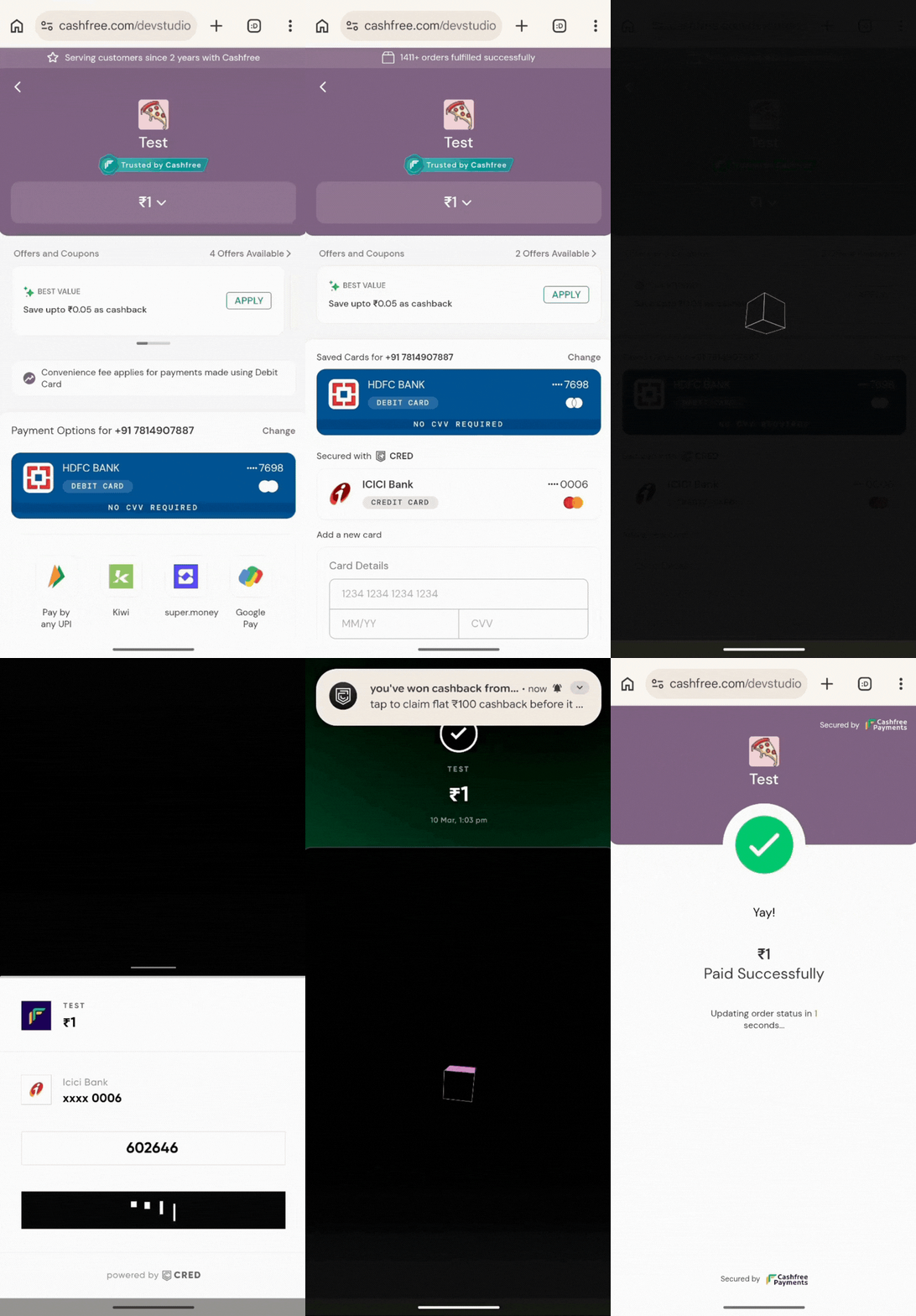
Card Link Experience on Checkout
How to enable the Card Link feature
Merchants can enable the Card Link feature using various integration methods depending on their setup.Cashfree hosted checkout merchants
Merchants using Cashfree Hosted Checkout can get started with the following considerations:- Merchants using Cashfree Hosted Checkout (web) in mWeb, will have Card Link feature enabled by default.
- Merchants using Native SDK to open Cashfree Hosted Checkout in webview in the native app will have to upgrade the SDK to the latest version.
- Merchants using Cashfree Hosted Checkout (web) in the native app, without using the Native SDK, will either have to render the checkout in Chrome custom tab or do additional handling on webview to support this feature.
Seamless checkout merchants
For merchants using seamless checkout, the following integration options are available:- Merchants using Seamless APIs of Cashfree will have to pass some additional parameters in the Fetch All Saved Card Instruments API, such as customer phone number. Cashfree will do eligibility check from different third-party apps and return the list of apps or device tokens to the merchant, along with the list of CoF tokens saved with Cashfree.
- Merchants using Cashfree Payment Gateway SDK will have to upgrade the SDK to the latest version, post which the SDK performs eligibility checks from different third-party apps and return the list of apps or device tokens to the merchant, in addition to CoF tokens saved with Cashfree.
- Merchants not using Cashfree Payment Gateway SDK, but having a native app, can use Card Link SDK. On checkout load, the merchant invokes the SDK and passes parameters such as customer phone number. SDK performs eligibility checks from different third-party apps and return the list of apps or device tokens to the merchant. The merchant can then process payment with any payment aggregator of their choice.
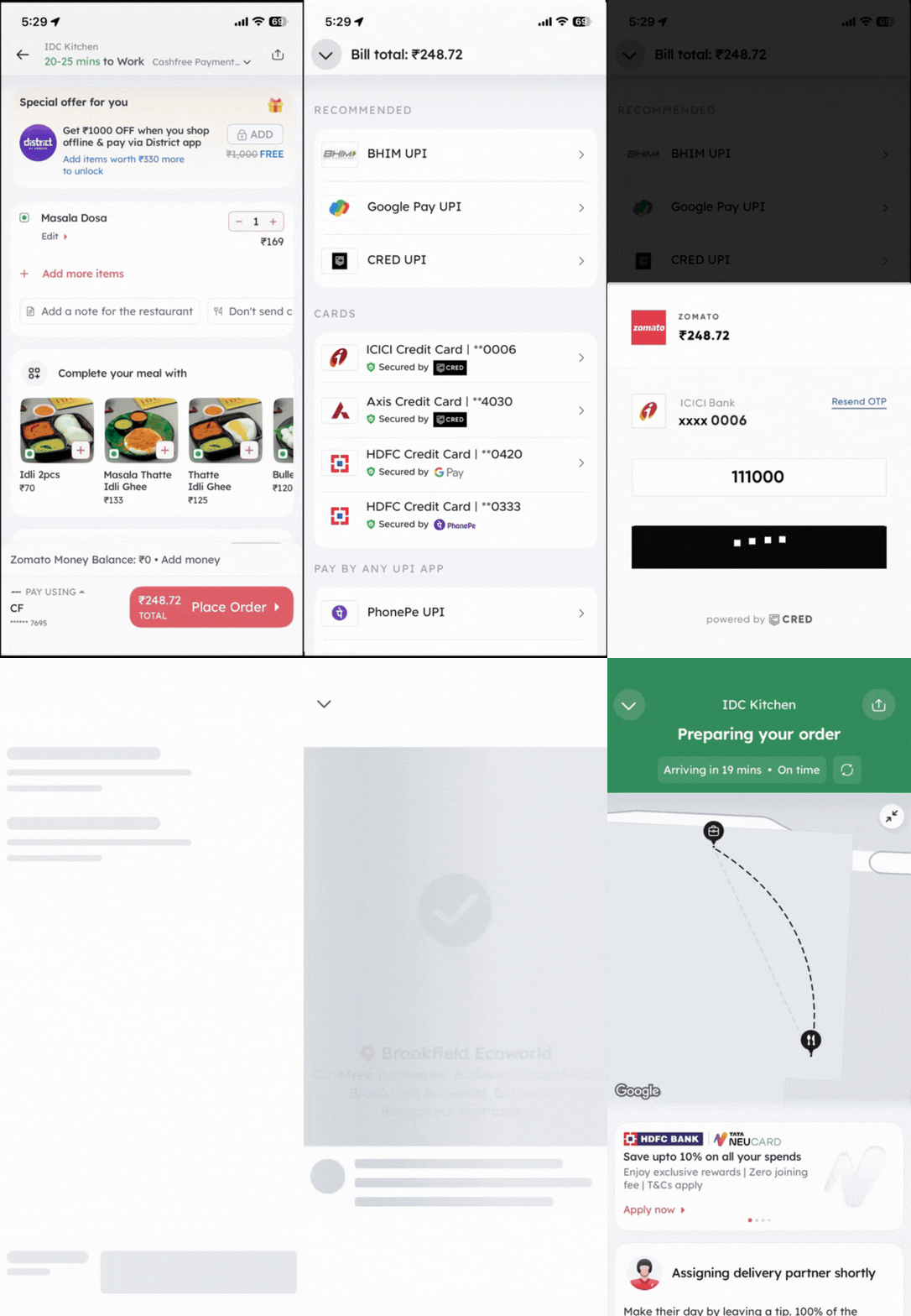
Card Link Experience on Seamless Checkout
Frequently asked questions
Refer to the following frequently asked questions for more information on the Card Link feature.Which apps are supported on this flow?
Which apps are supported on this flow?
This feature is currently live on Cred and will be soon made available on other third-party apps, as and when they’re ready with this functionality.
What are the supported platforms for Card Link?
What are the supported platforms for Card Link?
Card Link feature works on Android for both web and native app checkouts. This feature will soon be made available on iOS by these third-party apps.
Who handles payment processing?
Who handles payment processing?
For the customer, authentication is performed within the third-party app’s trusted environment, but at the back-end payment processing is done by the merchant’s payment aggregator itself.
When do saved cards from third-party apps appear on the checkout?
When do saved cards from third-party apps appear on the checkout?
Device tokens can only be fetched if the third-party app is present on the same device where checkout is opened, customer is logged in on the app and customer has a saved card available on that app. Cashfree does these eligibility checks, and only then device tokens are surfaced on the checkout.