

- Payout protect ML model: Identification of high-risk beneficiaries such as blacklisted bank accounts or VPAs in our global database.
- Smart Rules: Breach of velocity-based limits on transfer amount or count, or violation of downtime schedules configured by the merchant.
- Custom blacklists: Beneficiaries matching entries in your manually uploaded blacklists.
A blocked transfer cannot be unblocked. The transaction journey ends
immediately, and no funds are moved to the beneficiary.
View blocked transfers
Follow these steps to view blocked transfers in the Merchant Dashboard:- Log in to the Merchant Dashboard.
- Go to Payout Protect > Risky Transfers.
- Select the Blocked Transfers tab.
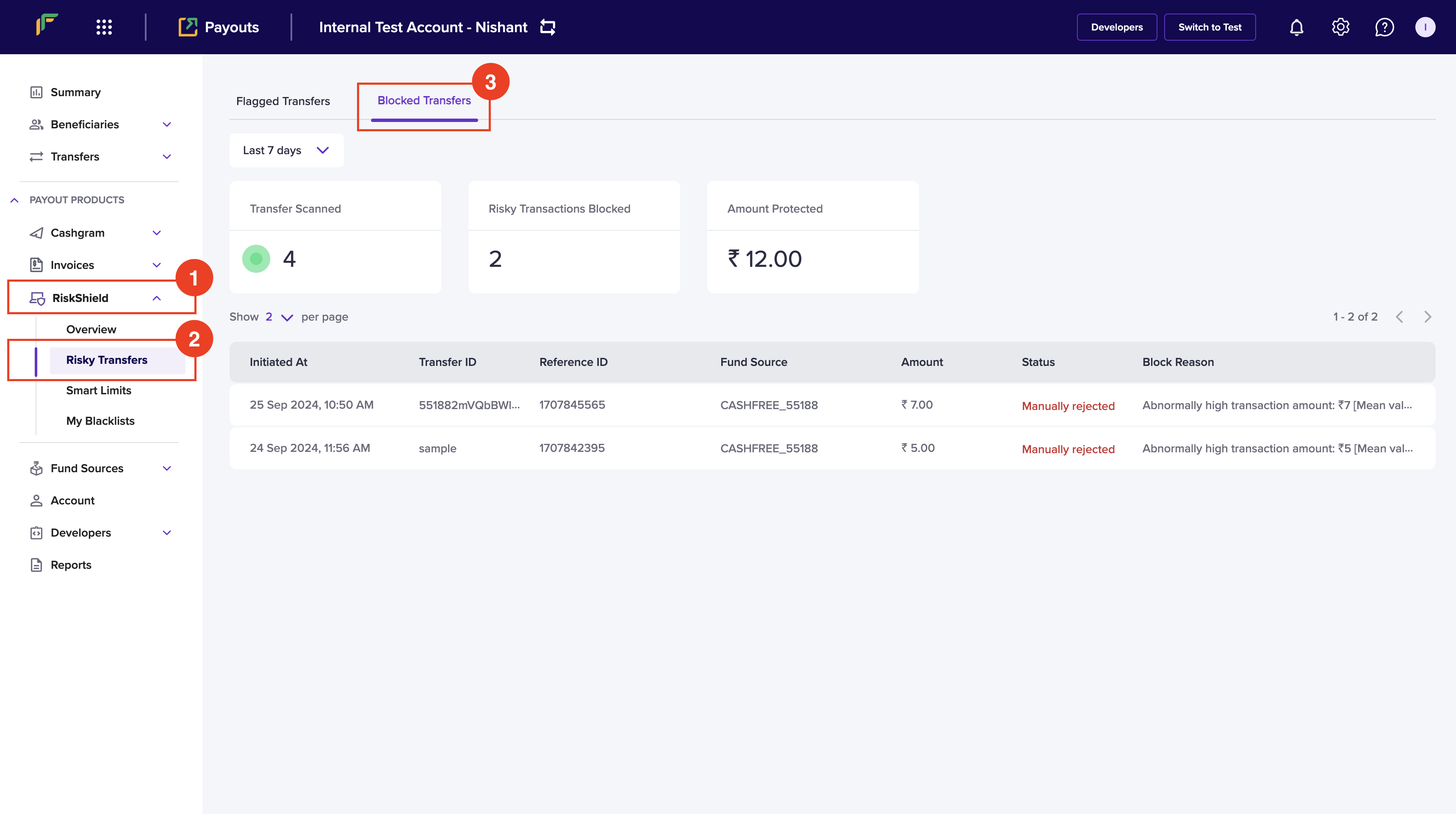
Components of blocked transfers
The blocked transfers tab includes the following components:- Transfer Scanned: Represents the total number of payout transactions analysed by the Payout Protect system.
- Risky Transactions Blocked: Represents the total count of transfers identified as high-risk or in violation of security policies that were permanently stopped.
- Amount Protected: Represents the cumulative monetary value of all blocked transfers, reflecting the total funds saved.
- Initiated At: Represents the initiation time of the transfer.
- Transfer ID: Represents the ID of the initiated transfer.
- Beneficiary ID: Represents the ID of the beneficiary designated to receive the transfer amount.
- Fundsource: Represents your fund source account from which the transfer was initiated.
- Amount: Represents the transfer amount.
- Status: Represents the status of the transfer.
- Block Reason: Describes the reason why the transfer was blocked.
Additional features
The blocked transfers tab includes the following features:- Last 7 Days: Use the dropdown menu to select the period for viewing blocked transfers. You can also choose a custom date range.
- Results per Page Filter: Adjust the number of transactions displayed per page using this filter.
Reasons for blocked transfers
Transfers can be blocked for various reasons by Payout Protect, often depending on factors such as the transfer type, the beneficiary, or the financial institution involved. Below are some common scenarios and reasons for blocked transfers:Payout protect blocking reasons
The table below lists reasons for blocked transfers caused by the payout protect ML model, which detects high-risk entities and suspicious recipient details using our global security database.Blocked due to smart limits
The table below lists reasons for blocked transfers resulting from Smart Limits configurations. Smart Limits allow you to manage transfer amounts and restrict processing during specific periods to mitigate risks.The transfer impact due to the smart limit can also be moved to Pending Review instead of being blocked. Please contact your account manager to enable this feature.