

Prerequisites
Complete these steps before you integrate hosted subscription checkout:- Create a Cashfree merchant account.
- Log in to the Merchant Dashboard.
- Go to Payment Gateway > Developers > API Keys and generate your test client ID and secret key.
Step 1: Create a plan
Create a subscription plan before you open hosted checkout. Use the Create Plan API to define the plan.curl --request POST \
--url https://sandbox.cashfree.com/pg/plans \
--header 'accept: application/json' \
--header 'content-type: application/json' \
--header 'x-api-version: 2025-08-01' \
--header 'x-client-id: xyz' \
--header 'x-client-secret: abc' \
--data '{
"plan_id": "plan_cashfree_sbox",
"plan_name": "Premium_10",
"plan_type": "ON_DEMAND",
"plan_currency": "INR",
"plan_max_amount": 100,
"plan_note": "Test Plan Cashfree"
}'
const options = {
  method: 'POST',
  headers: {
    accept: 'application/json',
    'content-type': 'application/json',
    'x-api-version': '2025-08-01',
    'x-client-id': 'xyz',
    'x-client-secret': 'abc'
  },
  body: JSON.stringify({
    plan_id: 'plan_cashfree_sbox',
    plan_name: 'Premium_10',
    plan_type: 'ON_DEMAND',
    plan_currency: 'INR',
    plan_max_amount: 100,
    plan_note: 'Test Plan Cashfree'
  })
};

fetch('https://sandbox.cashfree.com/pg/plans', options)
  .then(response => response.json())
  .then(response => console.log(response))
  .catch(err => console.error(err));
import requests

url = "https://sandbox.cashfree.com/pg/plans"

payload = {
    "plan_id": "plan_cashfree_sbox",
    "plan_name": "Premium_10",
    "plan_type": "ON_DEMAND",
    "plan_currency": "INR",
    "plan_max_amount": 100,
    "plan_note": "Test Plan Cashfree"
}
headers = {
    "accept": "application/json",
    "content-type": "application/json",
    "x-api-version": "2025-08-01",
    "x-client-id": "xyz",
    "x-client-secret": "abc"
}

response = requests.post(url, json=payload, headers=headers)
print(response.text)
OkHttpClient client = new OkHttpClient();

MediaType mediaType = MediaType.parse("application/json");
RequestBody body = RequestBody.create(mediaType, "{\"plan_id\":\"plan_cashfree_sbox\",\"plan_name\":\"Premium_10\",\"plan_type\":\"ON_DEMAND\",\"plan_currency\":\"INR\",\"plan_max_amount\":100,\"plan_note\":\"Test Plan Cashfree\"}");
Request request = new Request.Builder()
  .url("https://sandbox.cashfree.com/pg/plans")
  .post(body)
  .addHeader("accept", "application/json")
  .addHeader("content-type", "application/json")
  .addHeader("x-api-version", "2025-08-01")
  .addHeader("x-client-id", "xyz")
  .addHeader("x-client-secret", "abc")
  .build();

Response response = client.newCall(request).execute();
<?php
$curl = curl_init();
curl_setopt_array($curl, [
  CURLOPT_URL => "https://sandbox.cashfree.com/pg/plans",
  CURLOPT_RETURNTRANSFER => true,
  CURLOPT_CUSTOMREQUEST => "POST",
  CURLOPT_POSTFIELDS => "{\"plan_id\":\"plan_cashfree_sbox\",\"plan_name\":\"Premium_10\",\"plan_type\":\"ON_DEMAND\",\"plan_currency\":\"INR\",\"plan_max_amount\":100,\"plan_note\":\"Test Plan Cashfree\"}",
  CURLOPT_HTTPHEADER => [
    "accept: application/json",
    "content-type: application/json",
    "x-api-version: 2025-08-01",
    "x-client-id: xyz",
    "x-client-secret: abc"
  ],
]);
$response = curl_exec($curl);
$err = curl_error($curl);
curl_close($curl);
echo $response;
package main

import (
	"fmt"
	"strings"
	"net/http"
	"io/ioutil"
)

func main() {
	url := "https://sandbox.cashfree.com/pg/plans"
	payload := strings.NewReader("{\"plan_id\":\"plan_cashfree_sbox\",\"plan_name\":\"Premium_10\",\"plan_type\":\"ON_DEMAND\",\"plan_currency\":\"INR\",\"plan_max_amount\":100,\"plan_note\":\"Test Plan Cashfree\"}")
	req, _ := http.NewRequest("POST", url, payload)
	req.Header.Add("accept", "application/json")
	req.Header.Add("content-type", "application/json")
	req.Header.Add("x-api-version", "2025-08-01")
	req.Header.Add("x-client-id", "xyz")
	req.Header.Add("x-client-secret", "abc")
	res, _ := http.DefaultClient.Do(req)
	defer res.Body.Close()
	body, _ := ioutil.ReadAll(res.Body)
	fmt.Println(string(body))
}
Response
Once the request is successful, you will receive a response as shown below:{
"plan_currency": "INR",
"plan_id": "plan_cashfree_sbox",
"plan_interval_type": null,
"plan_intervals": null,
"plan_max_amount": 100,
"plan_max_cycles": null,
"plan_name": "Premium_10",
"plan_note": "Test Plan Cashfree",
"plan_recurring_amount": 0,
"plan_status": "ACTIVE",
"plan_type": "ON_DEMAND"
}
Step 2: Create subscription
API Documentation: Create Subscriptioncurl --request POST \
--url https://sandbox.cashfree.com/pg/subscriptions \
--header 'accept: application/json' \
--header 'content-type: application/json' \
--header 'x-api-version: 2025-01-01' \
--header 'x-client-id: xyz' \
--header 'x-client-secret: abc' \
--data '{
"customer_details": {
"customer_name": "Sushane Yadav",
"customer_email": "sushane.yadav@abc.com",
"customer_phone": "9999999999",
"customer_bank_account_holder_name": "Sushane Yadav",
"customer_bank_account_number": "010080198715",
"customer_bank_ifsc": "ICIC0001008",
"customer_bank_code": "ICIC",
"customer_bank_account_type": "SAVINGS"
},
"plan_details": {
"plan_id": "plan_cashfree_sbox",
"plan_name": "Premium_09",
"plan_type": "ON_DEMAND"
},
"authorization_details": {
"authorization_amount": 1,
"authorization_amount_refund": true,
"authorization_time": 1
},
"subscription_tags": {
"subscription_note": "test create subs"
},
"subscription_meta": {
"return_url": "https://wa.me/8473222?textPayment%20Successfull",
"notification_channel": [
"EMAIL",
"SMS"
]
},
"subscription_id": "create-ondemand-subs-12",
"subscription_expiry_time": "2028-12-24T14:15:22Z"
}'
const options = {
  method: 'POST',
  headers: {
    accept: 'application/json',
    'content-type': 'application/json',
    'x-api-version': '2025-01-01',
    'x-client-id': 'xyz',
    'x-client-secret': 'abc'
  },
  body: JSON.stringify({
    customer_details: {
      customer_name: 'Sushane Yadav',
      customer_email: 'sushane.yadav@abc.com',
      customer_phone: '9999999999',
      customer_bank_account_holder_name: 'Sushane Yadav',
      customer_bank_account_number: '010080198715',
      customer_bank_ifsc: 'ICIC0001008',
      customer_bank_code: 'ICIC',
      customer_bank_account_type: 'SAVINGS'
    },
    plan_details: {
      plan_id: 'plan_cashfree_sbox',
      plan_name: 'Premium_09',
      plan_type: 'ON_DEMAND'
    },
    authorization_details: {
      authorization_amount: 1,
      authorization_amount_refund: true,
      authorization_time: 1
    },
    subscription_tags: {
      subscription_note: 'test create subs'
    },
    subscription_meta: {
      return_url: 'https://wa.me/8473222?textPayment%20Successfull',
      notification_channel: ['EMAIL', 'SMS']
    },
    subscription_id: 'create-ondemand-subs-12',
    subscription_expiry_time: '2028-12-24T14:15:22Z'
  })
};

fetch('https://sandbox.cashfree.com/pg/subscriptions', options)
  .then(response => response.json())
  .then(response => console.log(response))
  .catch(err => console.error(err));
import requests

url = "https://sandbox.cashfree.com/pg/subscriptions"

payload = {
    "customer_details": {
        "customer_name": "Sushane Yadav",
        "customer_email": "sushane.yadav@abc.com",
        "customer_phone": "9999999999",
        "customer_bank_account_holder_name": "Sushane Yadav",
        "customer_bank_account_number": "010080198715",
        "customer_bank_ifsc": "ICIC0001008",
        "customer_bank_code": "ICIC",
        "customer_bank_account_type": "SAVINGS"
    },
    "plan_details": {
        "plan_id": "plan_cashfree_sbox",
        "plan_name": "Premium_09",
        "plan_type": "ON_DEMAND"
    },
    "authorization_details": {
        "authorization_amount": 1,
        "authorization_amount_refund": True,
        "authorization_time": 1
    },
    "subscription_tags": {"subscription_note": "test create subs"},
    "subscription_meta": {
        "return_url": "https://wa.me/8473222?textPayment%20Successfull",
        "notification_channel": ["EMAIL", "SMS"]
    },
    "subscription_id": "create-ondemand-subs-12",
    "subscription_expiry_time": "2028-12-24T14:15:22Z"
}
headers = {
    "accept": "application/json",
    "content-type": "application/json",
    "x-api-version": "2025-01-01",
    "x-client-id": "xyz",
    "x-client-secret": "abc"
}

response = requests.post(url, json=payload, headers=headers)
print(response.text)
OkHttpClient client = new OkHttpClient();

MediaType mediaType = MediaType.parse("application/json");
RequestBody body = RequestBody.create(mediaType, "{\"customer_details\":{\"customer_name\":\"Sushane Yadav\",\"customer_email\":\"sushane.yadav@abc.com\",\"customer_phone\":\"9999999999\",\"customer_bank_account_holder_name\":\"Sushane Yadav\",\"customer_bank_account_number\":\"010080198715\",\"customer_bank_ifsc\":\"ICIC0001008\",\"customer_bank_code\":\"ICIC\",\"customer_bank_account_type\":\"SAVINGS\"},\"plan_details\":{\"plan_id\":\"plan_cashfree_sbox\",\"plan_name\":\"Premium_09\",\"plan_type\":\"ON_DEMAND\"},\"authorization_details\":{\"authorization_amount\":1,\"authorization_amount_refund\":true,\"authorization_time\":1},\"subscription_tags\":{\"subscription_note\":\"test create subs\"},\"subscription_meta\":{\"return_url\":\"https://wa.me/8473222?textPayment%20Successfull\",\"notification_channel\":[\"EMAIL\",\"SMS\"]},\"subscription_id\":\"create-ondemand-subs-12\",\"subscription_expiry_time\":\"2028-12-24T14:15:22Z\"}");
Request request = new Request.Builder()
  .url("https://sandbox.cashfree.com/pg/subscriptions")
  .post(body)
  .addHeader("accept", "application/json")
  .addHeader("content-type", "application/json")
  .addHeader("x-api-version", "2025-01-01")
  .addHeader("x-client-id", "xyz")
  .addHeader("x-client-secret", "abc")
  .build();

Response response = client.newCall(request).execute();
<?php
$curl = curl_init();
curl_setopt_array($curl, [
  CURLOPT_URL => "https://sandbox.cashfree.com/pg/subscriptions",
  CURLOPT_RETURNTRANSFER => true,
  CURLOPT_CUSTOMREQUEST => "POST",
  CURLOPT_POSTFIELDS => "{\"customer_details\":{\"customer_name\":\"Sushane Yadav\",\"customer_email\":\"sushane.yadav@abc.com\",\"customer_phone\":\"9999999999\",\"customer_bank_account_holder_name\":\"Sushane Yadav\",\"customer_bank_account_number\":\"010080198715\",\"customer_bank_ifsc\":\"ICIC0001008\",\"customer_bank_code\":\"ICIC\",\"customer_bank_account_type\":\"SAVINGS\"},\"plan_details\":{\"plan_id\":\"plan_cashfree_sbox\",\"plan_name\":\"Premium_09\",\"plan_type\":\"ON_DEMAND\"},\"authorization_details\":{\"authorization_amount\":1,\"authorization_amount_refund\":true,\"authorization_time\":1},\"subscription_tags\":{\"subscription_note\":\"test create subs\"},\"subscription_meta\":{\"return_url\":\"https://wa.me/8473222?textPayment%20Successfull\",\"notification_channel\":[\"EMAIL\",\"SMS\"]},\"subscription_id\":\"create-ondemand-subs-12\",\"subscription_expiry_time\":\"2028-12-24T14:15:22Z\"}",
  CURLOPT_HTTPHEADER => [
    "accept: application/json",
    "content-type: application/json",
    "x-api-version: 2025-01-01",
    "x-client-id: xyz",
    "x-client-secret: abc"
  ],
]);
$response = curl_exec($curl);
$err = curl_error($curl);
curl_close($curl);
echo $response;
package main

import (
	"fmt"
	"strings"
	"net/http"
	"io/ioutil"
)

func main() {
	url := "https://sandbox.cashfree.com/pg/subscriptions"
	payload := strings.NewReader("{\"customer_details\":{\"customer_name\":\"Sushane Yadav\",\"customer_email\":\"sushane.yadav@abc.com\",\"customer_phone\":\"9999999999\",\"customer_bank_account_holder_name\":\"Sushane Yadav\",\"customer_bank_account_number\":\"010080198715\",\"customer_bank_ifsc\":\"ICIC0001008\",\"customer_bank_code\":\"ICIC\",\"customer_bank_account_type\":\"SAVINGS\"},\"plan_details\":{\"plan_id\":\"plan_cashfree_sbox\",\"plan_name\":\"Premium_09\",\"plan_type\":\"ON_DEMAND\"},\"authorization_details\":{\"authorization_amount\":1,\"authorization_amount_refund\":true,\"authorization_time\":1},\"subscription_tags\":{\"subscription_note\":\"test create subs\"},\"subscription_meta\":{\"return_url\":\"https://wa.me/8473222?textPayment%20Successfull\",\"notification_channel\":[\"EMAIL\",\"SMS\"]},\"subscription_id\":\"create-ondemand-subs-12\",\"subscription_expiry_time\":\"2028-12-24T14:15:22Z\"}")
	req, _ := http.NewRequest("POST", url, payload)
	req.Header.Add("accept", "application/json")
	req.Header.Add("content-type", "application/json")
	req.Header.Add("x-api-version", "2025-01-01")
	req.Header.Add("x-client-id", "xyz")
	req.Header.Add("x-client-secret", "abc")
	res, _ := http.DefaultClient.Do(req)
	defer res.Body.Close()
	body, _ := ioutil.ReadAll(res.Body)
	fmt.Println(string(body))
}
Response
Once the request is successful, you will receive a response as shown below:{
"authorization_details": {
"authorization_amount": 1,
"authorization_amount_refund": true,
"authorization_reference": null,
"authorization_time": null,
"authorization_status": null,
"payment_id": null,
"payment_method": null,
"instrument_id": null
},
"cf_subscription_id": "604456",
"customer_details": {
"customer_name": "Sushane Yadav",
"customer_email": "sushane.yadav@abc.com",
"customer_phone": "9999999999",
"customer_bank_account_holder_name": "Sushane Yadav",
"customer_bank_account_number": "010080198715",
"customer_bank_ifsc": "ICIC0001008",
"customer_bank_code": "ICIC",
"customer_bank_account_type": "SAVINGS"
},
"plan_details": {
"plan_id": "plan_cashfree_sbox",
"plan_name": "Premium_10",
"plan_type": "ON_DEMAND",
"plan_max_cycles": null,
"plan_recurring_amount": 0,
"plan_max_amount": 100,
"plan_interval_type": null,
"plan_intervals": null,
"plan_currency": "INR",
"plan_note": null,
"plan_status": null
},
"subscription_expiry_time": "2028-12-25T01:15:22+05:30",
"subscription_first_charge_time": null,
"subscription_id": "create-ondemand-subs-12",
"subscription_meta": {
"return_url": "https://wa.me/8473222?textPayment%20Successfull"
},
"subscription_payment_splits": null,
"subscription_session_id": "sub_session_0KnQeY5a63YSnrlk-unL2CuQHV1n4ghoo-laNrHiEL1qgWiytwC_ELZOxjl1AmRm53vh8XT9iTyBECN5KgjAnsu9L9cfzfbCG96rM4T_rZs02q6vsopg3RFXstNZppmlhOytuNMpayment",
"subscription_status": "INITIALIZED",
"subscription_tags": {
"subscription_note": "test create subs"
}
}
Step 3: Initiate an auth
Use the subscription_session_id received in the response of create subscription to initiate the subscription auth checkout. Refer to below code module to integrate :-const paymentMessage = document.getElementById("paymentMessage");
const cashfree = Cashfree({
mode: "sandbox" // or production
});
document.getElementById("subsCheckout").addEventListener("click", function(){
paymentMessage.innerText = "";
paymentMessage.classList.remove("alert-danger");
paymentMessage.classList.remove("alert-success");
cashfree.subscriptionsCheckout({
subsSessionId: document.getElementById("subsSessionId").value,
redirectTarget: "_blank"
}).then(function(result){
if(result.error){
document.getElementById("paymentMessage").innerHTML = (result.error.message)
}
})
})
<div class="container">
        <div class="row">
            <div class="col">
                <div class="row">
                    <h2>Demo of Cashfree Subscriptions</h2>
                </div>
            </div>
        </div>
        <div class="row">
            <div class="col col-lg-8 col-sm-12">
                <div class="row">
                    <h4>Subscriptions Session ID</h4>

                    <div class="col">
                        <textarea name="" id="subsSessionId" class="form-control"></textarea>
                    </div>
                </div>
                <div class="row mt-4">
                    <div class="col ">
                        <p class="alert" id="paymentMessage">

                        </p>
                    </div>
                </div>
            </div>
            <div class="col col-lg-4 col-sm-10">
                <div class=" ">
                    <div class="card w-100"  >
                        <div class="card-body w-100 pb-0">
                            <h5 class="card-title">
                               Subscriptions Checkout
                            </h5>

                            <div class="row">
                                <div class="col-12 submit-div col" bfor="qr">
                                    <button class="btn btn-block btn-full w-100 btn-primary" id="subsCheckout">
                                        Submit
                                    </button>
                                </div>
                            </div>
                        </div>
                    </div>
                </div>
            </div>
        </div>
    </div>
.card {
  box-shadow: rgba(50, 50, 93, 0.25) 0px 30px 60px -12px, rgba(0, 0, 0, 0.3) 0px 18px 36px -18px;
  padding-bottom: 0px;
  border-radius: 14px;
  float: right;
}

.container{
  border-radius: 20px;
  position: absolute;
  top: 50%;
  left: 50%;
  transform: translate(-50%, -50%);
  padding: 20px;
  border: 1px solid #ddd;
}

h4{
  color: rgba(0, 0, 0, 0.5);
}

.submit-div {
  text-align: center;
  padding: 20px;
  border-top: 1px solid #efefef;
}
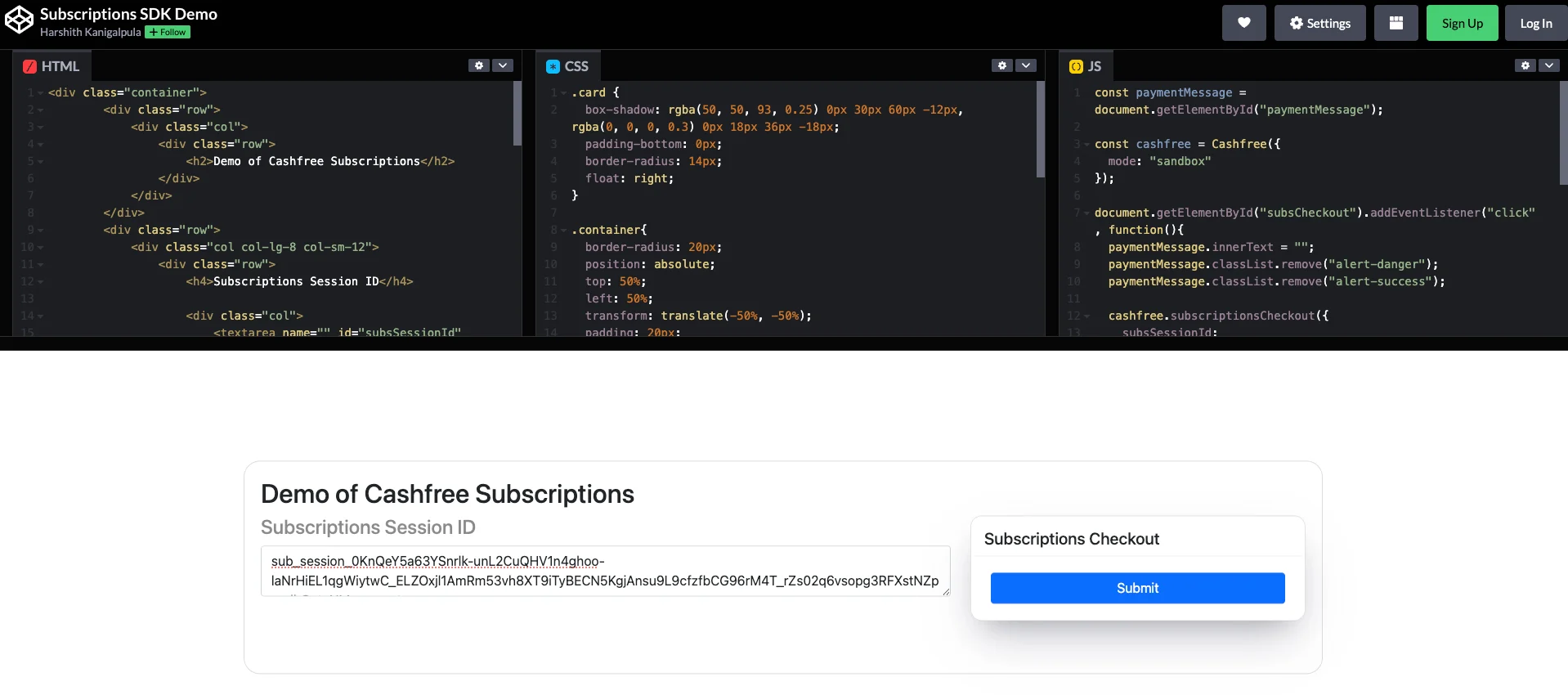
- Take the subscription_session_id and paste it in the codepen link and click on Submit.
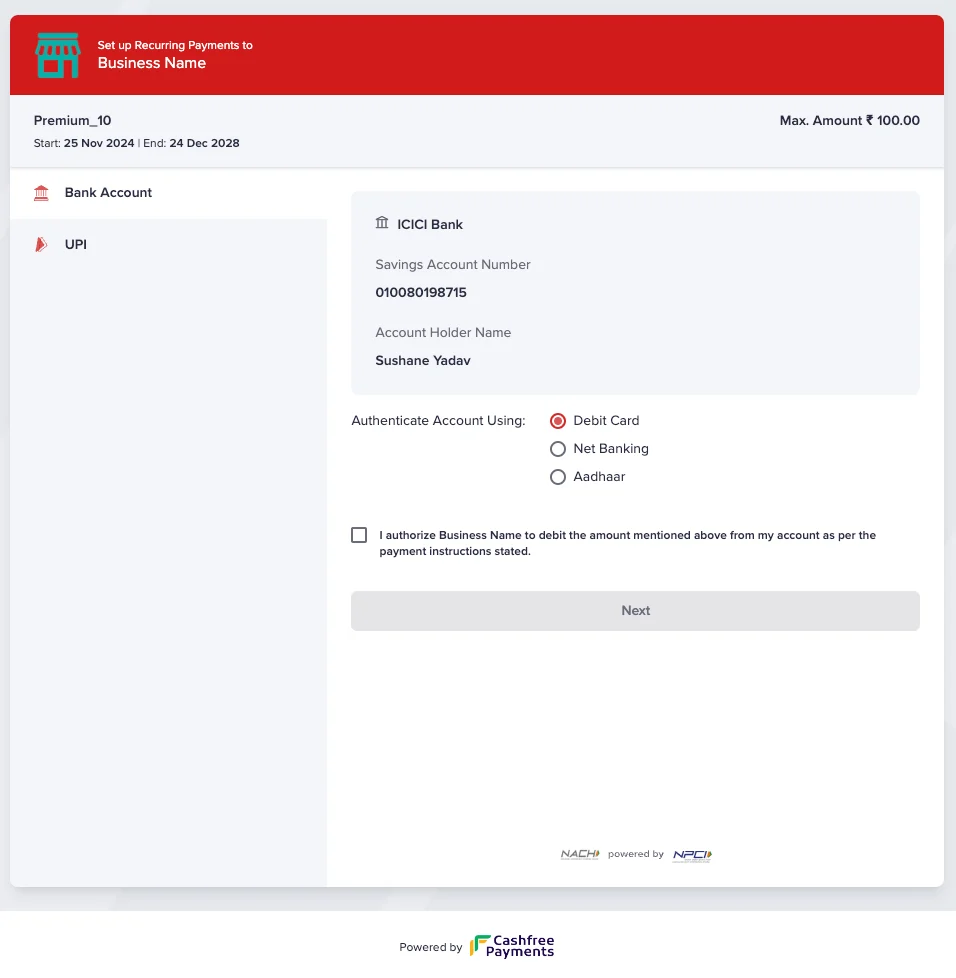
- You will be redirected to the subscription checkout page.
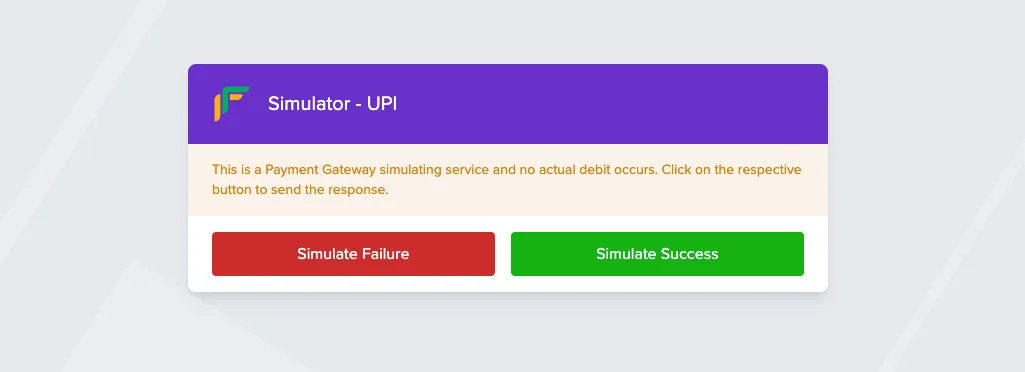
- Choose the payment mode you want to setup the subscription and submit. In case of sandbox you will be asked to simulate the payment.
- You will be redirected to the return url post the transaction is completed.
Step 4: Get subscription details
Use this API to check the subscription status and auth details post completion of the payment. API Documentation: Get Subscriptioncurl --request GET \
--url https://sandbox.cashfree.com/pg/subscriptions/{subscription_id} \
--header 'accept: application/json' \
--header 'x-api-version: 2025-01-01' \
--header 'x-client-id: xyz' \
--header 'x-client-secret: abc'
const options = {
  method: 'GET',
  headers: {
    accept: 'application/json',
    'x-api-version': '2025-01-01',
    'x-client-id': 'xyz',
    'x-client-secret': 'abc'
  }
};

fetch('https://sandbox.cashfree.com/pg/subscriptions/{subscription_id}', options)
  .then(response => response.json())
  .then(response => console.log(response))
  .catch(err => console.error(err));
import requests

url = "https://sandbox.cashfree.com/pg/subscriptions/{subscription_id}"

headers = {
    "accept": "application/json",
    "x-api-version": "2025-01-01",
    "x-client-id": "xyz",
    "x-client-secret": "abc"
}

response = requests.get(url, headers=headers)
print(response.text)
OkHttpClient client = new OkHttpClient();

Request request = new Request.Builder()
  .url("https://sandbox.cashfree.com/pg/subscriptions/{subscription_id}")
  .get()
  .addHeader("accept", "application/json")
  .addHeader("x-api-version", "2025-01-01")
  .addHeader("x-client-id", "xyz")
  .addHeader("x-client-secret", "abc")
  .build();

Response response = client.newCall(request).execute();
<?php
$curl = curl_init();
curl_setopt_array($curl, [
  CURLOPT_URL => "https://sandbox.cashfree.com/pg/subscriptions/{subscription_id}",
  CURLOPT_RETURNTRANSFER => true,
  CURLOPT_CUSTOMREQUEST => "GET",
  CURLOPT_HTTPHEADER => [
    "accept: application/json",
    "x-api-version: 2025-01-01",
    "x-client-id: xyz",
    "x-client-secret: abc"
  ],
]);
$response = curl_exec($curl);
$err = curl_error($curl);
curl_close($curl);
echo $response;
package main

import (
	"fmt"
	"net/http"
	"io/ioutil"
)

func main() {
	url := "https://sandbox.cashfree.com/pg/subscriptions/{subscription_id}"
	req, _ := http.NewRequest("GET", url, nil)
	req.Header.Add("accept", "application/json")
	req.Header.Add("x-api-version", "2025-01-01")
	req.Header.Add("x-client-id", "xyz")
	req.Header.Add("x-client-secret", "abc")
	res, _ := http.DefaultClient.Do(req)
	defer res.Body.Close()
	body, _ := ioutil.ReadAll(res.Body)
	fmt.Println(string(body))
}
Response
Once the request is successful, you will receive a response as shown below:{
"authorization_details": {
"authorization_amount": 1,
"authorization_amount_refund": true,
"authorization_reference": "J7iuqUTKXxoNS17u5oBq4n24jYFAV5@upi",
"authorization_time": "2024-11-25T22:05:25+05:30",
"authorization_status": "ACTIVE",
"payment_id": "513463",
"payment_method": "upi",
"instrument_id": null
},
"cf_subscription_id": "604456",
"customer_details": {
"customer_name": "Sushane Yadav",
"customer_email": "sushane.yadav@abc.com",
"customer_phone": "9999999999",
"customer_bank_account_holder_name": "Sushane Yadav",
"customer_bank_account_number": "010080198715",
"customer_bank_ifsc": "ICIC0001008",
"customer_bank_code": "ICIC",
"customer_bank_account_type": "SAVINGS"
},
"plan_details": {
"plan_id": "plan_cashfree_sbox",
"plan_name": "Premium_10",
"plan_type": "ON_DEMAND",
"plan_max_cycles": null,
"plan_recurring_amount": 0,
"plan_max_amount": 100,
"plan_interval_type": null,
"plan_intervals": null,
"plan_currency": "INR",
"plan_note": null,
"plan_status": null
},
"subscription_expiry_time": "2028-12-25T01:15:22+05:30",
"subscription_first_charge_time": null,
"subscription_id": "create-ondemand-subs-12",
"subscription_meta": {
"return_url": "https://wa.me/8473222?textPayment%20Successfull"
},
"subscription_payment_splits": null,
"subscription_session_id": "sub_session_8NDk6JTfSb9elrakgfn8VE_1j_pJ7zEWdWJefDha68ddBjapy6AjlxLLYoObqxLvDYF1nysfWCbu11wPeJmQbub00dadRUs7rPIf1nc33-4F85BNjZV0_3uOdt7rDMkPUesto0wpayment",
"subscription_status": "ACTIVE",
"subscription_tags": {
"subscription_note": "test create subs"
}
}
Step 5: Raise a charge on subscription
API Documentation: Raise a chargecurl --request POST \
--url https://sandbox.cashfree.com/pg/subscriptions/pay \
--header 'accept: application/json' \
--header 'content-type: application/json' \
--header 'x-api-version: 2025-01-01' \
--header 'x-client-id: xyz' \
--header 'x-client-secret: abc' \
--data '{
"subscription_id": "create-ondemand-subs-12",
"payment_id": "test-payment-subs-07",
"payment_type": "CHARGE",
"payment_amount": 10,
"payment_remarks": "first payment",
"payment_schedule_date": "2024-11-30T14:15:22Z"
}'
const options = {
  method: 'POST',
  headers: {
    accept: 'application/json',
    'content-type': 'application/json',
    'x-api-version': '2025-01-01',
    'x-client-id': 'xyz',
    'x-client-secret': 'abc'
  },
  body: JSON.stringify({
    subscription_id: 'create-ondemand-subs-12',
    payment_id: 'test-payment-subs-07',
    payment_type: 'CHARGE',
    payment_amount: 10,
    payment_remarks: 'first payment',
    payment_schedule_date: '2024-11-30T14:15:22Z'
  })
};

fetch('https://sandbox.cashfree.com/pg/subscriptions/pay', options)
  .then(response => response.json())
  .then(response => console.log(response))
  .catch(err => console.error(err));
import requests

url = "https://sandbox.cashfree.com/pg/subscriptions/pay"

payload = {
    "subscription_id": "create-ondemand-subs-12",
    "payment_id": "test-payment-subs-07",
    "payment_type": "CHARGE",
    "payment_amount": 10,
    "payment_remarks": "first payment",
    "payment_schedule_date": "2024-11-30T14:15:22Z"
}
headers = {
    "accept": "application/json",
    "content-type": "application/json",
    "x-api-version": "2025-01-01",
    "x-client-id": "xyz",
    "x-client-secret": "abc"
}

response = requests.post(url, json=payload, headers=headers)
print(response.text)
OkHttpClient client = new OkHttpClient();

MediaType mediaType = MediaType.parse("application/json");
RequestBody body = RequestBody.create(mediaType, "{\"subscription_id\":\"create-ondemand-subs-12\",\"payment_id\":\"test-payment-subs-07\",\"payment_type\":\"CHARGE\",\"payment_amount\":10,\"payment_remarks\":\"first payment\",\"payment_schedule_date\":\"2024-11-30T14:15:22Z\"}");
Request request = new Request.Builder()
  .url("https://sandbox.cashfree.com/pg/subscriptions/pay")
  .post(body)
  .addHeader("accept", "application/json")
  .addHeader("content-type", "application/json")
  .addHeader("x-api-version", "2025-01-01")
  .addHeader("x-client-id", "xyz")
  .addHeader("x-client-secret", "abc")
  .build();

Response response = client.newCall(request).execute();
<?php
$curl = curl_init();
curl_setopt_array($curl, [
  CURLOPT_URL => "https://sandbox.cashfree.com/pg/subscriptions/pay",
  CURLOPT_RETURNTRANSFER => true,
  CURLOPT_CUSTOMREQUEST => "POST",
  CURLOPT_POSTFIELDS => "{\"subscription_id\":\"create-ondemand-subs-12\",\"payment_id\":\"test-payment-subs-07\",\"payment_type\":\"CHARGE\",\"payment_amount\":10,\"payment_remarks\":\"first payment\",\"payment_schedule_date\":\"2024-11-30T14:15:22Z\"}",
  CURLOPT_HTTPHEADER => [
    "accept: application/json",
    "content-type: application/json",
    "x-api-version: 2025-01-01",
    "x-client-id: xyz",
    "x-client-secret: abc"
  ],
]);
$response = curl_exec($curl);
$err = curl_error($curl);
curl_close($curl);
echo $response;
package main

import (
	"fmt"
	"strings"
	"net/http"
	"io/ioutil"
)

func main() {
	url := "https://sandbox.cashfree.com/pg/subscriptions/pay"
	payload := strings.NewReader("{\"subscription_id\":\"create-ondemand-subs-12\",\"payment_id\":\"test-payment-subs-07\",\"payment_type\":\"CHARGE\",\"payment_amount\":10,\"payment_remarks\":\"first payment\",\"payment_schedule_date\":\"2024-11-30T14:15:22Z\"}")
	req, _ := http.NewRequest("POST", url, payload)
	req.Header.Add("accept", "application/json")
	req.Header.Add("content-type", "application/json")
	req.Header.Add("x-api-version", "2025-01-01")
	req.Header.Add("x-client-id", "xyz")
	req.Header.Add("x-client-secret", "abc")
	res, _ := http.DefaultClient.Do(req)
	defer res.Body.Close()
	body, _ := ioutil.ReadAll(res.Body)
	fmt.Println(string(body))
}
Response
Once the request is successful, you will receive a response as shown below:{
"action": null,
"cf_payment_id": "513474",
"channel": null,
"data": null,
"payment_amount": 10,
"payment_id": "test-payment-subs-07",
"payment_method": null,
"payment_status": "INITIALIZED",
"payment_type": "CHARGE",
"subscription_id": "create-ondemand-subs-12"
}