

Key features
The Cashfree Offers Engine provides the following capabilities to enhance your promotional strategies:- Flexible offer constructs: Build over 300 types of offers including free gifts, prepaid discounts, cashbacks, and No Cost EMIs.
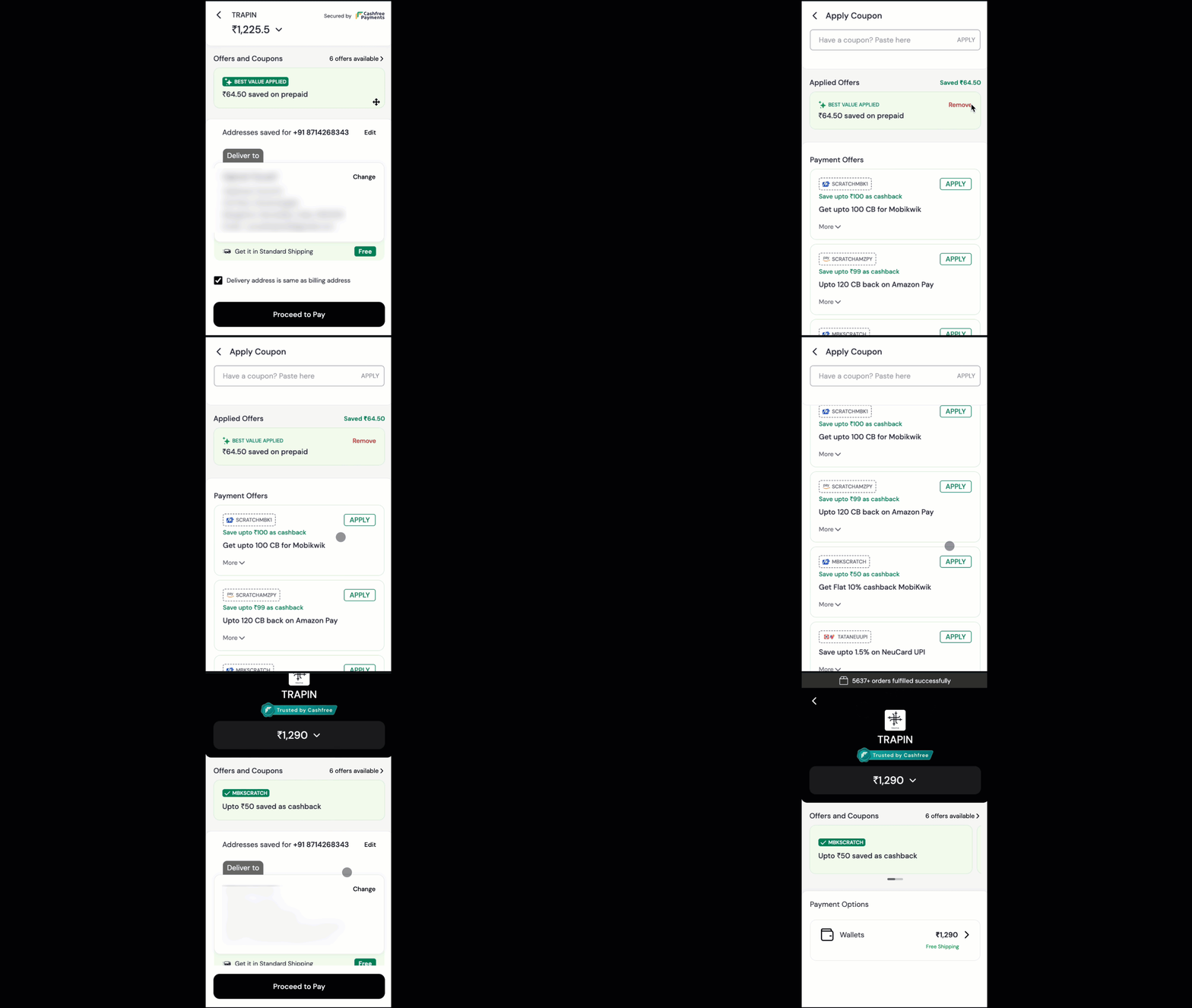
- Smart offer visibility: Automatically surface the best value offer to customers on the checkout page (eliminating manual code entry), boosting conversions by up to 25%.
- Unified dashboard control: Create and manage all offers from a single view with advanced targeting, velocity checks, and upper caps to manage discount burn.
- Deep Shopify integration: Full support for stacked discounts, automatic Shopify discounts, Buy X Get Y (BxGy), and product/collection level discounts directly synced with Shopify.
Benefits
Implementing a strategic offer programme delivers immediate business value through the following outcomes:Supported offer types
You can configure a wide variety of offers to suit different inventory and sales goals. The following offer types are available:- Order level discounts: Run flat discounts such as ₹100 off or percentage discounts such as 10% off. You can set a maximum discount cap to control burn.
- Product and collection discounts (Only via Shopify): Target specific items or collections to clear inventory or promote new arrivals.
- Prepaid discounts: Exclusive discounts applied only when a customer selects a prepaid payment method. This is highly effective for reducing Return to Origin (RTO) by discouraging COD.
- Cashbacks: Customers receive money back in their source account or wallet after a successful purchase. This builds loyalty and encourages repeat purchases.
- Free gift on cart: Customers receive complementary products when cart conditions such as “Spend ₹2000” are met. This increases perceived value and clears inventory without devaluing the primary product.
- Buy X Get Y (Only via Shopify): Customers receive additional items at discounted rates or for free when purchasing specified quantities. Increases order quantity and moves bulk inventory.
- No Cost EMI: Customers purchase high-value items on EMI without bearing the interest cost (merchant bears the interest). Enables aspirational purchases and significantly increases Average Order Value (AOV).
Offer targeting and conditions
To prevent excessive discounting and ensure the right offers reach the right users, you can apply strict conditions through the following mechanisms:Customer and velocity controls
Use these controls to manage offer usage and prevent abuse:- Customer segments: Restrict offers to specific segments of customers (list of customers to be uploaded).
- Customer velocity: Limit how many times a user can redeem an offer within a specific timeframe.
- Card velocity: Track usage per card to prevent abuse of bank-specific offers.
- Redemption limits: Set a global “Upper Cap” on the total number of times an offer can be used across the entire site.
- Day restrictions: Limit offers to specific days of the week such as “Wednesday Sale” or specific hours (Flash Sales).
Payment and bank identification targeting
Target offers based on the specific financial instrument used through these options: Payment locking: Configure payment locking using these options:- Prepaid only: Lock offers to exclude COD.
- Method specific: Restrict offers to specific payment groups such as UPI only, Credit Card only.
- Issuer: Create exclusive offers for specific banks such as HDFC, ICICI.
- Network: Target specific networks such as Visa, Mastercard, RuPay.
Checkout experience
You can control how offers are presented to the customer during the payment process using these visibility options:- Auto applied: The offer is applied automatically to eligible carts without manual intervention. Best for seamless UX.
- Listed on checkout: Available offers are listed on the payment page. The engine highlights the “Best Value” offer to the customer for one-click redemption. You can import and sync Shopify discounts if you want these discounts to be listed on checkout.
- Hidden (Coupon Code): The offer is invisible on the checkout UI. The customer must manually enter a code shared via marketing channels (Email/SMS).
Offer combination: Only one offer created on Cashfree can be applied per order. However, one or more Shopify-created offers can be applied simultaneously based on the combination setup done on Shopify.
Setting up offers
You can create offers through two methods:Offer creation through merchant dashboard
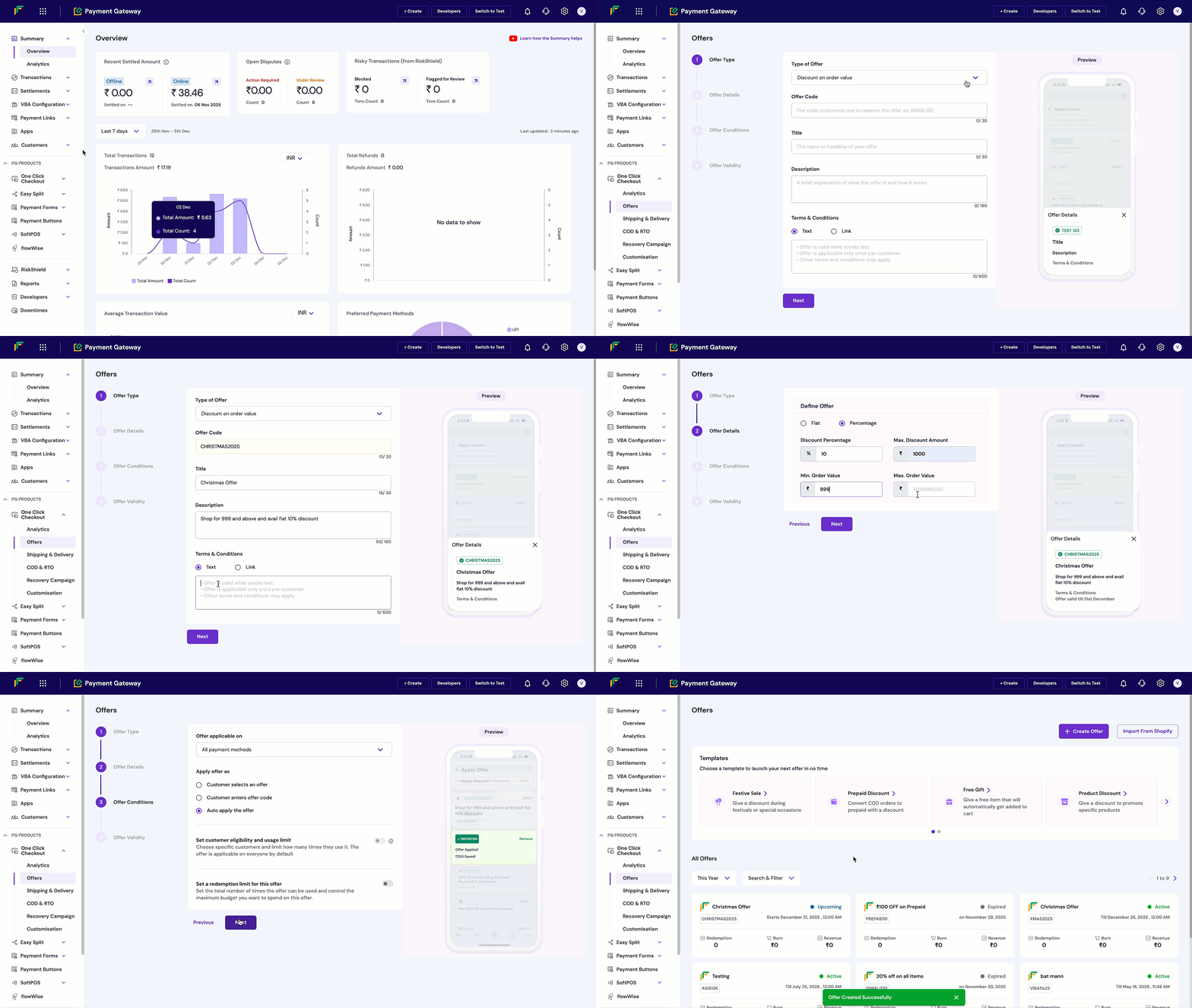
The merchant dashboard provides an intuitive workflow for merchants. Follow these steps to create an offer:1
Access offers and create new offer
- Log in to the Merchant Dashboard.
- Go to Payments > One Click Checkout > Offers.
- Select Create Offer to start the offer creation process.
2
Select offer type
Select the type of offer based on your promotional strategy:
- Discount on order value
- Discount on products
- Cashback on order value
- Cashback on products
3
Define offer details
Define the offer details such as flat discount or percentage, then select Next.
4
Configure offer conditions
Define the offer conditions such as:
- Customer selects an offer.
- Customer enters offer code.
- Auto apply the offer.
5
Set validity dates
Define the offer validity dates from the available calendar.
6
Confirm and activate
Select Confirm Offer to make the offer live for customers.
Importing Shopify discounts
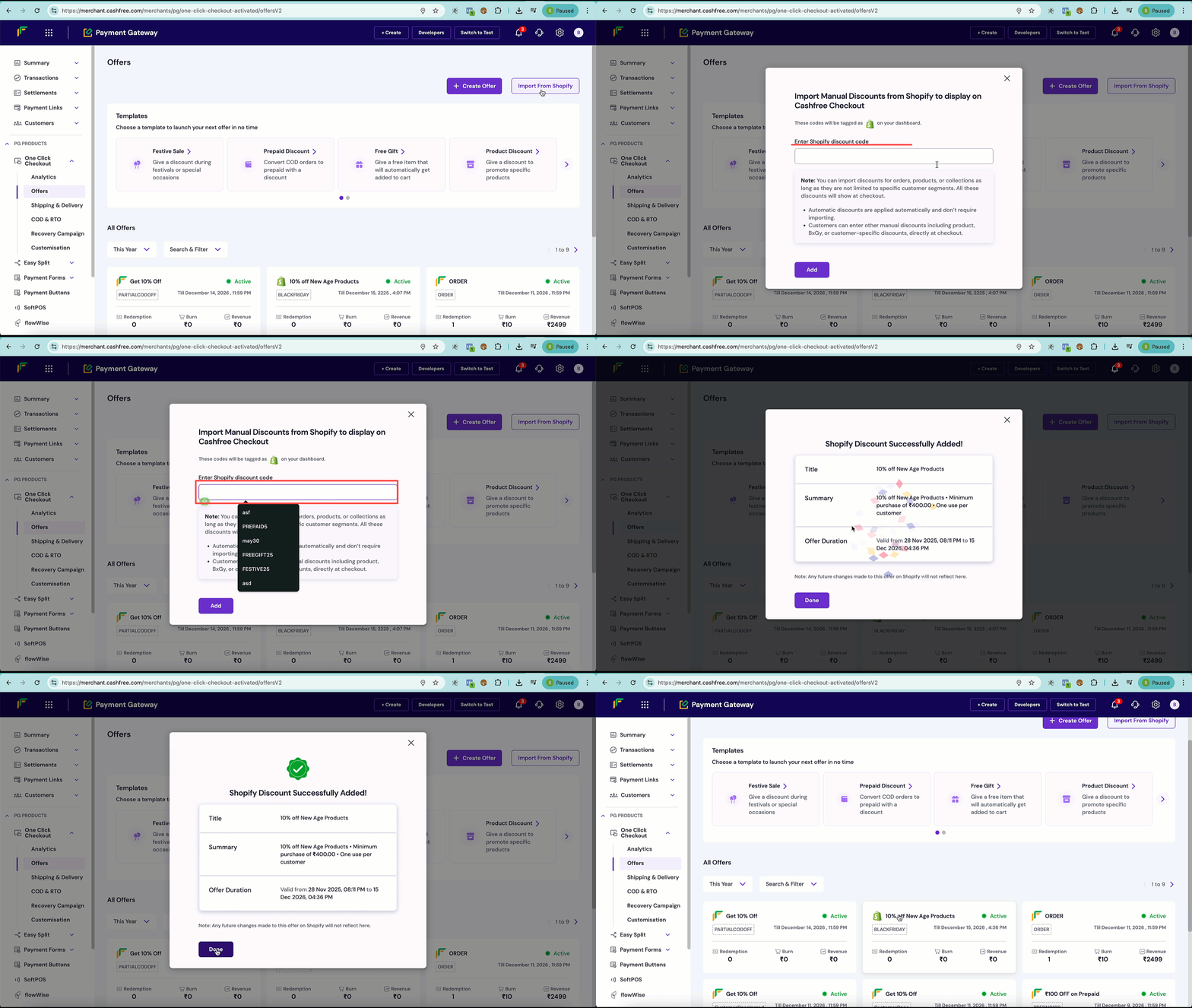
If you are using Shopify, you can import existing discounts directly into the Cashfree Offers Engine to synchronise them with your checkout page.- Log in to the Merchant Dashboard.
- Navigate to Payments > One Click Checkout > Offers.
- Select Import from Shopify.
- Enter the Shopify discount code and select the Add button.
- The system imports the Shopify discount and lists it in the Offers section.
API-based creation
For custom checkout flows and advanced integrations, offers can be managed programmatically using the following APIs:- Create Offer API: Set up new offers with complex configurations.
- Get Offer API: Retrieve offer details, status, and validity in real-time.