Documentation Index
Fetch the complete documentation index at: https://www.cashfree.com/docs/llms.txt
Use this file to discover all available pages before exploring further.
A batch transfer is a way to make multiple payouts transfer requests at one time. Cashfree offers separate APIs for batch transfers. This section provides details on how to integrate a batch transfer from scratch. It includes making a batch transfer and fetching the batch transfer status.
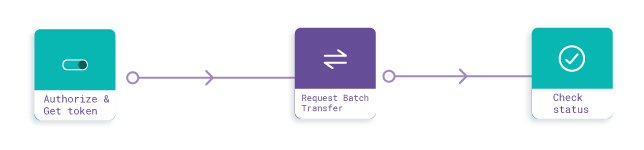 Steps
Steps
- Setup
- Initialisation and authorisation
- Request a batch transfer
- Get batch transfer status
Check out our libraries and samples section for the integration code hosted on GitHub.
Step 1: Setup
Get your corresponding clientId and clientSecret from your payout dashboard and ensure that your IP is whitelisted as well. Check our development quickstart here.
Host URL: Use the following URL for PROD and TEST, respectively:
Step 2: Initialisation and authorisation
Call the authenticate API to Cashfree system or server to obtain an Authorisation Bearer token. All other API calls must have this token as authorisation header in the format ‘Bearer <token>’ (without quotes) for them to be processed.
curl -X POST \
  'http://{{Host%20Url}}/payout/v1/authorize' \

-H 'X-Client-Id: {{client id}}' \
 -H 'X-Client-Secret: {{client secret}}' \
 -H 'cache-control: no-cache'
{
	"status": "SUCCESS",
	"message": "Token generated",
	"subCode": "200",
	"data": { "token": "eyJ0eXA...fWStg", "expiry": 1564130052 }
}
Step 3: Request batch transfer
A batch transfer allows you to request multiple payout transfers at a given time. Batch transfers can be created by passing the beneficiary ID or by passing the beneficiary details.
curl -X POST \
  'http://{{Host%20Url}}/payout/v1/requestBatchTransfer' \
  -H 'Authorization: Bearer {{Token}}' \
  -d '{
	"batchTransferId": "test_batch_format",
	"batchFormat": "BENEFICIARY_ID",
	"batch": [{
		"transferId": "PTM_00121241112",
		"amount": "12",
		"beneId": "b01",
		"remarks": "working"
	}]
}'
{
  "status": SUCCESS,
  "subCode": "200",
  "message": "Request accepted",
  "data": { "referenceId": 1594 }}
Step 4: Get batch transfer status
Get the status of all transfers within a batch transfer.
curl -X GET \
  'http://{{Host%20Url}}/payout/v1/getBatchTransferStatus?batchTransferId=test_batch_format_01' \
  -H 'Authorization: Bearer {{Token}}' \
{
"status": "SUCCESS",
"subCode": "200",
"message": "Details of transfer with transferId 159381033b123",
"data": {
"transfer": {
"referenceId": 17073,
"bankAccount": "026291800001191",
"beneId": "ABCD_123",
"amount": "20.00",
"status": "SUCCESS",
"utr": "1387420170430008800069857",
"addedOn": "2017-01-07 20:09:59",
"processedOn": "2017-01-07 20:10:05",
"acknowledged": 1
}
}
}

