Documentation Index
Fetch the complete documentation index at: https://www.cashfree.com/docs/llms.txt
Use this file to discover all available pages before exploring further.
Webhooks are events that notify you about the payment status. All Payout integrations should establish a webhook to listen to payout events, like status changes on payments. Webhooks are HTTP callbacks that receive notification messages for events.
Webhooks help you receive automatic updates and are significant for completing the integration with Cashfree Payments. Webhooks are triggered with a request from your side, for example, when a transfer fails or when a daily report is available. Requests get processed both synchronously and asynchronously. In rare scenarios, for some payment methods, the outcome may take a longer duration to confirm. Cashfree Payments notify you once we get updates from the bank about the payment status.
Do not go live without signature verification if you are using webhooks. For comprehensive security measures including IP whitelisting and signature verification, refer to the Webhook Security Checklist.
To configure webhooks,
- Log in to the Merchant Dashboard.
- Go to Payouts Dashboard > Developers > click Webhook in the Payouts section.
- In the Developers - Payouts screen, click Add Webhook URL.
- Enter the URL where you want to receive the updates about the payout events.
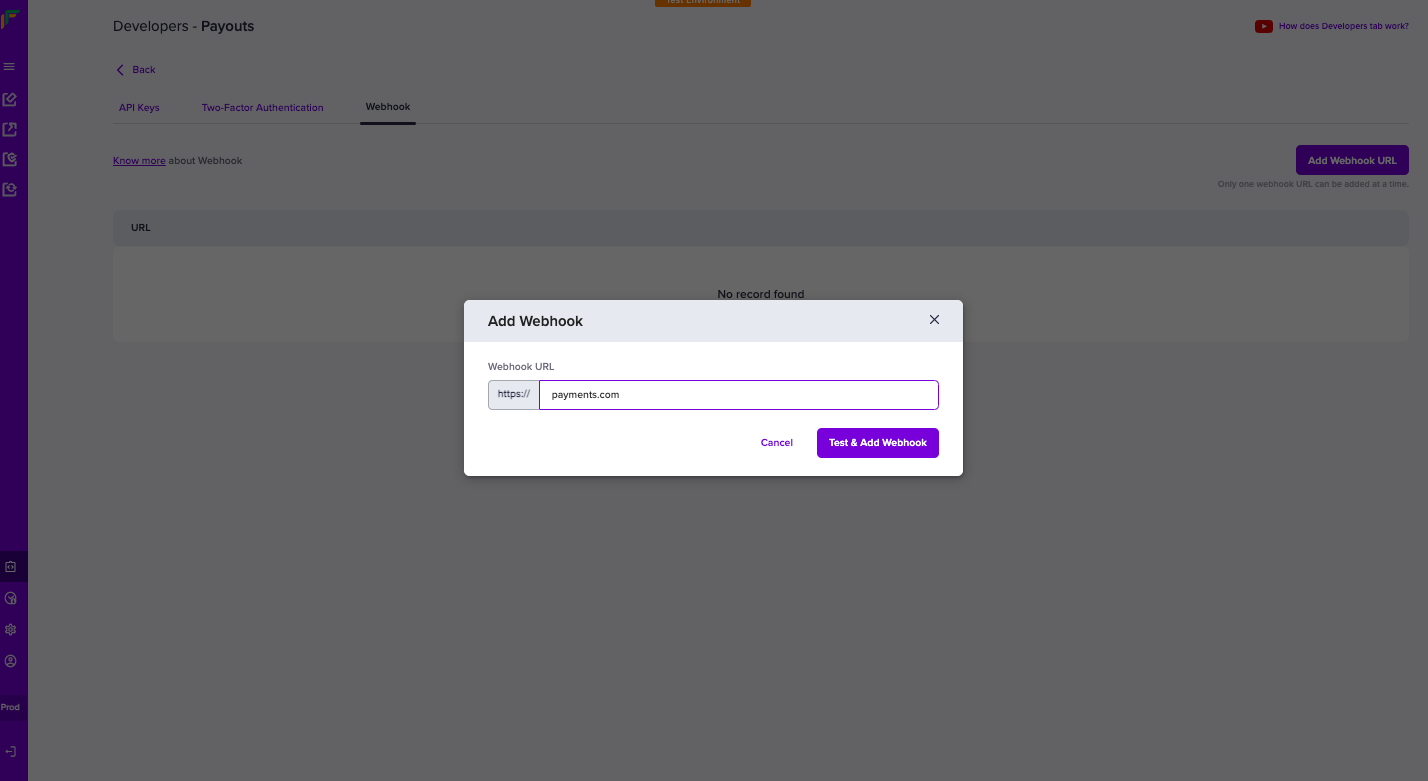
- Click Test & Add Webhook.
Webhook events
Payouts webhooks enable you to receive updates about all event-driven activities originating from your account. Below is the list of payouts webhooks:
| Events | Notifications |
|---|
| TRANSFER_SUCCESS | Transfer successful at the bank and account debited. |
| TRANSFER_APPROVED | Transfer approved by Approver through the API or dashboard |
| TRANSFER_FAILED | Sent whenever a transfer attempt fails. |
| TRANSFER_REVERSED | Transfer reversed by the beneficiary bank. |
| CREDIT_CONFIRMATION | Confirmation of balance credit. |
| TRANSFER_ACKNOWLEDGED | After the beneficiary bank has deposited the money it confirms the transfer. |
| TRANSFER_REJECTED | Transfer rejected by Cashfree Payments. |
| BENEFICIARY_INCIDENT | Sent whenever a beneficiary incident is created/resolved. |
| LOW_BALANCE_ALERT | Payouts recharge account low balance alert. |
TRANSFER_SUCCESS
Sent when a transfer is attempted successfully.
| Parameters | Description |
|---|
| event | It contains the name of the event which just occurred. Value = TRANSFER_SUCCESS. |
| transferId | Id of the transfer passed by the merchant. |
| referenceId | Id of the transfer generated by Cashfree Payments. |
| acknowledged | The flag indicates if the beneficiary bank has acknowledged the transfer. |
| eventTime | Transfer initiation time. |
| utr | Unique transaction reference number provided by the bank. |
| signature | A unique string that helps distinguish that the request is genuine and initiated by Cashfree Payments. |
What does the response parameter ‘acknowledged’ mean?
The acknowledged parameter value conveys if the beneficiary received the funds by checking its value. Ack = 1 or 0. 1 denotes the beneficiary received funds, and 0 denotes the beneficiary had not received funds.
The cash flow happens as explained below:
-
Debit: The debit of the transfers happens on the remitter account. After a successful debit, the beneficiary bank does further processing. When only the debit is successful, Ack = 0.
-
Credit: The beneficiary bank credits the fund to the account. The transfer is sent from the remitter bank to the beneficiary bank after a successful debit. When the credit to the end beneficiary is successful, Ack = 1.
To confirm the status of a payout, you need to check the acknowledged parameter value. If the value is 1, you can mark the transfer as successful. However, if the value is 0, you must either wait for the TRANSFER_ACKNOWLEDGED webhook event or use the Get Transfer Status API and confirm the acknowledged value.
TRANSFER_APPROVED
The webhook is sent when Approver approves the transfer through the dashboard or via API.
| Parameters | Description |
|---|
| event | It displays the occurred event name. Value = TRANSFER_APPROVED. |
| transferId | It displays the ID of the transfer created by you (merchants). |
| referenceId | It displays the ID of the transfer created by Cashfree Payments. |
| approvedBy | It displays the username of the approver if done through the dashboard. It displays API if done via API. |
| approvedAt | It displays the time of the approval. |
| signature | It displays the unique string that helps distinguish that the request is genuine and initiated by Cashfree Payments. |
TRANSFER_FAILED
Sent when a transfer attempt fails.
| Parameters | Description |
|---|
| event | It contains the name of the event which just occurred. Value = TRANSFER_FAILED. |
| transferId | Id of the transfer passed by the merchant |
| referenceId | Id of the transfer generated by Cashfree Payments. |
| reason | Reason for failure. |
| signature | A unique string that helps distinguish that the request is genuine and initiated by Cashfree Payments. |
TRANSFER_REVERSED
Sent when the beneficiary bank reverses a transfer.
| Parameters | Description |
|---|
| event | It contains the name of the event which just occurred. Value = TRANSFER_REVERSED. |
| transferId | Id of the transfer passed by the merchant. |
| referenceId | Id of the transfer generated by Cashfree Payments. |
| eventTime | Time at which the transfer was reversed. |
| reason | Reason for failure. |
| signature | A unique string which helps distinguish that the request is genuine and initiated by Cashfree Payments. |
CREDIT_CONFIRMATION
Sent when the balance credit is confirmed.
| Parameters | Description |
|---|
| event | It contains the name of the event which just occurred. Value = CREDIT_CONFIRMATION. |
| ledgerBalance | The overall balance of the ledger. |
| amount | Amount deposited. |
| utr | Unique transaction reference number provided by the bank. |
| signature | A unique string that helps distinguish that the request is genuine and initiated by Cashfree Payments. |
TRANSFER_ACKNOWLEDGED
Sent when the bank acknowledges a transfer.
| Parameters | Description |
|---|
| event | It contains the name of the event which just occurred. Value = TRANSFER_ACKNOWLEDGED. |
| transferId | Id of the transfer passed by the merchant. |
| referenceId | Id of the transfer generated by Cashfree Payments. |
| acknowledged | The flag illustrates if the beneficiary bank acknowledges the transfer. |
| signature | A unique string that helps distinguish that the request is genuine and initiated by Cashfree Payments. |
TRANSFER_REJECTED
Sent when a transfer is rejected.
| Parameter | Description |
|---|
| event | It contains the name of the event which just occurred. Value = TRANSFER_REJECTED. |
| transferId | Id of the transfer passed by the merchant. |
| referenceId | Id of the transfer generated by Cashfree Payments. |
| reason | Reason for rejection. |
| signature | A unique string that helps distinguish that the request is genuine and initiated by Cashfree Payments. |
BENEFICIARY_INCIDENT
Sent when a beneficiary incident is created or resolved.
| Parameter | Description |
|---|
| event | It contains the name of the event which just occurred. Value = BENEFICIARY_INCIDENT. |
| beneEntity | The entity of the beneficiary (BANK). |
| id | Identifier of the incident. |
| mode | Mode of the incident (IMPS/NEFT) |
| startedAt | Start time of the incident. |
| status | Status of the incident (ACTIVE/RESOLVED). |
| isScheduled | Scheduled or unscheduled incident (true or false). |
| severity | The severity of the incident (LOW/HIGH). |
| entityName | Name of the entity on which the incident is created (Bank Name). |
| entityCode | Code of the entity on which the incident is created. |
| resolvedAt | Resolution time of the incident. |
LOW_BALANCE_ALERT
Sent when the payout balance is low.
| Parameter | Description |
|---|
| event | It contains the name of the event which just occurred. Value = LOW_BALANCE_ALERT |
| currentBalance | The current balance of the beneficiary account |
| alertTime | Alert initiation time. |
| signature | A unique string that helps distinguish that the request is genuine and initiated by Cashfree Payments. |
Signature verification
Cashfree Payments sends a signature alongside every webhook, verifying this signature ( passed along with the POST parameters ) is mandatory before processing any response. It helps authenticate that the webhook is from Cashfree Payments.
We strongly recommend whitelisting Cashfree Payments production IP to help make your communication with us more secure.
Following are the steps to verify Cashfree Payments signature:
- Get all the POST parameters except ‘signature’ and assign it to an array as key-value pair.
- Sort the array based on keys.
- Concatenate all the values in this array and the resultant is the post data (say, postData).
- postData needs to be encrypted using SHA-256, and then base64 encoded.
- Now verify if both the signature calculated and the signature received a match.
- Proceed further if it matches, else discard the request.
To verify the signature, use the active API key that was generated first (old API key) and not the latest API keys. Do not go live without verifying the signature.
<?php
  $data = $_POST;
  $signature = $_POST["signature"];
  unset($data["signature"]); // $data now has all the POST parameters except signature
  ksort($data); // Sort the $data array based on keys
  $postData = "";
  foreach ($data as $key => $value){
    if (strlen($value) > 0) {
      $postData .= $value;
    }
  }
  $hash_hmac = hash_hmac('sha256', $postData, $clientSecret, true) ;

  // Use the clientSecret from the oldest active Key Pair.
  $computedSignature = base64_encode($hash_hmac);
  if ($signature == $computedSignature) {
    // Proceed based on $event
  } else {
    // Reject this call
  }
?>
import java.util.LinkedHashMap;
import java.util.Map;
import java.util.stream.Collectors;

import com.fasterxml.jackson.core.type.TypeReference;
import com.fasterxml.jackson.databind.ObjectMapper;
import javax.crypto.spec.SecretKeySpec;
import javax.crypto.Mac;
import org.apache.commons.codec.binary.Base64;

public class ComputedSignature {

    public static boolean checkSignature(String clientSecret, String data) {
   // write your code here
        ObjectMapper objectMapper = new ObjectMapper();
        String signatureKey = "signature";
        String hash = "";
        try {
            Map<String, Object> jsonMap = objectMapper.readValue(data, new TypeReference<Map<String, Object>>(){});
            String signature = jsonMap.get(signatureKey).toString();

            // remove the signature from map
            jsonMap.remove(signatureKey);
             Map<String, Object> sortedMap =  jsonMap.entrySet().
                     stream().
                     sorted(Map.Entry.comparingByKey()).
                     collect(Collectors.toMap(
                             Map.Entry::getKey,
                             Map.Entry::getValue,
                             (oldValue, newValue) -> oldValue, LinkedHashMap::new
                     ));

             // sort the map based on keys
             String postDataString = sortedMap.keySet().stream().map(key -> sortedMap.get(key).toString()).collect(Collectors.joining());

             // encode the post data on sha256
             Mac sha256HMAC = Mac.getInstance("HmacSHA256");
             SecretKeySpec secretKey  = new SecretKeySpec(clientSecret.getBytes(), "HmacSHA256");
             sha256HMAC.init(secretKey);

             hash = Base64.encodeBase64String(sha256HMAC.doFinal(postDataString.getBytes()));

             // check the hash generated with signature passed
             return hash.equals(signature);

        } catch (Exception e) {
            e.printStackTrace();
            return false;
        }
    }
}
const Cashfree = require("cashfree-sdk");
//convert post response recived in the notification end point to json
//and pass that to the SDK.
Cashfree.Payouts.VerifySignature(webhookPostDataJson, signature, clientSecret);
from cashfree_sdk import verification

#webhook_data = response.content
webhook_data = '{"cashgramId": "5b8283182e0711eaa4c531df6a4f439b-28", "event": "CASHGRAM_EXPIRED", "eventTime": "2020-01-03 15:01:06", "reason": "OTP_ATTEMPTS_EXCEEDED", "signature": "TBpM+4nr1DsWsov7QiHSTfRJP4Z9BD8XrDgEhBlf9ss="}'
verification.verify_webhook(webhook_data, 'JSON')
Webhook retries
Cashfree Payments webhooks service does its best to deliver events to your webhook endpoint. It is best practice for your application to respond to the callback. Our webhook service may send many payloads to a single endpoint in quick succession. You will need to build an application and configure your server to receive the response we send when events get triggered during the payout process.
Your server should return a 200 HTTP status code to acknowledge that you received the webhook without any issues. Any other information you return in the request headers or request body gets ignored. Any response code outside the 200 range, including 3xx codes, indicates that you did not receive the webhook.
When Cashfree Payments does not get the acknowledgment due to any reason, we retry to establish communication at regular intervals. If we do not receive the response after a few attempts, we gradually decrease the rate of retries. Based on this count, the service is disabled if it fails more than five times.
If you do not receive notifications from Cashfree Payments as expected, contact our support team by filling out the Support Form.
Development and testing webhooks
When you decide to use webhooks, first, you need to have a URL to receive notifications. This URL should be an HTTPS endpoint and accept JSON payload with the POST method. The easiest way to test out webhooks is with tools like Ngrok, Webhook.site, Beeceptor etc.
Simply use these services to create a new endpoint and put it in Cashfree. When a webhook has been sent through, you should see it on these tools. You can inspect the entire payload and share it with colleagues for further development and testing.
IPs to whitelist
When you decide to consume the webhooks, first, you need to verify if your systems need an IP whitelisting to be done at your end or not. Accordingly you can whitelist the below IPs of Cashfree:
UAT:
52.66.25.127
15.206.45.168
Prod:
52.66.101.190
3.109.102.144
Port: 443 (Secured)

