

When you make a Payout there are various states that the Payout goes through before reaching your customer account. The various states help you understand the status of the Payout. Cashfree Payouts supports synchronous and asynchronous payouts lifecycle. In synchronous lifecycle for a payout, all the state changes happen one after the other. The statuses that you see are real-time. Cashfree updates the status after it receives a response from the previous state. In an asynchronous lifecycle, users do not have to wait to see the final state, you get a response that your request has been received. The final status will be sent with the help of webhooks.Documentation Index
Fetch the complete documentation index at: https://www.cashfree.com/docs/llms.txt
Use this file to discover all available pages before exploring further.
Payouts synchronous lifecycle
When you make a Payout to your party, there are various states that the transfers may go through before the amount reaches the beneficiary account. The various states in Cashfree payouts synchronous lifecycle are shown below: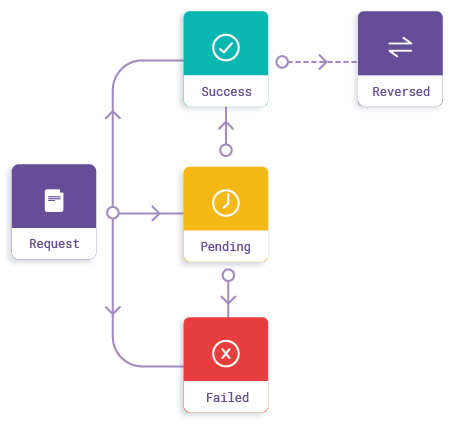
A transfer might be rejected for various reasons like your account could be blocked due to suspicious activities.
Pending
When the transfer status is yet to be confirmed, the payout is in the Pending state. At this point, the partner bank could be processing the payout and no further action is required from your end. The Pending state can transition into:- Success state, if the payout is successful.
- Failed state, if the payout fails.
Failed
When the payout request fails, the payout is in the Failed state. Failed is a final state and does not allow transitioning to any other state. You can reinitiate the transfers which have failed. For failed transfers, if any amount is debited, it will be reversed to you by the remitter bank within 24 hours. A payout can indicate a Failed state due to various reasons, such as:- The beneficiary account details are wrong and not validated. To avoid this, you can validate the beneficiary account details using the bank account verification feature.
- There is no sufficient balance in your Payouts recharge account. To avoid this, you can specify the balance in the Low Balance Alert section. If the balance goes below the amount specified, Cashfree Payments sends you a notification.
- Remitter or beneficiary bank servers are down.
Success
When the remitter’s bank has completed the transfer, the payout is in the Success state. The Success state can transition into the Reversed state if the transfer is reversed by the beneficiary bank.Reversed
A payout can be in the Reversed state due to various reasons, such as:- Incorrect account details.
- Reversal by the clearinghouse.
- Reversal by the beneficiary bank.
Rejected
When the payout request from Sync API is a high risk identified by Cashfree Payments, or blocked as per merchant blacklist, or blocked as per smart limits set by merchant, the payout is in the Rejected state. Rejected is a final state and does not allow transitioning to any other state.Payouts asynchronous lifecycle
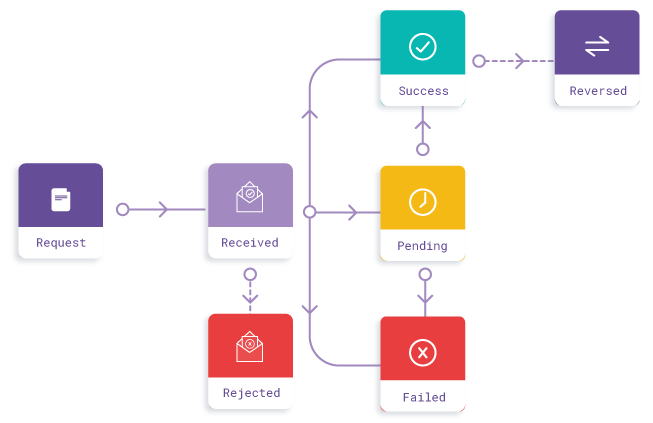
Received
When the transfer request has been received, the payout is in the Received state. It then processes the request further if the details provided are accurate.It can transition into the Rejected state if the details provided are incorrect. You have to reinitiate the payout.