Configure Webhooks To start receiving webhook event notifications,
  1. Go to Payment Gateway Dashboard > click Developers in the left navigation.
  2. Select Webhooks in the Payment Gateway section.
  3. Click Add Webhook URL and select the event you want to be notified about.
  4. Enter the URL where you want to receive the webhook notifications, and click Add.
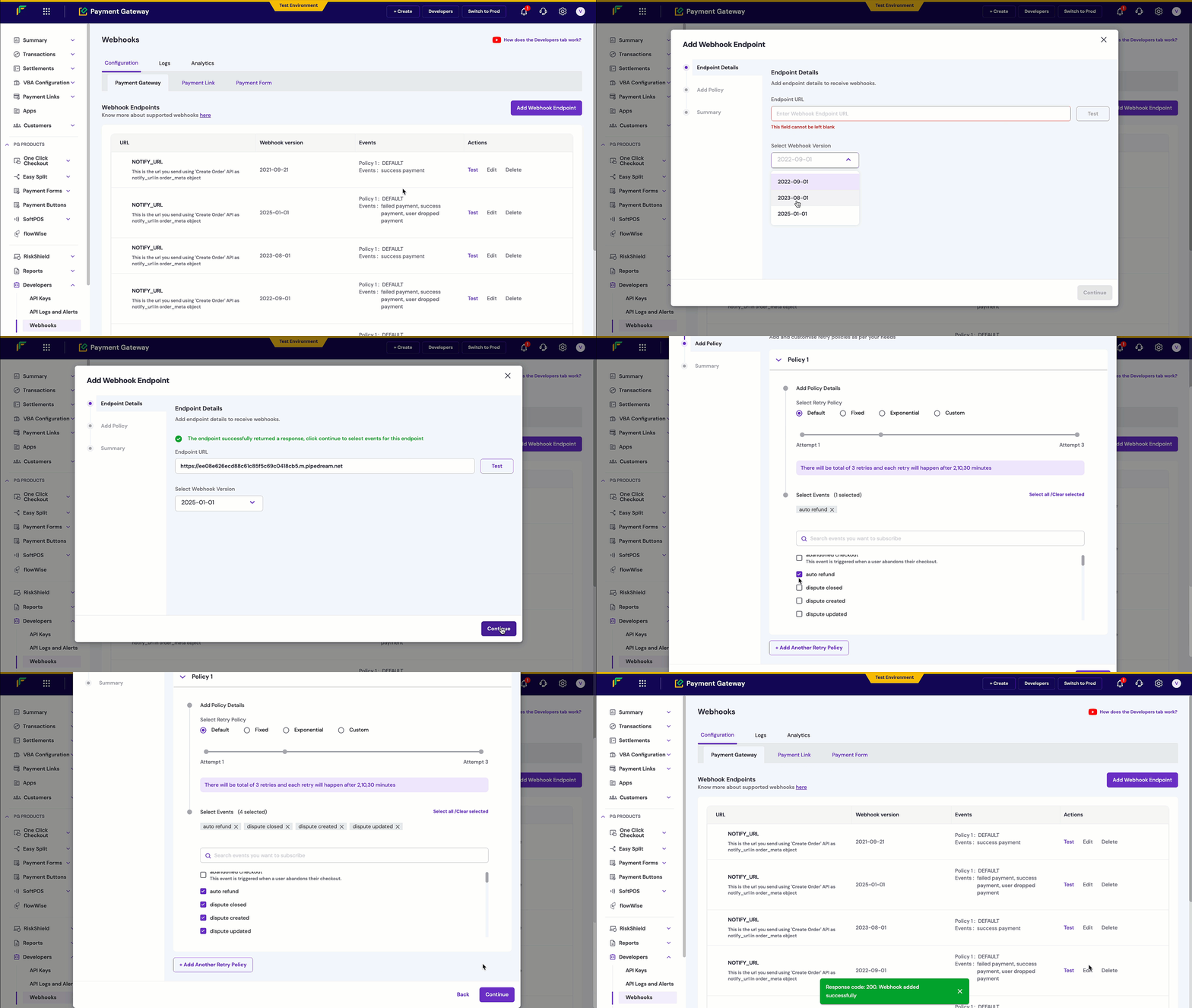
You will start to receive webhook event notifications on the URLs you have specified. You can use one URL to handle several different event types at once or specify individual URLs for specific events.

Configure Webhooks

Webhook events

Payment Forms trigger webhooks for the following events:
  • payment_form_order_webhook: Triggered when a customer makes a payment using a payment form

Webhook headers

Your webhook endpoint will receive the following headers for signature verification:
Header NameDescriptionExample
x-webhook-signatureHMAC-SHA256 signature for verifying authenticityf5oTYzpxzHmPBMmGDSjbAKZTleL4=
x-webhook-timestampTimestamp when the webhook was sent1746426425612
x-webhook-versionAPI version used for the webhook2023-08-01
content-typeContent type of the payloadapplication/json

Payment forms sample payload

{
    "data": {
        "form": {
            "form_id": "my-form-1",
            "cf_form_id": 2011640,
            "form_url": "https://payments-test.cashfree.com/forms/webhook-trial-1",
            "form_currency": "INR"
        },
        "order": {
            "order_amount": 22.00,
            "order_id": "CFPay_U1mgll3c0e9g_ehdcjjbtckf",
            "order_status": "PAID",
            "transaction_id": 1021206,
            "customer_details": {
                "customer_phone": "9999999999",
                "customer_email": "[email protected]",
                "customer_name": "John Doe",
                "customer_fields": [
                    {
                        "title": "Zoom ID",
                        "value": "john"
                    },
                    {
                        "title": "Company Designation",
                        "value": ""
                    }
                ]
            },
            "amount_details": [
                {
                    "title": "Webinar Tickets",
                    "value": 398,
                    "quantity": 2
                },
                {
                    "title": "Zoom Platform Fee",
                    "value": 10
                },
                {
                    "title": "Buy me a coffee :)",
                    "value": 0
                },
                {
                    "title": "Amount Dropdown Trial",
                    "value": 50,
                    "selectedoption": "Option 1"
                }
            ]
        }
    },
    "event_time": "2023-07-12T09:20:55+05:30",
    "type": "PAYMENT_FORM_ORDER_WEBHOOK"
}

Webhook Signature Verification

Verifying webhook signatures is essential for production environments to ensure the authenticity of webhook notifications and prevent fraudulent requests.
The signature must be verified to confirm the webhook originates from Cashfree. You’ll need your Cashfree Payment Gateway secret key and the raw payload.
  • The timestamp is in the header x-webhook-timestamp
  • The signature is in the header x-webhook-signature
Verification process:
  1. Concatenate the timestamp and raw request body: timestamp + rawBody
  2. Generate HMAC-SHA256 hash using your secret key
  3. Base64-encode the hash
  4. Compare with the x-webhook-signature header value
  • Node.js
  • Python
function verifyWebhookSignature(timestamp, rawBody, signature, secretKey) {
    const signatureString = timestamp + rawBody;
    const computedSignature = crypto
        .createHmac('sha256', secretKey)
        .update(signatureString)
        .digest('base64');
    
    return computedSignature === signature;
}