

CUSTOMER type terminal. Payment webhooks include terminal_details, so you can match each transaction to the right payer without manual bank-statement matching.
Prerequisites
Complete the following before you create Customer VPAs:- An active Cashfree Payment Gateway account with Offline Payments - SoftPOS enabled. See Get started with Offline Payments to request activation.
- Customer VPA enabled on your account. Contact your Cashfree account manager if the Customer VPA collection type is not visible when you add a collection point.
- A configured webhook URL if you plan to reconcile payments programmatically. See softPOS webhooks.
Key benefits
Customer VPA provides the following capabilities:Maintain a mapping between
cf_terminal_id and your internal customer ID. Payment webhooks include terminal_details with cf_terminal_id, terminal_phone, and terminal_vpa for reconciliation.How Customer VPA works
The Customer VPA collection flow has the following stages:- Create a
CUSTOMERtype terminal for each payer through the Merchant Dashboard or the Create Terminal API. - Cashfree generates the VPA and static QR code for the terminal.
- Share the QR code or VPA with the customer.
- The customer pays any amount through a UPI app.
- Cashfree sends a
PAYMENT_SUCCESS_WEBHOOKto your configured URL. The payload includesterminal_detailsto identify the customer terminal.
order_id only after the payment completes. Use the order_id from the webhook to initiate refunds.
Use cases
Customer VPA supports collections where each payer is known in advance and requires individual tracking.Create a customer VPA
Customer VPA is not enabled by default. Contact your Cashfree account manager to request activation before proceeding with the steps below.
- Merchant Dashboard
- API
To add and verify a Customer VPA collection point, complete the following steps:
- Log in to the Merchant Dashboard.
- Navigate to PG PRODUCTS > Offline Payments > Collection Point Management.
-
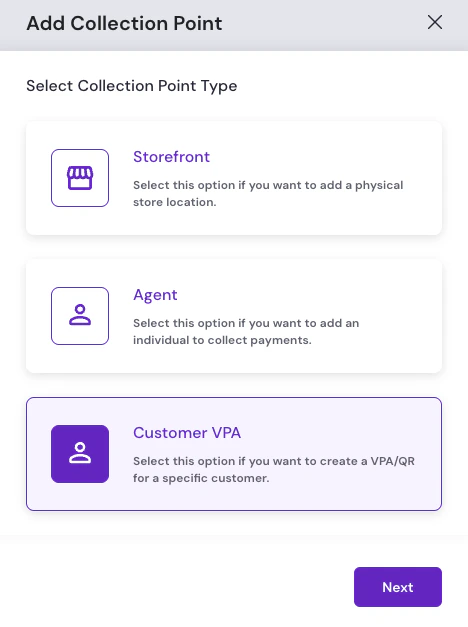
Click Add Collection Point, then select the Customer VPA collection type.
-
On Add Customer Details, provide the following mandatory customer details:
- Customer ID: A unique identifier for the customer (for example,
CUST001). - Customer Name: The customer’s name for this customer ID.
- Customer Phone Number: The customer’s mobile number with country code.
- Customer VPA: If not provided, the VPA defaults to
merchantName.customerId. - Customer Email: The customer’s email address.
- Customer Address: Street, city, state, and pin code for the customer.
Use Upload File on the Add Customer Details screen to upload a batch file and create customer VPAs or QR codes for multiple customers at once.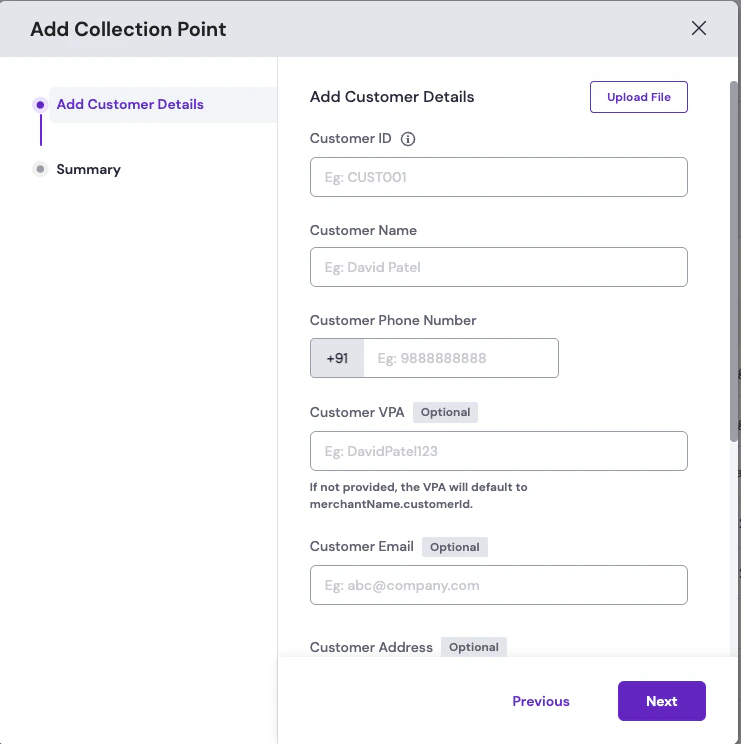
- Customer ID: A unique identifier for the customer (for example,
-
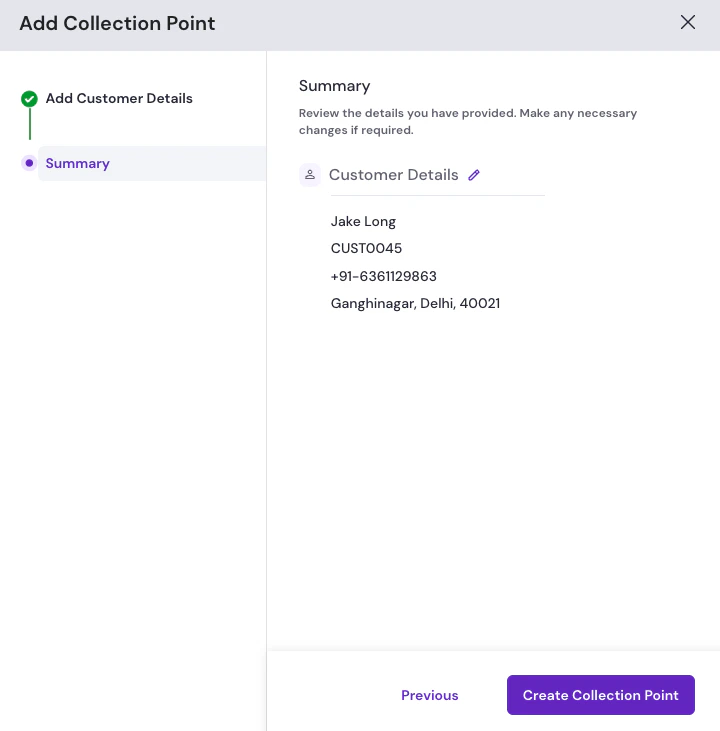
Click Next. On the Summary step, review the customer VPA details. Make any necessary changes by selecting the edit icon next to the details, then click Create Collection Point.
Reconciling payments
Every successful payment triggers aPAYMENT_SUCCESS_WEBHOOK to your configured URL. The webhook includes the terminal details (cf_terminal_id, phone, and VPA) alongside the payment amount, UPI reference number, and payer details.
You can use the webhook for the following actions:
- Mark an invoice as paid in your ERP or billing system.
- Send a payment confirmation by SMS, email, or WhatsApp to the customer.
- Trigger downstream actions such as unlocking a service, shipping an order, or extending a subscription.
- Update the customer outstanding balance in your CRM.
Refunds
Initiate refunds through the Create Refund API. Pass theorder_id from the PAYMENT_SUCCESS_WEBHOOK payload as the path parameter.
FAQs
Is the QR code static or dynamic in Customer VPA?
Is the QR code static or dynamic in Customer VPA?
The QR code is static. Cashfree generates the static QR code when the collection point is created. Download, print, or share it with the customer.
Can one customer have multiple VPAs?
Can one customer have multiple VPAs?
Each Customer VPA requires a unique
terminal_id. Create separate terminals if you need distinct VPAs for the same customer (for example, rent and utilities).How is the VPA prefix determined?
How is the VPA prefix determined?
By default, the VPA uses your merchant name as the prefix followed by the
terminal_id. Pass terminal_vpa_prefix in the API request or set a custom prefix in the Merchant Dashboard to override the default.How do partial payments work?
How do partial payments work?
Static QR codes accept any amount the customer enters. Read
payment_amount from the webhook and compare it against the expected balance to mark an invoice as fully paid, partially paid, or overpaid.Is there a limit on the number of Customer VPAs?
Is there a limit on the number of Customer VPAs?
Cashfree does not impose a platform cap on Customer VPA count. Contact your Cashfree account manager before creating terminals at very large scale.
When are webhooks delivered?
When are webhooks delivered?
Webhooks are sent in near real time, typically within seconds of bank confirmation.