

What is the status of my refund or reversal?
What is the status of my refund or reversal?
Check the status of an initiated refund from the Merchant Dashboard. Go to Payment Gateway Dashboard > Transactions > Refunds > Initiated Refunds and enter the Order ID.A refund goes through the following states:
- PENDING: The refund is currently being processed. View detailed remarks by navigating to Payment Gateway Dashboard > Transactions > Refunds > Initiated Refunds > Pending.
- SUCCESS: The refund is successfully processed and approved. The amount may take additional time to reflect in the customer’s bank or payment account.
- CANCELLED: The refund is cancelled. A notification is sent to the registered email ID on the Merchant Dashboard.
- ON HOLD: The refund is temporarily on hold due to insufficient funds.
How long does it take to receive a refund?
How long does it take to receive a refund?
Refunds typically take 5 to 10 working days to be credited, depending on the merchant’s refund policy and payment modes:
- UPI: Up to 5 working days.
- Cards: Up to 7 working days.
- Net Banking and others: 7 to 10 working days.
- Reversals: Typically processed within 5 working days for all payment modes.
- Refund status: Refund Initiated or Refund Processed.
- Order ID and Refund ID: Unique identifiers for your transaction.
- Payment Method: Original mode of payment.
- Date of initiation and processing: Timelines for when the request was made and completed.
- ARN (Acquirer Reference Number): A unique ID from the partner bank to track the refund in your bank statement.
What is an ARN number in refunds?
What is an ARN number in refunds?
The ARN (Acquirer Reference Number) is a unique ID provided by Cashfree’s partner bank. It helps track the refund transaction in your bank statement.
Why is my refund delayed?
Why is my refund delayed?
Refund processing time depends on the payment mode. Common reasons for delays include:
- Clearing and settlement: Refunds pass through payment networks and banks, where data matching and settlement depends on network efficiency.
- Fraud checks: Identity verification and risk reviews for flagged transactions can extend timelines.
- Non-business days: Processing is paused on weekends and public holidays, and resumes during business hours.
If the status of the refund is on hold due to insufficient balance, then how do I recharge my wallet?
If the status of the refund is on hold due to insufficient balance, then how do I recharge my wallet?
To add money to your Refund Wallet: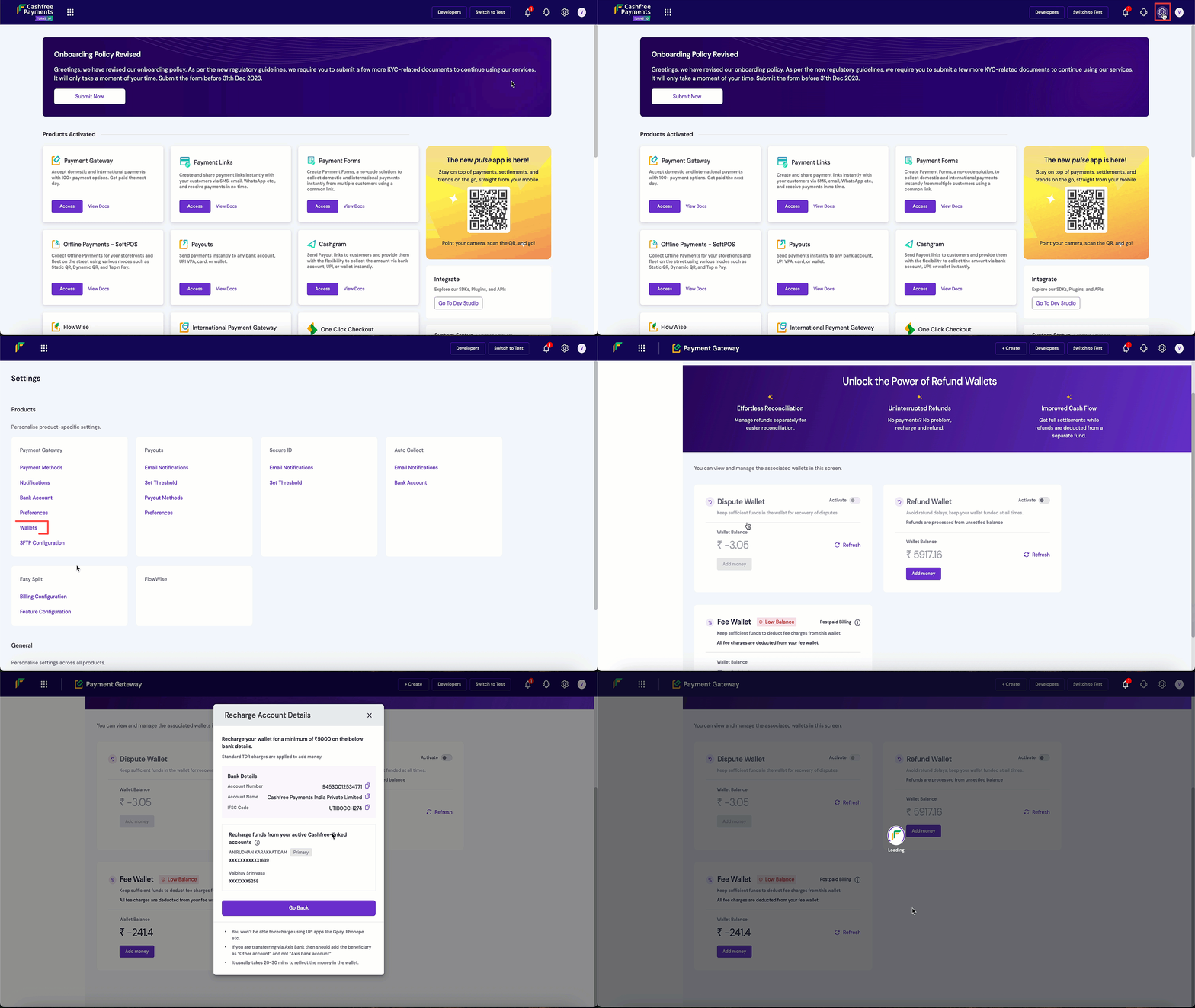
- Log in to the Merchant Dashboard.
- Click the Settings icon in the upper-right corner.
- Under Payment Gateway, select Wallets.
- In the Refund Wallet section, select Add money. The virtual bank account details linked to your Cashfree Refund Wallet will appear.
- Transfer funds to the displayed bank account using NEFT, RTGS, or IMPS.