WhatsApp
Payment Links.
Built to convert.
Native.Clean-widget.Zero-redirection.An in-chat payment widget that keeps customers inside WhatsApp from first tap to final confirmation. Built for higher conversions.
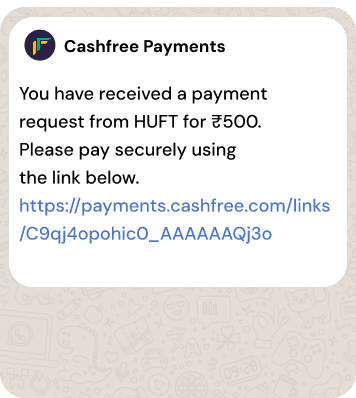
From a messy URL
to a clean widget.
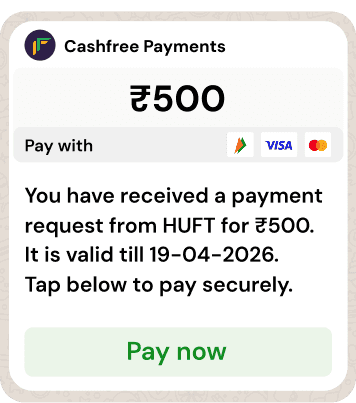
The amount is displayed prominently at the top for instant clarity.
- 1Clear amount visible upfront
The amount is displayed prominently at the top for instant clarity.
- 3Clean CTA button
A clean, high-contrast button makes the next action obvious.
- 2Link validity mentioned
The link validity is clearly mentioned so users know till when the link is valid.
- 4No clunky link preview
A clean, lightweight message without a bulky link preview for a better in-chat experience.

Customer sees the full picture.
Merchant name, amount, validity and accepted networks. Everything visible before they tap. No surprises, no second-guessing.

User lands back on WhatsApp.
Once the payment is done, the customer returns to the same conversation. Your team sees the update in real time. Reconciliation handles itself.


Send a payment link on WhatsApp.
Generate a payment link from the Cashfree dashboard, enter the customer's phone number, and send. The link arrives on their WhatsApp as an interactive widget, not a raw URL.

One tap. UPI fires.
Tap Pay now and the customer's UPI app opens via UPI intent. Cards and netbanking load right inside WhatsApp. No browser, no app-switching.
Every friction point. Removed.
Three things were killing payments on WhatsApp. We fixed all of them.
No clunky web redirects
The flow stays inside WhatsApp. UPI hands off cleanly to the customer's payment app, and the customer is back in chat as soon as it's done.
Full clarity upfront
Amount, merchant name, link validity and accepted networks. Everything shows inside the widget, before any tap.
One tap to pay
UPI opens in the customer's payment app via UPI intent. Cards and netbanking load inside WhatsApp. Post payment, the user lands back on WhatsApp.
Others redirect.
We don't.
Most payment links push customers to an external browser. That's where drop-offs happen. Cashfree keeps the entire experience inside WhatsApp.
| Feature | Cashfree WhatsApp Links | Other payment links |
|---|---|---|
| Payment experience | ✓Native in-chat widget | ✗External browser redirect |
| Customer stays in WhatsApp | ✓Yes | ✗Leaves the app |
| Amount visible before tap | ✓Yes | ✗No |
| Link validity shown | ✓Yes | ✗No |
| Link format | ✓Clean, embedded in widget | ✗Clunky URL, feels spammy |
| Call-to-action | ✓Clear, actionable CTA | ✗Missing |
| Conversion uplift | ✓Up to 2× higher | ✗Baseline |
Your customers are on WhatsApp.
Meet them there.
Frequently asked questions.
WhatsApp payment links are not a separate product. Any payment link generated from your Cashfree dashboard can be delivered through multiple channels, with WhatsApp being one of them.
When you create a payment link from the Cashfree dashboard, you'll see options to send it via email, SMS, and WhatsApp. Select any combination of channels. Enter the customer's phone number and email, and the link is delivered across the channels you've selected. On WhatsApp, it appears as a rich in-chat widget showing your verified business name, the amount, and a Pay Now button, instead of a plain text URL.
To enable WhatsApp as a delivery channel on your account, reach out to your Cashfree account manager. Activation typically takes a few working days.
Any payment link generated from your Cashfree dashboard can be delivered over WhatsApp. There is no separate product, no different SKU, and no additional setup required once WhatsApp is enabled on your account.
The difference lies in how the link is delivered. A raw payment URL on WhatsApp appears as a stripped-down preview that customers often ignore. The same link, delivered through Cashfree's WhatsApp integration, renders as a branded card inside the chat: your business name and logo at the top, the amount displayed prominently, link validity clearly stated, and a single Pay Now button. Conversion improves by up to 45% over SMS or email links, as the trust signals are built into the widget.
New to Cashfree? Sign up here, and our team will help you get started.
You do not need an existing chat or a saved contact. When you create a payment link from the Cashfree dashboard, you can choose the channels through which it is sent: email, SMS, WhatsApp, or any combination. Select WhatsApp, enter the customer's phone number, and the link is delivered directly to their WhatsApp.
The customer receives it as an in-chat widget. Your business name, the amount, accepted payment methods (UPI, cards, netbanking, wallets), and a Pay Now button are visible without any further action. When the customer taps Pay Now, the payment completes through Cashfree's checkout, and the confirmation lands back in the same WhatsApp thread. Your team sees the update in real time on the Cashfree dashboard.
This allows you to collect payments from anyone reachable on WhatsApp, including first-time customers you have not previously interacted with. Reach out to your account manager to enable it on your account.
A raw UPI deep link sent on WhatsApp typically appears as a flat URL preview. Customers often hesitate to act on it, and conversion drops as a result.
With Cashfree WhatsApp payment links, the same payment is presented as a widget rather than a link. UPI is one of several payment options inside the widget, alongside cards, netbanking, and wallets, allowing the customer to choose their preferred method. When the customer selects UPI and taps Pay Now, their UPI app (PhonePe, GPay, Paytm, BHIM) opens through UPI intent, the payment completes, and the customer is returned to WhatsApp.
The result is a cleaner experience, higher trust, and a broader set of payment options. Create an account to get started.

